
1. הקדמה
This manual provides essential instructions for the safe and efficient operation of your ICOM BC-152 charger. Please read this manual thoroughly before using the charger to ensure proper setup, operation, and maintenance. Keep this manual for future reference.
2. זיכערקייַט אינפֿאָרמאַציע
Always observe the following safety precautions to prevent injury, damage to the charger, or damage to the device being charged.
- Use only with compatible ICOM battery packs. Using incompatible batteries may cause fire, explosion, or injury.
- Do not expose the charger to rain, moisture, or extreme temperatures.
- נעמט נישט אויס אדער מאדיפיצירט נישט דעם טשאַרדזשער. לאָזט איבער אַלע סערוויסעס צו קוואַליפֿיצירטע פּערסאָנאַל.
- זיכער מאַכן אַז די עלעקטרישע אַוטלעט איז שטאַרקtage matches the charger's specifications.
- האַלטן די טשאַרדזשער אַוועק פון היץ קוואלן און דירעקט זונשייַן.
- נעמט ארויס דעם טשאַרדזשער פֿון דער עלעקטרישער אַוטלעט ווען ער איז נישט אין באַנוץ אָדער פֿאַר רייניקונג.
3. סעטאַפּ
3.1 אַנפּאַקינג
Carefully remove the ICOM BC-152 charger from its packaging. Verify that all components are present:
- ICOM BC-152 Charger Unit
- AC אַדאַפּטער (אויב אַרייַנגערעכנט)
- ינסטרוקטיאָן מאַנואַל (דעם דאָקומענט)
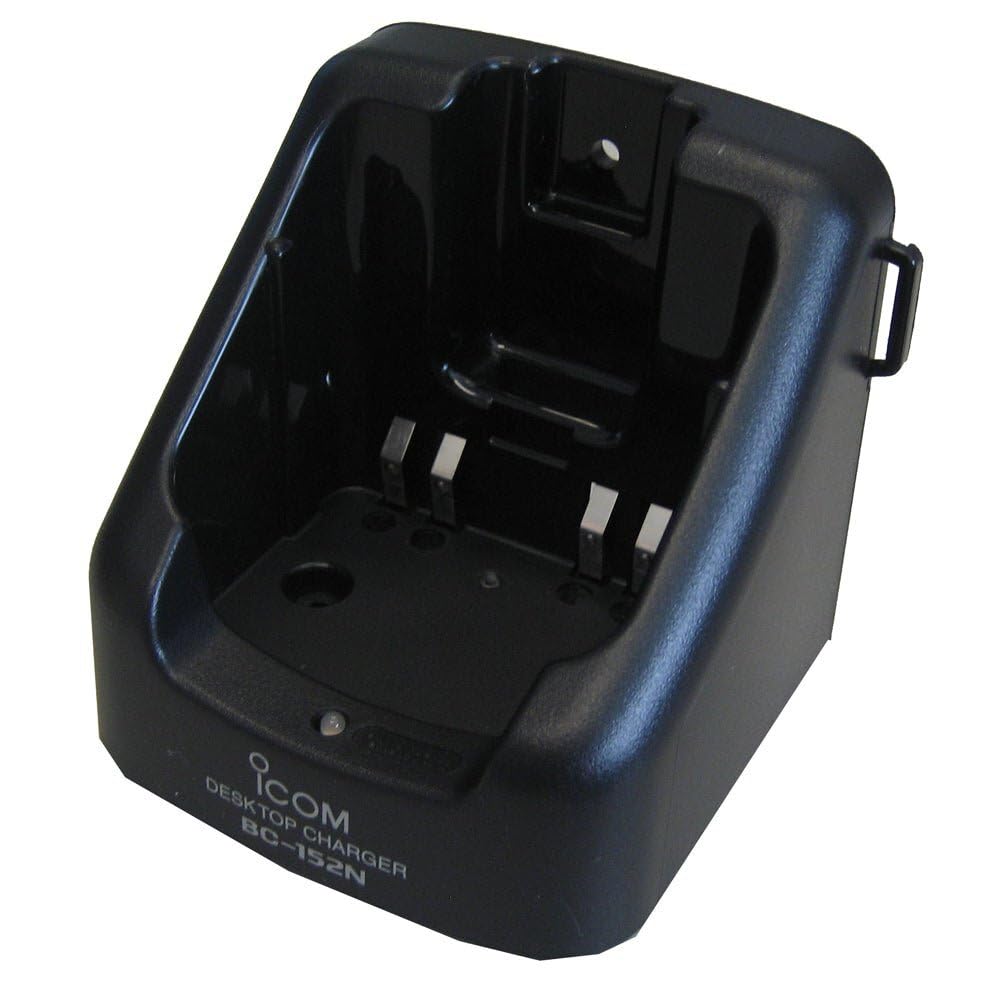
Figure 1: The ICOM BC-152 charger unit. This image shows the compact black charger with a single slot for a battery pack.
3.2 קאַנעקטינג מאַכט
- Connect the AC adapter cable to the DC input jack on the rear of the BC-152 charger unit.
- צאַפּן די AC אַדאַפּטער אין אַ נאָרמאַל וואַנט ווענטיל.
- די טשאַרדזשער איז איצט גרייט פֿאַר נוצן.
4. אַפּערייטינג ינסטרוקטיאָנס
4.1 אויפלאָדן אַ באַטעריע פּאַק
Follow these steps to charge a compatible ICOM battery pack:
- זיכער מאַכן אַז דער טשאַרדזשער איז פארבונדן צו אַ מאַכט מקור ווי באַשריבן אין סעקציע 3.2.
- Carefully insert the battery pack into the charging slot of the BC-152 charger. Ensure it is seated firmly.
- Observe the charging indicator light.
4.2 ינדיקאַטאָר לייץ
The BC-152 charger features an LED indicator to show the charging status:
- רויט (האַרט): די באַטעריע לאָדט זיך איצט אויף.
- גרין (האַרט): Charging is complete. The battery pack is fully charged.
- פלאַשינג רויט: Charging error or battery fault. Remove the battery and re-insert. If the error persists, consult the troubleshooting section.
- קיין ליכט: Charger is not connected to power, or no battery is inserted.
Charging time may vary depending on the battery's capacity and its current charge level. Typically, a fully depleted battery will take approximately 2-4 hours to charge.
5. וישאַלט
5.1 רייניקונג
צו האַלטן אָפּטימאַלע פאָרשטעלונג און אויסזען:
- שטענדיק ארויסנעמען דעם טשאַרדזשער פֿון דער עלעקטרישער אַוטלעט איידער איר רייניגט.
- Use a soft, dry cloth to wipe the exterior of the charger.
- ניצט נישט קיין שאַרפע רייניקונגס-מיטלען, סאָלווענטן אדער שטרענגע כעמיקאַלן.
- Ensure no moisture enters the charging slot or power input.
5.2 סטאָרידזש
When not in use for extended periods, store the charger in a cool, dry place, away from direct sunlight and extreme temperatures. Disconnect it from the power supply.
6. טראָובלעשאָאָטינג
If you encounter issues with your BC-152 charger, refer to the table below for common problems and solutions.
| פּראָבלעם | מעגלעך סיבה | לייזונג |
|---|---|---|
| Charger indicator light is off. | No power supply or battery not inserted. | Check AC adapter connection. Ensure battery is correctly inserted. |
| Indicator light flashes red. | Battery fault or charging error. | Remove and re-insert the battery. Try a different compatible battery if available. |
| באַטערי טוט נישט באַשולדיקן. | Faulty battery, charger, or power supply. | Verify power connection. Test with a known good battery. If problem persists, contact support. |
7. ספּעסאַפאַקיישאַנז
| סאָרט | ICOM |
| מאָדעל | בק-קסנומקס |
| אַרייַנשרייַב וואָלtage | 12-16V DC (via AC adapter) |
| רעזולטאַט חלקtage | 8.4V DC |
| טשאַרדזשינג קראַנט | בעערעך 450 מאַ |
| דימענשאַנז (W×H×D) | Approx. 80 × 50 × 90 mm (3.1 × 2.0 × 3.5 inches) |
| וואָג | 0.18 פונט (בעערעך 82 ג) |
| קאָליר | שוואַרץ |
באַמערקונג: ספּעציפֿיקאַציעס זענען אונטערטעניק צו ענדערונגען אָן באַמערקן פֿאַר פֿאַרבעסערונג.
8. וואָראַנטי אינפֿאָרמאַציע
ICOM products are manufactured with high-quality components and are subject to rigorous quality control. This product is covered by a limited warranty against defects in materials and workmanship. The specific terms and duration of the warranty may vary by region. Please refer to the warranty card included with your purchase or visit the official ICOM webפּלאַץ פֿאַר דיטיילד וואָראַנטי אינפֿאָרמאַציע.
This warranty does not cover damage caused by misuse, accident, unauthorized modification, or improper installation.
9. קונה שטיצן
If you have any questions, require technical assistance, or need to report a problem that cannot be resolved using the troubleshooting guide, please contact ICOM customer support.
ICOM America Inc.
Visit ICOM America's Contact Page
Please have your product model (BC-152) and serial number ready when contacting support.