
1. פּראָדוקט איבערview
The Lutron Maestro MS-OPS6M2N-DV-WH is an advanced occupancy/vacancy sensor switch designed to automatically control lighting in a room. This device utilizes passive infrared (PIR) technology to detect human motion and presence, ensuring lights are only on when needed. It combines the functionality of a standard light switch with an integrated motion sensor, offering convenience and energy savings.
שליסל פֿעיִקייטן:
- Passive infrared motion detection with Lutron XCT technology for fine motion sensing.
- 180-degree sensor field-of-view for comprehensive room coverage.
- Requires a neutral wire for installation.
- Occupancy version supports both auto-on/auto-off and manual-on/auto-off modes.
- Vacancy version is available to comply with CA Title 24 requirements.
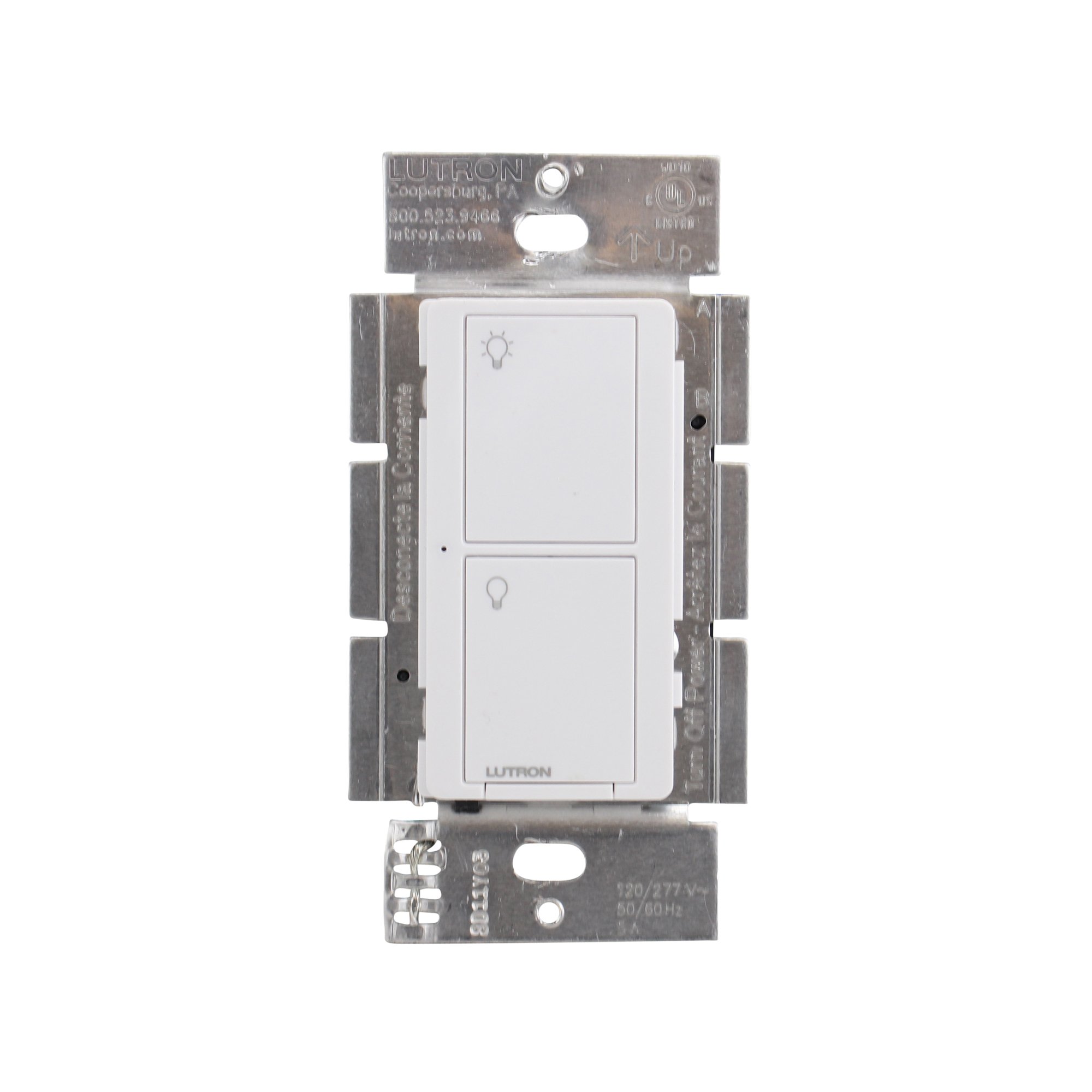
פיגורע 1: פראָנט view of the Lutron Maestro MS-OPS6M2N-DV-WH sensor switch.
2. סעטאַפּ און ייַנמאָנטירונג
וויכטיק זיכערהייט אינפֿאָרמאַציע: Before beginning installation, turn off power at the circuit breaker or fuse box. Incorrect installation can lead to electrical shock or fire. If you are unsure about any part of these instructions, consult a qualified electrician.
מכשירים פארלאנגט: Screwdriver (Phillips and flathead), wire strippers, electrical tape.
2.1 וויירינג אינסטרוקציעס
- קער אַוועק מאַכט: געפינט דעם קרייז-ברעכער וואס קאנטראלירט דעם סוויטש וואס איר פארטרעט און מאכט עס אויס. באשטעטיגט אז די עלעקטריע איז אויסגעלאשן מיט א וואלוטער.tagE tester.
- אַראָפּנעמען עקסיסטינג סוויטש: Carefully remove the wall plate and unscrew the existing switch from the wall box. Disconnect the wires from the old switch.
- אידענטיפיצירן דראָטן:
- Hot (Line) Wire: טיפּיש שוואַרץ, ברענגט מאַכט פֿון די קרייַז ברעאַקער.
- לאָדן דראָט: Typically black, connects to the light fixture.
- נייטראַל דראָט: Typically white, required for this switch.
- ערד דראָט: טיפּיש נאַקעט קופּער אָדער גרין.
Note: If you are replacing a 3-way switch, you will also have traveler wires. This model supports 3-way circuits. Refer to the detailed wiring diagram for 3-way installations.
- Connect Wires to Maestro Switch:
- פאַרבינדן די ערד דראָט from the wall box to the green ground wire on the Maestro switch.
- פאַרבינדן די נייטראַל דראָט from the wall box to the white neutral wire on the Maestro switch.
- פאַרבינדן די hot (line) wire און load wire from the wall box to the two black wires on the Maestro switch. If the light does not function correctly, swap these two black wires.
- For 3-way applications, connect the traveler wires as per the specific 3-way wiring diagram provided with the product packaging.
- זיכערער סוויטש: Carefully push the wired switch into the wall box, ensuring wires are not pinched. Screw the switch into place.
- ינסטאַלירן וואנט פּלאַטע: צוטשעפּן די דעקאָראַטיווע וואַנט טעלער.
- ומקערן מאַכט: צינדט צוריק אן די מאַכט ביים קרייַז ברעיקער.

פיגורע 2: עקסample wiring diagram for a single-pole installation. Consult the included manual for 3-way wiring.
3. אַפּערייטינג ינסטרוקטיאָנס
The Maestro sensor switch offers flexible operation modes to suit various needs.
3.1 מאָדעס פון אָפּעראַציע
- Occupancy Mode (Auto-On/Auto-Off): In this mode, the lights automatically turn ON when motion is detected and automatically turn OFF after a set time delay when no motion is detected. This is ideal for high-traffic areas where hands-free operation is desired.
- Vacancy Mode (Manual-On/Auto-Off): In this mode, the lights must be manually turned ON by pressing the switch button. They will then automatically turn OFF after a set time delay when no motion is detected. This mode is often used to meet energy codes and provides more control over when lights are initially activated.
3.2 אַדזשאַסטינג סעטטינגס
The Maestro sensor switch typically has small buttons or dip switches behind the wall plate for adjusting settings such as:
- צייט פאַרהאַלטן: How long the lights remain on after the last detected motion (e.g., 1, 5, 15, 30 minutes).
- סענסיטיוויטי: The level of motion required to trigger the sensor.
- אַפּערייטינג מאָדע: Switching between Occupancy (Auto-On) and Vacancy (Manual-On) modes.
Refer to the detailed instructions included with your product for specific steps on how to access and adjust these settings.
4. וישאַלט
The Lutron Maestro sensor switch requires minimal maintenance to ensure optimal performance.
- רייניקונג: To clean the surface of the switch, use a soft, damp שטאָף. ניצט נישט קיין שרײַבנדיקע רייניגער, סאָלווענטן, אדער שטרענגע כעמיקאַלן, ווײַל די קענען שאַטן די ענדיקונג אדער אינעווייניקסטע קאָמפּאָנענטן.
- סענסאָר שטערונג: Ensure the sensor lens is not obstructed by furniture, curtains, or other objects that could block its field of view. A clear path to the sensor is crucial for accurate motion detection.
- שטויב אקומולאציע: Periodically wipe the sensor lens to prevent dust accumulation, which can reduce sensitivity.
5. טראָובלעשאָאָטינג
If you encounter issues with your Maestro sensor switch, refer to the following common troubleshooting steps:
- Lights do not turn ON automatically (Occupancy Mode):
- Verify the sensor's field of view איז נישט פארמאכט.
- Check the sensitivity setting; it might be too low.
- Ensure the switch is in Occupancy (Auto-On) mode.
- Confirm power is supplied to the switch.
- Lights do not turn OFF:
- Ensure there is no continuous motion within the sensor's range.
- Check the time delay setting; it might be set too long.
- Verify the switch is correctly wired, especially the load wire.
- Lights flicker or behave erratically:
- Confirm that a neutral wire is properly connected. This switch requires a neutral wire for stable operation.
- ענשור אַז אַלע דראָט קאַנעקשאַנז זענען זיכער.
- If in a 3-way setup, ensure compatible companion switches are used and wired correctly.
- סוויטש רעאגירט נישט:
- Turn off power at the circuit breaker for 15 seconds, then restore power. This can reset the switch.
- Check all wiring connections for looseness or incorrect placement.
If these steps do not resolve the issue, contact Lutron customer support for further assistance.
6. ספּעסאַפאַקיישאַנז
| שטריך | דעטאַל |
|---|---|
| מאָדעל נומער | MS-OPS6M2N-DV-WH |
| סאָרט | לוטראָן |
| אָפּעראַציע מאָדע | אויטאָמאַטיש |
| קאָנטאַקט טיפּ | נאָרמאַללי עפֿן |
| קאַנעקטער טיפּ | שרויף טערמינאַלס |
| טערמינאַל | שרויף |
| נומער דימענשאַנז (L X W X H) | 2.2 X 2.2 X 4.5 אינטשעס |
| קרייַז טיפּ | 3-וועג |
| אַקטואַטאָר טיפּ | דרוק קנעפּל |
| קאָנטאַקט מאַטעריאַל | קופּער |
| אינטערנאַציאָנאַלע פּראַטעקשאַן שאַץ | IP54 |
| קאָנטראָל מעטאָד | ריר |
| קאַנעקטיוויטי פּראָטאָקאָל | ינפרערעד |
| קאָליר | ווייַס |
| פּונקט וואָג | 3.52 אונסעס |
| נייטראַל דראָט פארלאנגט | יא |
7. פּראָדוקט ווידעאָס
7.1 Lutron Maestro Sensor Switch Overview
ווידעא 1: אן איבערview of the Lutron Maestro sensor switch features and benefits. This video provides a general introduction to the product's capabilities.
7.2 Advanced Features and Configuration
Video 2: A detailed look into the advanced features and configuration options of the Lutron Maestro sensor switch, including setting adjustments.
8. וואָראַנטי אינפֿאָרמאַציע
Lutron products typically come with a limited warranty covering defects in materials and workmanship. For specific warranty terms and conditions applicable to your MS-OPS6M2N-DV-WH sensor switch, please refer to the warranty card included in the product packaging or visit the official Lutron webזייטל. האַלט דיין קויפן באַווייַז פֿאַר וואָראַנטי קליימז.
9. קונה שטיצן
For technical assistance, troubleshooting, or product inquiries, please contact Lutron customer support. You can find contact information on the official Lutron webוועבזייטל אדער אין די פּראָדוקט דאָקומענטאַציע.
אָנליין רעסורסן:
- באַזוכן די באַאַמטער Lutron Store on Amazon פֿאַר מער פּראָדוקטן און אינפֿאָרמאַציע.
- Refer to the comprehensive FAQs and support documents available on the Lutron corporate webפּלאַץ.