
1. הקדמה
This manual provides essential information for the safe and efficient operation of your AIMS Power 6000 Watt 24 VDC Pure Sine Inverter Charger, Model PICOGLF60W24V240VS. This unit is designed to convert 24VDC battery power into 120/240 VAC split phase pure sine wave electricity, suitable for a wide range of applications including homes, boats, RVs, solar systems, and mobile businesses. It features an 85A smart battery charger and a 40A automatic transfer switch.
Key features include 6000W continuous power, 18000W surge capability for 20 seconds, and compatibility with 8 different battery technologies, including lithium. The inverter also incorporates various protections and advanced features for reliable performance.
2. זיכערקייַט אינפֿאָרמאַציע
ווארענונג: This product may contain materials cautioned by California Proposition 65. Always handle with care and refer to local regulations.
HIGH VOLTAGE ווארענונג: Do not open the unit unless qualified to do so. High voltage is present inside. Always read and understand all instructions before working on this product to prevent electric shock or injury.
- Ensure proper ventilation; do not block the vents and fans.
- Use appropriate size and length of wires according to NEC color codes and local electrical standards.
- Always disconnect battery power before performing any maintenance or wiring.
- ענשור אַז די אַפּאַראַט איז רעכט גראָונדעד.
3. פּראָדוקט איבערview
The AIMS Power PICOGLF60W24V240VS is a robust inverter charger designed for demanding power needs. Below are images highlighting key components and features.
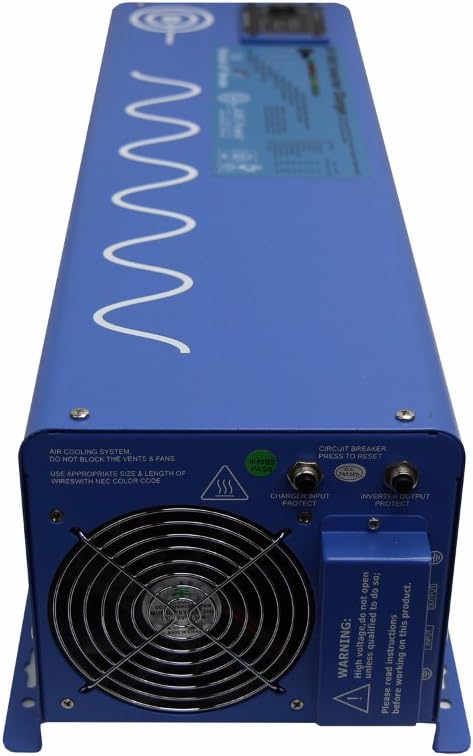
פיגורע 3.1: פראָנט view of the AIMS Power 6000 Watt Inverter Charger. Note the warning label regarding high voltage and the need to read instructions.

פיגורע 3.2: דערציען view of the inverter charger, displaying the positive (red) and negative (black) battery terminal connectors, cooling fan, LCD remote port, LED remote port, and dip switches for configuration.

פיגורע 3.3: דעטאַילעד view of the rear panel, highlighting the battery terminal connectors, LCD and LED remote ports, Auto Generator Start terminal, Battery Temp Sensor port, and the bank of dip switches (SW1-SW5) for various function settings.

פיגורע 3.4: זייַט view of the inverter charger, showing the AC input and output terminal block. This is where the 120/240 VAC split phase connections are made. Also visible are the circuit breaker and cooling fan.
4. סעטאַפּ און ייַנמאָנטירונג
Proper installation is crucial for the safe and efficient operation of your inverter charger. It is recommended that installation be performed by a qualified electrician.
4.1. מאַונטינג
- מאָנטירט דעם ינווערטער אין אַ טרוקענעם, גוט-ווענטילירטן אָרט, אַוועק פון דירעקטער זונשייַן, היץ-קוואַלן און ברענענדיקע מאַטעריאַלן.
- Ensure at least 30cm (12 inches) of clear space around the cooling fan and vents to allow for adequate airflow.
- The unit can be mounted horizontally or vertically, ensuring secure fastening.
4.2. באַטערי קאַנעקשאַנז
- Connect the 24VDC battery bank to the large positive (red) and negative (black) terminals on the rear of the inverter (refer to Figure 3.2 and 3.3).
- Observe correct polarity: connect positive to positive and negative to negative. Incorrect polarity will cause damage.
- Use appropriate gauge cables for your battery bank and inverter capacity. For a 6000W inverter, heavy gauge cables (e.g., 2/0 AWG or larger) are required to minimize voltage drop and ensure safety.
- מאַכן זיכער אַז אַלע קאַנעקשאַנז זענען ענג און זיכער.
4.3. AC Input/Output Connections
- The inverter supports 120/240 VAC split phase output. Connect your AC loads to the AC output terminal block (refer to Figure 3.4).
- For charging, connect a 240 VAC input source (e.g., grid power or generator) to the AC input terminal block.
- If using with a generator transfer switch, use hardwire hookup from this inverter. The inverter is tolerant of grounding the neutral when in inverter mode. This prevents GFCI outlet tripping due to additional neutral-ground connections in the main breaker box.
- Ensure all AC wiring adheres to local electrical codes and standards.
4.4. גראַונדינג
- Connect the grounding electrode terminal on the inverter to a reliable earth ground.
4.5. אפציאנעלע פארבינדונגען
- Remote Panel: Connect an optional remote panel to the LCD or LED remote port for convenient monitoring and control.
- באַטאַרייע טעמפּעראַטור סענסאָר: Connect the included battery temperature sensor to the designated port to optimize battery charging based on temperature.
- Auto Generator Start: Connect compatible auto generator start systems to the dedicated terminal for automatic generator activation when battery voltage איז נידעריק.
ווידעא 4.1: דאס ווידעא גיט א דעטאלירטע איבערזיכטview of the inverter's features and potential setup considerations. (Duration: 2:42)
5. אַפּערייטינג ינסטרוקטיאָנס
Once installed, the inverter charger offers several operational modes and settings.
5.1. פּאָווערינג אויף / אויסגעלאשן
- Locate the On/Off switch on the unit. Press to power on or off.
- פאַרזיכערן אַז אַלע קאַנעקשאַנז זענען זיכער איידער מאַכט אויף.
5.2. Dip Switch Settings
The inverter features a bank of dip switches (SW1-SW5) on the rear panel (refer to Figure 3.3) to configure various operational parameters, such as battery priority, charger settings, and power save mode. Consult the detailed manual for specific switch configurations for your application.
5.3. טשאַרדזשער אָפּעראַציע
- The built-in 85A multi-stage smart charger will automatically charge your battery bank when a 240 VAC input source is connected.
- The charger rate can be adjusted using the charge current control dial.
- The inverter supports 8 different battery charger settings, which can be selected via dip switches.
- The battery temperature sensor helps optimize charging by adjusting parameters based on ambient temperature.
5.4. Transfer Switch Functionality
- The integrated 40A transfer switch automatically switches between inverter power and an external AC source (grid/generator) with a typical transfer time of 10ms.
- This allows for seamless power transition for connected loads.
5.5. Power Save Mode
- The selectable 25W power save mode (hibernation) reduces idle consumption, conserving battery power when no significant load is detected.
6. וישאַלט
Regular maintenance ensures the longevity and optimal performance of your inverter charger.
- ווענטילאַטיאָן: Periodically check that the cooling fan and air vents are clear of dust and debris. Blocked vents can lead to overheating and reduced performance.
- פֿאַרבינדונגען: Annually inspect all electrical connections (battery, AC input/output, ground) for tightness and corrosion. Loose connections can cause arcing and damage.
- רייניקונג: Keep the exterior of the unit clean and dry. Do not use harsh chemicals or abrasive cleaners.
- סוויווע: זיכער מאַכן אַז די אָפּערייטינג סביבה בלייבט אין די ספּעציפֿישע טעמפּעראַטור און הומידיטי ריינדזשאַז.
7. טראָובלעשאָאָטינג
This section addresses common issues you might encounter with your inverter charger.
7.1. No AC Output / Inverter Not Turning On
- קוק די באַטאַרייע קאַנעקשאַנז: Ensure battery cables are securely connected and polarity is correct.
- באַטערי וואָלtage: Verify that the battery bank voltage is within the operational range (21.0Vdc-32.0Vdc). Low battery voltage will trigger an alarm or trip the unit.
- קרייַז צוימען: Press the circuit breaker on the unit to reset it if it has tripped. Note: If the power save feature is ON, you may need to turn it OFF to reset the GFCI outlet breaker.
- אָווערלאָאַד: Disconnect some loads and restart the inverter if an overload protection has been activated.
7.2. Charger Not Functioning Correctly
- AC אַרייַנשרייַב: Ensure a stable 240 VAC input source is connected to the AC input terminals.
- Charger Settings: Verify that the dip switch settings for the battery charger are correct for your battery type.
- Charger Cycling: If the charger constantly cycles (0 amps to 20/40 amps, then cuts off and restarts), ensure the AC input power quality is stable. While the unit is designed to be robust, unstable input power can affect charging behavior.
7.3. GFCI Outlet Tripping
- If the GFCI outlet trips, ensure the power save feature is OFF before attempting to reset the breaker.
- When using the inverter with a generator transfer switch, ensure hardwire connections are used to prevent tripping due to additional neutral-ground connections in the main breaker box.
8. ספּעסאַפאַקיישאַנז
Detailed technical specifications for the AIMS Power PICOGLF60W24V240VS Inverter Charger.
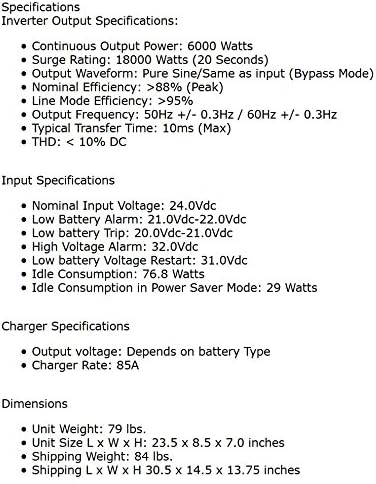
פיגורע 8.1: Detailed specifications including output, input, charger, and dimensions.
8.1. Inverter Output Specifications
- קעסיידערדיק רעזולטאַט מאַכט: 6000 וואטס
- סערדזש רייטינג: 18000 Watts (20 seconds)
- רעזולטאַט וואַוועפאָרם: Pure Sine / Same as input (Bypass Mode)
- Nominal Efficiency: >88% (Peak)
- Line Mode Efficiency: >95%
- רעזולטאַט אָפטקייַט: 50Hz +/- 0.3Hz / 60Hz +/- 0.3Hz (Auto Detect)
- Typical Transfer Time: 10ms
- THD: <10% DC
8.2. DC Input Specifications
- DC Nominal Input Voltage: 24.0Vdc
- מינימום אָנהייב חלקtage: 20.0Vdc
- נידעריק באַטערי שרעק: 21.0Vdc-22.0Vdc
- Low Battery Trip: 20.0Vdc-21.0Vdc
- הויך חלקtagE שרעק: 32.0Vdc
- נידעריק באַטאַרייע וואָלtage Restart: 26.6Vdc
- ליידיק קאַנסאַמשאַן: 46.5 וו
- Power Saver Mode Idle Consumption: 18.9 וו
8.3. Charger Specifications
- רעזולטאַט חלקtage: דעפּענדס אויף באַטאַרייע טיפּ
- Charger Rate: 85 א
8.4. גשמיות ספּעסאַפאַקיישאַנז
- נומער וואָג: 50 פונט
- פּראָדוקט דימענשאַנז (L x W x H): 23.5 X 8.59 X 7.05 אינטשעס
- מאָדעל נאָמען: PICOGLF60W24V240VS
9. וואָראַנטי
The AIMS Power PICOGLF60W24V240VS Inverter Charger comes with a Manufacturer Warranty. While specific terms may vary, customer feedback indicates a typical one-year warranty period. Please refer to the warranty card included with your product or contact AIMS Power directly for the most current and detailed warranty information.
10. שטיצן
For technical assistance, warranty claims, or any questions regarding your AIMS Power inverter charger, please contact AIMS Power customer support. All technical and warranty support is provided from their facility in Nevada, USA.
Refer to the official AIMS Power webוועבזייטל אדער די דאקומענטאציע וואס איז אריינגערעכנט מיט אייער פראדוקט פאר קאנטאקט דעטאלן.