
1. הקדמה
This manual provides essential instructions for the installation, operation, and maintenance of the BFT Elba BU Control Unit, model D113717 00002. This unit is designed for controlling gate automation systems, ensuring reliable and safe operation. Please read this manual carefully before proceeding with any installation or operation. Keep this manual for future reference.
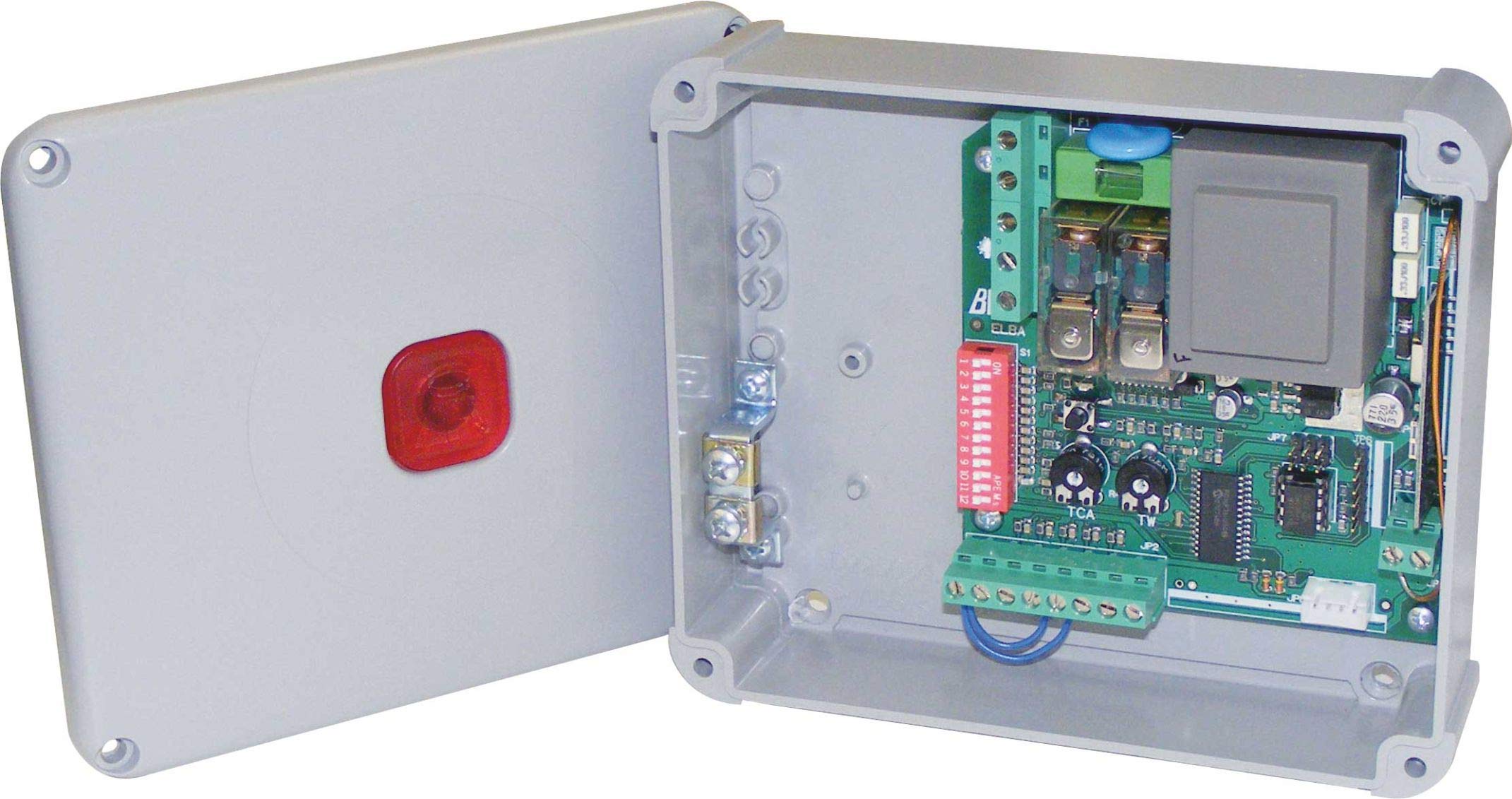
פיגורע 1: BFT Elba BU Control Unit D113717 00002. This image shows the main control board with various terminals and components.
2. זיכערקייַט אינפֿאָרמאַציע
ווארענונג: Incorrect installation or improper use can cause serious injury or damage.
- All installation and maintenance work must be performed by qualified personnel only.
- Disconnect power before performing any work on the control unit.
- Ensure all electrical connections comply with local and national electrical codes.
- שטעלט נישט אויס דעם אַפּאַראַט צו פייכטקייט, רעגן, אדער עקסטרעמע טעמפּעראַטורן.
- Use only original BFT spare parts and accessories.
- Keep children and unauthorized persons away from the gate automation system during operation.
3. פּעקל אינהאַלט
באַשטעטיקן אַז אַלע קאָמפּאָנענטן זענען פאַראַן און נישט געשעדיגט ביים אויספּאַקן:
- BFT Elba BU Control Unit (Model D113717 00002)
- ינסטרוקטיאָן מאַנואַל (דעם דאָקומענט)
- Mounting hardware (screws, anchors - may vary)
- Wiring terminals (pre-installed or separate - may vary)
4. סעטאַפּ און ייַנמאָנטירונג
This section outlines the general steps for installing the control unit. Refer to detailed wiring diagrams provided with the product for specific connections.
- מאָונטינג: Securely mount the control unit in a protective enclosure, away from direct weather exposure and vibrations. Ensure adequate ventilation.
- מאַכט קשר: Connect the main power supply (230V AC, 50 Hz) to the designated terminals. Ensure proper grounding.
- מאָטאָר קאַנעקשאַנז: Connect the gate motor(s) to the appropriate output terminals on the control unit.
- אַקסעסערי קאַנעקשאַנז: Connect safety devices (e.g., photocells, safety edges), command devices (e.g., push buttons, key switches), and other accessories (e.g., flashing lights) to their respective terminals.
- אַנטענע קשר: If using a radio receiver, connect the antenna to improve signal reception.
- ערשט מאַכט-אַרויף: After all connections are verified, apply power to the unit. Observe any indicator lights for initial status.
5. אַפּערייטינג ינסטרוקטיאָנס
The BFT Elba BU Control Unit offers various functionalities for gate automation.
- פּראָגראַממינג: The unit typically features a programming interface (e.g., dip switches, push buttons, or a display) to set operating parameters such as opening/closing times, force, pause times, and safety logic. Refer to the detailed programming guide for your specific gate system.
- מאַנואַל אָפּעראַציע: In case of power failure or emergency, the gate can usually be disengaged for manual operation. Consult your gate motor's manual for instructions on manual release.
- ווייַט קאָנטראָל: If a radio receiver is connected, remote controls can be programmed to operate the gate. Follow the instructions for pairing remote controls with the receiver.
6. וישאַלט
Regular maintenance ensures the longevity and safe operation of your BFT Elba BU Control Unit and the entire gate automation system.
- יערלעך דורכקוק: Have a qualified technician inspect the control unit and all associated components annually.
- ריינקייַט: Keep the control unit enclosure clean and free from dust, insects, and debris.
- וויירינג קאָנטראָל: קאָנטראָלירט פּעריִאָדיש אַלע וויירינג פֿאַרבינדונגען פֿאַר שטרענגקייט און וואונדער פון טראָגן אָדער קעראָוזשאַן.
- זיכערהייט מכשירים: Regularly test all safety devices (photocells, safety edges) to ensure they are functioning correctly.
- מאַכט דיסקאַנעקשאַן: Always disconnect the main power supply before performing any cleaning or inspection inside the control unit.
7. טראָובלעשאָאָטינג
איידער איר קאָנטאַקט טעכניש שטיצן, שייַעךview די פאלגענדע געוויינטלעכע פראבלעמען און זייערע מעגלעכע לייזונגען.
| פּראָבלעם | מעגלעך סיבה | לייזונג |
|---|---|---|
| Gate does not respond to commands. | No power, remote control battery flat, safety device activated, faulty wiring. | Check power supply, replace remote battery, check safety devices for obstructions, inspect wiring connections. |
| טויער עפנט זיך אבער פארמאגט נישט. | Safety device (e.g., photocell) obstructed or misaligned, programming error. | Clear obstruction from safety devices, clean photocell lenses, realign photocells, check programming parameters. |
| Gate operates intermittently. | Loose wiring connection, interference with remote signal, motor issue. | Check all wiring connections, ensure antenna is properly connected, consult a technician for motor diagnosis. |
If the problem persists after attempting these solutions, contact a qualified BFT service technician.
8. ספּעסאַפאַקיישאַנז
| שטריך | דעטאַל |
|---|---|
| מאָדעל נומער | ד113717 00002 |
| סאָרט | בפט |
| אַרייַנשרייַב וואָלtage | 230 V AC |
| אָפטקייַט | 50 הז |
| פאַבריקאַנט | B.F.T. SRL |
| קאַמפּאַטאַבאַל דעוויסעס | Gate automation systems (e.g., gate motors, safety sensors) |
9. וואָראַנטי און שטיצן
For detailed warranty information, please refer to the official warranty documentation provided with your product or visit the official BFT webפּלאַץ.
For technical support, spare parts, or service, please contact your authorized BFT dealer or a qualified service technician. Ensure you have your product model number (D113717 00002) and purchase details available when seeking support.
וויכטיק: Any unauthorized repairs or modifications will void the product warranty.