
1. הקדמה
Thank you for choosing the SCHWAIGER DCR600HD Full HD Cable TV Receiver. This manual provides essential information for the safe and efficient use of your device. Please read these instructions carefully before installation and operation, and keep them for future reference.
2. זיכערקייַט אינסטרוקציעס
- מאַכט צושטעלן: ניצט נאָר דעם מאַכט אַדאַפּטער וואָס קומט מיטן אַפּאַראַט. זיכערט זיך אַז דער וואָלומען איז גוט.tage שוועבעלעך דיין היגע מאַכט צושטעלן.
- ווענטילאַטיאָן: Do not block ventilation openings. Ensure adequate space around the receiver for proper airflow to prevent overheating.
- נעץ: Keep the device away from water, moisture, and high humidity. Do not expose it to rain or splashes.
- רייניקונג: טרענט אפ די עלעקטריציטעט איידער איר רייניגט. ניצט א ווייכע, טרוקענע שטאָף. ניצט נישט קיין פליסיקע אדער אייראזאל רייניגער.
- אָרט: Place the receiver on a stable, flat surface. Avoid direct sunlight, heat sources, and strong magnetic fields.
- סערוויס: פרובירט נישט צו עפענען אדער פאררעכטן דעם אפאראט אליין. לאָזט איבער אלע סערוויסעס צו קוואַליפֿיצירטע פּערסאָנעל.
3. פּעקל אינהאַלט
ביטע טשעק די פּאַקעט פֿאַר די פאלגענדע זאכן:
- SCHWAIGER DCR600HD Cable TV Receiver
- ווייַט קאָנטראָל
- Power Cable (integrated or separate adapter)
- באַניצער מאַנואַל (דעם דאָקומענט)
4. פּראָדוקט איבערview
4.1 פראָנט פּאַנעל
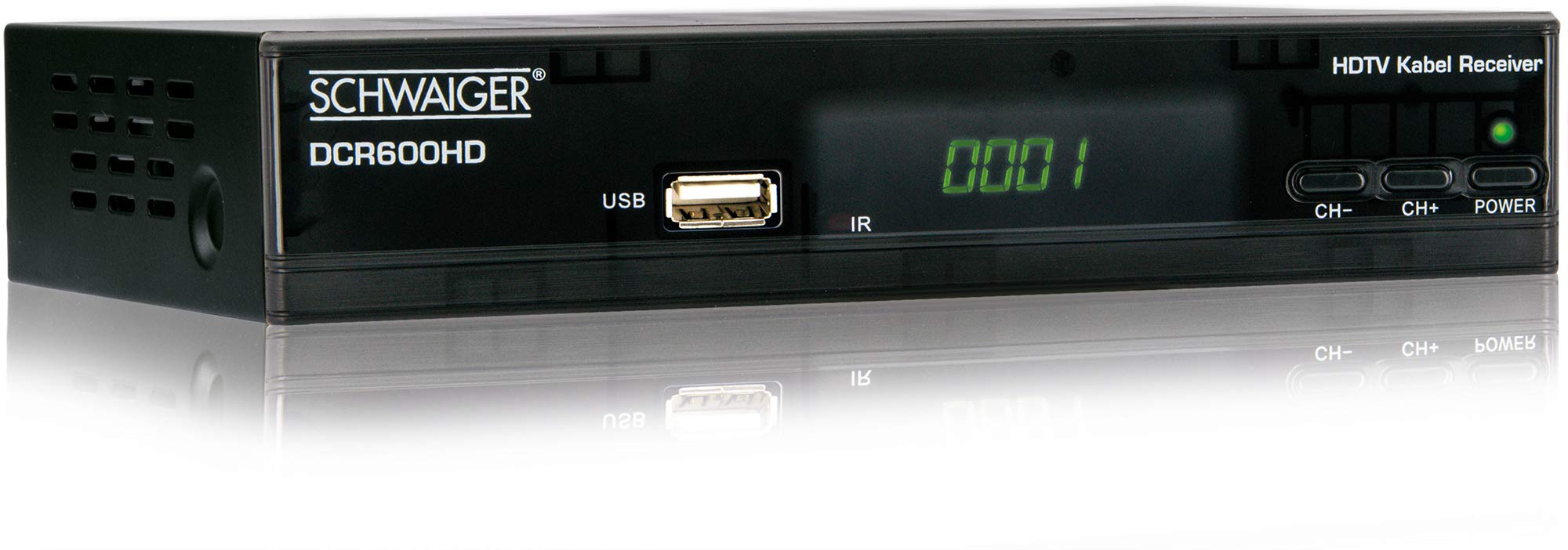
בילד: פראָנט view of the SCHWAIGER DCR600HD receiver, showing the display, USB port, IR receiver, and control buttons.
- ווייַז: ווײַזט קאַנאַל נומער אָדער צײַט.
- וסב פּאָרט: פֿאַר פֿאַרבינדן USB סטאָרידזש דעוויסעס פֿאַר מעדיע פּלייבאַק.
- IR: ינפרערעד ופנעמער פֿאַר די ווייַט קאָנטראָל.
- CH- / CH+: Buttons for changing channels.
- מאַכט: Button to turn the receiver on or off (standby).
4.2 דערציען פּאַנעל

בילד: דערציען view of the SCHWAIGER DCR600HD receiver, displaying various input and output ports.
- RF אין: Input for connecting to your cable TV network.
- ETHERNET / LAN: For network connection (if supported for updates or specific services).
- הדמי: High-Definition Multimedia Interface output for connecting to an HD TV.
- TV SCART (CVBS): SCART output for connecting to older TVs or other devices.
- ~220-240V 50/60Hz: Power input for the receiver.
4.3 רימאָוט קאָנטראָל

בילד: Layout of the SCHWAIGER DCR600HD remote control, showing various function buttons.
The remote control allows you to operate all functions of your receiver. Familiarize yourself with the button layout for easy navigation.
5. סעטאַפּ
5.1 פֿאַרבינדן דעם ריסיווער
- Connect to Cable Network: Connect your cable TV antenna cable to the רף אין port on the rear panel of the receiver.
- פאַרבינדן צו טעלעוויזיע:
- For High Definition (HD) picture quality, connect an HDMI cable from the HDMI port on the receiver to an HDMI input on your TV.
- For standard definition (SD) or older TVs, connect a SCART cable from the TV SCART (CVBS) port on the receiver to the SCART input on your TV.
- פאַרבינדן מאַכט: Plug the power cable into the receiver's power input and then into a wall outlet.
- Turn on TV: Switch on your television and select the correct input source (HDMI or SCART) corresponding to your connection.
5.2 ערשטער מאָל ינסטאַלירונג
Upon first power-on, the receiver will typically guide you through an initial setup process:
- שפּראַך סעלעקציע: Use the remote control to select your preferred language for the on-screen menus.
- לאַנד אויסוואַל: Select your country. This helps configure regional settings and channel frequencies.
- קאַנאַל יבערקוקן: The receiver will prompt you to perform an automatic channel scan. Confirm to start scanning for available cable TV channels. This process may take several minutes.
- היט סעטטינגס: Once the scan is complete, save the found channels. Your receiver is now ready for use.
6. אַפּערייטינג ינסטרוקטיאָנס
6.1 יקערדיק אָפּעראַציע
- מאַכט אויף / אַוועק: דרוק די מאַכט button on the remote control or front panel to switch the receiver on or to standby mode.
- קאַנאַל סעלעקציע: ניצן די CH+ / טש- buttons on the remote or front panel to change channels sequentially. Alternatively, use the number buttons to directly enter a channel number.
- באַנד אַדזשאַסטמאַנט: ניצן די VOL+ / וואָל- buttons on the remote control to adjust the audio volume.
- שטום: דרוק די שטום button to temporarily turn off the sound. Press again to restore.
6.2 עלעקטראָניש פּראָגראַם גייד (EPG)
The EPG provides a schedule of current and upcoming TV programs.
- דרוק די EPG button on the remote control to access the Electronic Program Guide.
- Navigate through channels and program times using the arrow buttons.
- דרוק OK צו view דיטיילד אינפֿאָרמאַציע וועגן אַ אויסגעקליבן פּראָגראַם.
6.3 מעדיע ווידערשפּיל דורך USB
איר קענט שפּילן מולטימעדיאַ files (AVI, MKV, MP3) from a USB storage device.
- Insert a USB flash drive or external hard drive into the וסב port on the front panel.
- The receiver should detect the USB device and prompt you to open the media player, or you can access it via the main menu.
- נאַוויגירן דורך דיין files and folders using the arrow buttons and press OK צו אויסקלייבן און שפּילן אַ file.
- Use the media control buttons (Play, Pause, Stop, Fast Forward, Rewind) on the remote control for playback.
6.4 טעלעטעקסט
Access teletext services provided by broadcasters.
- דרוק די טטקס button on the remote control to activate teletext.
- Use the number buttons to enter page numbers or the arrow buttons to navigate.
- דרוק טטקס again to exit teletext.
7. וישאַלט
- רייניקונג: Regularly wipe the receiver with a soft, dry, lint-free cloth. Do not use abrasive cleaners, waxes, or solvents.
- ווענטילאַטיאָן: Ensure that the ventilation slots are not obstructed by dust or other objects.
- ווייכווארג דערהייַנטיקונגען: קאָנטראָלירט פּעריִאָדיש דעם פאַבריקאַנט'ס website for any available software updates for your model. Follow the instructions provided with the update carefully.
8. טראָובלעשאָאָטינג
If you encounter problems with your receiver, refer to the following common issues and solutions:
| פּראָבלעם | מעגלעך סיבה / לייזונג |
|---|---|
| קיין בילד אָדער געזונט |
|
| ווייַט קאָנטראָל נישט ארבעטן |
|
| No channels found during scan |
|
| יו-עס-בי מעדיע שפּילט נישט |
|
9. ספּעסאַפאַקיישאַנז
| שטריך | באַשרייַבונג |
|---|---|
| מאָדעל נאָמען | DCR600HD |
| פּראָדוקט טיפּ | Digital DVB TV Tuner / Digital Player |
| קאָליר | שוואַרץ |
| דימענשאַנז (ב x ד x ה) | 17 סענטימעטער X 4.5 סענטימעטער X 10 סענטימעטער |
| וואָג | 380 ג |
| קאַנעקטיוויטי טעכנאָלאָגיע | HDMI, USB, SCART, RF |
| קאַמפּאַטאַבאַל דעוויסעס | טעלעוויזיע |
| ווידעא קאָדירונג | ה.264 |
| שטיצט רעזאַלושאַנז | 576 י, 576 פּ, 720 פּ, 1080 י, 1080 פּ |
| אַספּעקט ראַטיאָס | 4:3, 16:9 |
| אַודיאָ רעזולטאַט מאָדע | סטערעאָ |
| שטיצט אַודיאָ פֿאָרמאַטירונגען | mp3 |
| שטיצט מעדיע טייפּס | AVI, MKV, MP3 |
| גאַנץ וסב פּאָרץ | 1 (USB 4-pin Type A) |
| גאַנץ הדמי פּאָרץ | 1 |
| מאַכט קאַנסאַמשאַן | 3.8 וו |
| Voltage | 240 וואלטס |
| ספּעציעלע פֿעיִקייטן | Electronic Program Guide (EPG), Teletext, Built-in Bluetooth (Note: Bluetooth functionality may vary by region/firmware) |
| ווייַט קאָנטראָל | אַרייַנגערעכנט |
10. וואָראַנטי און שטיצן
For warranty information and technical support, please refer to the documentation included with your product packaging or visit the official SCHWAIGER webזייטל. האַלט אייער קויף קוויטל ווי אַ באַווייַז פון קויפן פֿאַר וואָראַנטי קליימז.