
1. הקדמה
The Sony Cyber-Shot DSC-H300 is a versatile 20.1-megapixel compact digital camera featuring a powerful 35x optical zoom lens. Designed for ease of use, it includes Optical SteadyShot image stabilization to reduce blur, various shooting modes, and the ability to capture HD videos. Its DSLR-like body provides a comfortable grip for stable shooting.
2. וואָס איז אין דער קעסטל
באַשטעטיקט אַז אַלע די פאלגענדע זאכן זענען אַרייַנגערעכנט אין דיין פּעקל:
- Sony Cyber-Shot DSC-H300 Camera Body
- אַאַ באַטעריז (קסנומקס)
- אַקסל רימען
- אָביעקטיוו קאַפּ
- Lens Strap
- מולטי וסב קאַבלע
- ינסטרוקטיאָן מאַנואַל (דעם דאָקומענט)
3. קאַמעראַ איבערview
Familiarize yourself with the main components and controls of your DSC-H300 camera.
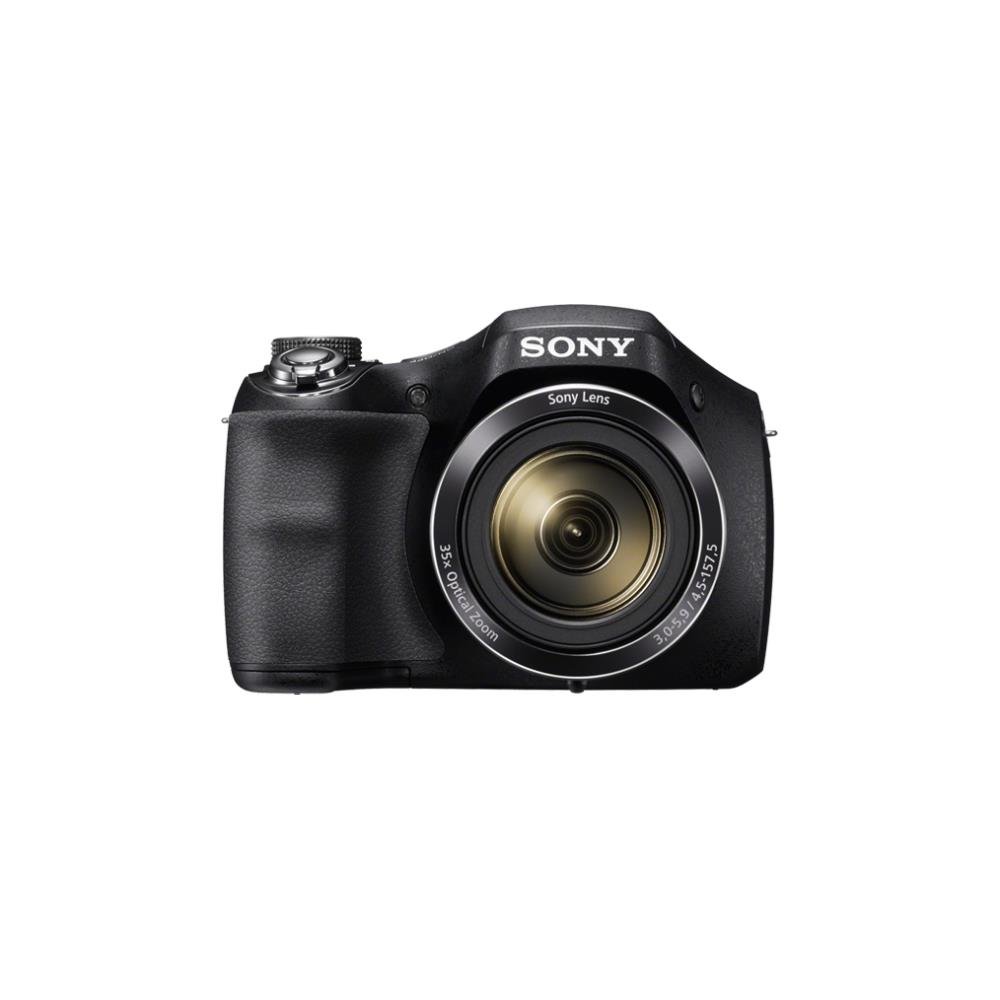
פיגורע 1: פראָנט view of the Sony Cyber-Shot DSC-H300 digital camera, illustrating its compact size with a width of 12.75 cm (5.06 inches) and a height of 8.9 cm (3.504 inches).
שליסל קאַמפּאָונאַנץ:
- לענס: Features 35x optical zoom.
- גריפ: Ergonomically designed for comfortable handling.
- לאָדן קנעפּל: פֿאַר כאַפּן בילדער.
- זום לעווער (W/T): קאָנטראָלירט אָפּטישן און דיגיטאַלן זום.
- מאָדע רעדל: Selects various shooting modes (Auto, Program, Manual, Scene, Movie, etc.).
- ON/OFF קנעפּל: מאַכט אָן אָדער אויס די קאַמעראַ.
- LCD Screen (3.0 inches): For framing shots, reviewינג בילדער, און נאַוואַגייטינג מעניוז.
- קאָנטראָל קנעפּלעך: For menu navigation, flash settings, display options, and playback.
- פֿילם קנעפּל: Dedicated button for starting and stopping video recording.
4. סעטאַפּ
4.1 ינסערטינג באַטעריז
- עפֿנט דעם דעקל פֿון דער באַטעריע־אָפּטיילונג, וואָס געפֿינט זיך אויף דער אונטערשטער זײַט פֿון דער קאַמעראַ.
- אַרײַנשטעלן פֿיר AA באַטעריעס, און זיכער מאַכן אַז די פּאָלאַריטעט (+/-) איז ריכטיק ווי אָנגעוויזן אין דעם אָפּטייל.
- פאַרמאַכן די באַטאַרייע אָפּטייל דעקן סיקיורלי.
4.2 אַרייַנלייגן אַ זכּרון קאָרט
- עפֿנט דעם דעקל פֿון דער זכּרון קאַרטל שפּאַלט, וואָס געפֿינט זיך געוויינטלעך לעבן דער באַטעריע אָפּטייל.
- Insert a compatible memory card (e.g., SD, SDHC, SDXC, Memory Stick PRO Duo) with the label facing the correct direction until it clicks into place.
- נאָענט די זיקאָרן קאָרט שפּעלטל דעקן.
4.3 Attaching the Shoulder Strap and Lens Cap
- Thread the shoulder strap through the strap eyelets on the camera body and secure it.
- Attach the lens cap to the lens using the provided lens strap to prevent loss.
5. אַפּערייטינג די קאַמעראַ
5.1 מאַכט אויף / אַוועק
דרוק די ON/OFF קנעפּל צו אנצינדן אדער אויסלעשן די קאַמעראַ. די לענס וועט זיך אויסציען ווען עס ווערט אנגעצינדן.
5.2 אויסקלייבן א שאָס־מאָדוס
דרייען די מאָדע רעדל to select your desired shooting mode:
- אינטעליגענטע אויטאָ (iA): Camera automatically optimizes settings for various scenes.
- פּראָגראַם אויטאָ (P): Camera sets exposure, but you can adjust other settings.
- שאַטער פּריאָריטעט (S): You set the shutter speed, camera adjusts aperture.
- אַפּערטור פּריאָריטעט (A): You set the aperture, camera adjusts shutter speed.
- מאַנואַל (מ): You control both shutter speed and aperture.
- סצענע אויסוואל (SCN): Choose from various scene modes (e.g., Portrait, Landscape, Night Scene).
- פֿילם מאָדע: פֿאַר רעקאָרדינג ווידיאס.
- פּאַנאָראַמאַ מאָדע: פֿאַר כאַפּן ברייטע פּאַנאָראַמישע בילדער.
5.3 נעמען בילדער
- Frame your shot: ניצט דעם LCD עקראַן צו קאָמפּאָנירן אייער בילד.
- פאָקוס: האלב דריקן די לאָדן קנעפּל to activate autofocus. The camera will beep and the focus indicator will turn green when focus is achieved.
- כאַפּן: Fully press the לאָדן קנעפּל צו נעמען די בילד.
- פארגרעסער: ניצן די Zoom Lever (W/T) to adjust the focal length. 'W' for wide-angle, 'T' for telephoto.
- פלאַש: Press the flash control button to cycle through flash modes (Auto, Fill-flash, Slow Sync, Flash Off, Advanced Flash).
- בילד סטאַביליזאַטיאָן: Optical SteadyShot image stabilization is built-in to reduce blur caused by camera shake.
5.4 רעקאָרדינג ווידיאס
- Ensure the camera is in פֿילם מאָדע (selected via the Mode Dial) or simply press the dedicated פֿילם קנעפּל.
- דרוק די פֿילם קנעפּל again to start recording. A red recording indicator will appear on the screen.
- דרוק די פֿילם קנעפּל once more to stop recording.
- The camera records in 720p HD with clear audio captured by the built-in microphone.
5.5 Panorama Mode
אויסקלייַבן די פּאַנאָראַמאַ מאָדע on the Mode Dial. Press the shutter button and sweep the camera horizontally or vertically across the scene to capture a wide panoramic image.
5.6 Viewאַרויסנעמען און אויסמעקן בילדער/ווידעאָס
דרוק די פּלייַבאַקק קנעפּל (usually indicated by a play icon) to enter playback mode. Use the navigation buttons to scroll through your captured photos and videos. To delete an item, select it and press the ויסמעקן קנעפּל (trash can icon).
6. וישאַלט
6.1 רייניקן די קאַמעראַ קערפּער
ווישט אָפּ דעם קאַמעראַ קערפּער מיט אַ ווייכן, טרוקענעם שטאָף. פֿאַר שווערן שמוץ, אַ ביסל ווישטampen the cloth with water and then wipe dry. Avoid using organic solvents like alcohol or thinner.
6.2 רייניקן די לינז
First, use a lens brush or blower to remove dust and small particles. Then, gently wipe the lens surface with a clean, soft lens cleaning cloth. Do not use excessive force or abrasive materials.
6.3 רייניקונג די לקד סקרין
Use a soft, lint-free cloth specifically designed for LCD screens. Gently wipe the screen to remove smudges or dust.
6.4 באַטערי קער
Always use fresh AA batteries. Remove batteries from the camera if it will not be used for an extended period to prevent leakage and damage.
6.5 סטאָרידזש
Store the camera in a cool, dry place away from direct sunlight, high temperatures, and humidity. Keep it in a camera bag or case to protect it from dust and scratches.
7. טראָובלעשאָאָטינג
If you encounter issues with your camera, try the following basic troubleshooting steps:
- קאַמעראַ טוט זיך נישט אָן: Ensure batteries are correctly inserted and fully charged. Try new batteries.
- בילדער זענען פארשוואומען: Check that the lens is clean. Ensure the camera is focusing correctly (half-press shutter). Use a faster shutter speed in low light or for moving subjects. Optical SteadyShot is active to help.
- בליץ ברענט נישט: Check flash mode settings; ensure it's not set to 'Flash Off'.
- זכּרון קאַרטל טעות: Turn off the camera, remove and reinsert the memory card. Ensure the card is compatible and not full.
- קאַמעראַ פרירט זיך: Remove the batteries, wait a few seconds, and reinsert them to reset the camera.
For more detailed troubleshooting and solutions, please refer to the comprehensive user manual provided with your product or visit the official Sony support webפּלאַץ.
8. ספּעסאַפאַקיישאַנז
| שטריך | באַשרייַבונג |
|---|---|
| מאָדעל נאָמען | DSC H300 |
| פאָטאָ סענסאָר האַכלאָטע | 20.1 מפּ |
| אָפּטיש פארגרעסער | 35x |
| דיגיטאַל פארגרעסער | 70x |
| בילד סטאַביליזאַטיאָן | Digital, Optical (SteadyShot) |
| פאַרשטעלן גרייס | 3 אינטשעס (LCD) |
| ווידעא האַכלאָטע | 720 פּ |
| סענסאָר טיפּ | CCD |
| מינימום לאָדן ספּיד | 30 סעקונדעס |
| מאַקסימום לאָדן ספּיד | 30 סעקונדעס |
| ISO קייט | 100 - 3200 (אויסגעברייטערט) |
| מאַכט מקור | 4 קס אַאַ באַטעריז |
| קאַנעקטיוויטי | וסב |
| קאָמפּאַטיבלע זכּרון קאַרדס | Memory Stick Duo, SD Memory Card, SDHC Memory Card, SDXC Memory Card, microSD Memory Card, microSDHC Memory Card, microSDXC Memory Card |
| פּונקט וואָג | 495 גראַמז |
9. וואָראַנטי און שטיצן
Your Sony Cyber-Shot DSC-H300 digital camera comes with a manufacturer's warranty. Please refer to the warranty card included in your product packaging for specific terms, conditions, and duration of coverage.
For technical support, customer service, driver downloads, and additional detailed manuals, please visit the official Sony support webפּלאַץ: