
הקדמה
This manual provides detailed instructions for the setup, operation, and maintenance of your Seiko QHR024S Digital Alarm Clock. Please read this manual thoroughly before using your clock to ensure proper function and longevity. Keep this manual for future reference.
פּראָדוקט איבערview
The Seiko QHR024S is a modern digital alarm clock featuring a clear LCD display, radio wave control for accurate timekeeping, and essential functions like alarm, snooze, and temperature display.
שליסל פֿעיִקייטן:
- דיגיטאַל ווייַז
- קאַלענדאַר ווייַז
- סנאָאָזע פֿונקציע
- טעמפּעראַטור ווייַז
- שרעק פֿונקציע
- Quartz, Atomic Movement
- Illumination (Backlight)
- Global Radio Wave Control
קאָמפּאָנענט אידענטיטעט:
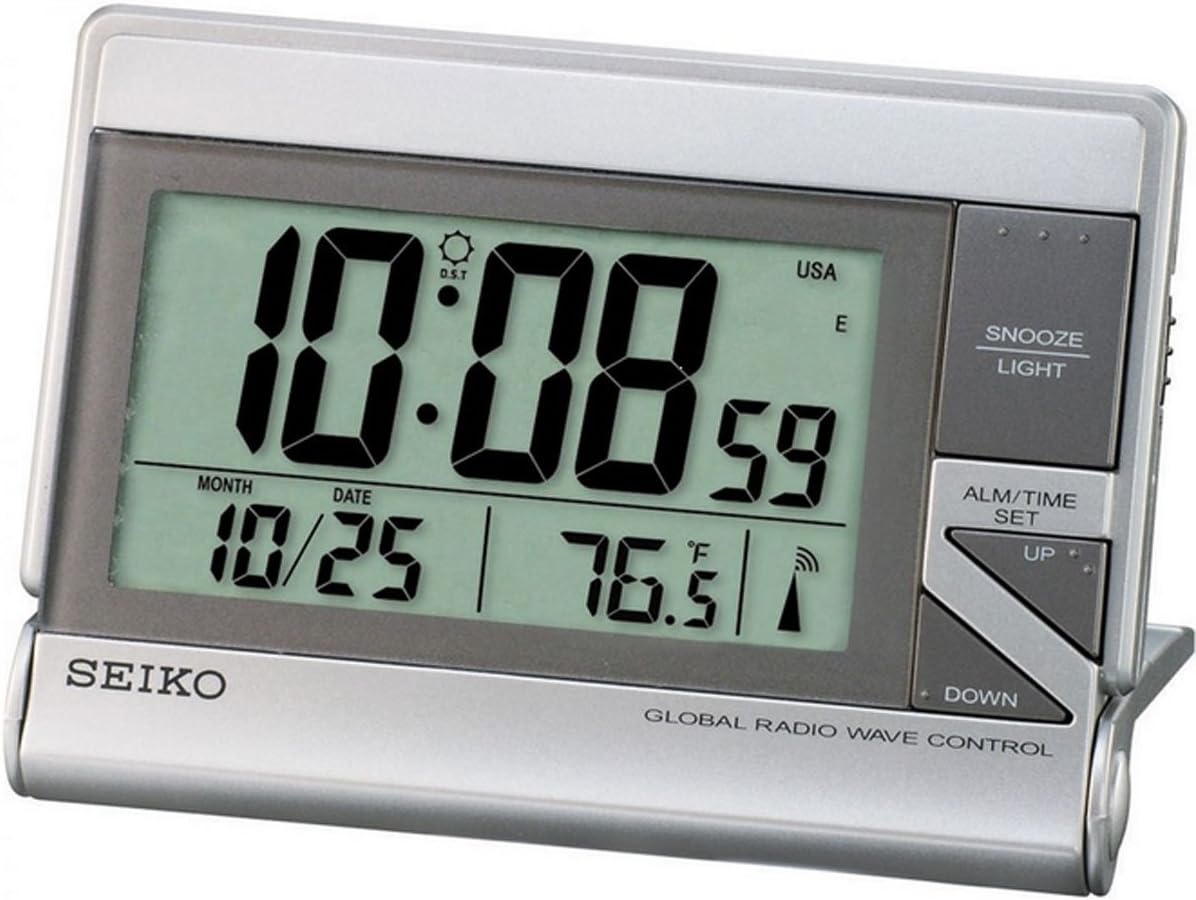
The image displays the front view of the Seiko QHR024S Digital Alarm Clock. The large LCD screen shows the time (e.g., 10:08:59), date (e.g., 10/25), and temperature (e.g., 76.5°F). Indicators for Daylight Saving Time (DST), USA time zone, and radio wave reception are also visible. To the right of the display are the control buttons: 'SNOOZE LIGHT' at the top, 'ALM/TIME SET' in the middle, and 'UP' and 'DOWN' arrow buttons below it. The 'SEIKO' logo is printed on the bottom left, and 'GLOBAL RADIO WAVE CONTROL' is printed on the bottom right.
Refer to the image above for the location of the following components:
- LCD ווייַז: Shows time, date, temperature, and various indicators.
- SNOOZE LIGHT Button: אַקטיוויזירט די שלאָף-פונקציע און באַקלייט-ליכט.
- ALM/TIME SET Button: Used to enter time and alarm setting modes.
- UP קנעפּל: Adjusts values upwards during setting.
- אַראָפּ קנעפּל: Adjusts values downwards during setting.
סעטאַפּ
1. באַטאַרייע ייַנמאָנטירונג
- געפינט דעם דעקל פונעם באַטעריע־אָפּטייל אויף דער הינטערשטער זייגער.
- Remove the cover by sliding or unlatching it.
- Insert one (1) LR44 battery, ensuring the polarity (+/-) matches the diagram inside the compartment.
- פאַרבייַטן די באַטאַרייע אָפּטייל דעקן סיקיורלי.
Note: An LR44 battery is typically included with your purchase.
2. Initial Power On and Radio Wave Reception
Upon battery installation, the clock will power on and automatically attempt to receive the time signal from the nearest atomic clock transmitter. This process may take several minutes to several hours depending on your location and environmental conditions.
- שטעלט דעם זייגער לעבן א פענצטער, ווייט פון עלעקטראנישע אפאראטן וואס קענען שאפן א שטערונג.
- The radio wave indicator on the display will flash during reception and become solid once synchronized.
- If reception is poor, try repositioning the clock. Manual time setting is available if automatic synchronization is not successful.
אַפּערייטינג ינסטראַקשאַנז
1. Setting Time and Date Manually
- דריקן און האַלטן די ALM/TIME SET קנעפּל ביז די צייט-אויסשטעלונג הייבט אן צו בלינקען.
- ניצן די UP or אַראָפּ קנעפּלעך צו סטרויערן די שעה. דריק ALM/TIME SET צו באַשטעטיקן און אריבערגיין צו מינוטן.
- Repeat this process for minutes, year, month, and date.
- After setting the date, press ALM/TIME SET צו אַרויסגאַנג די באַשטעטיקן מאָדע.
2. באַשטעטיקן די שרעק
- דרוק די ALM/TIME SET button once briefly to display the current alarm time.
- While the alarm time is displayed, press and hold ALM/TIME SET ביז די אַלאַרם שעה בלינקט.
- ניצן די UP or אַראָפּ קנעפּלעך צו סטרויערן די אַלאַרם שעה. דריק ALM/TIME SET to confirm and move to alarm minutes.
- Adjust alarm minutes using UP or אַראָפּ. דרוק ALM/TIME SET צו באַשטעטיקן און אַרויסגאַנג שרעק באַשטעטיקן.
- צו אַקטיווירן אָדער דעאַקטיווירן דעם אַלאַרם, דריק די ALM/TIME SET button briefly to show the alarm time, then press UP or אַראָפּ to toggle the alarm ON/OFF indicator.
3. Snooze and Backlight Function
ווען דער שרעק סאָונדס, דריקן די שלאָף ליכט button to temporarily stop the alarm. The alarm will sound again after a few minutes (typical snooze duration is 5-10 minutes). Pressing any other button will turn off the alarm until the next set time.
דרוק די שלאָף ליכט button at any time to activate the backlight for a few seconds, illuminating the display for easy viewאין נידעריק ליכט באדינגונגען.
4. טעמפּעראַטורע ווייַז
The clock displays the ambient temperature. The unit of temperature (Celsius or Fahrenheit) can typically be switched via a small button or switch located on the back or side of the clock. Refer to the physical unit for the exact location of this control.
5. טאָגליכט שפּאָרן צייט (דסט)
The Seiko QHR024S, with its Global Radio Wave Control feature, is designed to automatically adjust for Daylight Saving Time. Ensure the DST indicator is correctly set (usually automatic) or manually adjust if necessary during time setting.
וישאַלט
1. רייניקונג
To clean the clock, use a soft, dry cloth. Do not use abrasive cleaners, solvents, or chemical sprays, as these can damage the casinג אדער אַרויסווייַז.
2. באַטערי פאַרבייַט
When the display becomes dim or the clock functions erratically, it is time to replace the battery. Follow the battery installation steps outlined in the
Ask a question about this manual
Ask about setup, troubleshooting, compatibility, parts, safety, or missing instructions. Manuals+ will review the question and use this page’s manual context to help answer it.