
DIRECTV RC71 ווײַטקאָנטראָל באַניצער מאַנואַל
מאָדעל: RC71
הקדמה
The DIRECTV RC71 Remote Control is designed for efficient access to functions for your DIRECTV system. This remote is compatible with various DIRECTV receivers and can also control your television's volume and power functions. It supports both Infrared (IR) and Radio Frequency (RF) communication modes.
In IR mode, the RC71 is compatible with all legacy and current DIRECTV receivers. In RF mode, it is specifically designed to work with the DIRECTV HR44 Genie and Genie clients C41 and C41W. When operating in RF mode, the remote utilizes the RF4CE protocol for enhanced speed and accuracy, confirming each button press to reduce missed inputs. For TV and AV functions, the remote will still use IR communication even when in RF mode for the receiver.
סעטאַפּ
1. באַטאַרייע ייַנמאָנטירונג
The RC71 remote control requires two (2) AA alkaline batteries for operation.
- געפֿינען די דעקן פון די באַטאַרייע אָפּטייל אויף די צוריק פון די ווייַט קאָנטראָל.
- שלעפּט דעם דעקל אַראָפּ און הייבט עס אַראָפּ.
- Insert two AA batteries, ensuring the positive (+) and negative (-) terminals align with the indicators inside the compartment.
- לייגט צוריק דעם דעקל פונעם באַטעריע־אָפּטייל דורך עס צוריקצורוקן אין פּלאַץ ביז עס קליקט זיכער.
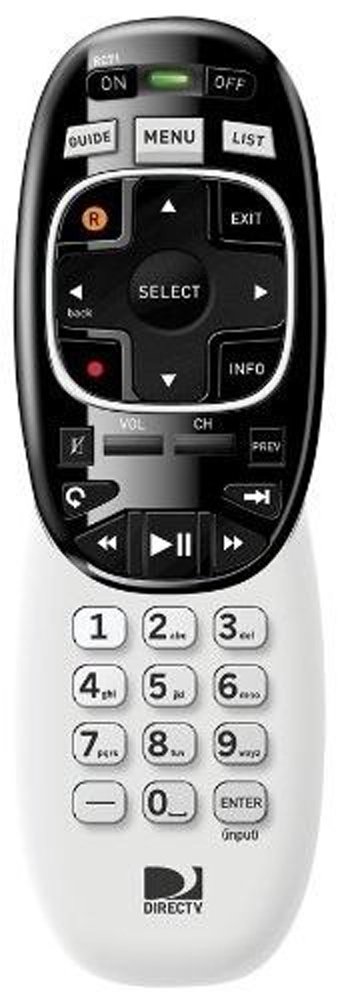
Image: The DIRECTV RC71 Remote Control, showing its ergonomic design and button layout.
2. Pairing with DIRECTV Receiver
The RC71 remote can operate in two modes: Infrared (IR) and Radio Frequency (RF).
IR Mode (for all DIRECTV receivers)
In IR mode, the remote requires a direct line of sight to the receiver. No special pairing is typically required; the remote should function immediately after battery installation.
RF Mode (for HR44 Genie, C41, C41W clients)
For RF mode functionality with compatible receivers, follow these steps:
- Ensure your DIRECTV receiver (HR44 Genie or C41/C41W client) is powered on.
- Point the RC71 remote at the receiver.
- דריקן און האַלטן די שטום און אַרייַן buttons simultaneously until the green light at the top of the remote flashes twice.
- Release the buttons. The remote is now attempting to pair in RF mode.
- Follow any on-screen prompts that may appear on your television to confirm the pairing.
3. Programming for TV/AV Functions
To control your television's volume and power, the remote needs to be programmed with your TV's code. This process typically involves using the receiver's on-screen menu.
- דרוק די MENU button on your RC71 remote.
- נאַוויגירן צו Settings & Help, דעמאלט סעטטינגס, און צום סוף ווייַט קאָנטראָל.
- אויסקלייַבן פּראָגראַם רימאָוט or a similar option.
- Follow the on-screen instructions to select your television brand and program the remote.
- Test the volume and power buttons to ensure successful programming.
אַפּערייטינג די רימאָוט קאָנטראָל
The RC71 remote control features a streamlined button layout for intuitive operation.
- מאַכט קנעפּל: Toggles power for the DIRECTV receiver and, once programmed, for the television.
- גייד: דיספּלייז די פּראָגראַם פירער.
- רשימה: צוטריט צו אייערע רעקארדירטע פראגראמען.
- קאַנאַל אַרויף / אַראָפּ: ענדערונגען טשאַנאַלז.
- באַנד אַרויף / אַראָפּ: Adjusts television volume (after programming).
- שטום: Mutes television audio (after programming).
- Directional Pad (Arrows) and SELECT: נאַוויגירט מעניוז און סעלעקטירט אָפּציעס.
- REW, PLAY, FWD, PAUSE, STOP, RECORD: Controls playback of recorded content.
- Numbers (0-9): גלייך אריינגעבן קאַנאַל נומערן.
- אינפֿאָרמאַציע: ווײַזט פּראָגראַם אינפֿאָרמאַציע.
- אַרויסגאַנג: Exits menus or returns to live TV.
The ergonomic design of the RC71 is intended for comfortable handling during extended use.
וישאַלט
באַטערי פאַרבייַט
Replace batteries when the remote's response becomes sluggish or the indicator light fails to flash. Always replace both AA batteries simultaneously with new ones to ensure optimal performance.
רייניקונג
צו רייניקן די ווײַטקאָנטראָל, ווישט אָפּ זײַן ייבערפֿלאַך מיט אַ ווייכן, טרוקענעם שטאָף. פֿאַר שווערן שמוץ, ווישט אַ ביסלamp cloth can be used, followed by immediate drying. Avoid using harsh chemicals or abrasive cleaners, as these can damage the remote's finish or internal components.
טראָובלעשאָאָטינג
- ווייַט ניט ריספּאַנדינג:
- קאָנטראָלירן די ייַנמאָנטירונג פון די באַטאַרייע און פאַרבייַטן אויב נייטיק.
- Ensure a clear line of sight between the remote and the receiver/TV for IR functions.
- If in RF mode, ensure the remote is properly paired with the receiver. Repeat the pairing steps if needed.
- TV/AV functions not working:
- Verify that the remote has been correctly programmed for your television model. Re-program if unsure.
- Ensure the remote is pointed directly at the TV's IR sensor.
- Remote feels sluggish or inconsistent:
- פאַרבייַטן באַטעריז מיט פריש אָנעס.
- Consider resetting the remote to factory settings (consult your DIRECTV receiver's on-screen help or DIRECTV support for specific instructions, as this process can vary).
ספּעסאַפאַקיישאַנז
| סאָרט | DIRECTV |
| מאָדעל נאָמען | RC71 |
| מאָדעל נומער | RC71 |
| קאָליר | ווייַס |
| קאַנעקטיוויטי טעכנאָלאָגיע | ינפרערעד, ראַדיאָ אָפטקייַט |
| קאַמפּאַטאַבאַל דעוויסעס | DIRECTV Receivers (all in IR, HR44 Genie/C41/C41W in RF), Television |
| Maximum Number of Supported Devices | 1 (DIRECTV Receiver) + 1 (Television) |
| קנעפּל קוואַנטיטעט | 20 |
| קאָנטראָללער טיפּ | קנעפּל קאָנטראָל |
| מאַקסימום קייט | 10 Meters (RF) |
| באַטערי טיפּ | 2 אַאַ אַלקאַליין באַטעריז |
| פּונקט וואָג | 3.52 אונסעס |
| ספּעציעלע שטריך | ערגאַנאַמיק פּלאַן |
וואָראַנטי אינפֿאָרמאַציע
The DIRECTV RC71 Remote Control comes with a manufacturer warranty for 90 days from the date of purchase. Please retain your proof of purchase for warranty claims. For detailed terms and conditions, refer to the warranty documentation provided with your product or contact DIRECTV customer support.
שטיצן
For further assistance, technical support, or to inquire about specific programming codes for your television, please contact DIRECTV customer support. You can find contact information on the official DIRECTV website or through your DIRECTV service provider.