
1. הקדמה
The Orbit 94886 Pocket Star Ultima is a digital irrigation controller designed for indoor use, capable of managing up to 6 watering stations. This manual provides comprehensive instructions for the installation, programming, and operation of your new irrigation timer, ensuring efficient and effective watering for your landscape. Its user-friendly interface, featuring a large LCD display and intuitive buttons, simplifies the programming process.
2. זיכערקייַט אינפֿאָרמאַציע
- This controller is designed for indoor use only. Do not install it outdoors or in areas exposed to direct weather conditions.
- זיכער מאַכן אַז די מאַכט צושטעל איז דיסקאַנעקטיד איידער איר דורכפירן קיין וויירינג אָדער וישאַלט.
- Use only the specified 24V AC power adapter. Using an incorrect power supply can damage the unit and void the warranty.
- Keep the controller away from water sources and high humidity to prevent electrical hazards.
- Do not attempt to open or repair the controller yourself. Refer all servicing to qualified personnel.
3. פּעקל אינהאַלט
Your Orbit 94886 Pocket Star Ultima package should contain the following item:
- One (1) Orbit 94886 Pocket Star Ultima 6-Station Indoor Irrigation Controller.
4. פּראָדוקט איבערview
The Orbit Pocket Star Ultima controller features a clear LCD display, intuitive navigation buttons, and a rotary dial for easy program selection. The terminal block for wiring is located at the bottom of the unit, protected by a removable cover.

פיגורע 4.1: פראָנט view of the Orbit 94886 Pocket Star Ultima controller, showing the LCD screen, control buttons, and rotary dial.

Figure 4.2: The controller with its bottom cover attached, illustrating its compact design.
5. סעטאַפּ
5.1. ינסטאַלירונג
The Orbit 94886 controller is designed for indoor installation. Choose a clean, dry location away from direct sunlight and extreme temperatures. Mount the unit securely to a wall using appropriate screws and anchors.

פיגורע 5.1: עקסample installation diagram, showing the indoor controller connected to an outdoor irrigation valve.
5.2. וויירינג
Before wiring, ensure the power supply to the controller is disconnected. The terminal block is located at the bottom of the unit. Use simple tool-less "push-in" terminals for easy wire connections.
- Common Wire (COM): Connect the common wire from your irrigation valves to the terminal labeled "COM". This is typically a white wire.
- Station Wires (1-6): Connect each individual valve wire to its corresponding station terminal (1 through 6).
- Rain Sensor (SENSOR): If using a rain sensor (sold separately), connect its wires to the "SENSOR" terminals. The controller supports a normally closed rain sensor.
- Pump Start Relay (PUMP): If you have a pump start relay or master valve, connect its wires to the "PUMP" terminals.
- 24V AC Power (24VAC): Connect the 24V AC power adapter wires to the "24VAC" terminals.
פיגורע 5.2: דעטאַילעד view of the wiring terminal block, showing connections for 24VAC, SENSOR, COM, stations 1-6, and PUMP.
Important Power Limitation Warning:
The controller's power supply has specific current limitations. Each valve connected should not exceed 150mA (milliampere) at 24V. The total current drawn by all simultaneously active valves must not exceed 500mA. For example, if your valves draw 150mA each, you can operate a maximum of 3 valves simultaneously. If your valves draw 220mA each, you can operate a maximum of 2 valves simultaneously. Exceeding these limits can damage the controller.
6. אַפּערייטינג ינסטרוקטיאָנס
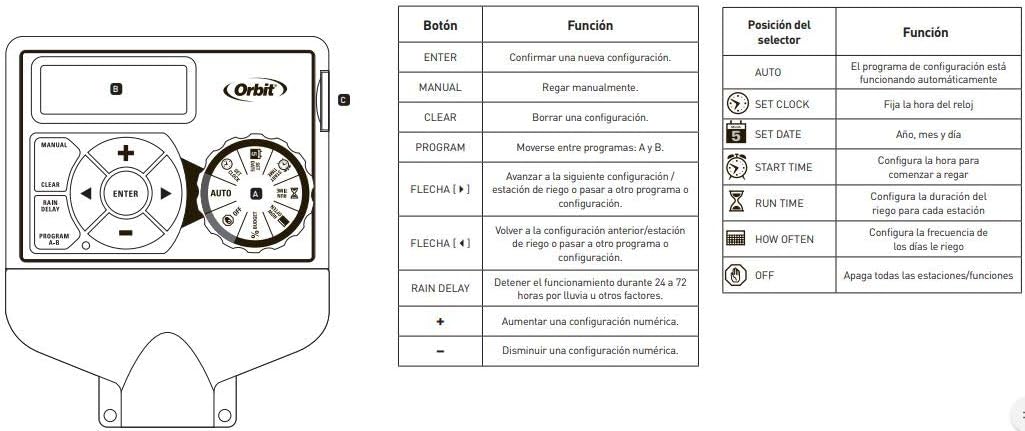
The controller features a rotary dial to select different functions and buttons for navigation and setting values.

Figure 6.1: Controller interface with a guide to button and dial functions.
6.1. Rotary Dial Functions
- שטעלן זייגער: Used to set the current time and day.
- שטעלן דאַטע: Used to set the current year, month, and day.
- אָנהייב צייט: Used to set the start times for your watering programs.
- לויפן צייט: Used to set the duration for each watering station (1 to 99 minutes).
- ווי אָפֿט: Used to set the watering frequency (e.g., specific days of the week, odd/even days).
- אָטאַמאַטיק: The default operating mode where programmed schedules run automatically.
- OFF: Disables all watering programs and functions.
6.2. קנעפּל פאַנגקשאַנז
- אַרייַן: Confirms a setting or moves to the next step.
- מאַנואַל: Initiates manual watering.
- קלאָר: Clears a setting or program.
- רעגן פאַרהאַלטן: Activates the rain delay function (24, 48, or 72 hours).
- PROGRAM A-B: Switches between independent programs (A, B, C). The controller supports 3 independent programs.
- +/- קנעפּלעך: Adjust numerical values up or down.
- Arrow Buttons (Left/Right): Navigate through settings or stations.
6.3. Programming Your Controller
- Set Current Time and Date: קער די רעדל צו שטעלן זייגער און שטעלן טאָג. Use the +/- buttons to adjust values and ENTER to confirm.
- אויסקלייַבן פּראָגראַם: דרוק די פּראָגראַם AB button to select Program A, B, or C. Each program can have up to 4 start times.
- Set Start Times: קער די רעדל צו אָנהייב צייט. Use the +/- buttons to set up to four start times for the selected program. Press ENTER after each time.
- Set Run Times: קער די רעדל צו לויפן צייט. Use the arrow buttons to select each station (1-6) and the +/- buttons to set the watering duration (1-99 minutes) for that station. Press ENTER after each.
- שטעלן וואַסערונג אָפטקייט: קער די רעדל צו ווי אָפט. Select specific days of the week, or choose odd/even day watering. Use the arrow and +/- buttons to make your selections.
- אַקטיווירן פּראָגראַם: קער די רעדל צו AUTO to enable the programmed schedule.
6.4. מאַנואַל אָפּעראַציע
To water manually, turn the dial to AUTO, דעמאָלט דריקן די מאַנואַל button. Use the arrow buttons to select the desired station and the +/- buttons to set the run time. Press ENTER to start manual watering. The controller will return to automatic mode after the manual cycle is complete.
6.5. רעגן פארלענגערונג פונקציע
If rain is expected or has occurred, you can temporarily suspend watering. Turn the dial to AUTO, דעמאָלט דריקן די רעגן פאַרהאַלטן button. Use the +/- buttons to select a delay of 24, 48, or 72 hours. The controller will automatically resume the programmed schedule after the delay period.
7. וישאַלט
- האַלט דעם קאָנטראָללער ריין און פריי פון שטויב און שמוץ. ניצט אַ ווייכן, טרוקענעם שטאָף פֿאַר רייניקונג.
- Ensure the installation area remains dry and protected from moisture.
- Periodically check wiring connections to ensure they are secure.
- During winter months in cold climates, it is recommended to disconnect the controller and store it indoors to prevent damage from freezing temperatures.
8. טראָובלעשאָאָטינג
| פּראָבלעם | מעגלעך סיבה | לייזונג |
|---|---|---|
| קאָנטראָללער דיספּלעי איז ליידיק. | No power or faulty power adapter. | Check power outlet and power adapter connection. Ensure the 24VAC terminals are correctly wired. |
| Stations are not watering. | Controller is in OFF mode; incorrect programming; faulty wiring; rain sensor activated. | Turn dial to AUTO. Verify program settings (start times, run times, frequency). Check wiring to valves. Check if rain sensor is wet or activated. |
| Only some stations are watering. | Faulty valve; wiring issue to specific station; power limitation exceeded. | Check wiring for the non-watering stations. Test the valve manually. Ensure total current draw does not exceed 500mA (max 150mA per valve). |
| Controller resets or behaves erratically. | Power fluctuations; internal fault; excessive current draw. | ינשור סטאַביל מאַכט צושטעלן. Verify that the total current draw from active valves does not exceed 500mA. If problems persist, contact support. |
9. ספּעסאַפאַקיישאַנז
- סאָרט: אָרביט
- מאָדעל: 94886
- נומער פון סטאַנציעס: 6
- ייַנמאָנטירונג: דרינענדיק
- מאַכט אַרייַנשרייַב: 24 וואלט AC
- Max Current per Valve: 150 מאַ (0.15 אַ)
- Max Total Current: 500 מאַ (0.5 אַ)
- פּראָדוקט דימענשאַנז (LxWxH): 14.6 סענטימעטער X 6.2 סענטימעטער X 23.5 סענטימעטער
- מאַטעריאַל: פּלאַסטיק
- ווייַז טיפּ: לקד
- אַפּערייטינג טעמפּעראַטור: 10 Degrees Celsius (minimum, typical operating range is wider)
- סמאַרט היים קאַמפּאַטאַבילאַטי: ניט קאַמפּאַטאַבאַל
- UPC: 046878941267
10. וואָראַנטי
The Orbit 94886 Pocket Star Ultima 6-Station Indoor Irrigation Controller comes with a 3-יאָר לימיטעד וואָראַנטי from the date of purchase. This warranty covers defects in materials and workmanship under normal use. Please retain your proof of purchase for warranty claims. The warranty does not cover damage caused by improper installation, misuse, accidents, unauthorized repairs, or exceeding the specified electrical current limits.
11. שטיצן
For technical assistance, troubleshooting beyond this manual, or warranty inquiries, please contact Orbit customer support. You can typically find contact information on the Orbit webוועבזייטל אדער אויף דער פּראָדוקט פּאַקאַדזשינג.
Orbit Worldwide Webפּלאַץ: www.orbitonline.com