
הקדמה
Thank you for choosing the Divoom Onbeat 200 Bluetooth Portable Speaker. This manual provides essential information for setting up, operating, and maintaining your speaker. Please read it thoroughly before use to ensure optimal performance and longevity of your device.
The Divoom Onbeat 200 is a compact and powerful portable speaker designed to deliver rich audio with the convenience of Bluetooth wireless connectivity. It features a built-in microphone for hands-free calling, making it versatile for both music playback and communication.
פּעקל אינהאַלט
ביטע טשעק די פּאַקעט פֿאַר די פאלגענדע זאכן:
- Divoom Onbeat 200 Bluetooth Portable Speaker
- וסב טשאַרדזשינג קאַבלע
- 3.5 מם אַודיאָ קאַבלע
- באַניצער מאַנואַל
אויב עס פעלן אדער זענען געשעדיגט אין זאכן, ביטע קאנטאקטירט אייער הענדלער פאר הילף.
פּראָדוקט איבערview
The Divoom Onbeat 200 features a sleek design with intuitive controls. Familiarize yourself with the speaker's components before use.
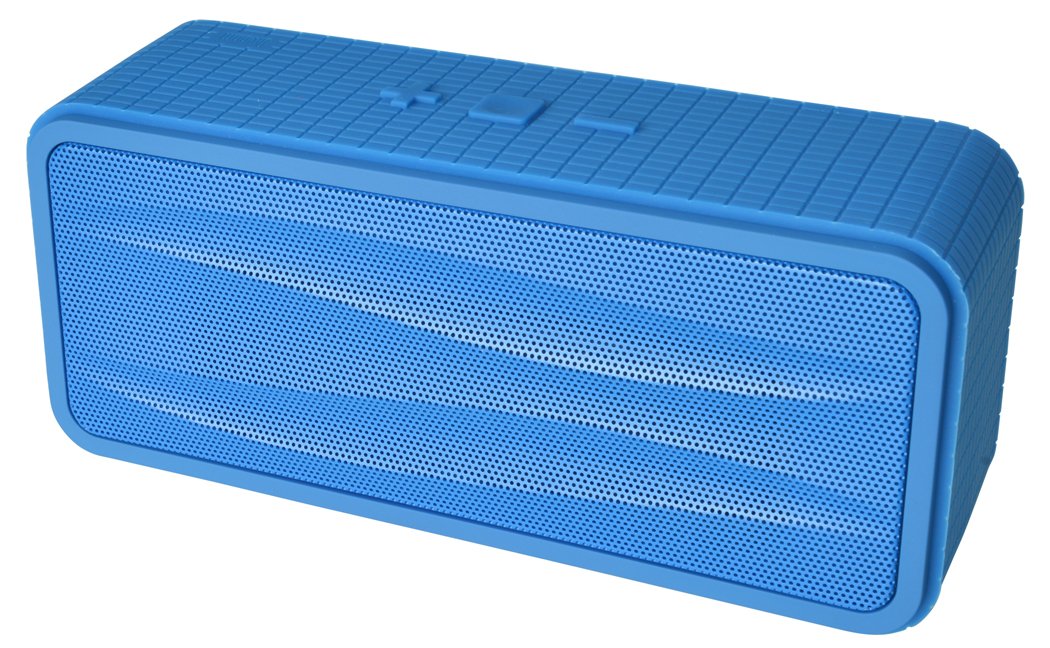
פיגורע 1: Divoom Onbeat 200 Bluetooth Portable Speaker shown with various compatible smartphones, highlighting its wireless connectivity. The speaker is blue and rectangular with a mesh grille.
The speaker is equipped with dual drivers for stereo sound and a passive radiator for enhanced bass. The control panel typically includes power, volume, and Bluetooth pairing buttons. A built-in microphone is integrated for hands-free communication.

פיגורע 2: Detailed dimensions of the Divoom Onbeat 200 speaker. The speaker measures approximately 16.5 cm in length, 7 cm in height, and 5.2 cm in depth.
סעטאַפּ
1. טשאַרדזשינג די ספּיקער
- פֿאַרבינדט דעם קליינעם עק פֿונעם USB טשאַרדזשינג קאַבל צום טשאַרדזשינג פּאָרט אויפֿן רעדנער.
- פֿאַרבינדט דעם גרויסן עק פֿון דעם USB טשאַרדזשינג קאַבל צו אַ USB מאַכט אַדאַפּטער (נישט אַרייַנגערעכנט) אָדער אַ קאָמפּיוטער'ס USB פּאָרט.
- The charging indicator light will illuminate, typically red, during charging.
- Once fully charged, the indicator light will change color or turn off (refer to specific LED behavior in the full manual if available). A full charge usually takes 2-3 hours.
באַמערקונג: For first-time use, ensure the speaker is fully charged.
2. בלועטאָאָטה פּערינג
- Ensure the speaker is charged and turned off.
- Press and hold the Power button (or dedicated Bluetooth button) for a few seconds until you hear an audible prompt or see the Bluetooth indicator light flashing rapidly, indicating it's in pairing mode.
- אויף אייער סמאַרטפאָון, טאַבלעט, אָדער אַנדער בלוטוט-ענייבאַלד מיטל, גייט צו די בלוטוט סעטטינגס.
- געבן בלועטאָאָטה און זוכן פֿאַר בנימצא דעוויסעס.
- Select "Onbeat 200" from the list of devices.
- Once paired, you will hear a confirmation tone, and the Bluetooth indicator light will typically glow solid blue.
טיפּ: דער רעדנער וועט אויטאָמאַטיש פּרובירן זיך ווידער צו פֿאַרבינדן מיטן לעצטן געפּאָרטן מיטל ווען עס ווערט אָנגעצונדן, אויב יענע מיטל'ס בלועטוט איז אַקטיוו און אין דער געגנט.
אַפּערייטינג ינסטראַקשאַנז
מאַכט אויף / אַוועק
- צו אנצינדן: דריק און האלט דעם פּאַוער קנעפּל ביז די אינדיקאַטאָר ליכט צינדט זיך אָן.
- אויסצולאָשן: דריק און האַלט דעם פּאַוער קנעפּל ביז די אינדיקאַטאָר ליכט גייט אויס.
באַנד קאָנטראָל
- To increase volume: Press the Volume Up (+) button.
- To decrease volume: Press the Volume Down (-) button.
איר קענט אויך אַדזשאַסטירן די באַנד גלייך פֿון אייער פֿאַרבונדענע מיטל.
מוזיק פּלייַבאַקק
- Play/Pause: Press the Play/Pause button (often integrated with the Power or Bluetooth button).
- Next Track: Double-press the Volume Up (+) button (or a dedicated skip button).
- Previous Track: Double-press the Volume Down (-) button (or a dedicated skip button).
באַמערקונג: Specific button functions may vary slightly. Refer to the physical markings on your speaker.
הילפס-איינגאנג (AUX)
פֿאַר דעוויסעס אָן בלועטוט, קענט איר נוצן דעם 3.5 מם אַודיאָ קאַבל:
- פֿאַרבינדט איין עק פֿון דעם 3.5 מ״מ אַודיאָ קאַבל צום AUX-אין פּאָרט אויף דעם רעדנער.
- פאַרבינדן די אנדערע סוף צו די כעדפאָון דזשאַק פון דיין אַודיאָ מיטל.
- The speaker will automatically switch to AUX mode, or you may need to press a mode button.
מאַכן און באַקומען קאַללס
The Divoom Onbeat 200 features a built-in microphone for hands-free calling when connected via Bluetooth to a smartphone.
- ענטפֿערן אַ רוף: When a call comes in, the music will pause. Press the Play/Pause button (or phone icon button) once to answer the call.
- ענדיקן אַ רוף: During a call, press the Play/Pause button (or phone icon button) once to end the call.
- פארווארפן א רוף: Press and hold the Play/Pause button (or phone icon button) for approximately 2 seconds to reject an incoming call.
- ווידער-רופן לעצטע נומער: Double-press the Play/Pause button (or phone icon button) to redial the last number called.
Audio will be routed through the speaker, and your voice will be picked up by the built-in microphone.
וישאַלט
- האַלט דעם רעדנער אַוועק פון וואַסער, נעץ און עקסטרעמע טעמפּעראַטורן.
- רייניקט דעם רעדנער מיט אַ ווייכן, טרוקענעם שטאָף. ניצט נישט קיין שרײַבנדיקע רייניגערס אדער סאָלווענטן.
- פֿאַרמײַדט צו לאָזן דעם רעדנער פאַלן אָדער אים אויסשטעלן צו שטאַרקע קלאַפּן.
- ווען נישט אין באַנוץ פֿאַר לענגערע פּעריאָדן, האַלט דעם רעדנער אין אַ קיל, טרוקן אָרט און לאָד עס אויף פּעריאָדיש צו האַלטן די באַטאַריע געזונט.
טראָובלעשאָאָטינג
| פּראָבלעם | מעגלעך לייזונג |
|---|---|
| דער רעדנער גייט נישט אן. | זיכער מאַכן אַז דער רעדנער איז גאָר אויפגעלאָדן. פֿאַרבינדט עס צו אַ מאַכט מקור און פּרוּווט ווידער. |
| קען נישט פארבינדן דורך בלוטוט. |
|
| קיין קלאַנג אָדער נידעריקע וואָלומען. |
|
| געזונט דיסטאָרשאַן. |
|
ספּעסאַפאַקיישאַנז
- מאָדעל נאָמען: Onbeat 200
- נומער מאָדעל נומער: Onbeat 200-Blue
- סאָרט: דיוואָם
- רעדנער טיפּ: ביכערשעלף
- ספּעציעלע פֿעיִקייטן: Built-in Microphone, Stereo
- רעקאַמענדיד ניצט: מוזיק
- קאַמפּאַטאַבאַל דעוויסעס: סמאַרטפאָנע
- סאָונד סאָונד קאַנאַל קאַנפיגיעריישאַן: 2.0
- קאָליר: בלוי
- נומער וואָג: 544 ג (1.2 פונט)
- איז וואָטערפּרוף: ניין
- קאָנטראָל אופֿן: App (Note: While listed, primary control is via physical buttons and connected device)
- ווירעלעסס קאָמוניקאַציע טעכנאָלאָגיע: בלועטאָאָטה
- מאַכט מקור: באַטאַרייע פּאַוערד (1 ליטהיום יאָן באַטאַרייע אַרייַנגערעכנט)
- פּראָדוקט דימענשאַנז: 16.51 X 5.08 X 7.11 סענטימעטער
- רעדנער מאַקסימום רעזולטאַט מאַכט: 4 וואטס
- קאַנעקטיוויטי טעכנאָלאָגיע: בלועטאָאָטה
- מאַונטינג טיפּ: טאַבלעטאָפּ
- ערשטער בנימצא: 17 מאי 2013
וואָראַנטי און שטיצן
The Divoom Onbeat 200 comes with a standard manufacturer's warranty. Please refer to the warranty card included in your package or visit the official Divoom webזייטל פֿאַר דעטאַלירטע וואָראַנטי טערמינען און באדינגונגען.
For technical support, troubleshooting assistance, or service inquiries, please contact Divoom customer support through their official channels. Keep your purchase receipt and product model information handy when contacting support.