
1. הקדמה
Thank you for choosing the Fonestar AS-24U Hi-Fi USB/SD/MP3 Amplifier. This manual provides essential information for the safe and efficient operation of your device. Please read it thoroughly before use and retain it for future reference.
2. זיכערקייַט אינסטרוקציעס
- מאַכט צושטעלן: פאַרזיכערן די amplifier is connected to a power source matching the specified voltagE (230 וו).
- ווענטילאַטיאָן: בלאָקירט נישט די ווענטילאַציע עפענונגען. לאָזט גענוג פּלאַץ אַרום דעם אַפּאַראַט פֿאַר געהעריקן לופטפלוס צו פאַרמייַדן איבערהיצונג.
- נעץ: האַלטן די amplifier away from water, moisture, and high humidity environments. Do not expose it to dripping or splashing.
- היץ קוואלן: פֿאַרמײַדט צו שטעלן דעם אַפּאַראַט לעבן היץ־קוואַלן ווי ראַדיאַטאָרן, היץ־רעגיסטערס, אויוון, צי אַנדערע היץ־פּראָדוצירנדיקע אַפּאַראַטן.
- רייניקונג: Disconnect the power cord before cleaning. Use a dry, soft cloth. Do not use liquid cleaners or aerosol cleaners.
- סערוויס: דו זאלסט נישט פּרווון צו דינען דעם פּראָדוקט זיך. קאָנטאַקט אַלע קוואַלאַפייד סערוויס פּערסאַנעל.
- אָבדזשעקט / פליסיק פּאָזיציע: קיינמאָל שטופּן אַבדזשעקץ פון קיין מין אין דעם פּראָדוקט דורך אָופּאַנינגז ווייַל זיי קען אָנרירן געפערלעך וואָלtagE ווייזט אָדער קורץ-אויס פּאַרץ וואָס קען רעזולטאַט אין אַ פייַער אָדער עלעקטריש קלאַפּ.
3. פּראָדוקט איבערview
3.1 פראָנט פּאַנעל
The front panel features controls for power, input selection, volume adjustment, and USB/SD media playback. It also includes a display for media information.
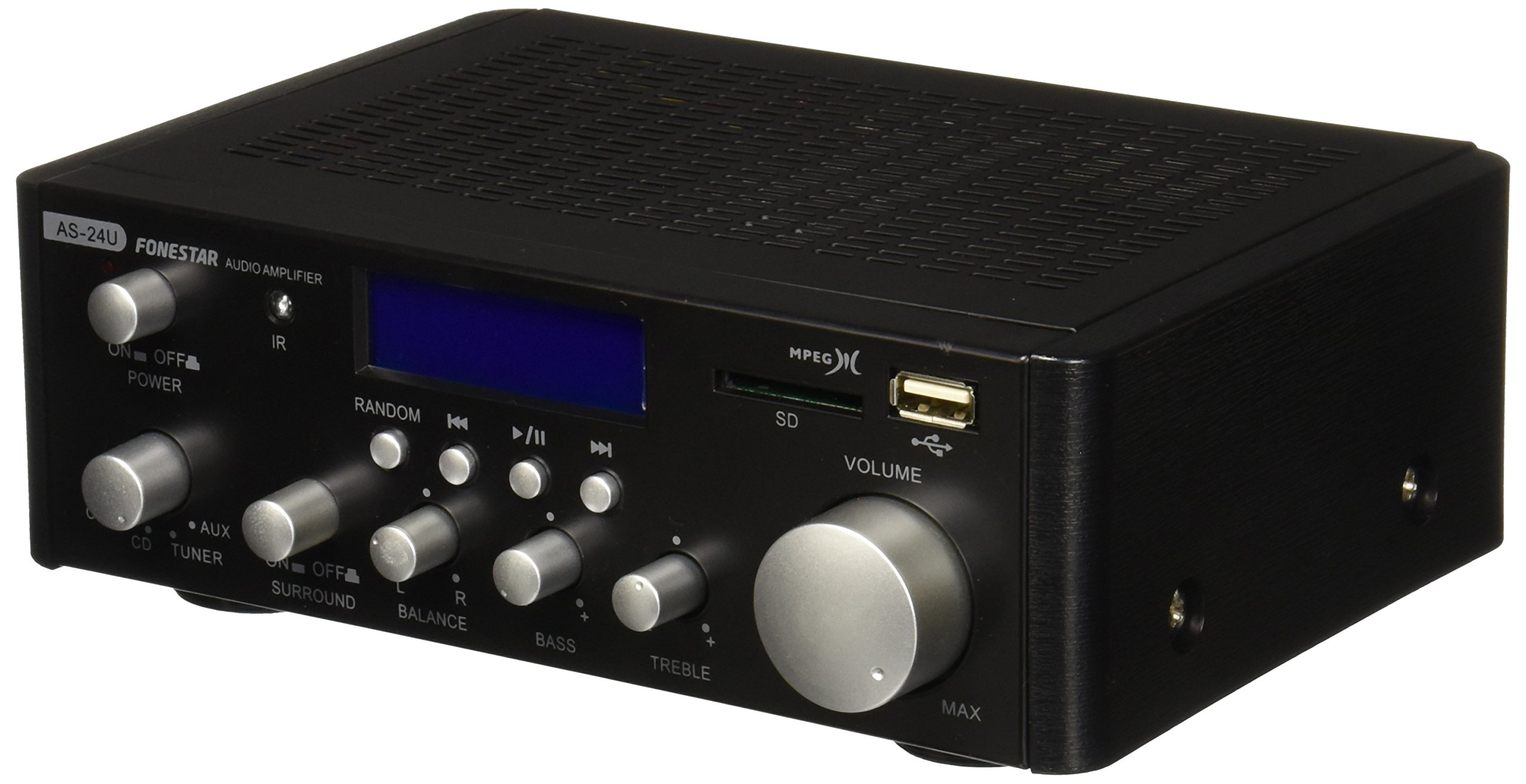
בילד 1: פראָנט view of the Fonestar AS-24U amplifier, showing the main controls and display.
3.2 דערציען פּאַנעל
The rear panel provides all necessary connections for audio input sources, speaker outputs, and power.

בילד 2: דערציען view of the Fonestar AS-24U amplifier, detailing input/output ports and power connection.
- INPUT (AUX, TUNER, CD): RCA stereo inputs for connecting external audio sources.
- SPEAKER OUT (STEREO): Spring clip terminals for connecting passive speakers (4-8 Ω).
- SPEAKER OUT (SURROUND): Additional spring clip terminals for surround speakers (8 Ω).
- מאַכט אין: AC power input for the main power cable.
- VOLTAGE סעלעקטאָר: Switch for selecting between 115V and 230V power input. Ensure this is set correctly for your region.
3.3 רימאָוט קאָנטראָל
די אַרייַנגערעכנטע ווײַטקאָנטראָל ערמעגליכט באַקוועמע אָפּעראַציע פון די amplifier's media playback functions.
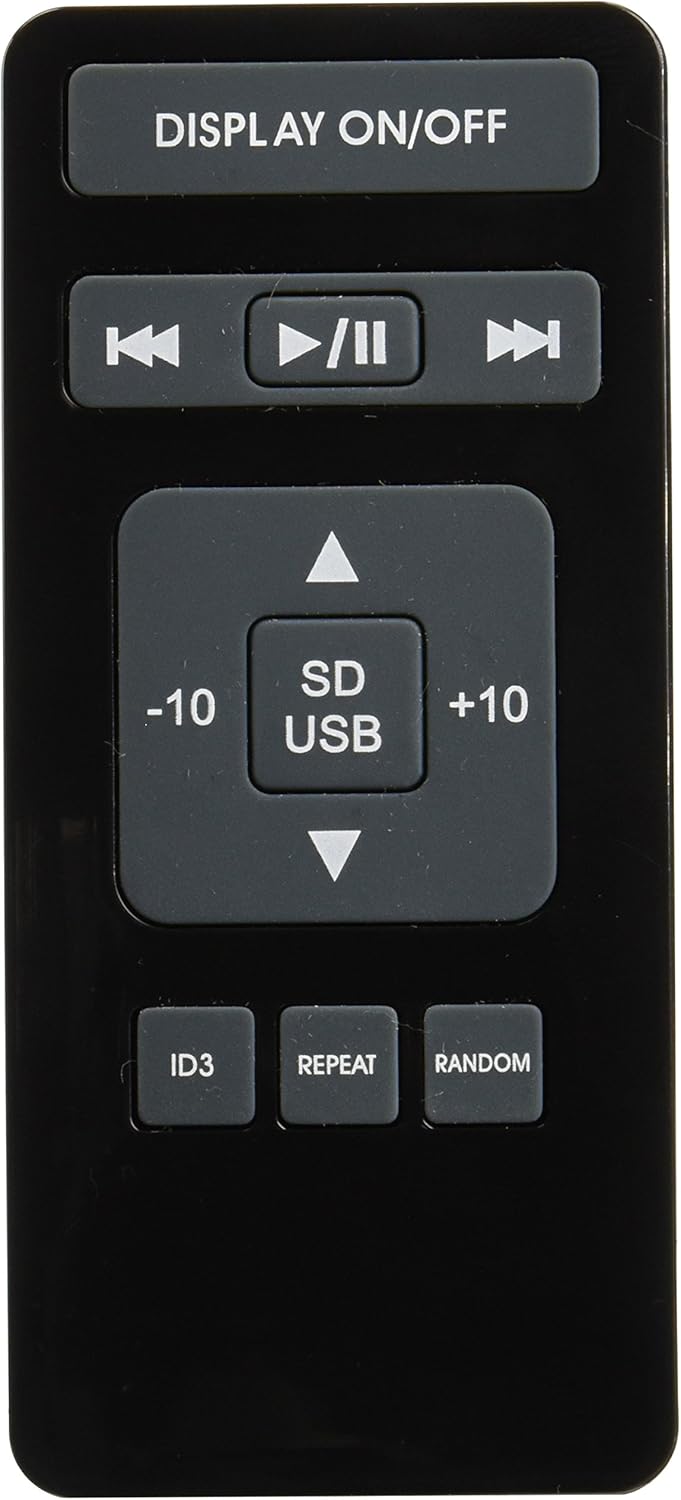
Image 3: Remote control for the Fonestar AS-24U amplifier, showing buttons for media playback and display control.
- DISPLAY ON / OFF: Toggles the front panel display.
- PLAY/PAUSE, PREVIOUS/NEXT: קאָנטראָלס פֿאַר מעדיע ווידערשפּיל.
- SD/USB: Selects between SD card and USB drive as the media source.
- -10/+10: Skips tracks by 10.
- ID3: Displays ID3 tag אינפֿאָרמאַציע פֿאַר mp3 files.
- איבערחזרן: Toggles repeat modes (e.g., repeat one, repeat all).
- טראַף: Toggles random playback.
4. סעטאַפּ
4.1 קאַנעקטינג ספּיקערז
- פאַרזיכערן די ampדער ליפייער איז אויסגעלאשן און נישט אריינגעפלעקט אין פלאג.
- Connect your passive speakers to the SPEAKER OUT terminals on the rear panel.
- Match the positive (+) terminal on the amplifier to the positive (+) terminal on your speaker, and the negative (-) to the negative (-).
- For stereo speakers, use the 4-8 Ω terminals. For surround speakers, use the 8 Ω terminals. Ensure your speakers' impedance matches the ampליפיער ס ספּעסאַפאַקיישאַנז.
4.2 פֿאַרבינדן אַודיאָ קוועלער
- Connect your audio devices (e.g., CD player, tuner, auxiliary device) to the corresponding RCA INPUT jacks (CD, TUNER, AUX) on the rear panel.
- Ensure left and right channels are correctly matched (red for right, white for left).
4.3 מאַכט קאַנעקשאַן
- Verify the VOLTAGE SELECTOR switch on the rear panel is set to the correct voltage for your region (e.g., 230V).
- Connect the power cable to the POWER IN socket on the rear panel and then to a suitable wall outlet.
5. אַפּערייטינג ינסטרוקטיאָנס
5.1 פּאַוערינג אויף / אַוועק
דריק דעם מאַכט קנעפּל אויף דער פראָנט פּאַנעל צו דרייען דעם amplifier on or off. A soft start protection circuit is integrated.
5.2 אויסקלייבן די איינגאבע מקור
Use the input selector knob or buttons on the front panel to choose between CD, TUNER, AUX, USB, or SD inputs.
5.3 אַדזשאַסטירן באַנד
Rotate the main volume knob on the front panel to adjust the overall sound level. Start with a low volume and gradually increase it to a comfortable listening level.
5.4 USB/SD שפּיל
- אַרײַנשטעלן אַ USB פֿלעש דרייוו אָדער SD קאַרטל מיט MP3 אַודיאָ fileס אין די ריספּעקטיוו שפּאַלט אויף די פראָנט טאַפליע.
- Select the USB or SD input using the input selector.
- Use the playback controls (Play/Pause, Previous/Next) on the front panel or remote control to manage your music.
- The remote control allows for additional functions like skipping 10 tracks (+10/-10), displaying ID3 tags, repeating tracks, and random playback.
6. וישאַלט
6.1 רייניקונג
צו ריין די amplifier, first unplug it from the power outlet. Use a soft, dry cloth to wipe down the exterior surfaces. Do not use abrasive cleaners, waxes, or solvents as they may damage the finish.
6.2 סטאָרידזש
אויב סטאָרינג די amplifier for an extended period, ensure it is unplugged, clean, and stored in a cool, dry place away from direct sunlight and extreme temperatures.
7. טראָובלעשאָאָטינג
- קיין מאַכט:
- Check if the power cable is securely connected to both the amplifier and the wall outlet.
- זייט זיכער אז די וואַנט ווענטיל אַרבעט גוט.
- Verify the VOLTAGE SELECTOR switch is set correctly.
- קיין קול:
- באַשטעטיקן אַז די ריכטיקע אַרייַנגאַנג מקור איז אויסגעקליבן.
- קאָנטראָלירט אַלע רעדנער פֿאַרבינדונגען פֿאַר ריכטיקער פּאָלאַריטעט און זיכער פּאַסיק.
- פאַרזיכערן אַז די באַנד איז אויסגעדרייט און נישט מיוטיד.
- פּרוביר מיט אַן אַנדער אַודיאָ מקור.
- פאַרקרימט סאָונד:
- רעדוצירן דעם באַנד.
- טשעק די רעדנער אימפּעדאַנס קאָמפּאַטיביליטי.
- זיכער מאַכן אַז די אַודיאָ קייבלס זענען נישט געשעדיגט און זיכער פארבונדן.
- USB/SD ווידערשפּיל פּראָבלעמען:
- Ensure the USB drive or SD card is formatted to a compatible file סיסטעם (למשל, FAT32).
- באַשטעטיקן אַז די אַודיאָ fileס זענען אין mp3 פֿאָרמאַט.
- פרובירט אן אנדערן USB דרייוו אדער SD קארטל.
8. ספּעסאַפאַקיישאַנז
| סאָרט | FONESTAR |
| מאָדעל | AS-24U |
| Stereo Power Output | 25 + 25 W max, 15 + 15 W RMS (4 Ω), 12 + 12 W RMS (8 Ω) |
| Surround Power Output | 10 + 10 W max, 6 + 6 W RMS (8 Ω) |
| ינפּוץ | 3 stereo (CD, Tuner, AUX), 2 x RCA 400 mV |
| פּראַטעקשאַנז | Soft start, short circuit, overload |
| Voltage | 230 וואלטס |
| דימענסיעס (L X W X H) | 5 x 5 x 10 ס״מ (אומגעפער 50 x 50 x 100 מ״מ) |
| וואָג | 1.9 קג |
| רעדנער קאַנעקטיוויטי | ווייערד |
9. וואָראַנטי און שטיצן
This Fonestar AS-24U amplifier comes with a standard manufacturer's warranty. Please refer to the warranty card included with your purchase for specific terms and conditions. For technical support, service, or warranty claims, please contact your retailer or the official Fonestar customer service.