
1. הקדמה
This manual provides comprehensive instructions for the safe and effective use, assembly, maintenance, and troubleshooting of your MAXXUS RunMaxx 4.2i Treadmill. Please read this manual thoroughly before operating the device and retain it for future reference.
The MAXXUS RunMaxx 4.2i is a compact and foldable electric treadmill designed for home fitness, offering a robust training experience with features like adjustable incline, a powerful motor, and Bluetooth connectivity for app integration.
2. וויכטיק סאַפעטי אינסטרוקציעס
To reduce the risk of serious injury, always follow basic precautions when using this treadmill, including the following:
- לייענט אַלע אינסטרוקציעס אין דעם מאַנואַל איידער איר ניצט די טרעדמיל.
- האַלטן קינדער און פּעץ אַוועק פון די טרעדמיל בעשאַס אָפּעראַציע.
- שטעלט דעם טרעדמיל אויף א פלאַכער, סטאַבילער ייבערפלאַך מיט גענוג פּלאַץ אַרום אים.
- Ensure the safety key is properly attached before starting the treadmill.
- דו זאלסט נישט יקסיד די מאַקסימום באַניצער וואָג פון 110 קג.
- באַראַטנ זיך אַ דאָקטער איידער איר אָנהייבן קיין געניטונג פּראָגראַם.
- נעמט ארויס דעם טרעדמיל פון דער עלעקטרישער אַוטלעט ווען עס איז נישט אין באַנוץ אָדער איידער רייניקונג/וישאַלט.
- ניצט נישט דעם טרעדמיל אויב עס האט א צעבראכענעם שנור אדער פלאג, אדער אויב עס ארבעט נישט ריכטיג.
3. פֿאַרזאַמלונג
The MAXXUS RunMaxx 4.2i treadmill is designed for easy assembly. It comes largely pre-assembled. Follow these steps for final setup:
- אויספּאַקן: נעמט פֿאָרזיכטיק אַרויס אַלע קאָמפּאָנענטן פֿון דער פּאַקאַדזשינג. מאַכט זיכער אַז אַלע טיילן וואָס זענען אויסגערעכנט אין דער פּאַקינג־ליסטע זענען פֿאַראַן.
- באַזע סטאַביליזאַטיאָן: Place the main frame on a level surface.
- אַפּרייט ינסטאַלירונג: Securely attach the uprights to the main frame using the provided hardware.
- קאנסאל אטאַטשמענט: Mount the control console onto the uprights, ensuring all cables are connected correctly.
- סעטאַפּ פון האַנדלעבאַר: Attach the handlebars to the console or uprights as per the diagram.
- לעצט טשעקס: Verify all bolts and screws are tightened. Ensure the treadmill is stable before plugging it in.

Figure 3.1: Fully assembled MAXXUS RunMaxx 4.2i Treadmill.
4. אַפּערייטינג ינסטרוקטיאָנס
4.1. קאָנטראָל פּאַנעל איבערview

פיגורע 4.1: דעטאַילעד view פון די LCD קאָנטראָל פּאַנעל.
The LCD display provides real-time feedback on your workout, including: Heart Rate, Time, Distance, Speed, and Calories Burned. The console also features controls for speed, incline, program selection, and a safety key slot.
4.2. אָנהייבן אַ וואָרקאַוט
- Plug the treadmill into a grounded electrical outlet.
- Attach the safety key to your clothing and insert the other end into the designated slot on the console. The treadmill will not operate without the safety key.
- טרעט אויף די זייט רעלסן פון די טרעדמיל.
- Press the "START" button to begin. The belt will start moving at a low speed.
- Adjust the speed using the "+" and "-" buttons. The treadmill supports speeds from 1-16 קילאמעטער/ה.
- Adjust the incline using the incline buttons.
4.3. טרענירונג פראגראמען
The MAXXUS RunMaxx 4.2i offers 36 פאַר-געשטעלטע טריינינג פּראָגראַמען to diversify your training. Select a program using the "PROGRAM" button and confirm your selection. Each program automatically adjusts speed and incline over time.
4.4. Bluetooth Connectivity (iC+ Training App)
The treadmill is equipped with a Bluetooth receiver for compatibility with the iC+ Training App. Download the app on your smartphone or tablet, enable Bluetooth, and connect to your treadmill to access additional workout options and track your progress.
4.5. Measuring Heart Rate
The treadmill features manual pulse sensors on the handlebars. Grip these sensors firmly during your workout to display your heart rate on the LCD screen. An integrated receiver for an optional radio pulse belt is also available for continuous heart rate monitoring.
5. וישאַלט
רעגולערע אויפהאלטונג גאראנטירט די לאנגעוויטי און אפטימאלע פערפארמאנס פון אייער טרעדמיל.
- רייניקונג: ווישט אַראָפּ די טרעדמיל ייבערפלאַכן מיט אַדamp טוך נאך יעדן באַניץ. פֿאַרמייַדן שרײַבנדיקע רייניגער.
- גאַרטל לובריקיישאַן: Periodically lubricate the running belt according to the manufacturer's recommendations (typically every 3-6 months depending on usage). This prevents friction and extends belt life.
- גאַרטל שפּאַנונג און אַליינמאַנט: Check the running belt tension and alignment regularly. Adjust if the belt slips or drifts to one side. Refer to the detailed instructions in the full manual for adjustment procedures.
- מאָטאָר אָפּטייל: Keep the motor compartment clean and free of dust. Unplug the treadmill before opening the motor cover.
6. סטאָרידזש און פּאָרטאַביליטי
The MAXXUS RunMaxx 4.2i is designed to be foldable for space-saving storage and features integrated transport wheels for easy relocation.
6.1. Folding the Treadmill
- פאַרזיכערן אַז די טרעדמיל איז אויסגעדרייט אַוועק און אַנפּלאַגד.
- Lift the running deck until it locks into the upright position.
- The folded dimensions are approximately ל 112 רענטגענ וו 74 רענטגענ ה 130 סענטימעטער.

Figure 6.1: Treadmill in folded position, showing compact storage.
6.2. Transporting the Treadmill
Once folded, tilt the treadmill slightly and use the integrated transport wheels to move it to your desired storage location. Exercise caution when moving the unit due to its weight (approximately 65 קג).
7. טראָובלעשאָאָטינג
| פּראָבלעם | מעגלעך סיבה | לייזונג |
|---|---|---|
| טרעדמיל הייבט זיך נישט אן. | Power cord unplugged; Safety key not inserted; Circuit breaker tripped. | Ensure power cord is securely plugged in; Insert safety key fully; Reset circuit breaker. |
| פליסנדיק גאַרטל סליפּס. | Belt tension too loose; Belt worn out. | Adjust belt tension (refer to manual); Contact customer service for belt replacement. |
| ומגעוויינטלעך ראַש בעשאַס אָפּעראַציע. | Loose components; Lack of lubrication; Motor issue. | Check and tighten all visible bolts; Lubricate running belt; Contact customer service. |
| ווייַז נישט ארבעטן. | לויזער קאַבל פֿאַרבינדונג; פּראָבלעם מיט שטראָם. | Check console cable connections; Verify power supply. |
For issues not listed here or if solutions do not resolve the problem, please contact MAXXUS customer support.
8. טעכניש ספּעסאַפאַקיישאַנז
- מאָדעל: MAXXUS RunMaxx 4.2i
- מאָדעל נומער: 600005-00019-0001
- דימענשאַנז (אַנפאָלדעד): ל 165 רענטגענ וו 74 רענטגענ ה 130 סענטימעטער
- דימענשאַנז (פאָולדיד): ל 112 רענטגענ וו 74 רענטגענ ה 130 סענטימעטער
- פליסנדיק ייבערפלאַך: 125 X 44 סענטימעטער
- פּראָדוקט וואָג: 63 קג
- מאַקסימום באַניצער וואָג: 110 קג
- מאָטאָר: 1.75 הפּ דק מאָטאָר
- גיכקייַט קייט: 1 - 16 קילאָמעטער פּער שעה
- שיפּוע אַדזשאַסטמאַנט: Yes (Adjustable)
- ווייַז טיפּ: לקד
- Displayed Metrics: Heart Rate, Time, Distance, Speed, Calories Burned
- וואָרקאָוט מגילה: 36 פאַר-שטעלן מגילה
- קאַנעקטיוויטי: Bluetooth (for iC+ Training App)
- קלאַפּ אַבזאָרפּשאַן: Cushion-Flex System
- ראַם מאַטעריאַל: אַללוי סטיל
- מאַכט מקור: אַק אַדאַפּטער
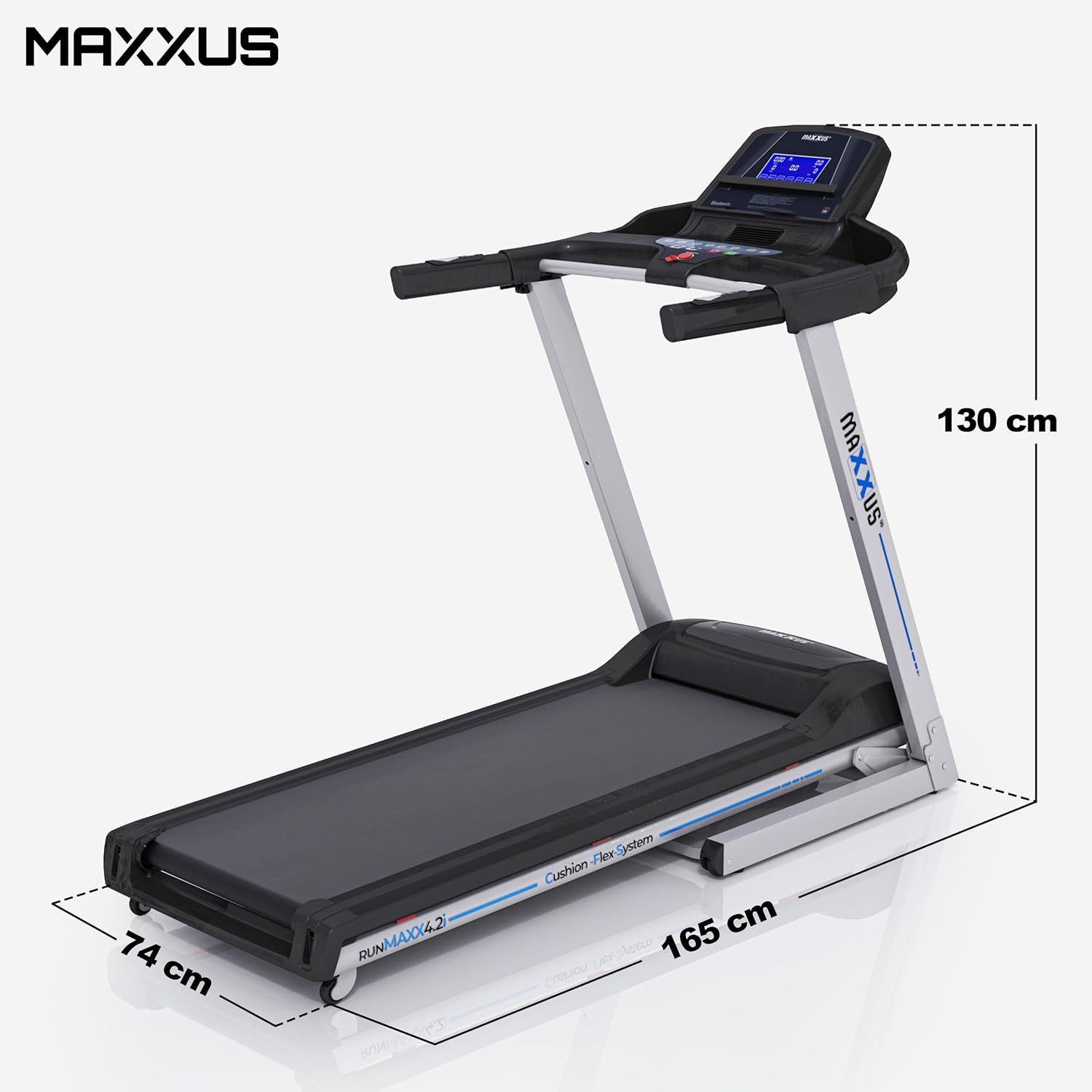
Figure 8.1: Treadmill dimensions (unfolded).

Figure 8.2: Running surface dimensions.
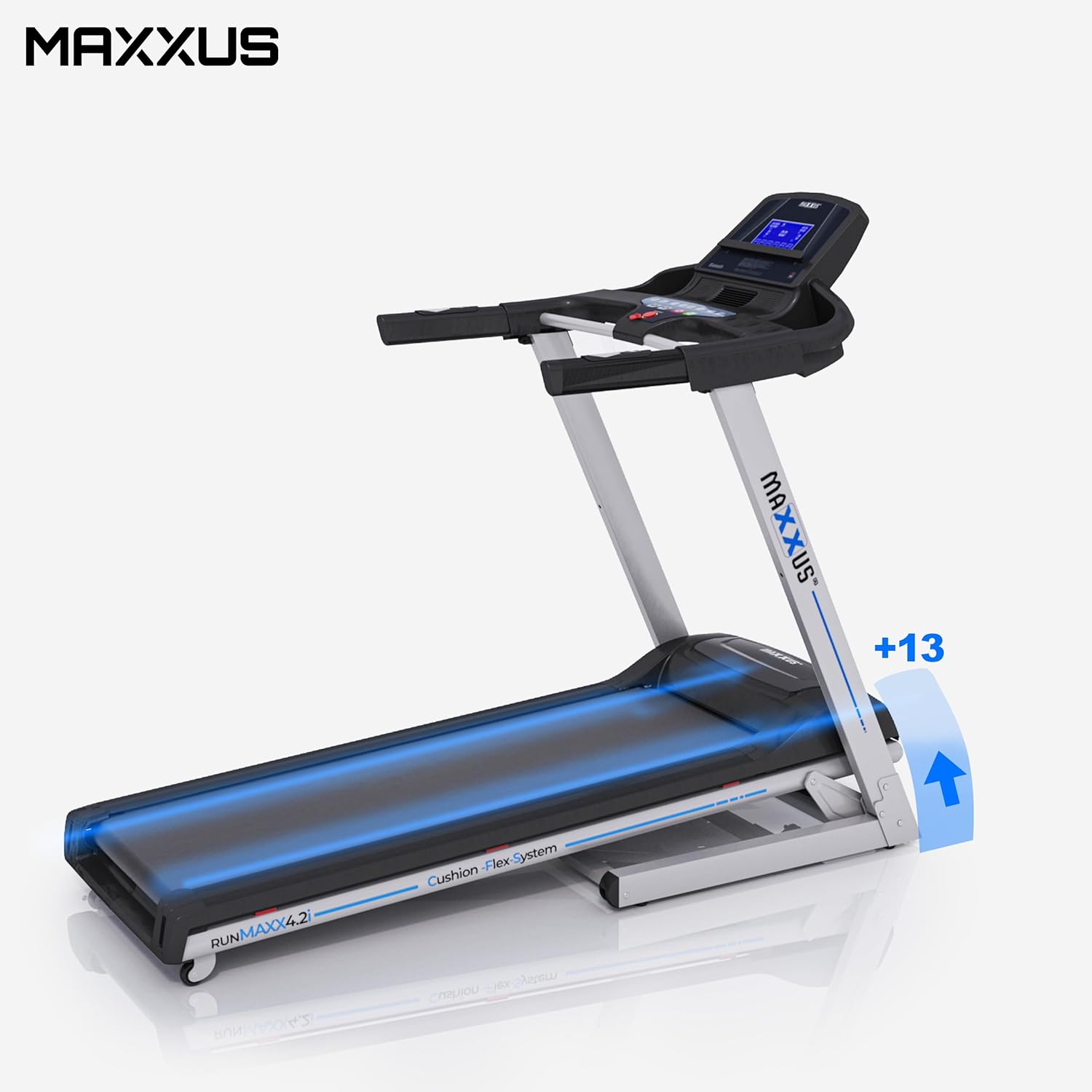
Figure 8.3: Treadmill showing incline capability.
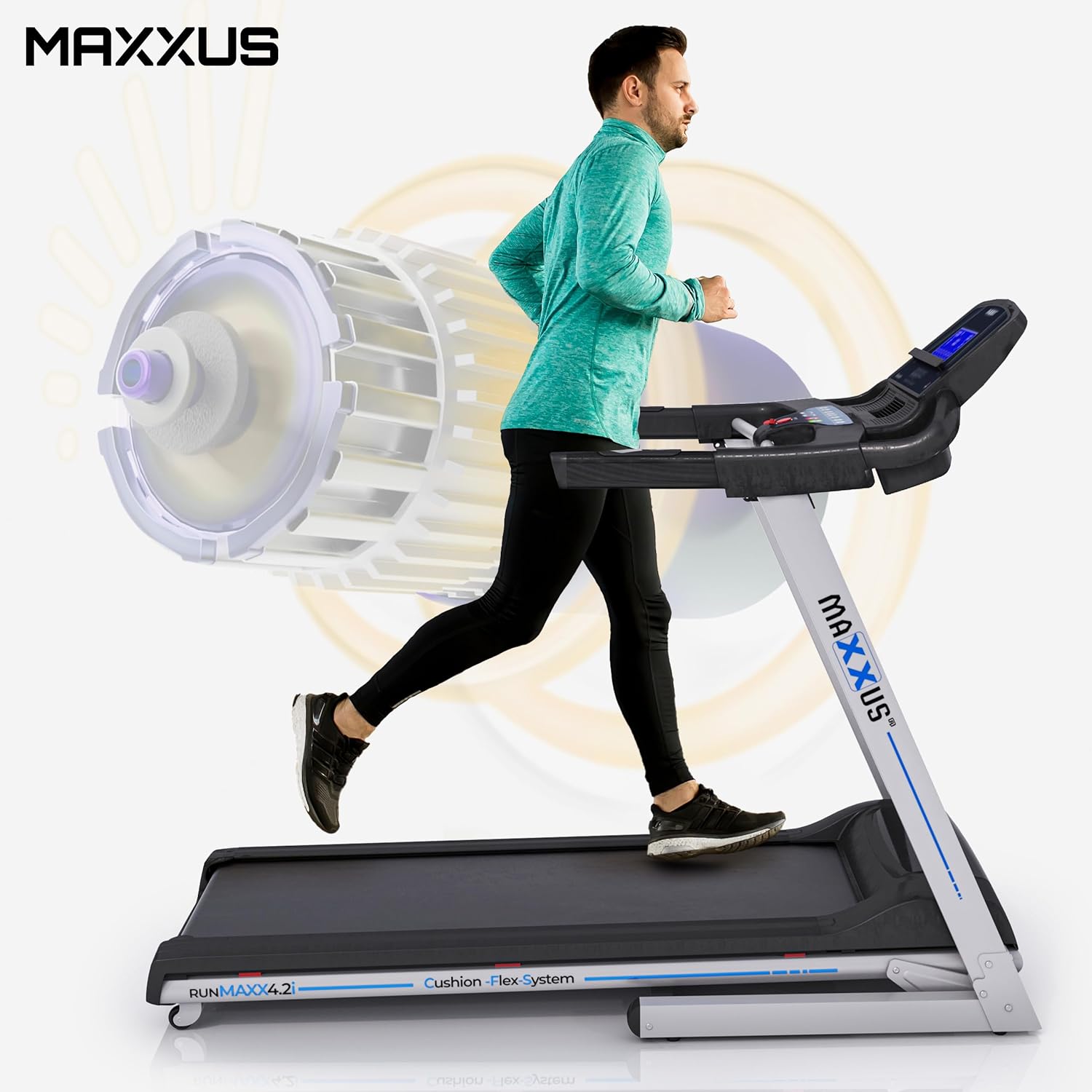
Figure 8.4: Illustration of the powerful motor and user in motion.
9. וואָראַנטי און שטיצן
MAXXUS products are known for their quality and durability. For warranty information, service requests, or technical support, please refer to the warranty card included with your product or visit the official MAXXUS webזייטל. האַלט אייער קויף קוויטל ווי אַ באַווייַז פון קויפן פֿאַר וואָראַנטי קליימז.
פאַבריקאַנט: MAXXUS
ערשטער פאַראַנען דאַטע: 23 מערץ 2015