
הקדמה
This manual provides instructions for the Vivanco RR 220 remote control, designed for compatibility with Samsung Smart TVs. Please read this manual thoroughly before using the device to ensure proper operation and to understand its features.
פּעקל אינהאַלט
- Vivanco RR 220 Remote Control
- דעם באַניצער מאַנואַל
באַמערקונג: באַטעריעס זענען נישט אַרייַנגערעכנט און מוזן זיין געקויפט באַזונדער.
סעטאַפּ
1. באַטאַרייע ייַנמאָנטירונג
- געפֿינען די באַטאַרייע אָפּטייל אויף די צוריק פון די ווייַט קאָנטראָל.
- רוקט דעם באַטעריע דעקל אַראָפּ אָדער דריק דעם לאַטש און הייבט אויף צו עפֿענען.
- Insert two (2) AAA batteries, ensuring the positive (+) and negative (-) terminals align with the markings inside the compartment.
- Replace the battery cover, ensuring it clicks securely into place.
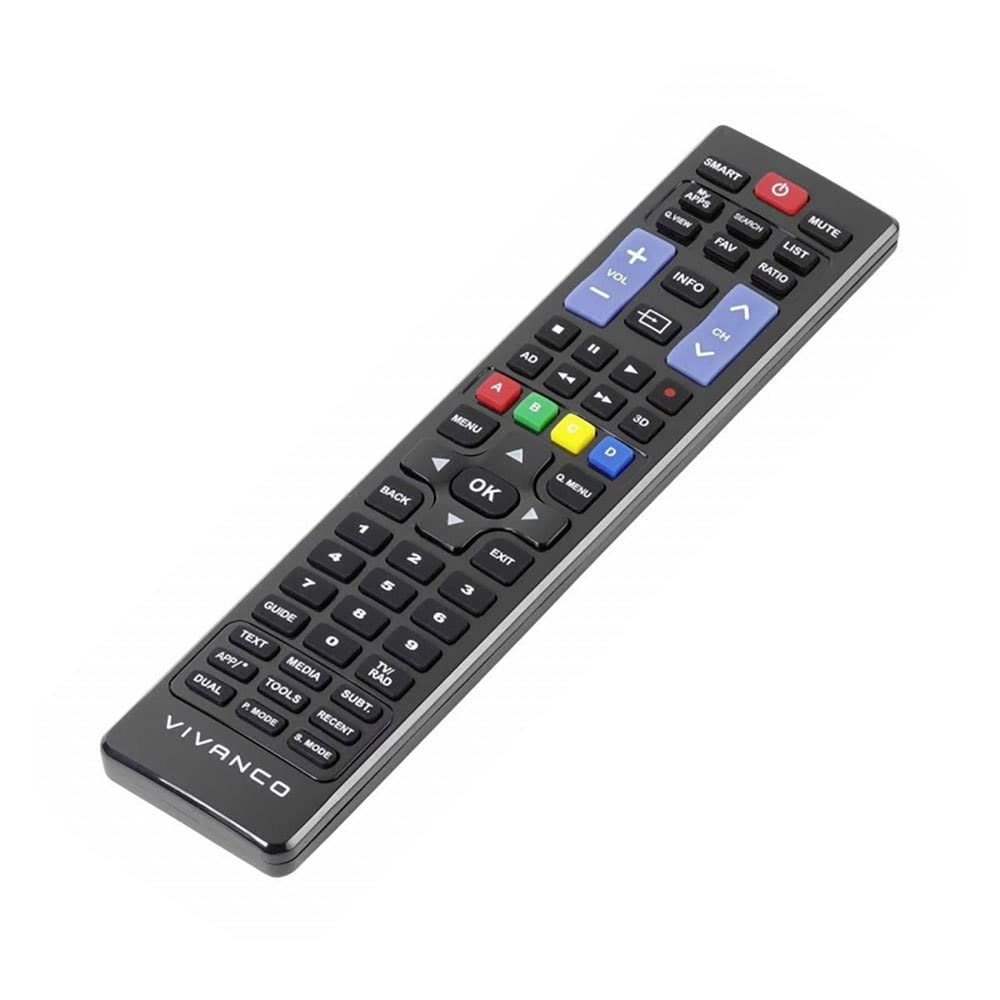
בילד 1: Vivanco RR 220 remote control. This image displays the front of the remote control, highlighting its 57 buttons and ergonomic design. The battery compartment is located on the reverse side.
2. ערשט נוצן
The Vivanco RR 220 is pre-programmed for Samsung Smart TVs. No additional setup or pairing is typically required. Once batteries are installed, point the remote control towards your Samsung Smart TV and press the Power button to test functionality.
אַפּערייטינג ינסטראַקשאַנז
The remote control features 57 buttons, providing comprehensive control over your Samsung Smart TV and compatible devices. Below are common button functions:
- מאַכט קנעפּל: טורנס די טעלעוויזיע אויף אָדער אַוועק.
- נומער קנעפּלעך (0-9): For direct channel selection or data input.
- באַנד אַרויף / אַראָפּ: אַדזשאַסץ די אַודיאָ באַנד.
- קאַנאַל אַרויף / אַראָפּ: טוישט טעלעוויזיע קאַנאַלן.
- שטיל קנעפּל: שטילט דעם טעלעוויזיע אַודיאָ.
- נאַוויגאַציע פּאַד (אַרויף, אַראָפּ, לינקס, רעכטס, אַרייַן): געניצט צו נאַוויגירן מעניוז און אויסקלייבן אָפּציעס.
- צוריק/צוריק קנעפל: קערט צו די פריערדיקע פאַרשטעלן אָדער מעניו.
- Smart Hub/Home Button: Accesses the Smart Hub or main menu of your Samsung Smart TV.
- מקור / אַרייַנשרייַב קנעפּל: אויסקלייבט אריינגאנג קוועלער (HDMI, AV, אאז"וו).
- קאָליר קנעפּלעך (רויט, גרין, געל, בלוי): For specific functions within certain applications or menus, as indicated on-screen.
- שפּיל קאָנטראָלן (שפּילן, פּויזע, אָפּשטעלן, שנעל פֿאָרווערטס, צוריקשפּײַלן): Controls media playback on compatible devices or apps.
For specific functions related to your TV model, refer to your Samsung TV's user manual.
וישאַלט
רייניקונג די רימאָוט קאָנטראָל
- ניצט אַ ווייכן, טרוקענעם שטאָף צו ווישן די ייבערפלאַך פון דער ווײַטקאָנטראָל.
- פֿאַר שווערן שמוץ, אַ ביסל דampyi די שטאָף מיט וואַסער אָדער אַ מילד, ניט-אַברייסיוו רייניקונג.
- ניצט נישט קיין שאַרפע כעמיקאַלן, סאָלווענטן, אדער אַברייסיוו רייניקונג פּאַדס, ווייל די קענען שעדיקן די ענדיקונג אדער אינעווייניקסטע קאָמפּאָנענטן פון דער ווייַטקאָנטראָל.
- Ensure no liquid enters the remote control through button gaps or the battery compartment.
באַטערי פאַרבייַט
Replace batteries when the remote's response becomes sluggish or it stops functioning. Always replace both batteries simultaneously with new AAA alkaline batteries. Do not mix old and new batteries or different types of batteries.
טראָובלעשאָאָטינג
| פּראָבלעם | מעגלעך סיבה | לייזונג |
|---|---|---|
| ווייַט קאָנטראָל נישט ארבעטן. |
|
|
| עטלעכע קנעפּלעך פונקציאָנירן נישט. |
|
|
ספּעסאַפאַקיישאַנז
- סאָרט: Vivanco
- מאָדעל נאָמען: רר 220
- פּראָדוקט מאָדעל נומער: 38016
- קאַמפּאַטאַבאַל דעוויסעס: Home cinema, DVD/Blu-ray player, Television (Samsung Smart TV compatible)
- קאַנעקטיוויטי טעכנאָלאָגיע: Wireless IR (Infrared)
- נומער פון קנעפּלעך: 57
- באַטערי טיפּ: 2 x AAA (Alkaline recommended)
- באַטעריז אַרייַנגערעכנט: ניין
- פּראָדוקט דימענשאַנז: 18 X 4.8 X 2.3 סענטימעטער
- פּראָדוקט וואָג: 80 ג
- מאַקסימום קייט: 15 מעטער
- ספּעציעלע פֿעיִקייטן: IPTV, DVB-T, HDTV compatibility