
Jensen CD-490
JENSEN CD-490 Portable Stereo CD Player with AM/FM Radio and Aux Line-in Instruction Manual
הקדמה
The JENSEN CD-490 is a portable stereo CD player equipped with an AM/FM stereo radio and an auxiliary line-in. It features a top-loading CD player with an LED track display, skip/search/repeat functions, and programmable memory. The unit includes a telescopic antenna for radio reception, a foldable carrying handle for portability, and a stereo headphone jack. An auxiliary input allows connection of external audio devices such as MP3 players.
וויכטיק סאַפעטי אינפֿאָרמאַציע
ווארענונג: דעם פּראָדוקט כּולל קעמיקאַלז באקאנט צו די שטאַט פון קאַליפאָרניאַ צו פאַרשאַפן ראַק און געבורט חסרונות אָדער אנדערע רעפּראָדוקטיווע שאָדן.
Always follow basic safety precautions when using electrical appliances to reduce the risk of fire, electric shock, and personal injury. Keep this manual for future reference.
וואָס איז אַרייַנגערעכנט
- JENSEN CD-490 Portable Stereo CD Player with AM/FM Radio
- אַק מאַכט שנור
- באַזיצער ס מאַנואַל
פּראָדוקט איבערview
Familiarize yourself with the controls and features of your JENSEN CD-490 unit.
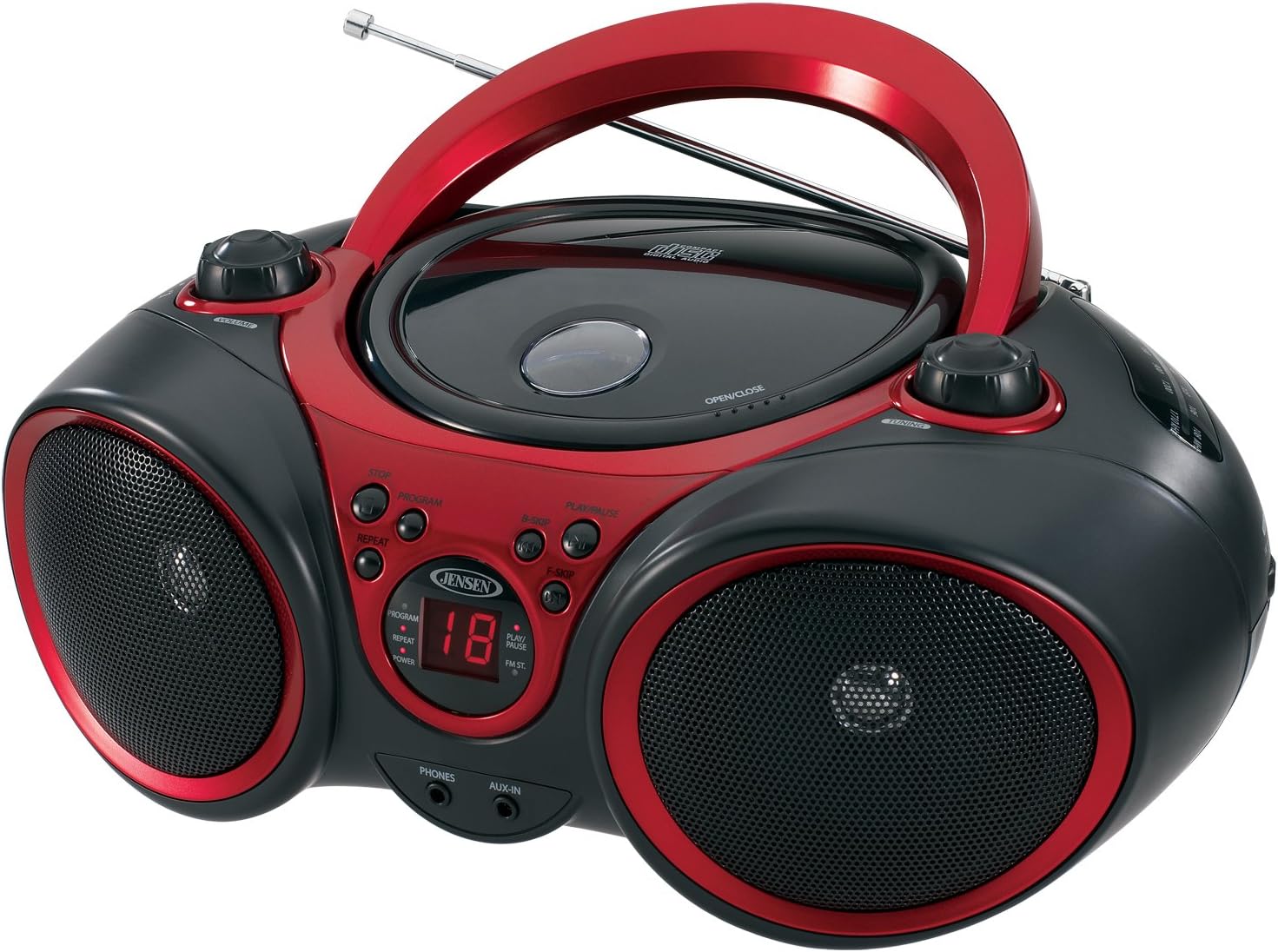
בילד: פראָנט view of the JENSEN CD-490 unit, showing the CD compartment, speakers, control buttons, and display.
פראָנט פּאַנעל קאָנטראָלס:
- VOLUME קנופּ: אַדזשאַסץ די אַודיאָ רעזולטאַט מדרגה.
- STOP קנעפּל: סטאַפּס קאָמפּאַקטדיסק פּלייבאַק.
- פּראָגראַם קנעפּל: Used for programming CD tracks.
- REPEAT קנעפּל: איבערחזרט דעם איצטיקן טרעק אדער אלע טרעקס.
- B-SKIP Button: Skips backward through CD tracks.
- שפּיל / פּויזע קנעפּל: הייבט אָן אָדער פּויזירט סי-די ווידערשפּיל.
- F-SKIP Button: Skips forward through CD tracks.
- געפֿירט ווייַז: Shows CD track number and function indicators (PROGRAM, REPEAT, POWER, PLAY/PAUSE, FM ST).
- פאָנעס דזשאַק: פֿאַר קאַנעקטינג סטעריאָו כעדפאָונז.
- AUX-IN דזשאַק: פֿאַר קאַנעקטינג פונדרויסנדיק אַודיאָ דעוויסעס.
שפּיץ פּאַנעל קאָנטראָלס:
- סי-די קאמפארטמענט: Top-loading area for compact discs.
- OPEN/CLOSE Latch: Releases the CD compartment lid.
- טונינג קנעפּל: Adjusts AM/FM radio frequency.
זייט פּאַנעל קאָנטראָלס:
- פונקציע סוויטש: Selects between RADIO, CD/AUX IN, and OFF modes.
- AM/FM באַנד סעלעקטאָר: Selects between AM and FM radio bands.
דערציען פּאַנעל פֿעיִקייטן:
- אַק מאַכט אַרייַנשרייַב: פֿאַר פֿאַרבינדן דעם AC מאַכט שנור.
- באַטערי אָפּטייל: Holds 8 'C' (UM-2) batteries for portable operation.
- טעלאַסקאָפּיק אַנטענע: אויסשטרעקבארע אַנטענע פֿאַר FM ראַדיאָ אָפּנאַם.
סעטאַפּ
מאַכט די אַפּאַראַט:
The CD-490 can be powered by either AC power or batteries.
AC מאַכט:
- Ensure the unit is in the OFF position using the FUNCTION switch.
- Connect the AC power cord to the AC power input on the rear of the unit.
- Plug the other end of the AC power cord into a standard AC 120V/60Hz wall outlet.
באַטאַרייע מאַכט:
- זיכער מאַכן אַז די אַפּאַראַט איז אין דער "אויס" פּאָזיציע.
- עפֿענען די דעקן פון די באַטאַרייע אָפּטייל אויף די דנאָ פון די אַפּאַראַט.
- Insert 8 'C' (UM-2) size batteries (not included), ensuring correct polarity (+/-).
- פאַרמאַכן די באַטאַרייע אָפּטייל דעקן סיקיורלי.
אַנטענע סעטאַפּ:
For optimal FM radio reception, fully extend the telescopic antenna. For AM reception, the unit has a built-in antenna, so no adjustment is typically needed.
Operating the CD Player
The CD-490 supports standard audio CDs and CD-R/RW discs.
- Set the FUNCTION switch to the 'CD/AUX IN' position.
- Press the 'OPEN/CLOSE' latch to open the CD compartment lid.
- Place an audio CD into the compartment with the label side facing up.
- Close the CD compartment lid firmly until it clicks. The LED display will show the total number of tracks on the CD.
- Press the 'PLAY/PAUSE' button to begin playback. The current track number will appear on the LED display.
- Adjust the 'VOLUME' knob to your desired listening level.
- To pause playback, press the 'PLAY/PAUSE' button. Press it again to resume.
- To skip to the next track, press the 'F-SKIP' button. To go back to the beginning of the current track or the previous track, press the 'B-SKIP' button.
- To stop playback, press the 'STOP' button.
איבערחזרן פֿונקציע:
- During playback, press the 'REPEAT' button once to repeat the current track. The 'REPEAT' indicator will light up.
- Press the 'REPEAT' button a second time to repeat all tracks on the CD. The 'REPEAT' indicator will flash.
- Press the 'REPEAT' button a third time to cancel the repeat function.
פּראָוגראַמד פּלייַבאַק:
- In STOP mode, press the 'PROGRAM' button. The 'PROGRAM' indicator will light up and '00' will flash on the display.
- Use the 'F-SKIP' or 'B-SKIP' buttons to select your desired track.
- Press the 'PROGRAM' button again to confirm the track. The display will show the next program number.
- איבערחזרן סטעפּס 2 און 3 צו פּראָגראַם אַרויף צו 20 טראַקס.
- After programming, press the 'PLAY/PAUSE' button to start programmed playback.
- To cancel programmed playback, press the 'STOP' button twice.
Operating the AM/FM Radio
- Set the FUNCTION switch to the 'RADIO' position.
- Select either 'AM' or 'FM' using the AM/FM band selector switch.
- Extend the telescopic antenna for FM reception. Adjust its position for best reception.
- דריי דעם 'TUNING' קנעפּל צו אויסקלייבן אייער געוואונטשענע ראַדיאָ סטאַנציע.
- Adjust the 'VOLUME' knob to your desired listening level.
ניצן די אַגזיליערי אַרייַנשרייַב
The AUX-IN jack allows you to connect an external audio device (e.g., MP3 player, smartphone) to play through the CD-490's speakers.
- Set the FUNCTION switch to the 'CD/AUX IN' position.
- Connect one end of a 3.5mm audio cable (not included) to the AUX-IN jack on the front of the CD-490.
- Connect the other end of the audio cable to the headphone jack or line-out jack of your external audio device.
- Turn on your external audio device and start playback.
- Adjust the volume on both your external device and the CD-490's 'VOLUME' knob for optimal sound.
וישאַלט און זאָרג
- האַלט דעם אַפּאַראַט אַוועק פון דירעקטער זונשייַן, היץ קוועלער, און איבערגעטריבענער שטויב אָדער פייכטקייט.
- רייניקט דעם אַפּאַראַט מיט אַ ווייכן, טרוקענעם שטאָף. ניצט נישט קיין שרײַבנדיקע רייניגערס אדער סאָלווענטן.
- To clean the CD lens, use a commercially available CD lens cleaner.
- אויב איר ניצט באַטעריעס, נעמט זיי אַרויס אויב די אַפּאַראַט וועט נישט געניצט ווערן פֿאַר אַ לענגערע צייט צו פאַרמייַדן ליקאַדזש.
טראָובלעשאָאָטינג
| פּראָבלעם | מעגלעך סיבה | לייזונג |
|---|---|---|
| קיין מאַכט | AC שנור נישט פארבונדן; באַטעריעס אויסגעשעפט אדער נישט ריכטיג אריינגעשטעלט. | קאָנטראָלירט די AC שנור פֿאַרבינדונג; פֿאַרבייטן באַטעריעס אָדער זיכער מאַכן אַז די פּאָלאַריטעט איז ריכטיק. |
| CD does not play / 'NO DISC' error | CD inserted incorrectly; CD is dirty or scratched; Unit in wrong function mode. | Re-insert CD with label side up; Clean or replace CD; Set FUNCTION switch to 'CD/AUX IN'. |
| נעבעך ראַדיאָ אָפּטראָג | Antenna not extended/adjusted; Weak signal. | Extend and adjust FM telescopic antenna; Reposition the unit for better signal. |
| קיין קלאַנג פֿון AUX-IN | Audio cable not connected; Volume too low on external device or unit. | Ensure audio cable is securely connected; Increase volume on both devices. |
ספּעסאַפאַקיישאַנז
- מאָדעל: CD-490
- מאַכט מקור: AC 120V/60Hz or 8 x 'C' (UM-2) batteries (not included)
- רעזולטאַט מאַכט: 2 קס 1.5 וו רמס
- CD קאַמפּאַטאַבילאַטי: קאָמפּאַקטדיסק, סי-ר / רוו
- ראַדיאָ באַנדס: AM/FM סטערעאָ
- קאַנעקטיוויטי: Auxiliary Input Jack, Stereo Headphone Jack
- דימענשאַנז (L x W x H): 12.7 X 9.1 X 5.8 אינטשעס
- וואָג: 3.4 פונט
- פאַבריקאַנט: Spectra Merchandising International, Inc.
- ערשטער בנימצא: 14 מאי 2003
וואָראַנטי און שטיצן
Specific warranty information and customer support contact details are typically provided with your product packaging or on the manufacturer's official website. Please refer to those resources for the most accurate and up-to-date information.
פּראָדוקט ווידעא
קוקט דעם אפיציעלן פראדוקט ווידעא פאר א וויזועלע איבערבליקview of the JENSEN CD-490 Stereo.
ווידעא: אן איבערview of the JENSEN CD-490 Portable Stereo CD Player, highlighting its features and design.
Ask a question about this manual
Ask about setup, troubleshooting, compatibility, parts, safety, or missing instructions. Manuals+ will review the question and use this page’s manual context to help answer it.