
1. הקדמה
This manual provides instructions for the OEM RMT-B119A remote control, designed as a replacement or secondary remote for various Sony Blu-ray player models. This remote offers full functionality for controlling your Blu-ray player's features.
Compatible Sony Blu-ray Player Models:
- BDP-BX59
- בדפּ-ס 390
- בדפּ-ס 590
- BDP-BX110
- בדפּ-ס 1100
- בדפּ-ס 3100
- BDP-BX310
2. סעטאַפּ
2.1 באַטאַרייע ייַנמאָנטירונג
The remote control requires two (2) AAA batteries (not included). Follow these steps to install the batteries:
- געפֿינען די דעקן פון די באַטאַרייע אָפּטייל אויף די צוריק פון די ווייַט קאָנטראָל.
- דריק אַראָפּ אויף דעם טאַב און שלעפּ דעם דעקל אַראָפּ צו עפֿענען דעם אָפּטייל.
- אַרײַנשטעלן צוויי AAA באַטעריעס, און זיכער מאַכן אַז די פּאָזיטיוו (+) און נעגאַטיוו (-) טערמינאַלן זענען ריכטיק אויסגעשטעלט מיט די מאַרקירונגען אינעווייניק אין דעם אָפּטייל.
- שטופּט צוריק דעם דעקל פון דעם באַטעריע־אָפּטייל ביז עס קליקט זיכער.
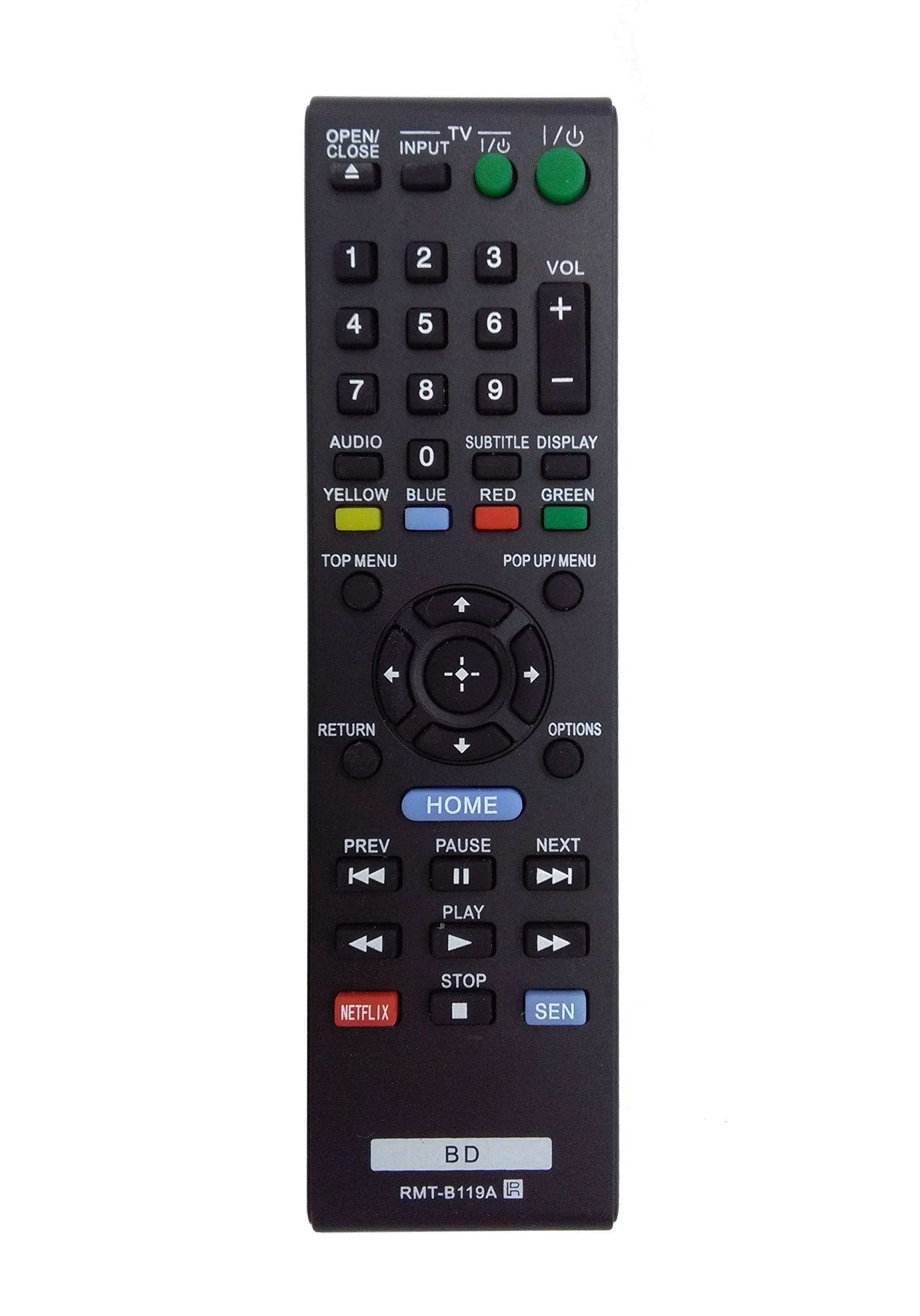
Image: The OEM RMT-B119A remote control, showing the full button layout on the front and a partial view of the open battery compartment on the back, revealing the battery terminals.
3. אַפּערייטינג ינסטרוקטיאָנס
3.1 Remote Control Layout and Button Functions
Familiarize yourself with the buttons on your RMT-B119A remote control. Below is a description of each button's primary function.
Image: The OEM RMT-B119A remote control, displaying all buttons and their labels.
- Power (I/O): Turns the Blu-ray player on or off.
- OPEN/CLOSE (▲): אָפּענס אָדער קלאָוזיז די דיסק טאַץ.
- איינגאבע: Switches the input source on the connected TV (if programmed).
- טעלעוויזיע: Switches the remote to TV control mode (if programmed).
- נומערן בלאט (0-9): Used for direct track selection, chapter selection, or entering numerical data.
- VOL (+/-): Adjusts the volume level (typically for the connected TV, if programmed).
- אַודיאָ: Changes the audio track or language during playback.
- SUBTITLE DISPLAY: Toggles subtitle display on or off, or cycles through available subtitle languages.
- YELLOW, BLUE, RED, GREEN: Color-coded function buttons, typically used for specific features within menus or interactive content. Their function varies depending on the disc or menu.
- שפּיץ מעניו: Accesses the main menu of the Blu-ray disc.
- POP UP/MENU: Displays the pop-up menu during disc playback.
- Directional Pad (↑↓←→): נאַוויגירט דורך מעניוז און אָפּציעס.
- Center Button (Enter/Select): Confirms a selection or enters a menu item.
- צוריקקומען: גייט צוריק צום פריערדיקן עקראַן אָדער מעניו.
- אָפּציעס: Displays context-sensitive options or settings.
- היים: Accesses the Blu-ray player's home menu.
- PREV (◀◀): Skips to the beginning of the current track/chapter or the previous track/chapter.
- PAUSE (▌▌): פּאָזאַז פּלייבאַק.
- NEXT (▶▶): Skips to the next track or chapter.
- PLAY (▶): סטאַרץ אָדער רעזאַמייז פּלייבאַק.
- שטאָפּ (■): סטאַפּס פּלייבאַק.
- נעטפליקס: Direct access button for the Netflix streaming service.
- SEN: Direct access button for the Sony Entertainment Network (now PlayStation Video/Music).
- בד: Likely a dedicated button for Blu-ray Disc functions or to switch to Blu-ray mode.
4. וישאַלט
כדי צו זיכער מאַכן די לאַנגלעבעניש און ריכטיקע פונקציאָנירן פון אייער ווייַט קאָנטראָל, פאָלגט די וישאַלט גיידליינז:
- רייניקונג: ווישט אָפּ די ווײַטקאָנטראָל מיט אַ ווייכן, טרוקענעם שטאָף. פֿאַר שווערן שמוץ, ווייכט עס אַ ביסל אויס.ampווישט דעם שטאָף מיט וואַסער אָדער אַ מילדן, נישט-שרייַבנדיקן רייניגער. פֿאַרמייַדט ניצן שטרענגע כעמיקאַלן אָדער סאָלווענטן.
- באַטערי פאַרבייַט: טוישט די באַטעריעס ווען די ווײַטקאָנטראָל רעאַקציע ווערט טראָג אָדער עס הערט אויף צו אַרבעטן. טוישט שטענדיק ביידע באַטעריעס אין דער זעלבער צייט מיט נײַע פון דעם זעלבן טיפּ.
- סטאָרידזש: האַלט די ווײַטקאָנטראָלירטע מיטל אין אַ קיל, טרוקן אָרט אַוועק פון דירעקט זונשייַן, עקסטרעמע טעמפּעראַטורן און הויכע הומידיטי. אויב די ווײַטקאָנטראָלירטע מיטל וועט נישט ווערן גענוצט פֿאַר אַ לענגערע צייט, נעמט אַרויס די באַטעריעס צו פאַרמייַדן ליקאַדזש.
- ויסמיידן טראפנס: באַשיצט דעם ווײַטקאָנטראָל פֿון פֿיזישן קלאַפּ, ווײַל פֿאַלן קענען שאַטן אינעווייניקסטע קאָמפּאָנענטן.
5. טראָובלעשאָאָטינג
If you experience issues with your remote control, refer to the following table for common problems and solutions:
| פּראָבלעם | מעגלעך סיבה | לייזונג |
|---|---|---|
| ווייַט טוט נישט אַרבעטן. | טויטע אדער נישט ריכטיק אריינגעשטעלטע באַטעריעס. | פאַרבייטן באַטעריעס מיט נייַע, זיכער מאַכן אַז די פּאָלאַריטעט איז ריכטיק (+/-). |
| די ווײַטקאָנטראָל אַרבעט צווישנצײַטיק. | Low battery power or obstruction. | Replace batteries. Ensure no objects are blocking the remote's signal path to the Blu-ray player. |
| די ווײַט קאָנטראָלירט נישט דעם טעלעוויזאָר. | Remote not programmed for TV or TV mode not selected. | This remote is primarily for Blu-ray players. TV control functionality may require specific programming not covered by this manual, or may not be supported by this OEM model. |
| Buttons are unresponsive or sticky. | שמוץ אדער דעבריס אונטער קנעפּלעך. | Clean the remote control surface. Avoid spilling liquids on the remote. |
6. ספּעסאַפאַקיישאַנז
- סאָרט: אָעם
- מאָדעל נומער: RMT-B119A
- קאַנעקטיוויטי טעכנאָלאָגיע: ינפרערעד (IR)
- קאַמפּאַטאַבאַל דעוויסעס: Sony Blu-ray Players (specific models listed in Introduction)
- מאַכט מקור: 2 X AAA באַטעריז (ניט אַרייַנגערעכנט)
- מאַקסימום קייט: בעערעך 10 מעטער (33 פֿיס)
- ספּעציעלע שטריך: ערגאַנאַמיק פּלאַן
7. וואָראַנטי און שטיצן
This OEM RMT-B119A remote control comes with a 30-טאָג וואָראַנטי פֿון דעם קויפֿדאַטום, וואָס באַדעקט פֿאַבריקאַציע־דעפֿעקטן. ביטע באַהאַלטן אייער קויפֿבאַווײַז פֿאַר וואָראַנטי־קליימז.
For technical support or warranty inquiries, please contact the retailer or manufacturer directly. Refer to your purchase documentation for specific contact information.