
1. הקדמה
א דאנק פארן קויפןasing the KLH R5100 Surround Sound Receiver. This receiver is designed to provide high-quality audio and video performance for your home entertainment system. It features multiple audio and video inputs, surround sound processing, and a powerful amplifier to deliver an immersive listening experience. Please read this manual thoroughly before operating the unit to ensure proper setup and optimal performance.
2. וויכטיק סאַפעטי אינפֿאָרמאַציע
כדי צו רעדוצירן דעם ריזיקע פון עלעקטרישן קלאַפּ, פייער, אדער שאָדן צום אַפּאַראַט, ביטע אָבסערווירן די פאלגענדע זיכערהייט מיטלען:
- מאַכט מקור: פֿאַרבינדט דעם אַפּאַראַט נאָר צו אַן AC 120V, 60Hz מאַכט צושטעל.
- ווענטילאַטיאָן: זיכערט גענוג ווענטילאציע. בלאקירט נישט די ווענטילאציע עפענונגען. לאזט גענוג פלאץ ארום דעם איינהייט פאר געהעריגן לופט שטראם.
- וואַסער און נעץ: שטעלט נישט אויס דעם אַפּאַראַט צו רעגן, פייכטקייט, אדער איבערגעטריבענע הומידיטי. שטעלט נישט קיין זאכן אָנגעפילט מיט פליסיקייטן, ווי וואַזעס, אויף דעם אַפּאַראַט.
- היץ: האַלט דעם אַפּאַראַט אַוועק פֿון היץ־קוואַלן ווי ראַדיאַטאָרן, היץ־רעגיסטערס, אויוון, אָדער אַנדערע אַפּאַראַטן (אַרייַנגערעכנט ampליפיערס) וואָס פּראָדוצירן היץ.
- רייניקונג: נעמט ארויס דעם אַפּאַראַט פֿון דער וואַנט־ווענטיל איידער איר רייניגט. ניצט אַ טרוקענעם שטאָף פֿאַר רייניגן.
- סערוויס: פרובירט נישט צו סערוויסן דעם אַפּאַראַט אליין. לאָזט איבער אַלע סערוויסינג צו קוואַליפֿיצירטע סערוויס פּערסאָנעל.
- קאַבלעס: באַשיצן די מאַכט שנור פון גיין אויף אָדער פּינטשט, ספּעציעל אין פּלאַגז, קאַנוויניאַנס ריספּאַנסאַבילאַטיז און די פונט ווו זיי אַרויסגאַנג פון די אַפּאַראַט.
3. פּעקל אינהאַלט
ביטע קאָנטראָלירט אַז אייער פּעקל כּולל די פאלגענדע זאכן:
- KLH R5100 Surround Sound Receiver
- ווייַט קאָנטראָל אַפּאַראַט
- באַניצער ס מאַנואַל
- אַודיאָ/ווידעאָ קאַבלען (RCA טיפּ)
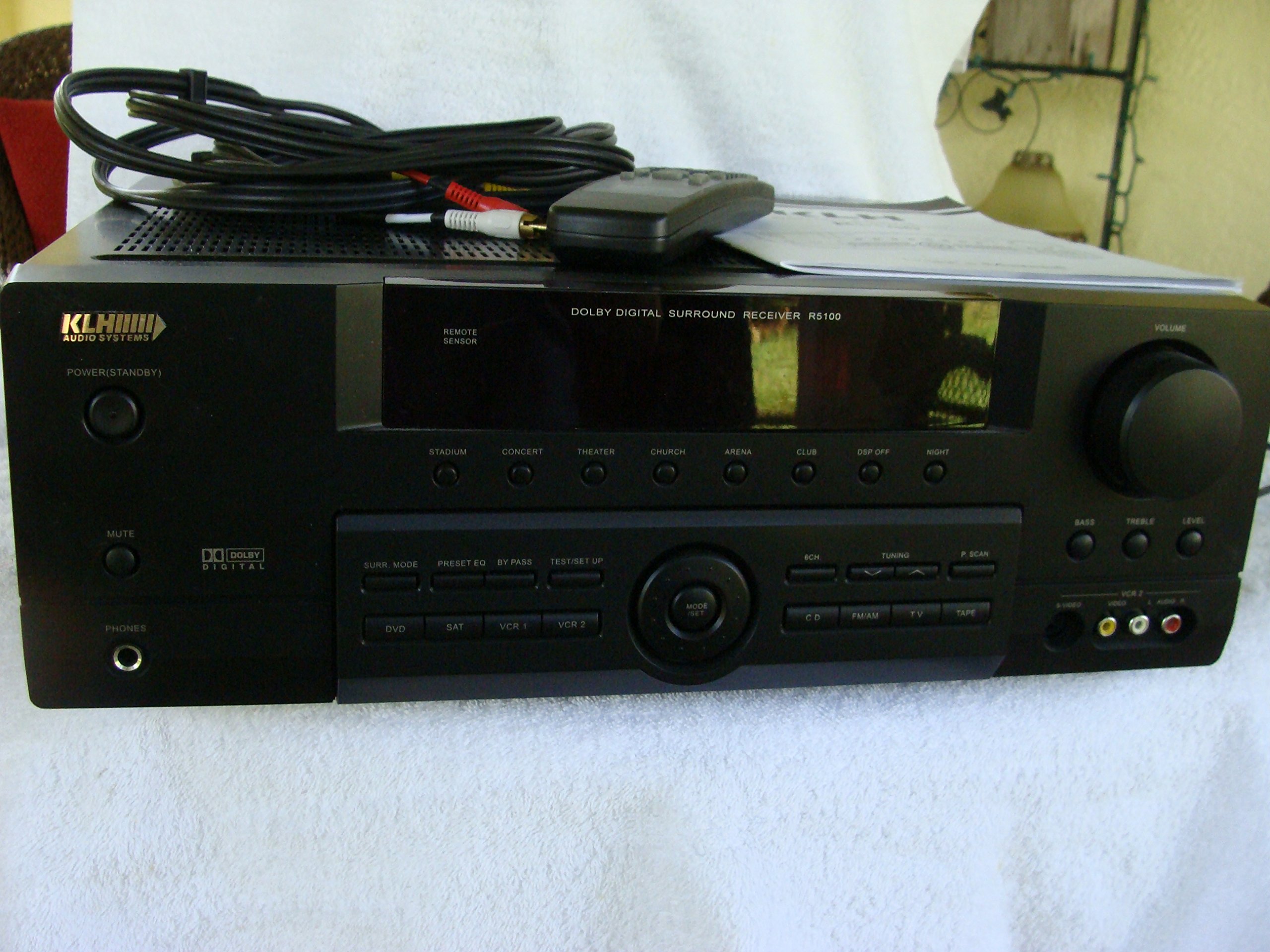
Image: The KLH R5100 receiver, its remote control, user manual, and included audio/video cables.
4. פּראָדוקט איבערview
4.1 פראָנט פּאַנעל קאָנטראָלס
The front panel provides access to essential controls and indicators for daily operation.

בילד: א דעטאַלירטע view of the receiver's front panel, highlighting the display, volume control, and input selection buttons.
- מאַכט קנעפּל: טורנס די ופנעמער אויף אָדער אַוועק.
- אַרייַנשרייַב סעלעקטאָרס: Buttons for DVD, SAT, VCR 1, VCR 2, CD, FM/AM, TV, TAPE to choose your audio/video source.
- באַנד קנעפּל: אַדזשאַסטירט די אַלגעמיינע אַרויסגאַנג באַנד.
- Surround Mode Buttons: Select various sound fields like Stadium, Concert, Theater, Church, Arena, Club, DSP Off, Night.
- Bass/Treble/Level: Controls for adjusting audio tone and individual channel levels.
- כעדפאָון דזשאַק: פֿאַר פּריוואַט צוגעהערט.
4.2 דערציען פּאַנעל קאַנעקשאַנז
The rear panel houses all input and output terminals for connecting your audio and video components, as well as speakers.

Image: The full rear panel of the receiver, displaying all connection ports for audio, video, and speakers.
- ספּיקער טערמינאַלס: Connections for Main (Front Left/Right), Center, and Rear (Surround Left/Right) speakers.
- אַודיאָ אינפּוטס (RCA): For connecting CD players, tape decks, VCRs, TVs, and other stereo audio sources.
- Video Inputs/Outputs (RCA/S-Video): For connecting video sources like DVD players, VCRs, and TVs.
- דיגיטאַלע אַודיאָ אינפּוטס (אָפּטיש/קאָאַקסיאַל): For connecting digital audio sources like DVD players or set-top boxes.
- 6CH Direct Input: For connecting external multi-channel decoders or players with 5.1 analog outputs.
- סובוואָאָפער אַרויס: RCA אויסגאַנג פֿאַר קאַנעקטינג אַן אַקטיוו סאַבוווּפער.
- אַנטענע טערמינאַלס: For FM and AM antennas.
4.3 ווייַט קאָנטראָל יוניט
The remote control provides convenient access to all receiver functions from your listening position.

בילד: א נאָענטע בילד view of the remote control unit, detailing its buttons for various functions.
- מאַכט אויף / אַוועק: טורנס די ופנעמער אויף אָדער אַוועק.
- אַרייַנשרייַב סעלעקטאָרס: Dedicated buttons for each input source (DVD, CD, TV, etc.).
- באַנד אַרויף / אַראָפּ: אַדדזשוסץ די בעל באַנד.
- שטום: מאַכט צייטווייליק שטיל די אַודיאָ אַרויסגאַנג.
- סעראַונד מאָדע: Cycles through available surround sound modes.
- Level/Test: For adjusting individual speaker levels and running a test tone.
- טונער קאָנטראָלס: For FM/AM station tuning and memory functions.
5. סעטאַפּ
5.1 פֿאַרבינדן אייערע רעדנערס
Ensure the receiver is unplugged from the power outlet before making any connections.
- פראָנט ספּיקערז: Connect your main left and right speakers to the 'MAIN SPEAKERS (8Ω)' terminals. Ensure correct polarity (+ to + and - to -).
- צענטער רעדנער: Connect your center channel speaker to the 'CENTER SPEAKER (8Ω)' terminals.
- דערציען ספּיקערז: Connect your surround left and right speakers to the 'REAR SPEAKERS (8Ω)' terminals.
- סובוואָאָפער: Connect an active subwoofer to the 'SUBWOOFER OUT' RCA jack using a single RCA cable.

בילד: דעטאַלירט view of the speaker connection terminals on the rear panel.
5.2 פֿאַרבינדן אַודיאָ/ווידעאָ קוועלער
Use appropriate cables (RCA, Optical, Coaxial) to connect your source components to the receiver.
- DVD שפּילער: Connect the audio output of your DVD player to the 'DVD' audio input jacks (RCA) on the receiver. For digital audio, use either the 'DIGITAL IN OPTICAL' or 'DIGITAL IN COAXIAL' input. Connect the video output to the 'DVD' video input.
- קאָמפּאַקטדיסק שפּילער: Connect the audio output of your CD player to the 'CD' audio input jacks (RCA).
- TV/Cable Box: Connect the audio output of your TV or cable box to the 'TV' audio input jacks (RCA). Connect video output to the 'TV' video input.
- אנדערע מכשירים: Use 'SAT', 'VCR 1', 'VCR 2', or 'TAPE' inputs for other audio/video components as needed.

Image: A close-up of the digital audio inputs (Coaxial, Optical) and the 6-channel direct input section on the rear panel.
5.3 אַנטענע קאַנעקשאַן
Connect the supplied FM and AM antennas to their respective terminals on the rear panel for radio reception.
6. אַפּערייטינג ינסטרוקטיאָנס
6.1 יקערדיק אָפּעראַציע
- מאַכט אויף: Press the Power button on the front panel or remote control.
- אויסקלייַבן אַרייַנשרייַב: Press the desired input selector button (e.g., 'DVD', 'CD') on the front panel or remote control to choose your source.
- סטרויערן באַנד: Turn the Volume knob on the front panel or use the Volume Up/Down buttons on the remote control.
6.2 Surround Sound Modes
The R5100 offers various sound modes to enhance your listening experience:
- סטאַדיאָן: Simulates the acoustics of a large stadium.
- קאָנצערט: Creates a concert hall ambiance.
- טעאטער: Optimized for movie playback, enhancing dialogue and effects.
- קירך: Replicates the spaciousness of a church.
- Arena: Provides a wide, open sound field.
- קלוב: Simulates a lively club environment.
- DSP Off: Disables digital sound processing for a direct stereo signal.
- נאַכט: Reduces dynamic range for late-night listening without disturbing others.
Press the 'SURR. MODE' button on the remote or front panel to cycle through these modes.
6.3 טאָן קאָנטראָל
Use the BASS and TREBLE controls on the front panel or remote to adjust the low and high frequency response. The LEVEL controls allow for fine-tuning of individual speaker output levels.
6.4 טונער אָפּעראַציע
To listen to radio:
- Press the 'FM/AM' input selector.
- Use the 'TUNING' buttons on the front panel or remote to find stations.
- Press 'MEMORY' to store favorite stations, and 'P.SCAN' to scan through presets.
7. וישאַלט
To ensure the longevity and optimal performance of your KLH R5100 receiver, follow these maintenance guidelines:
- רייניקונג: Wipe the exterior surfaces with a soft, dry cloth. Do not use abrasive cleaners, waxes, or solvents as they may damage the finish.
- ווענטילאַטיאָן: Regularly check that the ventilation openings are not obstructed by dust or debris. Use a soft brush or vacuum cleaner to gently remove any build-up.
- מאַכט שנור: Inspect the power cord periodically for any signs of damage. If damaged, discontinue use and contact qualified service personnel.
- סטאָרידזש: If storing the unit for an extended period, unplug it from the power outlet and cover it to protect against dust.
8. טראָובלעשאָאָטינג
If you encounter problems with your receiver, refer to the following common issues and solutions before seeking professional service.
| פּראָבלעם | מעגלעך סיבה | לייזונג |
|---|---|---|
| קיין מאַכט | שטראָם שנור אַרויסגעצויגן; שטראָם אַוטלעט נישט אַקטיוו | זיכער מאַכן אַז די עלעקטרישע שנור איז זיכער איינגעשטעקט; קאָנטראָלירט די עלעקטרישע אַוטלעט מיט אַן אַנדער מיטל |
| קיין געזונט | Incorrect input selected; Speakers not connected properly; Volume too low; Mute function active | Select correct input source; Check speaker connections and polarity; Increase volume; Deactivate Mute |
| ווייַט קאָנטראָל נישט ארבעטן | Batteries depleted; Obstruction between remote and receiver; Remote sensor blocked | Replace batteries; Remove any obstructions; Ensure remote sensor on receiver is clear |
| נעבעך ראַדיאָ אָפּטראָג | אַנטענע נישט פארבונדן אָדער שלעכט פּאַזיציאָנירט | Connect antennas securely; Adjust antenna position for better reception |
| פאַרקרימט געזונט | Input signal too high; Speaker impedance mismatch; Damaged cables | Reduce source volume; Ensure speakers match 8Ω impedance; Check and replace damaged cables |
9. ספּעסאַפאַקיישאַנז
The following are the technical specifications for the KLH R5100 Surround Sound Receiver:
- מאָדעל נומער: ר5100
- פּראָדוקט דימענשאַנז: 16.88 X 6.88 X 15.75 אינטשעס
- נומער וואָג: 24.2 פונט
- מאַכט מקור: אַק 120 וו, 60 הז
- מאַכט קאַנסאַמשאַן: 320 וו
- אַודיאָ רעזולטאַט מאָדע: אַרומרינגלען
- סאָונד סאָונד קאַנאַל קאַנפיגיעריישאַן: 5.1
- קאַנעקטיוויטי טעכנאָלאָגיע: RCA, 3.5mm Jack, Optical, Coaxial
- קאַמפּאַטאַבאַל דעוויסעס: ספּיקערז
- קאָנטראָללער טיפּ: ווייַט
- ספּעציעלע שטריך: Advanced Room Calibration (as per product listing, though specific details may vary)
- קאָליר: שוואַרץ
10. וואָראַנטי און שטיצן
For warranty information and customer support, please refer to the documentation included with your purchase or contact KLH customer service directly. Keep your proof of purchase for any warranty claims.