
הקדמה
Thank you for choosing the Beetel M53 CLI Corded Phone. This manual provides detailed instructions for setting up, operating, and maintaining your new telephone. Please read this manual carefully before use to ensure proper functionality and to maximize your experience with the product.
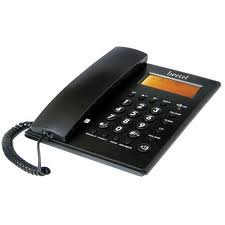
Figure 1: Beetel M53 CLI Corded Phone. This image displays the main unit of the Beetel M53 corded phone, showcasinג זײַן קאָמפּאַקטן דיזײַן און קלאַוויאַטור.
סעטאַפּ
Follow these steps to set up your Beetel M53 CLI Corded Phone:
- פֿאַרבינדן דעם האַנדסעט: Plug one end of the coiled cord into the handset and the other end into the jack labeled האַנדסעט on the side of the phone base.
- פֿאַרבינדט דעם ליניע שנור: שטעקט איין עק פון די טעלעפאן ליניע שנור אין די דזשעק וואס איז באצייכנט מיט LINE on the back of the phone base. Plug the other end into your telephone wall jack.
- מאַכט קשר: The phone is powered via the telephone line. No external power adapter is required for basic operation.
- ערשטע אויסשטעלונג: Upon successful connection, the 12-digit green/orange backlit LCD will display the current time and date.

Figure 2: Connection Diagram. This diagram illustrates how to connect the handset and the telephone line cord to the Beetel M53 phone base.
אַפּערייטינג ינסטראַקשאַנז
מאַכן און באַקומען קאַללס
- צו מאַכן אַ רוף: הייבן די כאַנדסעט אָדער דריקן די רעדנער button. Dial the desired telephone number.
- צו באַקומען אַ רוף: ווען דער טעלעפאָן קלינגט, הייבט אויף דעם האַנדסעט אָדער דריק די קנעפּל רעדנער קנעפּל.
- צו ענדיקן אַ רוף: לייגט צוריק דעם האנטסעט אויפן וויגעלע אדער דריקט דעם קנעפּל רעדנער קנעפּל ווידער אויב איר ניצט אַ רעדנערפאָן.
Caller ID (CLI) Features
The Beetel M53 supports FSK/DTMF compatible caller ID and Centrex enabled CLIP (Calling Line Identification Presentation).
- Incoming Call Display: The 12-digit LCD will display the incoming number, new call indicator, total calls, and repeat calls.
- Incoming Memory: The phone stores up to 80 incoming call records.
- Outgoing Memory: דער טעלעפאָן האַלט ביז 24 אַרויסגייענדיקע רופן רעקאָרדס.
- Checking Calls: ניצן די אַרויף / אַראָפּ navigation buttons to scroll through incoming and outgoing call records.
- Erasing Calls: בשעת viewing a call record, press the ויסמעקן קנעפּל צו מעקן עס.
- רוף צוריק: בשעת viewing an incoming call record, press the רוף צוריק button to dial the number.
LCD Display and Clock
- The 12-digit green/orange backlit LCD provides clear visibility of numbers, time, and date.
- The real-time clock displays the year, date, and month.
- To set the time and date, refer to the specific instructions in the full manual (if available, otherwise this feature is typically automatic or set via network).
Speakerphone Facility
צו ניצן דעם רעדנערפאָן, דריק די רעדנער button during a call or before dialing. Press it again to end the call or switch back to the handset.
יקערדיק קאַלקולאַטאָר
The phone includes a basic calculator function. To access it, press the CALC button (if present, or refer to specific key mapping). Use the numeric keypad for input and the designated function keys for operations.

Figure 3: LCD Display. This image shows the 12-digit LCD of the Beetel M53, illustrating how caller ID information and the real-time clock are displayed.
וישאַלט
- רייניקונג: ווישט דעם טעלעפאָן מיט אַ ווייכן, דamp שטאָף. דו זאלסט נישט נוצן אַברייסיוו קלינערז אָדער סאָלוואַנץ.
- ויסמיידן ליקווידס: האַלט דעם טעלעפאָן אַוועק פון וואַסער און אַנדערע פליסיקייטן.
- טעמפּעראַטור: פֿאַרמײַדט אויסשטעלן דעם טעלעפֿאָן צו עקסטרעמע טעמפּעראַטורן אָדער דירעקטער זון.
- סטאָרידזש: If storing the phone for an extended period, disconnect it from the telephone line.
טראָובלעשאָאָטינג
| פּראָבלעם | מעגלעך לייזונג |
|---|---|
| קיין רעדל טאָן | Check if the telephone line cord is securely connected to both the phone and the wall jack. Test with another phone if available. |
| קאַללער אידענטיפיקאַציע ווערט נישט געוויזן | Ensure you have subscribed to Caller ID service from your telephone service provider. Verify the phone is connected correctly. |
| דיספּליי איז ליידיק אָדער טונקל | Check line connection. The display is line-powered. If the issue persists, contact customer support. |
| קען נישט הערן דעם רופער / רופער קען מיך נישט הערן | Adjust volume. Check handset cord connection. If using speakerphone, ensure microphone is not obstructed. |
ספּעסאַפאַקיישאַנז
| שטריך | באַשרייַבונג |
|---|---|
| סאָרט | Beetel |
| מאָדעל | M53 |
| טיפּ פון טעלעפאָן | קאָרדעד |
| מאַטעריאַל | פּלאַסטיק |
| מאַכט מקור | עלעקטריש מיט שנור (ליניע-געטריבן) |
| ענטפער סיסטעם טיפּ | דיגיטאַל |
| קאַללער שייַן | Yes (FSK/DTMF compatible, Centrex enabled CLIP) |
| אינקאַמינג רוף זכּרון | 80 רעקאָרדס |
| אַרויסגייענדיקע רוף זכּרון | 24 רעקאָרדס |
| לקד ווייַז | 12-digit, Green/Orange Backlit |
| זייגער | Real time clock with year, date, and month display |
| נאָך פֿעיִקייטן | Speakerphone, Basic Calculator |
וואָראַנטי און שטיצן
Your Beetel M53 CLI Corded Phone comes with a standard manufacturer's warranty. Please retain your purchase receipt for warranty claims. For technical support, service, or warranty inquiries, please contact Beetel customer service through their official webוועבזייטל אדער די קאָנטאַקט אינפֿאָרמאַציע וואָס איז צוגעשטעלט געוואָרן מיט אייערע קויף דאָקומענטאַציע.
פֿאַר ווייטערדיקע הילף, ביטע באַזוכט די Beetel Store on Amazon.