
OneConcept MG3-V12-WH_SML
OneConcept V-12 Stereo System
באַניצער מאַנואַל
Model: MG3-V12-WH_SML
הקדמה
This manual provides detailed instructions for the safe and efficient operation of your OneConcept V-12 Stereo System. Please read this manual thoroughly before using the device and retain it for future reference.

בילד: פראָנט view of the OneConcept V-12 Stereo System, showing the main unit with integrated CD player, control buttons, digital display, and two detachable speakers. The system is white and rests on a circular stand.
זיכערקייַט אינסטרוקציעס
- דו זאלסט נישט ויסשטעלן די אַפּאַראַט צו רעגן אָדער נעץ.
- דו זאלסט נישט פאַרשפּאַרן קיין ווענטאַליישאַן אָופּאַנינגז.
- פאַרזיכערן געהעריק מאַכט צושטעלן וואָלtage ווי אנגעצייכנט אויף דער איינהייט.
- האַלט דעם אַפּאַראַט אַוועק פון דירעקטער זונשייַן, היץ קוועלער און שטאַרקע מאַגנעטישע פעלדער.
- פרובירט נישט צו צענעמען אדער פאררעכטן דעם איינהייט אליין. לאָזט איבער אלע סערוויסעס צו קוואַליפֿיצירטע פּערסאָנעל.
סעטאַפּ
אַנפּאַקינג און אינהאַלט
נעמט פֿאָרזיכטיק אַרויס אַלע קאָמפּאָנענטן פֿון דער פּאַקעט. באַשטעטיקט אַז אַלע זאַכן זענען פֿאַראַן:
- OneConcept V-12 Main Unit
- Two Detachable Speakers
- מאַכט אַדאַפּטער
- באַניצער מאַנואַל (דעם דאָקומענט)
פּלייסמאַנט אָפּציעס
The OneConcept V-12 offers versatile placement options:
- Desktop/Shelf Placement: Use the integrated stand for stable placement on any flat surface.
- וואַנט מאָונטינג: The main unit and speakers can be detached from the stand and mounted on a wall using appropriate hardware (not included). Ensure the wall can support the weight of the unit.

בילד: זייט view of the OneConcept V-12 Stereo System, highlighting its compact design and the circular stand. This view demonstrates the unit's suitability for various placements.

Image: The OneConcept V-12 Stereo System with its two speakers detached from the central unit. This illustrates the modular design, allowing for flexible speaker placement or wall mounting.
Connecting Power and Speakers
- פֿאַרבינדט דעם מאַכט אַדאַפּטער צום DC IN פּאָרט אויף דער צוריקזייט פֿון דער הויפּט אַפּאַראַט.
- צאַפּן די מאַכט אַדאַפּטער אין אַ נאָרמאַל וואַנט ווענטיל.
- Connect the speaker cables from the detachable speakers to the corresponding speaker output jacks on the back of the main unit. Ensure correct polarity.

בילד: הינטערשטע view of the OneConcept V-12 Stereo System, showing the speaker cable connections and the main power input. This view also highlights the ventilation grilles on the back of the unit and speakers.

Image: Top-down rear view of the OneConcept V-12 Stereo System, focusing on the manual switches for AM/FM radio selection and the main mode selector (AUX, Radio, CD, Alarm). Also visible is the tuning wheel.
אַפּערייטינג ינסטראַקשאַנז
יקערדיק קאָנטראָלס
- מאַכט אויף/אַוועק: דרוק די מאַכט קנעפּל צו קער די אַפּאַראַט אויף אָדער אַוועק.
- באַנד: ניצן די VOL+ און וואָל- קנעפּלעך צו סטרויערן די באַנד.
- DIRECTIONS: דרוק די מאָדע button to cycle through available input sources: CD, USB, SD, FM Radio, AM Radio, AUX.
קאָמפּאַקטדיסק / mp3 פּלייבאַק
- דרוק די עפענען / נאָענט קנעפּל צו עפענען די CD טאַץ.
- לייגט אַ סי-די אָדער MP3 סי-די אויף דער שפּינדל מיט דער עטיקעט זײַט אַרויף.
- דרוק די עפענען / נאָענט קנעפּל ווידער צו פאַרמאַכן דעם טאַץ.
- Ensure the unit is in CD mode. Playback should begin automatically.
- ניצן די SKIP קנעפּלעך (◀◀ / ▶▶) צו נאַוויגירן די טראַקס.
- דרוק שפּיל / פּויזע צו פּויזע אָדער נעמענ זיכ ווידער פּלייבאַק.
- דרוק האַלטן צו האַלטן פּלייבאַק.

Image: The OneConcept V-12 Stereo System with its front-loading CD tray open, revealing the disc compartment. The detached speakers are also visible, emphasizing the system's modularity.
וסב / סד פּלייבאַק
- אַרײַנשטעלן אַ USB פלאַש דרייוו אין דעם USB פּאָרט אָדער אַן SD קאַרטל אין דעם SD קאַרטל שפּאַלט.
- דרוק די מאָדע קנעפל ביז "USB" אדער "SD" ווערט געוויזן.
- די איינהייט וועט אויטאמאטיש דעטעקטירן און אנהייבן שפילן קאמפאטיבלע אודיא files (mp3).
- ניצן די איבערחזרן / פּראָג button for repeat modes and programming playback.
- ניצן די אלבאם button to navigate between folders (albums) on the storage device.
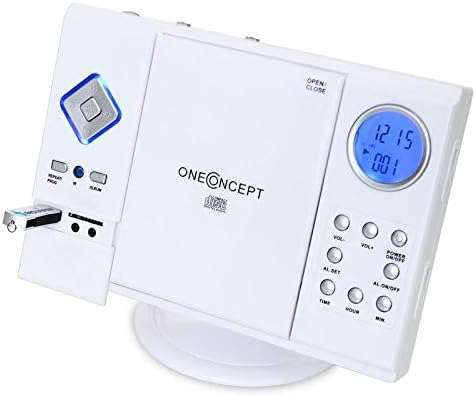
Image: Close-up of the left side of the OneConcept V-12 Stereo System, clearly showing a USB flash drive inserted into its dedicated port. This highlights the system's USB playback capability.

בילד: דעטאַלירט view of the OneConcept V-12 Stereo System's left panel, featuring the USB port, SD card slot, and two 3.5mm audio jacks (likely headphone out and AUX in). This image emphasizes the various connectivity options.
ראַדיאָ אָפּעראַציע (FM/AM)
- Switch the AM/FM selector on the back of the unit to the desired band.
- דרוק די מאָדע button until "Radio" is displayed.
- ניצן די טונינג wheel on the back of the unit to manually tune to a station.
- For better reception, extend the FM wire antenna fully.
AUX ינפּוט
Connect an external audio device (e.g., smartphone, MP3 player) to the AUX IN jack using a 3.5mm audio cable (not included). Press the מאָדע button until "AUX" is displayed. Audio from the connected device will play through the stereo system.
שרעק פֿונקציע
The unit features an alarm function. Refer to the buttons on the right side of the main unit for setting the alarm:
- AL. SET: Press to enter alarm setting mode.
- TIME / HOUR / MIN: Use these buttons to set the alarm time.
- AL. ON/OFF: Press to activate or deactivate the alarm.
וישאַלט
רייניקונג
- שטענדיק אָפּשטעקן די אַפּאַראַט פון די מאַכט ווענטיל איידער רייניקונג.
- ניצט אַ ווייכן, טרוקענעם שטאָף צו ווישן די אויסערלעכע ייבערפלאַכן.
- ניצט נישט קיין שרײַבנדיקע רייניגער, וואַקסן אדער סאָלווענטן, ווײַל זיי קענען שאַטן די ענדיקונג.
- פֿאַר די סי-די לענס, ניצט אַ ספּעציעלע סי-די לענס רייניגער דיסק.
סטאָרידזש
אויב איר לייגט דאָס אַפּאַראַט אַוועק פֿאַר אַ לענגערע צייט, זאָלט איר עס אָפּשטעקן פֿון עלעקטריע און עס אַוועקלייגן אין אַ קיל, טרוקן אָרט, אַוועק פֿון דירעקטער זון און עקסטרעמע טעמפּעראַטורן.
טראָובלעשאָאָטינג
| פּראָבלעם | מעגלעך סיבה | לייזונג |
|---|---|---|
| קיין מאַכט | עלעקטרישע שנור נישט זיכער פארבונדן. | קאָנטראָלירט די פֿאַרבינדונג פֿון דער עלעקטרישער שנור צום אַפּאַראַט און צום וואַנט־אַויטלעט. |
| קיין געזונט | Volume too low; incorrect mode selected; speaker cables loose. | Increase volume; select correct input mode; check speaker connections. |
| CD/USB/SD not playing | Disc/device inserted incorrectly; incompatible file format; dirty disc. | Reinsert disc/device correctly; ensure MP3 format; clean disc; try another disc/device. |
| נעבעך ראַדיאָ אָפּטראָג | אַנטענע נישט אויסגעשטרעקט; שוואַך סיגנאַל. | Fully extend FM wire antenna; reposition unit for better signal. |
ספּעסאַפאַקיישאַנז
| שטריך | דעטאַל |
|---|---|
| סאָרט | OneConcept |
| מאָדעל נומער | MG3-V12-WH_SML |
| קאָליר | ווייַס |
| קאַנעקטיוויטי טעכנאָלאָגיע | וסב |
| ספּעציעלע פֿעיִקייטן | CD changer, Alarm function |
| קאַמפּאַטאַבאַל דעוויסעס | MP3 player, Smartphone |
| רעדנער טיפּ | סטערעאָ |
| אַרומרינגלען סאָונד קאַנאַל קאַנפיגיעריישאַן | 2.0 |
| שטיצט סטאַנדאַרדס | mp3 |
| נומער דימענשאַנז (L X W X H) | 28 X 20 X 33 סענטימעטער |
| פּונקט וואָג | 2.4 קילאָגראַמס |
| מאַכט מקור | קאָרדעד עלעקטריק |
וואָראַנטי און שטיצן
This product is covered by a standard return policy. For specific warranty details and support, please refer to your point of purchase or the official OneConcept webפּלאַץ. האַלטן דיין קויפן קאַבאָלע פֿאַר וואָראַנטי קליימז.
For technical assistance or inquiries, please contact OneConcept customer support, providing your product model number (MG3-V12-WH_SML) and a detailed description of the issue.
Ask a question about this manual
Ask about setup, troubleshooting, compatibility, parts, safety, or missing instructions. Manuals+ will review the question and use this page’s manual context to help answer it.