
בייערדינאמיק 721360
Beyerdynamic Stegos TB Wireless Boundary Microphone User Manual
מאָדעל: 721360
הקדמה
This manual provides comprehensive instructions for the setup, operation, and maintenance of your Beyerdynamic Stegos TB Wireless Boundary Microphone. Please read this manual thoroughly before using the device to ensure optimal performance and longevity.
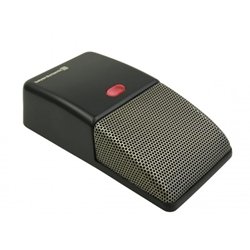
Image: Beyerdynamic Stegos TB Wireless Boundary Microphone. This image displays the compact, black wireless boundary microphone, designed for discreet placement on surfaces like conference tables.
וויכטיק סאַפעטי אינסטרוקציעס
- שטעלט נישט אויס דעם אפאראט צו וואסער אדער איבעריגע פייכטקייט.
- ויסמיידן עקסטרעם טעמפּעראַטורעס.
- פרובירט נישט צו עפענען אדער מאדיפיצירן דעם אפאראט. לאָזט איבער אלע סערוויסעס צו קוואַליפֿיצירטע פּערסאָנעל.
- ניצט נאָר ספּעציפֿישע מאַכט קוועלער און אַקסעסאָריעס.
- האַלטן אויס פון דערגרייכן פון קינדער.
פּעקל אינהאַלט
באַשטעטיקן אַז אַלע זאכן זענען פאַראַן אין פּעקל:
- Beyerdynamic Stegos TB Wireless Boundary Microphone
- יו-עס-בי טשאַרדזשינג קאַבל (מיקראָ יו-עס-בי)
- באַניצער מאַנואַל (דעם דאָקומענט)
סעטאַפּ
1. אויפלאָדן דעם מיקראָפאָן
- Connect the Micro USB end of the charging cable to the microphone's charging port.
- Connect the standard USB end of the cable to a powered USB port (e.g., computer, USB wall adapter).
- The LED indicator on the microphone will show charging status.
- אַמאָל גאָר באפוילן, דיסקאַנעקט די טשאַרדזשינג קאַבלע.
2. זיך פֿאַרבינדן צו אַ מיטל
The Stegos TB microphone connects wirelessly to compatible devices, typically personal computers, for video conferencing applications.
- זייט זיכער אַז דער מיקראָפאָן איז אויפגעלאָדן און אנגעצונדן.
- Activate Bluetooth on your personal computer or compatible device.
- Put the microphone into pairing mode (refer to the device's specific button combination, usually holding a power/pairing button). The LED indicator will typically flash to indicate pairing mode.
- On your computer, search for available Bluetooth devices. Select "Beyerdynamic Stegos TB" from the list.
- Once paired, the LED indicator on the microphone will show a solid light, indicating a successful connection.
- In your computer's sound settings or video conferencing software, select the "Beyerdynamic Stegos TB" as the input audio device.
אַפּערייטינג ינסטראַקשאַנז
מאַכט אויף / אַוועק
- To power on: Press and hold the power button for approximately 3 seconds. The LED indicator will illuminate.
- To power off: Press and hold the power button for approximately 3 seconds. The LED indicator will turn off.
שטום פֿונקציע
The microphone features a mute function for privacy during calls.
- To mute: Press the mute button once. The LED indicator may change color or flash to indicate mute status.
- To unmute: Press the mute button again. The LED indicator will return to its normal operating state.
פּלייסמאַנט פֿאַר אָפּטימאַל פאָרשטעלונג
For best audio pickup, place the Stegos TB microphone on a flat surface in the center of the participants. Its omnidirectional polar pattern ensures 360-degree sound capture.
וישאַלט
רייניקונג
- Wipe the microphone's exterior with a soft, dry, or slightly damp שטאָף.
- ניצט נישט קיין שטרענגע כעמיקאלן, סאָלווענטן אדער אַברייסיוו רייניגער.
- Ensure no liquid enters the microphone grille or ports.
סטאָרידזש
When not in use for extended periods, store the microphone in a cool, dry place, away from direct sunlight and extreme temperatures. It is recommended to fully charge the battery before long-term storage and recharge it every few months to maintain battery health.
טראָובלעשאָאָטינג
| פּראָבלעם | מעגלעך סיבה | לייזונג |
|---|---|---|
| דער מיקראָפאָן גייט נישט אָן. | נידעריגע אדער אויסגעשעפטע באַטעריע. | Charge the microphone using the provided USB cable. |
| קען נישט פאַרבינדן זיך וויירלעס. | Bluetooth is off on the device; microphone not in pairing mode; out of range. | Ensure Bluetooth is enabled. Put microphone into pairing mode. Move microphone closer to the device. |
| No audio input from microphone. | Microphone is muted; incorrect audio input selected on computer/software. | Unmute the microphone. Select "Beyerdynamic Stegos TB" as the input device in your system settings or application. |
| נעבעך אַודיאָ קוואַליטעט. | Microphone too far from speaker; environmental noise; interference. | Place microphone closer to speakers. Reduce background noise. Ensure no obstructions between microphone and receiving device. |
ספּעסאַפאַקיישאַנז
- סאָרט: בייערדינאַמיק
- מאָדעל: Stegos TB (721360)
- קאַנעקטיוויטי טעכנאָלאָגיע: Wireless (USB for charging)
- קאַנעקטער טיפּ: מיקראָ וסב (פֿאַר טשאַרדזשינג)
- ספּעציעלע שטריך: ווירעלעסס
- קאַמפּאַטאַבאַל דעוויסעס: פערזענלעכע קאָמפּיוטער
- קאָליר: שוואַרץ
- פּאָליאַר מוסטער: אָמנידירעקטיאָנאַל
- מאַכט מקור: באַטאַרייע פּאַוערד
- רעקאַמענדיד ניצט: ווידעא זיצונג
וואָראַנטי אינפֿאָרמאַציע
Beyerdynamic products are covered by a limited warranty. For specific warranty terms and conditions, please refer to the warranty card included with your product or visit the official Beyerdynamic webזייטל. האַלט דיין קויפן באַווייַז פֿאַר וואָראַנטי קליימז.
Note: Warranty details are subject to change and may vary by region.
שטיצן און קאָנטאַקט
For further assistance, technical support, or service inquiries, please contact Beyerdynamic customer support through their official webזייטל אדער די קאָנטאַקט אינפֿאָרמאַציע וואָס איז צוגעשטעלט אין אייער פּראָדוקט פּאַקאַדזשינג.
באַאַמטער Webפּלאַץ: www.beyerdynamic.com
ביטע האַלט אייער מאָדעל נומער (721360) און סעריע נומער גרייט ווען איר קאָנטאַקטירט שטיצע.
Ask a question about this manual
Ask about setup, troubleshooting, compatibility, parts, safety, or missing instructions. Manuals+ will review the question and use this page’s manual context to help answer it.