
שאַרף RRMCGA535WJSA
Sharp Aquos LCD TV Remote Control Instruction Manual
מאָדעל: RRMCGA535WJSA
סאָרט: Sharp
הקדמה
This manual provides comprehensive instructions for the operation and maintenance of your new Sharp Aquos LCD TV Remote Control, model RRMCGA535WJSA. This genuine Sharp remote transmitter is designed to provide seamless control over your compatible Sharp Aquos LCD TV models. Please read this manual thoroughly before use to ensure proper functionality and to maximize your viewינג דערפאַרונג.
זיכערקייַט אינפֿאָרמאַציע
ביטע אָבסערווירן די פאלגענדע זיכערקייַט פּריקאָשאַנז:
- Do not expose the remote control to direct sunlight, high humidity, or extreme temperatures.
- פֿאַרמײַדט צו לאָזן אַראָפּ די ווײַטקאָנטראָל אָדער אויסשטעלן עס צו שטאַרקע קלאַפּן.
- Do not attempt to disassemble or modify the remote control. This may void the warranty and cause damage.
- האַלטן באַטעריז אויס פון דערגרייכן פון קינדער. אויב סוואַלאָוד, זוכן באַלדיק מעדיציניש ופמערקזאַמקייַט.
- אַוועקוואַרפן גענוצטע באַטעריעס לויט די לאָקאַלע רעגולאַציעס. נישט פֿאַרברענען.
פּעקל אינהאַלט
באַשטעטיקן אַז אַלע זאכן זענען פאַראַן אין פּעקל:
- Sharp Aquos LCD TV Remote Control (Model: RRMCGA535WJSA)
- ינסטרוקטיאָן מאַנואַל (דעם דאָקומענט)
באַמערקונג: באַטעריעס זענען טיפּיש נישט אַרייַנגערעכנט און מוזן זיין געקויפט באַזונדער.
פּראָדוקט איבערview
Familiarize yourself with the buttons and features of your remote control.

פיגורע 1: פראָנט View פון רימאָוט קאָנטראָל
This image displays the front of the Sharp Aquos remote control, showing all primary buttons including power, input selection, channel, volume, numeric keypad, and navigation controls. The Sharp and Aquos logos are visible at the bottom.
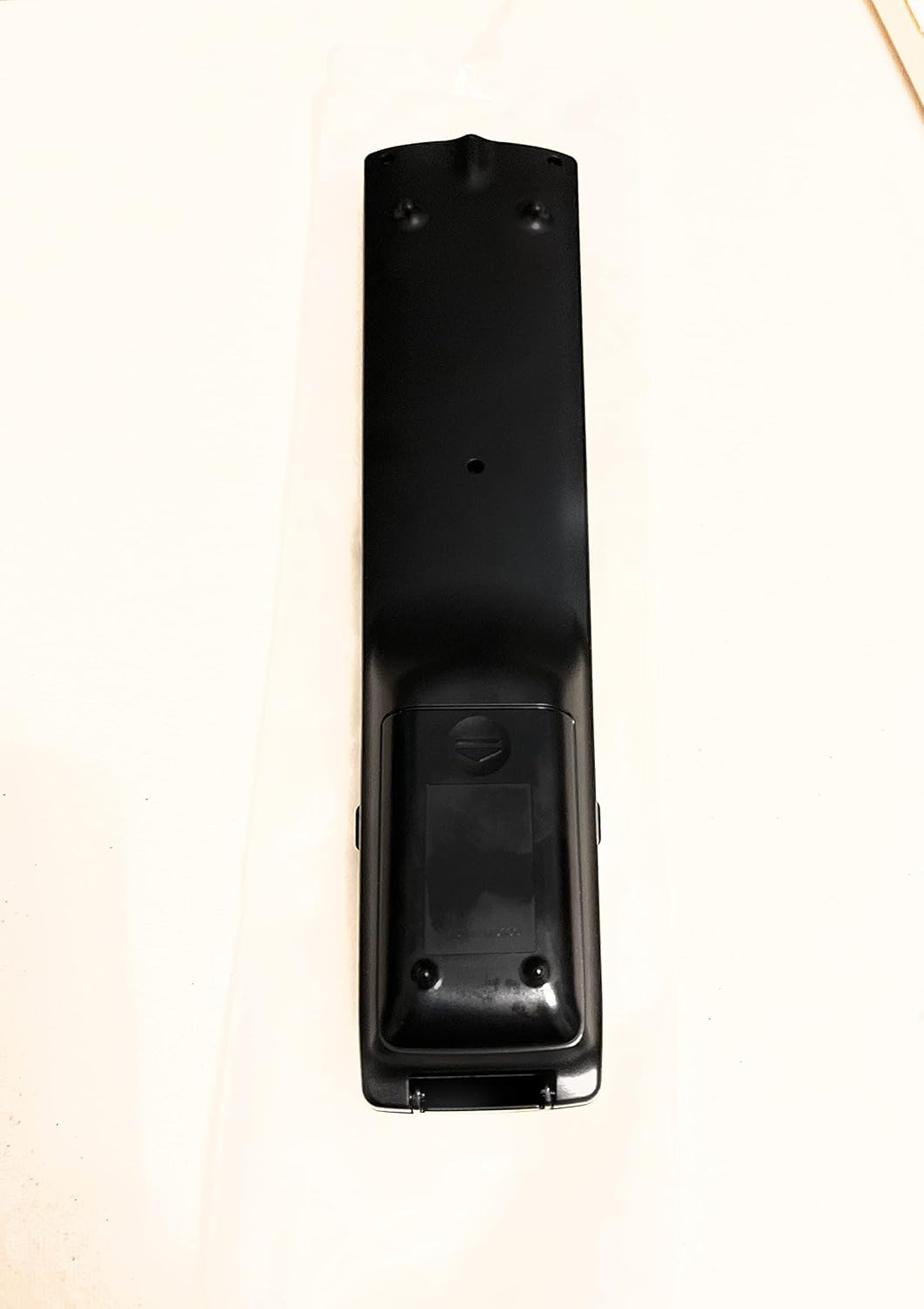
פיגורע 2: צוריק View פון רימאָוט קאָנטראָל
This image shows the rear side of the Sharp Aquos remote control, highlighting the smooth, ergonomic design and the battery compartment cover.

Figure 3: Remote Control with Battery Compartment Open
This image illustrates the Sharp Aquos remote control with its battery compartment cover slid open, revealing the space for battery insertion.

Figure 4: Close-up of Hidden Panel
This close-up image shows the lower section of the Sharp Aquos remote control with its hinged panel opened, revealing additional function buttons such as SLEEP, AUDIO, AV MODE, and CC (Closed Caption).
קנעפּל פאַנגקשאַנז:
| קנעפּל | פֿונקציע |
|---|---|
| מאַכט | טורנס די טעלעוויזיע אויף אָדער אַוועק. |
| INPUT / SOURCE | Selects the input source (e.g., HDMI, AV, Component). |
| טש +/- | Changes the TV channel up or down. |
| וואָל +/- | אַדזשאַסץ די באַנד מדרגה. |
| שטום | שטומט אדער אנשטומט דעם טעלעוויזיע קלאַנג. |
| MENU | Opens the TV's on-screen menu. |
| אַרייַן | Confirms selections within the menu. |
| Navigation Arrows (Up/Down/Left/Right) | נאַוויגירט דורך מעניו אָפּציעס. |
| EXIT / RETURN | Exits the current menu or returns to the previous screen. |
| נומערישע קלאַוויאַטור (0-9) | גלייך אריינגעבן קאַנאַל נומערן. |
| שלאָף (under hidden panel) | Sets the TV to turn off automatically after a set period. |
| AUDIO (under hidden panel) | Selects audio modes or tracks. |
| AV MODE (under hidden panel) | Adjusts picture and sound settings for different content types. |
| פֿאַרמאַכטע אונטערשריפֿט (CC) (under hidden panel) | Turns closed captions on or off. |
סעטאַפּ
ייַנמאָנטירונג פון באַטאַרייע:
- געפינט די באַטעריע אָפּטייל אויף דער צוריקזייט פון דער ווײַטקאָנטראָל (זעט בילד 2).
- Slide the battery compartment cover downwards to open it (refer to Figure 3).
- Insert two (2) AAA batteries (not included), ensuring the positive (+) and negative (-) terminals align correctly with the indicators inside the compartment.
- שטופּט צוריק דעם דעקל פון דעם באַטעריע־אָפּטייל ביז עס קליקט זיכער.
באַמערקונג: ניצט שטענדיק נייע באַטעריעס פון דעם זעלבן טיפּ. מישט נישט אַלטע און נייע באַטעריעס, אדער פאַרשידענע טיפּן באַטעריעס.
אַפּערייטינג ינסטראַקשאַנז
יקערדיק אָפּעראַציע:
- מאַכט אויף / אַוועק: דרוק די מאַכט button to turn your Sharp Aquos TV on or off.
- באַנד קאָנטראָל: דרוק די VOL+ קנעפּל צו פֿאַרגרעסערן די באַנד און באַנד - צו פאַרמינערן באַנד.
- קאַנאַל סעלעקציע: ניצן די טש + or CH - buttons to change channels sequentially. Alternatively, use the numeric keypad to directly enter a channel number.
- אַרייַנשרייַב מקור סעלעקציע: דרוק די אַרייַנשרייַב or מקור button to cycle through available input sources (e.g., HDMI 1, HDMI 2, AV, Component).
- שטום: דרוק די שטום button to temporarily silence the TV audio. Press again to restore sound.
מעניו נאַוויגאַציע:
- דרוק די MENU button to display the TV's on-screen menu.
- ניצן די נאַוויגאַציע אַראָוז (Up, Down, Left, Right) to move through menu options.
- דרוק די אַרייַן button to select a highlighted option or confirm a setting.
- דרוק די אַרויסגאַנג or צוריקקומען button to close the menu or go back to the previous menu level.
Advanced Functions (Hidden Panel):
Some advanced functions are located under a hinged panel at the bottom of the remote control (refer to Figure 4). Gently open this panel to access buttons such as:
- שלאפן: שטעלט א טייַמער כּדי דער טעלעוויזיע זאָל זיך אויטאָמאַטיש אויסלעשן.
- אַודיאָ: Adjusts audio settings or selects audio tracks.
- AV MODE: Cycles through preset picture and sound modes (e.g., Standard, Movie, Game).
- פֿאַרמאַכטע אונטערשריפֿט (CC): מאַכט די אונטערשריפטן אָן אָדער אויס.
וישאַלט
רייניקונג:
To clean the remote control, wipe it gently with a soft, dry cloth. Do not use liquid cleaners, abrasive cleaners, or chemical solvents, as these may damage the surface or internal components.
באַטערי פאַרבייַט:
Replace batteries when the remote control's response becomes sluggish or stops working. Follow the battery installation steps outlined in the "Setup" section. Always replace both batteries at the same time.
טראָובלעשאָאָטינג
| פּראָבלעם | מעגלעך סיבה | לייזונג |
|---|---|---|
| ווייַט קאָנטראָל נישט ארבעטן. | טויטע אדער נישט ריכטיק אריינגעשטעלטע באַטעריעס. | פאַרבייטן באַטעריעס מיט נייַע, זיכער מאַכן אַז די פּאָלאַריטעט איז ריכטיק (+/-). |
| די ווייט קאנטראל ראיאן איז שלעכט. | Weak batteries; obstruction between remote and TV; infrared sensor on TV is blocked. | Replace batteries. Ensure no objects are blocking the line of sight between the remote and the TV's IR sensor. |
| ספעציפישע קנעפלעך רעאגירן נישט. | שמוץ אדער דעבריס אונטערן קנעפּל; אינערלעכע פראבלעם. | Clean the remote control. If the issue persists, the remote may require replacement. |
| טעלעוויזיע רעאַגירט נישט אויף קיין ווײַטקאָנטראָל באַפֿעלן. | TV is unplugged or turned off; TV's IR sensor is faulty. | Ensure the TV is powered on and plugged in. Test with another remote if available. Consult TV's manual for IR sensor location. |
ספּעסאַפאַקיישאַנז
| שטריך | דעטאַל |
|---|---|
| מאָדעל נומער | RRMCGA535WJSA |
| סאָרט | שאַרף |
| קאַמפּאַטאַבאַל דעוויסעס | Sharp Aquos LCD Televisions (various models, see product title for list) |
| קאַנעקטיוויטי טעכנאָלאָגיע | ינפרערעד (IR) |
| מאַכט מקור | 2 X AAA באַטעריז (ניט אַרייַנגערעכנט) |
| דימענסיעס (בעערעך) | 8.8 רענטגענ 2.4 X 0.9 אינטשעס (פּאַקע דימענשאַנז) |
| וואָג (בעערעך) | 4 אונסעס |
| ספּעציעלע שטריך | Ergonomic design, Hidden function panel |
וואָראַנטי און שטיצן
לעגאַל אָפּלייקענונג:
This item is provided in new condition. Please note that this item is offered "as is" as it is past its original manufacturer's warranty period. Any implied warranties are disclaimed to the fullest extent permitted by law.
קונה שטיצן:
For further assistance or inquiries regarding your Sharp Aquos LCD TV, please refer to your television's original instruction manual or visit the official Sharp support website. For issues specifically with this replacement remote control, please contact the seller from whom it was purchased.
Ask a question about this manual
Ask about setup, troubleshooting, compatibility, parts, safety, or missing instructions. Manuals+ will review the question and use this page’s manual context to help answer it.