
1. הקדמה
The D-Link GO-SW-5G is a 5-Port Unmanaged Gigabit Desktop Switch designed for home and small office environments. This device provides a simple and cost-effective solution to expand your network connectivity, offering high-speed Gigabit Ethernet ports for reliable data transfer. It incorporates D-Link's Green Technology for energy efficiency, reduced heat generation, and extended product lifespan.
This switch is a plug-and-play device, requiring no complex configuration or software installation, making it easy to integrate into an existing network.
2. פּעקל אינהאַלט
ביטע באַשטעטיקן אַז אַלע זאכן וואָס זענען ליסטעד אונטן זענען אַרייַנגערעכנט אין דיין פּעקל:
- D-Link GO-SW-5G 5-Port Gigabit Desktop Switch
- מאַכט אַדאַפּטער
- שנעל ינסטאַלל גייד
אויב עס פעלן אדער זענען געשעדיגט אין זאכן, ביטע קאנטאקטירט אייער הענדלער פאר הילף.
3. סעטאַפּ אינסטרוקציעס
The D-Link GO-SW-5G switch is designed for easy plug-and-play installation. Follow these steps to set up your device:
3.1. קאָננעקט די מאַכט אַדאַפּטער
- Locate the power input port on the side of the D-Link GO-SW-5G switch.
- Connect the provided power adapter to this port.
- שטעקט אריין דעם אנדערן עק פונעם מאַכט אַדאַפּטער אין אַ נאָרמאַלן עלעקטרישן ווענטיל.
- The power LED on the front of the switch will illuminate, indicating that the device is receiving power.

פיגורע 1: זייַט view of the D-Link GO-SW-5G switch with the power input port.
3.2. קאָננעקט צו דיין נעץ
- Using a standard Ethernet cable (RJ45), connect one end to an available LAN port on your router (not your modem).
- Connect the other end of this Ethernet cable to any of the five available ports on the back of the D-Link GO-SW-5G switch.
- The corresponding LED on the front of the switch will light up, indicating an active connection.
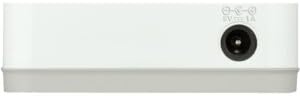
פיגורע 2: דערציען view of the D-Link GO-SW-5G switch with five Ethernet ports.
3.3. Connect Network Devices
- Connect your network devices (e.g., computers, gaming consoles, network printers, smart TVs) to the remaining available Ethernet ports on the D-Link GO-SW-5G switch using Ethernet cables.
- Each connected device will have its corresponding LED on the front of the switch illuminate, confirming a successful connection.

פיגורע 3: פראָנט view of the D-Link GO-SW-5G switch showing active port LEDs.
4. אַפּערייטינג ינסטרוקטיאָנס
The D-Link GO-SW-5G is an unmanaged switch, meaning it operates automatically without requiring user configuration. Once connected as described in the Setup section, it will begin forwarding network traffic between connected devices.
- אויטאָמאַטישע פארהאנדלונג: The switch automatically detects the network speed (10/100/1000 Mbps) and duplex mode (half/full) of connected devices and adjusts accordingly.
- אויטאָ MDI/MDIX: All ports support automatic MDI/MDIX crossover, eliminating the need for crossover cables when connecting to other switches or hubs.
- LED ינדיקאַטאָרס: Each port has an LED indicator on the front panel. A lit LED indicates an active link, and blinking indicates network activity.
5. וישאַלט
To ensure optimal performance and longevity of your D-Link GO-SW-5G switch, consider the following maintenance guidelines:
- אָרט: Place the switch in a cool, dry location away from direct sunlight, heat sources, and excessive moisture. Ensure adequate ventilation around the device.
- רייניקונג: Use a soft, dry cloth to clean the exterior of the switch. Avoid using liquid or aerosol cleaners, as they may damage the device.
- קאַבלע פאַרוואַלטונג: Keep Ethernet cables neatly organized to prevent tangles and accidental disconnections.
- מאַכט ציקל: If you experience network issues, a simple power cycle (unplugging the power adapter for 10 seconds and then plugging it back in) can often resolve minor problems.
6. טראָובלעשאָאָטינג
If you encounter issues with your D-Link GO-SW-5G switch, refer to the following common troubleshooting steps:
- קיין מאַכט LED:
- זיכער מאַכן אַז דער מאַכט אַדאַפּטער איז זיכער פארבונדן צו ביידע דעם סוויטש און אַ אַרבעטנדיק עלעקטריש ווענטיל.
- באַשטעטיקן אַז די עלעקטרישע אַוטלעט אַרבעט דורך אַרײַנשטעקן אַן אַנדער אַפּאַראַט.
- No Link/Activity LED for a Connected Device:
- Check that the Ethernet cable is securely plugged into both the switch port and the network device.
- פּרוּווט אַן אַנדער עטערנעט קאַבל צו ויסשליסן אַ דעפעקטיוון קאַבל.
- זיכער מאַכן אַז די פֿאַרבונדענע דעוויס איז אנגעצינדן און אַז זײַן נעץ אַדאַפּטער פֿונקציאָנירט ריכטיק.
- פּרוּווט קאַנעקטינג די מיטל צו אַ אַנדערש פּאָרט אויף די באַשטימען.
- לאַנגזאַמע נעץ גיכקייט:
- Verify that all connected devices and cables support Gigabit Ethernet (1000 Mbps) for optimal performance. The switch will operate at the lowest common speed.
- Ensure your router and internet service provider (ISP) plan support the desired speeds.
- Perform a power cycle on the switch and your router.
- ינטערמיטאַנט קאַנעקטיוויטי:
- קוק פֿאַר פרייַ קאַבלע קאַנעקשאַנז.
- Ensure the switch is not overheating; provide adequate ventilation.
- טעסט מיט פֿאַרשידענע עטערנעט קייבלס.
7. ספּעסאַפאַקיישאַנז
| סאָרט | ד-לינק |
| מאָדעל נומער | GO-SW-5G/B |
| נומער פון פּאָרץ | 5 |
| באַשטימען טיפּ | אַנמאַנידזשד |
| דאַטאַ אַריבערפירן קורס | 1 Gigabits Per Second (10/100/1000 Mbps) |
| צובינד | RJ45 |
| קאָליר | ווייַס |
| פּונקט וואָג | 0.22 פונט |
| Voltage | 100-240 וואלטס |
| קאַמפּאַטאַבאַל דעוויסעס | PC, Mac, and other Ethernet-enabled devices |
| סוויטשינג שטאָף | 10 גבפּס |
| UPC | 790069365669 |
8. וואָראַנטי און שטיצן
לימיטעד וואָראַנטי: The D-Link GO-SW-5G switch comes with a 3-year limited warranty. For detailed terms and conditions, please refer to the warranty information included in your package or visit the official D-Link webפּלאַץ.
טעכניש שטיצן: For technical assistance, product registration, or to download the latest firmware and documentation, please visit the ד-לינק שטיצן Webפּלאַץ or contact D-Link customer service.