
הקדמה
This manual provides detailed instructions for the setup, operation, and maintenance of your iLive ISB212B Bluetooth Speaker. This compact speaker delivers audio wirelessly from compatible Bluetooth devices and also supports wired connections. Please read this manual thoroughly before using your speaker.
פּעקל אינהאַלט
- iLive ISB212B Bluetooth Speaker
- Mini-USB to USB Charging Cable
פּראָדוקט פֿעיִקייטן
- Wireless audio streaming via Bluetooth
- LED pairing indicator for connection status
- Compact, cylindrical design
- Rechargeable battery with approximately 2 hours of playback
- Mini-USB port for battery recharging
- 3.5mm Audio Input for wired connections
קאָנטראָלס און ינדיקאַטאָרס
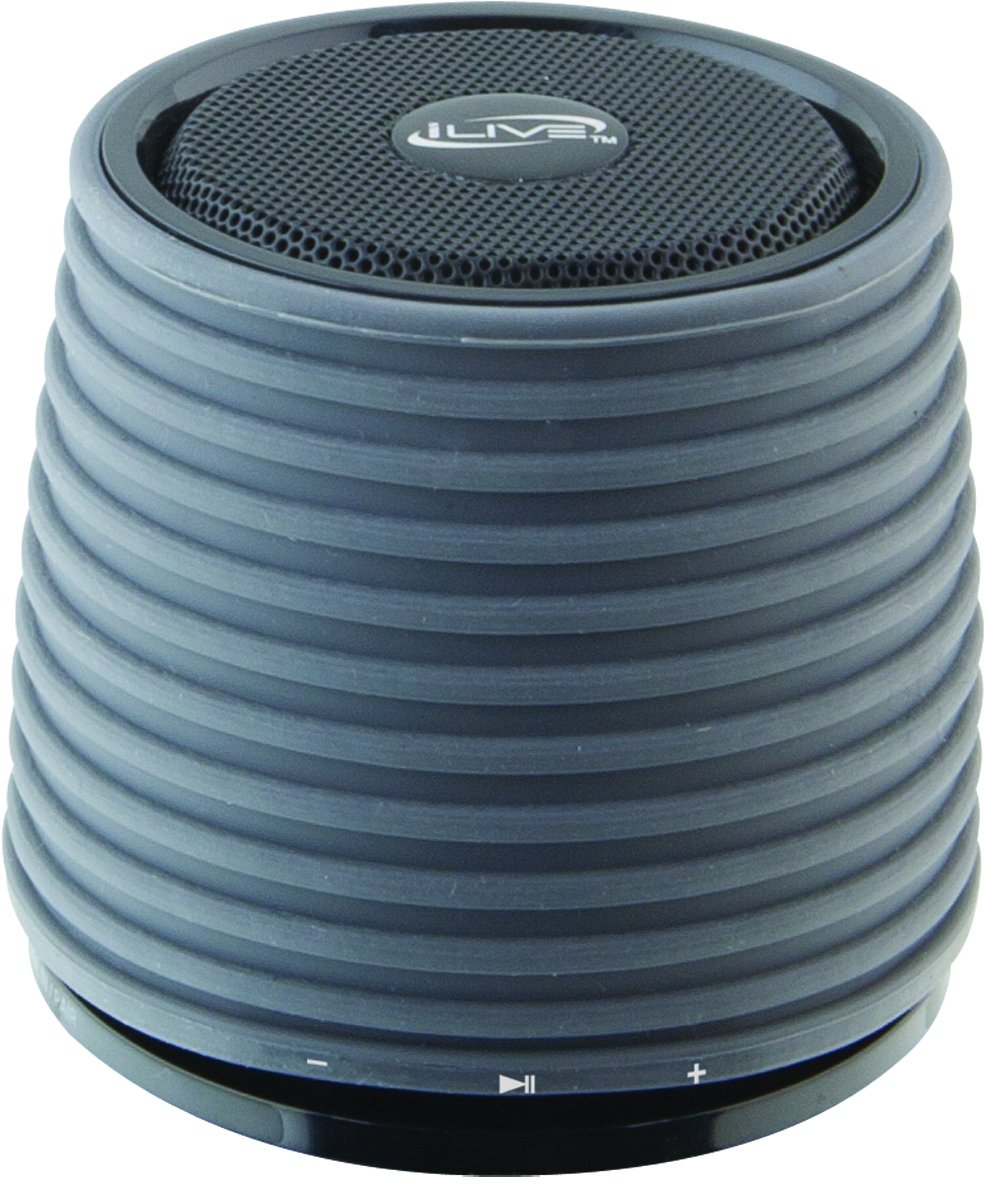
This image displays the iLive ISB212B Bluetooth Speaker. It features a cylindrical shape with a textured grey body and a black speaker grille on top. A band around the middle shows control buttons for play/pause, volume up/next track, and volume down/previous track.
- מאַכט קנעפּל: דריקן און האַלטן צו מאַכט אויף / אַוועק.
- שפּיל / פּויזע קנעפּל: קאָנטראָלירט אַודיאָ ווידערשפּיל.
- באַנד אַרויף / ווייַטער ליד קנעפּל: קורץ דריקן צו פארגרעסערן די קול, לאנג דריקן פארן נעקסטן ליד.
- באַנד אַראָפּ / פריערדיקע ליד קנעפּל: קורץ דריקן צו פארמינערן די קול, לאנג דריקן פארן פריערדיגן ליד.
- LED Pairing Indicator: ווײַזט דעם סטאַטוס פֿון דער בלועטוט פֿאַרבינדונג.
- מיני-וסב פּאָרט: פֿאַר אָפּלאָדן די אינעווייניקסטע באַטאַרייע.
- 3.5 מם אַודיאָ אַרייַנשרייַב: For connecting external audio devices via an auxiliary cable (not included).
סעטאַפּ
1. טשאַרדזשינג די באַטערי
- Connect the small end of the included Mini-USB to USB charging cable to the Mini-USB port on the speaker.
- Connect the large end of the USB charging cable to a powered USB port (e.g., computer, USB wall adapter).
- דער LED אינדיקאַטאָר וועט זיך אָנצינדן בעתן אויפלאָדן און וועט זיך אויסלעשן אָדער טוישן קאָליר ווען עס איז גאָר אויפגעלאָדן.
- א פולע אויפלאדונג גיט בערך 2 שעה פון שפיל צייט.
2. פּאָווערינג אויף / אויסגעלאשן
- To power on, press and hold the Power button until the LED indicator illuminates.
- To power off, press and hold the Power button again until the LED indicator turns off.
אַפּערייטינג ינסטראַקשאַנז
1. בלועטאָאָטה פּערינג
- Ensure the speaker is powered on and within 30 feet of your Bluetooth device.
- The LED pairing indicator will flash, indicating it is in pairing mode.
- On your Bluetooth device (smartphone, tablet, etc.), enable Bluetooth and search for new devices.
- Select "iLive ISB212B" from the list of available devices.
- Once paired, the LED pairing indicator will become solid, and you may hear an audible confirmation.
- אויב די פּאָרינג פיילז, מאַכט אויס דעם רעדנער און דיין מיטל, און איבערחזרן די טריט.
2. פּלייַינג אַודיאָ
- After successful Bluetooth pairing, begin playing audio on your connected device.
- Use the Play/Pause button on the speaker to control playback.
- Use the Volume Up/Down buttons for volume adjustment. Long press for track navigation.
3. Using the 3.5mm Audio Input
- Connect one end of a 3.5mm audio cable (not included) to the 3.5mm Audio Input port on the speaker.
- פֿאַרבינדט דעם אַנדערן עק פֿונעם קאַבל צו דער כעדפֿאָן דזשעק אָדער אַודיאָ אַרויסגאַנג פֿון אייער עקסטערנעם אַודיאָ מיטל.
- דער רעדנער וועט אויטאָמאַטיש איבערגיין צו אַוקסיליאַר אינפוט מאָדע.
- Adjust volume using your external device and the speaker's volume controls.
וישאַלט
- רייניקט דעם רעדנער מיט אַ ווייכן, טרוקענעם שטאָף. ניצט נישט קיין שרײַבנדיקע רייניגערס אדער סאָלווענטן.
- Keep the speaker away from water, moisture, and extreme temperatures. This product is not waterproof.
- האַלט דעם רעדנער אין אַ קיל, טרוקן אָרט ווען עס איז נישט אין באַנוץ פֿאַר לענגערע פּעריאָדן.
- פרובירט נישט צו צענעמען אדער מאדיפיצירן דעם רעדנער. דאס וועט בטל מאכן די גאראנטיע.
טראָובלעשאָאָטינג
| פּראָבלעם | לייזונג |
|---|---|
| דער רעדנער גייט נישט אן. | Ensure the battery is charged. Connect the speaker to a power source using the Mini-USB cable. |
| קענען ניט פאַרבינדן מיט בלועטאָאָטה מיטל. |
|
| קיין קלאַנג אָדער נידעריקע וואָלומען. |
|
| קורץ באַטאַרייע לעבן. | זיכער מאַכן אַז דער רעדנער איז גאָר אויפגעלאָדן איידער נוצן. די באַטאַרייע לעבן קען זיין אַנדערש לויטן וואָלומען מדרגה און נוצן. |
ספּעסאַפאַקיישאַנז
| שטריך | דעטאַל |
|---|---|
| מאָדעל נומער | ISB212B |
| קאַנעקטיוויטי | Bluetooth, 3.5mm Auxiliary, Mini-USB (charging) |
| רעדנער רעזולטאַט מאַכט | 3 וואטס |
| באַטערי טיפּ | 1 ליטהיום יאָן (אַרייַנגערעכנט) |
| באַטאַרייע לעבן (בעערעך) | 2 שעה |
| פּראָדוקט דימענשאַנז | 7.8 X 7.8 X 7.01 סענטימעטער |
| פּונקט וואָג | 295 ג |
| לאַנד פון אָריגין | כינע |
| וואָטערפּרוף | ניין |
וואָראַנטי און שטיצן
This iLive ISB212B Bluetooth Speaker comes with a 90-טאָג וואָראַנטי from the date of purchase. This warranty covers manufacturing defects. For technical support or warranty claims, please refer to the contact information provided with your product packaging or visit the official iLive webפּלאַץ.