
1. הקדמה
Thank you for choosing the Atlantic Full Motion TV Wall Mount. This mount is designed to securely hold flat-panel televisions ranging from 37 inches to 64 inches, offering versatile viewing angles and space-saving capabilities. Please read this manual thoroughly before installation and use to ensure safe and proper operation.
2. זיכערקייַט אינפֿאָרמאַציע
ווארענונג:
- For stud mounting, use only lag bolts.
- Plastic anchors are only for concrete, stone, or masonry installations.
- דער פּראָדוקט איז דיזיינד פֿאַר נוצן אין האָלץ סטאַדז און האַרט באַטאָנען ווענט. טאָן ניט ינסטאַלירן אין דרייוואַל אַליין.
- Ensure the TV's weight, including accessories, does not exceed 132 lbs (60 kg).
- Improper use could result in serious injury or property damage.
- Always ensure all bolts are securely tightened before hanging the TV.
If you have any questions or concerns during installation, please contact customer support.
3. פּעקל אינהאַלט
ביטע באַשטעטיקן אַז אַלע קאָמפּאָנענטן זענען פאַראַן איידער איר הייבט אָן די אינסטאַלאַציע:
- TV Wall Mount Assembly (1)
- Standard Mounting Hardware (various screws, washers, spacers)
- Small Tool (1)
- וועלקראָ סטראַפּס (2)
- אינסטרוקציעס מאַנואַל (1)
4. פּראָדוקט פֿעיִקייטן
- וניווערסאַל פּלאַן: Compatible with 37" - 84" flat-panel TVs up to 132 lbs. VESA certified 100mm x 100mm to 600mm x 400mm.
- Adjustable Optimal Viewינג: Features +5°/-15° tilt and +/-180° swivel for flexible viewינג אַנגלעס.
- פּלאַץ שפּאָרן פּלאַן: Retracts to 3.1" from the wall and extends up to 21.5" for maximum versatility.
- דוראַבאַל קאַנסטראַקשאַן: Built with solid heavy gauge steel and a durable coated finish for secure support.
5. סעטאַפּ און ייַנמאָנטירונג
Before you begin, ensure you have the necessary tools (not included): tape measure, pencil, screwdriver, electric drill, stud finder, and possibly a hammer drill for concrete walls.
5.1. אנשטעלן קלאַמערן צום טעלעוויזיע
Identify the correct screws and washers for your TV's VESA mounting holes. For flat-back TVs, screws may connect directly. For curved or concave-back TVs, use appropriate spacers and washers to ensure a secure fit.
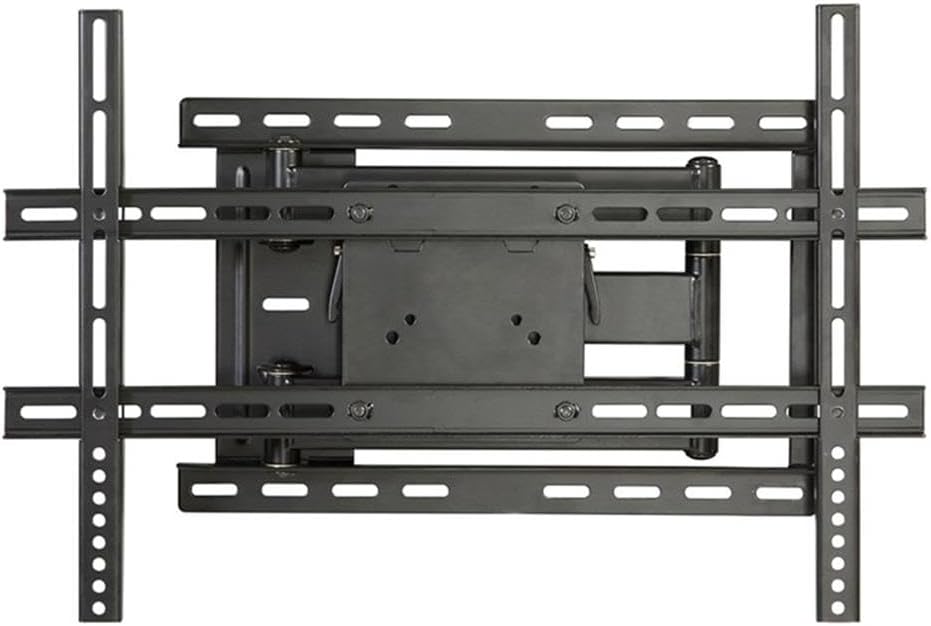
בילד: איבערview of the Atlantic Full Motion TV Wall Mount components.
Attach the TV brackets to the back of your television using the selected screws and washers. Ensure they are securely fastened but do not overtighten.
5.2. Attaching Wall Plate to Wall
For Wood Stud Mounting:
- Locate wood studs using a stud finder. Mark the center of the studs.
- Position the mounting template (provided) at your desired height and align the holes with your stud center line. Mark the drill locations.
- בויער פּילאָט האָלעס ניצן אַ 7/32 אינטש (5.5 מם) דיאַמעטער בויער ביסל.
- Install the wall plate using the lag bolts. Tighten the lag bolts only until the wall plate is firmly against the wall. Do not overtighten.
For Solid Concrete Wall Mounting:
- Position the mounting template at your desired height on the concrete surface. Mark the drill locations.
- Drill pilot holes using a 3/8 in. (10 mm) diameter masonry drill bit, to a depth of 2.5 in. (64 mm).
- Insert plastic anchors into the drilled holes. Ensure they are flush with the concrete surface.
- Install the wall plate using the lag bolts. Tighten the lag bolts only until the wall plate is firmly against the wall. Do not overtighten.

Image: The TV wall mount with a transparent TV outline, illustrating how the mount supports the television.
5.3. Hanging and Securing TV to Wall Plate
Carefully lift the TV with the attached brackets and hook them onto the wall plate. Ensure the TV is level. Once positioned, secure the TV to the wall plate using the locking mechanisms or screws as indicated in the detailed instructions provided with the product.

Image: The Atlantic Full Motion TV Wall Mount extended from the wall, holding a television in a living room setting.
6. אַפּערייטינג ינסטרוקטיאָנס
The Atlantic Full Motion TV Wall Mount allows for easy adjustment to achieve optimal viewינג אַנגלעס.
6.1. טילט אַדזשאַסטמאַנט
The mount allows for a tilt range of +5° (upward) to -15° (downward). To adjust the tilt, loosen the tilting bolts (usually located on the side of the TV plate), set the TV to your desired angle, and then tighten the bolts to secure it in place.

Image: Diagram illustrating the +5° to -15° tilt adjustment range of the TV wall mount.
6.2. דריי-אדזשאַסטמענט
The mount offers a +/-180° swivel capability. Gently push or pull the TV to the left or right to achieve your desired viewing angle. The articulating arms will extend and retract smoothly.

Image: Diagram illustrating the +/-180° swivel adjustment range of the TV wall mount.
6.3. אויסשטרעקן און צוריקציען
To extend the TV from the wall, gently pull the screen forward. To retract, push the screen back towards the wall until it reaches its home position (3.1" from the wall).
6.4. קאַבלע מאַנאַגעמענט
Use the provided Velcro straps to organize and secure cables along the articulating arms to maintain a neat appearance and prevent damage.
7. וישאַלט
- Regularly check all screws and bolts to ensure they remain tight and secure.
- רייניקט דעם מאָונט מיט אַ ווייכן, טרוקענעם שטאָף. פֿאַרמייַדט אַברייסיוו רייניגער אָדער סאָלווענטן.
- Do not hang anything on the mount or TV that exceeds the specified weight limit.
8. טראָובלעשאָאָטינג
| פּראָבלעם | מעגלעך סיבה | לייזונג |
|---|---|---|
| די טעלעוויזיע איז נישט גלייך. | Mounting plate or TV brackets are not perfectly level. | Adjust the leveling screws on the TV plate or re-level the wall plate. |
| מאונט פילט זיך נישט סטאביל. | Loose mounting bolts or incorrect installation. | Ensure all lag bolts are securely tightened into studs/concrete. Verify correct installation steps. |
| Cables are blocked by the mount. | Incorrect cable routing or VESA mount position. | Add spacers between the bracket and TV back if needed. Reroute cables using Velcro straps. |
| Arm is stiff to move. | Joints may need lubrication. | Apply a small amount of lubricant to the arm's joints. |
9. ספּעסאַפאַקיישאַנז
- מאָדעל נומער: 63607068
- קאַמפּאַטאַבאַל טעלעוויזיע סיזעס: 37" - 84" (optimal for 37" - 64" as per product title)
- מאַקסימום וואָג קאַפּאַציטעט: 132 לבס (60 קג)
- VESA קאַמפּאַטאַבילאַטי: 100 מם רענטגענ 100 מם צו 600 מם רענטגענ 400 מם
- ווינקל ווינקל +5° / -15°
- סוויוואַל ווינקל: +/-180°
- Distance from Wall (Retracted): 3.1 אינטשעס
- Distance from Wall (Extended): 21.5 אינטשעס
- פּראָדוקט דימענשאַנז: 3.25 X 25.63 X 11.5 אינטשעס
- נומער וואָג: 15.7 פונט
- מאַטעריאַל: Metal; Plastic
- קאָליר: שוואַרץ
10. וואָראַנטי און שטיצן
For warranty information or technical support, please refer to the product packaging or contact Atlantic customer service directly. Keep your purchase receipt for warranty claims.