
1. הקדמה
This manual provides detailed instructions for the safe and efficient operation of your Vivitek Qumi Q5 Pocket DLP Projector. Please read this manual thoroughly before using the projector and retain it for future reference. The Vivitek Qumi Q5 is a compact, high-definition LED projector designed for portability and versatility, featuring 500 lumens brightness, WXGA resolution, and various connectivity options.
2. וויכטיק סאַפעטי אינפֿאָרמאַציע
באַמערקט די פאלגענדע זיכערהייט מיטלען צו פאַרמייַדן שעדיקן צו די פּראָיעקטאָר און ענשור באַניצער זיכערהייט:
- בלאָקירט נישט די ווענטילאַציע עפענונגען. זאָרגט פֿאַר גענוג לופט־פֿלוס אַרום דעם פּראָיעקטאָר.
- קוק נישט גלייך אריין אין די פּראָיעקטאָר לינז ווען די לamp איז אָן. די העלע ליכט קען שאַטן די אויגן.
- ניצט נאָר דעם מאַכט אַדאַפּטער וואָס ווערט צוגעשטעלט מיטן פּראָיעקטאָר.
- שטעלט נישט אויס דעם פּראָיעקטאָר צו רעגן אָדער פייכטקייט צו רעדוצירן דעם ריזיקאָ פֿון פֿײַער אָדער עלעקטרישן שאָק.
- שטעלן די פּראַדזשעקטער אויף אַ סטאַביל, גלייַך ייבערפלאַך.
- נעמט ארויס דעם פּראָיעקטאָר פֿון דער עלעקטרישער אַוטלעט איידער איר רייניגט עס אָדער ווען עס איז נישט אין באַנוץ פֿאַר לענגערע פּעריאָדן.
- אָפּשיקן אַלע סערוויסעס צו קוואַלאַפייד סערוויס פּערסאַנעל.
3. פּעקל אינהאַלט
באַשטעטיקט אַז אַלע זאכן וואָס זענען אויסגערעכנט אונטן זענען אַרייַנגערעכנט אין אייער פּעקל:
- Vivitek Qumi Q5 Projector
- מאַכט אַדאַפּטער
- Universal I/O to VGA Cable
- HDMI קאַבלע
- 3.5mm AV-in Cable
- קעריינג טאַש
- ווייַט קאָנטראָל
- שנעל אָנהייב גייד
- וואָראַנטי קאַרד
4. פּראָדוקט איבערview
Familiarize yourself with the various components and features of your Vivitek Qumi Q5 projector.
4.1 פראָנט View

בילד 4.1: פראָנט view of the Vivitek Qumi Q5 projector, showing the lens and ventilation grilles.
The front of the projector features the projection lens and air vents for cooling. Ensure these vents are not obstructed during operation.
4.2 שפּיץ View

בילד 4.2: Top view of the Vivitek Qumi Q5 projector, highlighting the touch-sensitive control panel.
The top panel includes touch-sensitive controls for navigation and menu selection. The "Qumi" logo is also visible.
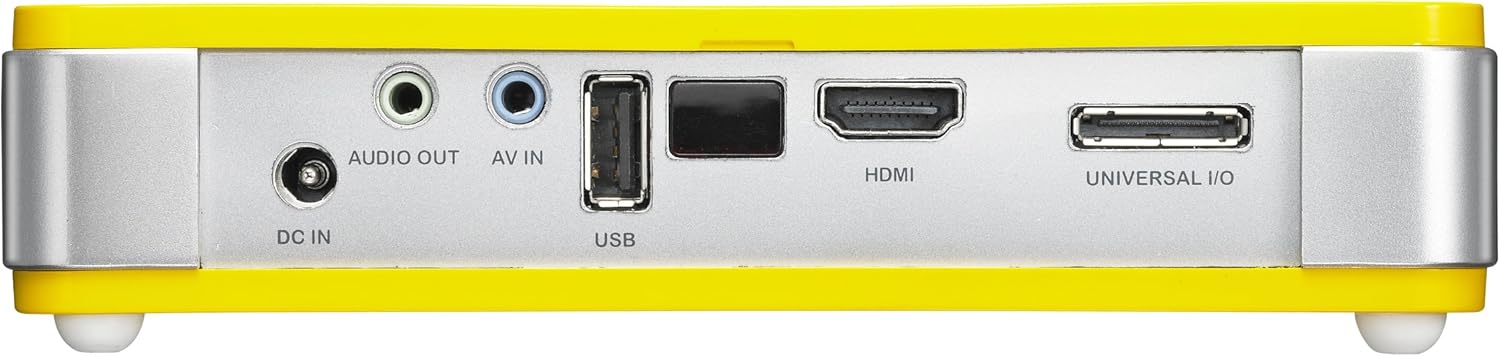
4.3 דערציען View (Connectivity Ports)

בילד 4.3: דערציען view of the Vivitek Qumi Q5 projector, displaying all input and output ports.
The rear panel houses all essential connectivity ports:
- דק אין: פֿאַר קאַנעקטינג די מאַכט אַדאַפּטער.
- אַודיאָ אויס: 3.5 מ״מ דזשעק פֿאַר עקסטערנע רעדנערס אָדער כעדפאָונז.
- AV IN: 3.5mm jack for composite video and stereo audio input.
- וסב: פֿאַר פֿאַרבינדן USB סטאָרידזש דעוויסעס.
- הדמי: High-Definition Multimedia Interface for digital video and audio input.
- UNIVERSAL I/O: Multi-purpose port for VGA and other analog inputs via adapter.
5. סעטאַפּ
Follow these steps to set up your Vivitek Qumi Q5 projector.
5.1 Powering On the Projector
- פאַרבינדן די מאַכט אַדאַפּטער צו די DC IN פּאָרט אויף די פּראַדזשעקטער.
- צאַפּן די מאַכט אַדאַפּטער אין אַ וואַנט ווענטיל.
- Press the power button on the projector or remote control to turn on the device. The power indicator light will illuminate.
5.2 פֿאַרבינדן אַרייַנגאַנג קוועלער
The Qumi Q5 supports various input sources:
- הדמי: Connect an HDMI cable from your source device (e.g., laptop, Blu-ray player) to the HDMI פּאָרט אויף די פּראַדזשעקטער.
- ווגאַ: Use the supplied Universal I/O to VGA cable to connect your computer's VGA output to the UNIVERSAL I/O פּאָרט.
- AV (קאָמפּאָזיט): Use the supplied 3.5mm AV-in cable to connect composite video and stereo audio devices to the AV IN פּאָרט.
- וסב: אַרייַנלייגן אַ וסב בליץ פאָר אין די וסב port to play media files גלייַך.
- ווירעלעסס (אָפּטיאָנאַל): If using an optional WiFi USB dongle, insert it into the USB port for wireless connectivity. Refer to the dongle's instructions for setup.
5.3 אַדזשאַסטינג פאָקוס
Locate the focus wheel on the side of the projector. Rotate the wheel until the projected image appears sharp and clear on your screen or wall.
בילד 5.3: זייַט view of the Vivitek Qumi Q5, indicating the location of the focus adjustment wheel.
6. אפערירן דעם פּראָיעקטאָר
6.1 נאַוויגירן דעם מעניו
Use the touch-sensitive buttons on the top panel or the remote control to navigate the projector's on-screen display (OSD) menu. The menu allows you to adjust image settings, input sources, and other system configurations.
6.2 אויסקלייבן די איינגאבע מקור
Press the "Source" button on the remote control or navigate through the OSD menu to select the desired input source (HDMI, VGA, AV, USB, or Wireless).
6.3 בילד אַדזשאַסטמאַנץ
Within the OSD menu, you can adjust various image parameters:
- ברייטנאַס / קאַנטראַסט: Adjust for optimal image visibility.
- Color/Tint: Fine-tune color reproduction.
- אַספּעקט פאַרהעלטעניש: Select between 4:3, 16:9, or other available ratios to match your content.
- Keystone Correction: Correct trapezoidal distortion if the projector is not perfectly perpendicular to the screen.
6.4 שפּילן מעדיע פֿון USB
When a USB drive is inserted, the projector's media player interface will typically launch automatically. You can browse and play supported video, audio, and image files גלייַך פון די וסב פאָר.
6.5 3D פונקציאָנאַליטעט
The Qumi Q5 is 3D-ready via DLP Link technology. To view 3D content, you will need compatible 3D source material, a 3D-capable player, and active DLP Link 3D glasses (sold separately).
7. וישאַלט
געהעריגע אויפהאלטונג גאראנטירט די לאנגעוויטי און אפטימאלע פערפארמאנס פון אייער פראיעקטאר.
7.1 רייניקן דעם פּראָיעקטאָר
- עקסטעריע: ניצן אַ ווייך, לינט-פֿרייַ שטאָף אַ ביסל דampמיט וואַסער אָדער אַ מילד רייניקונג לייזונג. דו זאלסט נישט נוצן אַברייסיוו קלינערז אָדער סאָלוואַנץ.
- לענס: Gently wipe the lens with a lens cleaning cloth or lens paper. Avoid touching the lens surface with your fingers.
- ווענץ: Use a soft brush or compressed air to clear dust from the ventilation openings.
7.2 געפירט ליכט מקור
The Qumi Q5 utilizes an LED light source with an estimated operational life of up to 30,000 hours, significantly reducing the need for lamp פאַרבייַט קאַמפּערד צו טראַדיציאָנעלע פּראַדזשעקטאָרס.
7.3 סטאָרידזש
When not in use for extended periods, store the projector in its carrying pouch in a cool, dry place, away from direct sunlight and extreme temperatures.
8. טראָובלעשאָאָטינג
Refer to this section for solutions to common issues you may encounter.
| פּראָבלעם | מעגלעך סיבה | לייזונג |
|---|---|---|
| קיין בילד געוויזן. |
|
|
| דאָס בילד איז פֿאַרשוואָמען. |
|
|
| ניט קיין אַודיאָ. |
|
|
| Projector overheats or shuts down. |
|
|
9. ספּעסאַפאַקיישאַנז
Key technical specifications for the Vivitek Qumi Q5 projector:
- מאָדעל: Qumi Q5
- ווייַז טעכנאָלאָגיע: DLP Pico chipset
- געבוירן רעזאלוציע: WXGA (1280 X 720)
- ברייטקייט: אַרויף צו קסנומקס לומענס
- ליכט מקור: LED (Estimated 30,000 hours operation)
- קאַנעקטיוויטי: HDMI, Universal I/O (VGA), AV mini-jack, USB, Audio-out mini-jack, Wireless (via optional USB dongle)
- אינערלעכער זכּרון: 4 גיגאבייט
- 3D גרייט: Yes, via DLP Link
- דימענסיעס: 4 X 6.3 X 1.3 אינטשעס (10.16 X 16.00 X 3.30 סענטימעטער)
- וואָג: 1.1 פונט (0.5 קג)
- מאַכט צושטעלן: פונדרויסנדיק מאַכט אַדאַפּטער
10. וואָראַנטי און שטיצן
Your Vivitek Qumi Q5 projector is covered by a limited warranty. Please refer to the included Warranty Card for specific terms and conditions, including warranty period and coverage details. For technical support, service, or further inquiries, please visit the official Vivitek webזייטל אדער קאנטאקט זייער קאסטומער סערוויס דעפארטמענט. האלט אייער קויף קוויטל אלס באווייז פון קויפן פאר גאראנטיע קליימס.