
הקדמה
The Jabra Music Street2 Bluetooth Stereo Headset is designed to provide high-quality audio and hands-free communication. This manual provides essential information for the proper use, maintenance, and troubleshooting of your device. Please read it carefully before use.
סעטאַפּ
1. טשאַרדזשינג די העאַדסעט
Before first use, fully charge the headset. Connect the micro-USB charging cable to the charging port on the headset and the other end to a USB power source.
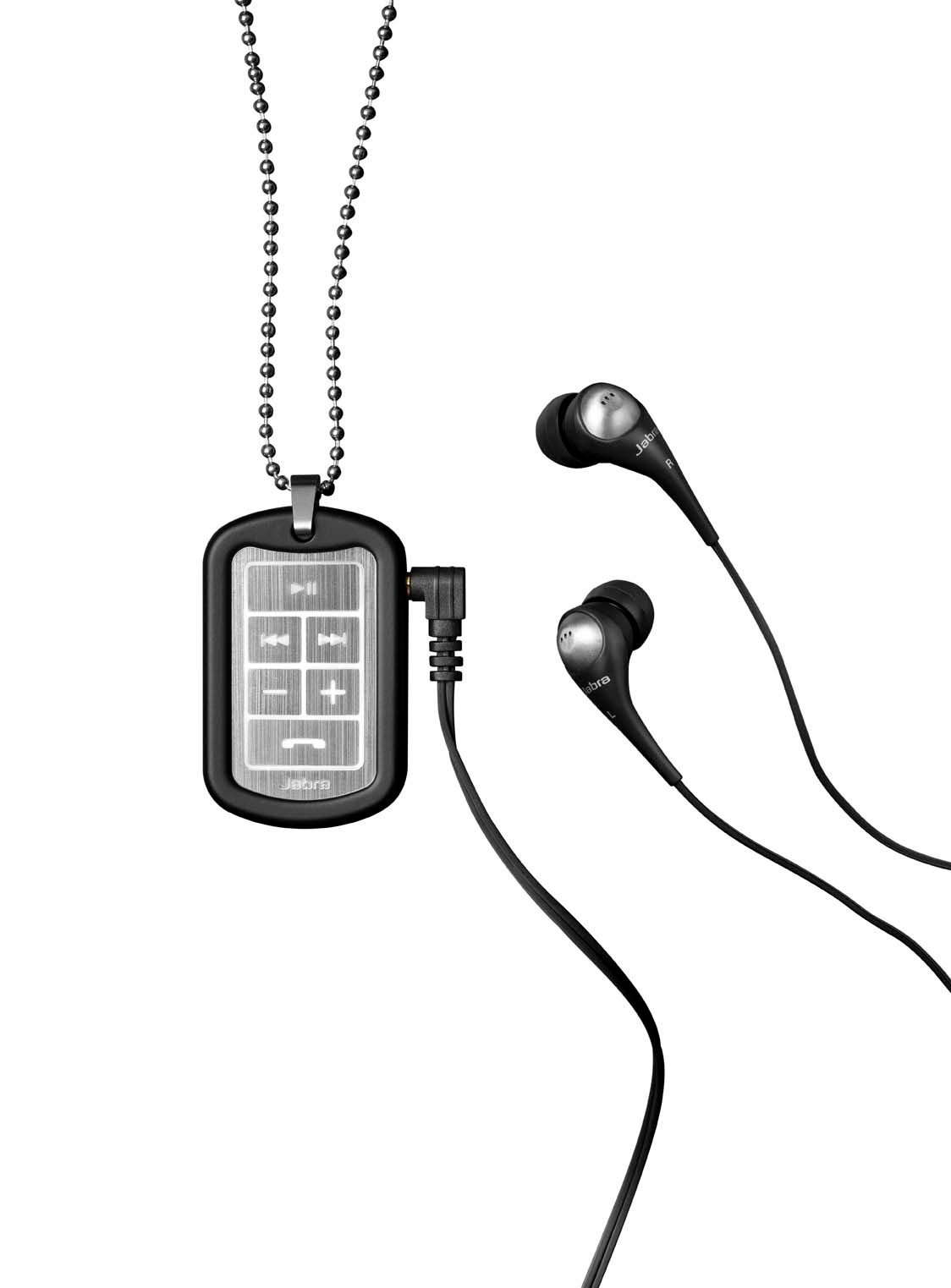
Image: The Jabra Music Street2 headset, highlighting the micro-USB charging port located on the side of the control unit.
- א פולע אָפּלאָד נעמט געוויינטלעך אַרום 2 שעה.
- די LED אינדיקאַטאָר וועט ווייַזן די טשאַרדזשינג סטאַטוס (למשל, רויט פֿאַר טשאַרדזשינג, בלוי פֿאַר גאָר טשאַרדזשד).
2. פּערינג מיט אַ בלועטאָאָטה דיווייס
- מאַכן זיכער אַז די כעדסעט איז אויסגעדרייט אַוועק.
- Press and hold the Multi-function button (usually the play/pause button) for approximately 5-7 seconds until the LED indicator flashes blue rapidly. This indicates pairing mode.
- אויף אייער בלוטוט-ענייבאַלד מיטל (סמאַרטפאָן, טאַבלעט, אאז"וו), גייט צו די בלוטוט סעטטינגס און ענייבלט בלוטוט.
- זוכן פֿאַר available devices. "Jabra Street2" should appear in the list.
- Select "Jabra Street2" to connect. If prompted for a passcode, enter "0000" (four zeros).
- Once successfully paired, the LED indicator will flash blue slowly.
The headset can remember multiple paired devices but can only be connected to one at a time.
אַפּערייטינג ינסטראַקשאַנז
מאַכט אויף / אַוועק
- מאַכט אויף: Press and hold the Multi-function button until the LED flashes blue.
- מאַכט אַוועק: Press and hold the Multi-function button until the LED flashes red and then turns off.
מוזיק קאָנטראָל
- שפּיל / פּויזע: דרוק אַ מאָל אויף די מולטי-פונקציאָנירן.
- ווייַטער שפּור: Press the "Next Track" button (usually marked with a forward arrow).
- פֿריִערדיקע שפּור: Press the "Previous Track" button (usually marked with a backward arrow).
- באַנד אַרויף: דריק דעם "+" קנעפל.
- באַנד אַראָפּ: דריק דעם "-" קנעפּל.
רופן פאַרוואַלטונג
- ענטפער רופן: דרוק אַ מאָל אויף די מולטי-פונקציאָנירן.
- סוף רופן: דריק דעם מולטי-פונקציע קנעפּל איין מאָל בעת אַ רוף.
- אָפּוואַרפן רופן: דריקן און האַלטן די מולטי-פונקציע קנעפּל פֿאַר 2 סעקונדעס.
- ריאַל די לעצטע נומער: דריקט צוויי מאָל דעם מולטי-פונקציע קנעפּל ווען איר זענט נישט אויף אַ רוף.
- שטימע דיילינג: Press the Multi-function button once when not on a call (if supported by your phone).
The headset automatically switches between music and calls.
וישאַלט
- Keep the headset dry. Moisture can damage the electronic circuits.
- פֿאַרמײַדט עקסטרעמע טעמפּעראַטורן. הויכע טעמפּעראַטורן קענען פֿאַרקירצן דאָס לעבן פֿון עלעקטראָנישע דעוויסעס, שאַטן באַטעריעס, און פֿאַרדרייען אָדער צעשמעלצן געוויסע פּלאַסטיקס.
- Do not attempt to open the headset. Unauthorized modifications can damage the unit and void your warranty.
- Clean the headset with a soft, dry cloth. Do not use harsh chemicals or detergents.
- האַלט די כעדסעט אין אַ קיל, טרוקן אָרט ווען נישט אין באַנוץ פֿאַר לענגערע פּעריאָדן.
טראָובלעשאָאָטינג
קיין מאַכט
- זיכער מאַכן אַז די כעדסעט איז גאָר אויפגעלאָדן. פֿאַרבינדט עס צו אַ מאַכט מקור און קאָנטראָלירט דעם טשאַרדזשינג אינדיקאַטאָר.
קענען ניט פאַרבינדן מיט דיווייס
- Make sure the headset is in pairing mode (LED flashing blue rapidly).
- Ensure Bluetooth is enabled on your device and it is within range (typically 10 meters or 33 feet).
- Try turning off and on both the headset and your Bluetooth device.
- If previously paired, try deleting "Jabra Street2" from your device's Bluetooth list and re-pairing.
קיין געזונט אָדער נעבעך געזונט קוואַליטעט
- קאָנטראָלירט די וואָלומען לעוועלס אויף ביידע די כעדסעט און אייער פֿאַרבונדענע מיטל.
- זיכער מאַכן אַז די כעדסעט איז ריכטיק פארבונדן צו דיין מיטל.
- ריקט זיך נענטער צו אייער אפאראט כדי צו פארמיידן אריינמישונג.
- Ensure the ear buds are correctly inserted and fit snugly to block external noise.
Calls Not Switching Automatically
- Verify that the headset is the active audio device for calls on your phone's Bluetooth settings.
- Some phone models may require manual selection of the audio output during a call.
ספּעסאַפאַקיישאַנז
| מאָדעל נאָמען | Jabra Music Street2 |
| בלועטאָאָטה ווערסיע | 3.0 + עדר |
| ווירעלעסס ראַנגע | אַרויף צו 10 מעטער (33 פֿיס) |
| רעדן צייט | אַרויף צו 8 שעה |
| סטאַנדביי צייט | אַרויף צו 9.5 טעג |
| טשאַרדזשינג צייט | בעערעך 2 שעה |
| קאַנעקטיוויטי | Bluetooth, 3.5 mm Jack (for wired connection if applicable) |
| פֿעיִקייטן | Virtual surround sound, power bass, noise-blocking ear buds, automatic music/call switching |
וואָראַנטי & שטיצן
Jabra products are covered by a limited warranty. For specific warranty terms and conditions, please refer to the warranty card included with your product or visit the official Jabra webפּלאַץ.
For technical support, frequently asked questions, or to download the latest software/firmware updates, please visit the official Jabra support page:
You may also contact Jabra customer service directly for assistance.