
הקדמה
Thank you for choosing the Acoustic Audio AA5105 5.1 Surround Sound Home Entertainment System. This system is designed to provide an immersive audio experience for your home theater, personal computer, gaming system, or other audio devices. It features a powerful subwoofer and five satellite speakers, offering versatile connectivity options including RCA, USB, and SD/MMC card inputs.
To ensure proper operation and longevity of your system, please read this manual thoroughly before setup and use. Keep this manual for future reference.
וויכטיק סאַפעטי אינפֿאָרמאַציע
- עלעקטריקאַל זיכערקייַט: Do not expose this appliance to rain or moisture. Do not remove the cover. Refer servicing to qualified personnel only.
- מאַכט מקור: פאַרזיכערן די מאַכט צושטעלן וואָלtage matches the requirements specified on the unit. Unplug the unit during lightning storms or when unused for long periods.
- ווענטילאַטיאָן: בלאָקירט נישט קיין ווענטילאַציע עפענונגען. אינסטאַלירט לויט די אינסטרוקציעס פונעם פאַבריקאַנט.
- היץ: דו זאלסט נישט ינסטאַלירן לעבן קיין היץ קוואלן אַזאַ ווי ראַדיאַטאָרס, היץ רעדזשיסטערז, סטאָוווז אָדער אנדערע אַפּאַראַט (אַרייַנגערעכנט ampליפיערס) וואָס פּראָדוצירן היץ.
- רייניקונג: ריין בלויז מיט אַ טרוקן שטאָף.
- אָרט: Place the unit on a stable, flat surface to prevent it from falling. Keep speakers away from strong magnetic fields.
- קאַבלעס: באַשיצן די מאַכט שנור פון גיין אויף אָדער פּינטשט, ספּעציעל אין די פּלאַגז, קאַנוויניאַנס רעסאַפּיז און די פונט ווו זיי אַרויסגיין פון די אַפּאַראַט.
פּעקל אינהאַלט
Carefully unpack your system and ensure all items are present. If any items are missing or damaged, please contact your retailer.
- 1x Powered Subwoofer (300W)
- 5x Satellite Speakers (80W each)
- 1x רימאָוט קאָנטראָל
- Audio Cables (RCA to RCA, 3.5mm to RCA)
- ינסטראַקשאַנז מאַנואַל

Image: Included accessories and manual. Shows the remote control, the front cover of the instruction manual, and three sets of RCA audio cables.
פּראָדוקט איבערview
Subwoofer (Main Unit)
The subwoofer houses the amplifier for the entire system and features all input/output connections, as well as front panel controls for volume, bass, treble, and input selection. It provides deep bass response through its digitally tuned wooden enclosure.
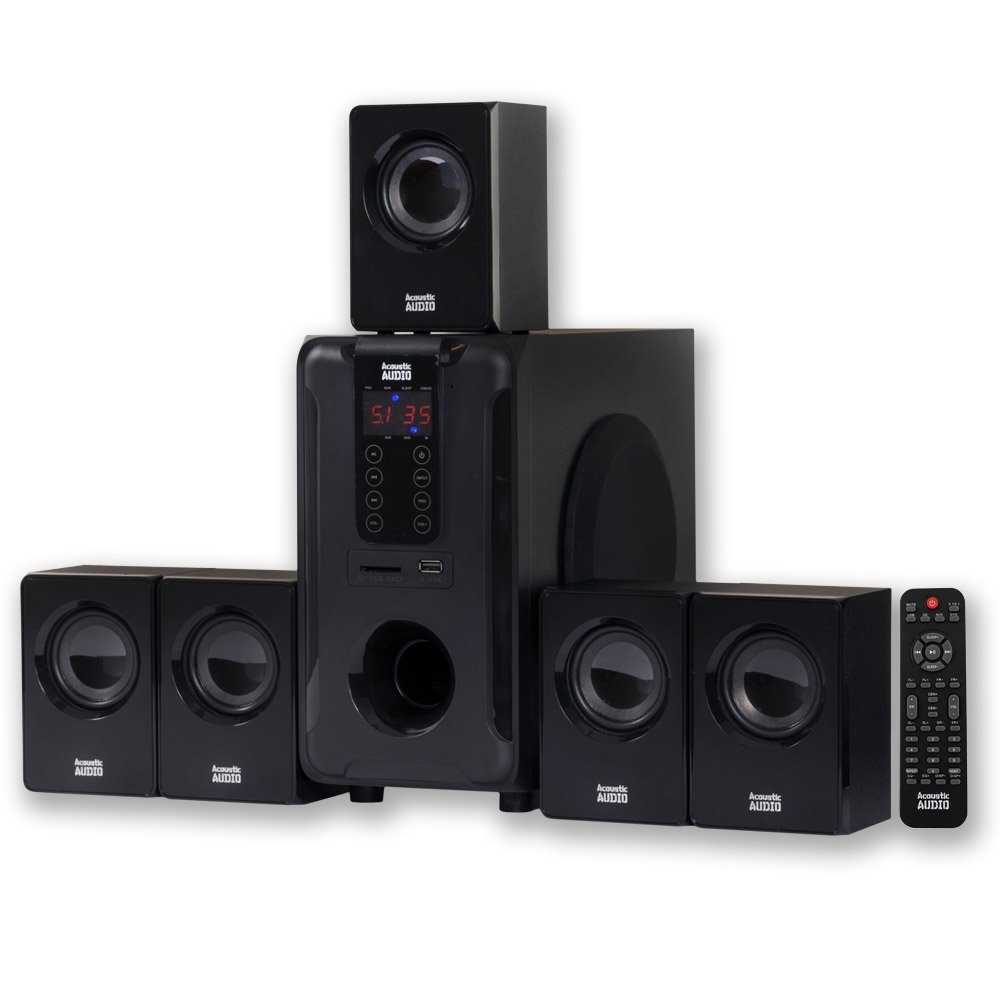
Image: The complete Acoustic Audio AA5105 5.1 Surround Sound System, showing the central subwoofer unit and five satellite speakers.
סאַטעליט ספּיקערז
The five full-range satellite speakers are magnetically shielded, allowing for placement near televisions and computer monitors without interference. They come with mounting hardware for flexible installation.

Image: A single Acoustic Audio satellite speaker, showcasinג זײַן קאָמפּאַקטן דיזײַן און רעדנער גריל.
סעטאַפּ אינסטרוקציעס
1. רעדנער פּלייסמאַנט
- Front Left/Right: Place these speakers to the left and right of your viewing area, equidistant from the listener.
- צענטער: Position the center speaker directly above or below your display.
- Surround Left/Right: Place these speakers to the sides or slightly behind your listening position.
- סובוואָאָפער: The subwoofer can be placed anywhere in the room, preferably near a wall or corner for enhanced bass.
2. פֿאַרבינדן רעדנערס צום סאַבוואָאָפער
Connect each satellite speaker to the corresponding output on the rear panel of the subwoofer. Ensure correct polarity (positive to positive, negative to negative) for optimal sound quality.

Image: Rear panel of the subwoofer. This image displays the power source input, AUX audio inputs (L/R, FL, FR, CEN, SW, SL, SR), DVD audio inputs (FL, FR, CEN, SL, SR), audio outputs for speakers, and the power switch.
- Identify the speaker outputs on the subwoofer's rear panel. These are typically labeled FL (Front Left), FR (Front Right), CEN (Center), SL (Surround Left), and SR (Surround Right).
- Connect the wires from each satellite speaker to its corresponding terminal on the subwoofer.
3. קאַנעקטינג אַודיאָ קוואלן
The AA5105 offers multiple ways to connect your audio devices:
- RCA Audio Input (AUX/DVD): Use the provided RCA cables to connect your TV, DVD player, gaming console, or other devices.
- For 2.1 stereo sound, use the "AUX AUDIO INPUT" L/R (Red/White) jacks.
- For 5.1 surround sound, use the "AUX AUDIO INPUT" or "DVD AUDIO INPUT" jacks, connecting FL, FR, CEN, SW, SL, SR from your source to the corresponding inputs on the subwoofer. A 3.5mm to RCA cable is included for connecting devices with a 3.5mm headphone jack.
- וסב ינפּוט: אַרײַנשטעלן אַ USB פֿלעש דרייוו מיט MP3 אַודיאָ fileאַרײַן אין דעם USB פּאָרט אויף דער פראָנט פּאַנעל.
- SD/MMC Card Input: Insert an SD or MMC memory card containing MP3 audio files into the card slot on the front panel.
4. מאַכט קאַנעקשאַן
- Ensure the power switch on the rear of the subwoofer is in the "OFF" position.
- Connect the power cord to the AC IN port on the subwoofer.
- שטעקט אריין דעם אנדערן עק פונעם עלעקטרישן שנור אין א געווענליכע וואנט-אויסגאבע.
אַפּערייטינג ינסטראַקשאַנז
1. פּאָווערינג אויף / אויסגעלאשן
Flip the power switch on the rear panel of the subwoofer to the "ON" position. The system will power on. To turn off, flip the switch to "OFF".
2. ינפּוט סעלעקציע
Use the "Input" button on the front panel of the subwoofer or the remote control to cycle through available audio sources: AUX, DVD, USB, SD/MMC.
3. Volume, Bass, and Treble Control
- בעל באַנד: Adjust the overall system volume using the main volume knob on the front panel or the VOL+/- buttons on the remote.
- באַס / טרעבל: Use the dedicated Bass and Treble controls on the front panel or remote to fine-tune the audio output to your preference.
- Individual Speaker Volume: The subwoofer features independent speaker controls for each satellite speaker. Adjust these to balance the sound across your 5.1 setup.
4. Surround Sound Mode (5.1 / 2.1)
Upon startup, the unit is typically set to 2.1 stereo mode. To activate 5.1 surround sound, press the "5.1/2.1" button on the remote control or front panel. Ensure your audio source is providing a 5.1 signal for true surround sound.
5. USB/SD/MMC Playback
When a USB drive or SD/MMC card is inserted, the system will automatically switch to the corresponding input and begin playing MP3 files. Use the playback controls (Play/Pause, Next/Previous Track) on the front panel or remote control.
6. רימאָוט קאָנטראָל פאַנגקשאַנז
The included remote control provides full functionality for the system. Refer to the remote control diagram (if available in the physical manual) for specific button functions, including Mute, Sleep, Repeat, and Reset.
וישאַלט
- רייניקונג: Wipe the surfaces of the subwoofer and satellite speakers with a soft, dry cloth. Do not use liquid cleaners or aerosols, as they may damage the finish or internal components.
- ווענטילאַטיאָן: Ensure that the ventilation openings on the subwoofer are not obstructed to prevent overheating.
- סטאָרידזש: If storing the system for an extended period, unplug it from the power outlet and store it in a cool, dry place away from direct sunlight and extreme temperatures.
טראָובלעשאָאָטינג
If you encounter issues with your AA5105 system, please consult the following table before contacting customer support.
| פּראָבלעם | מעגלעך סיבה | לייזונג |
|---|---|---|
| קיין מאַכט | Power cord not connected; Power switch off; Outlet not working. | Ensure power cord is securely plugged in; Turn power switch ON; Test outlet with another device. |
| קיין געזונט | Incorrect input selected; Volume too low; Mute function active; Loose audio cables; Incorrect 5.1/2.1 mode. | Select correct input source; Increase volume; Deactivate mute; Check all audio cable connections; Press 5.1/2.1 button to switch modes. |
| פאַרקרימט געזונט | Volume too high; Poor audio source quality; Loose speaker wires. | Reduce volume; Try a different audio source; Check speaker wire connections for proper polarity. |
| Only 2 speakers working in 5.1 setup | System in 2.1 mode; Audio source not providing 5.1 signal; Incorrect wiring. | Press 5.1/2.1 button to switch to 5.1 mode; Ensure your source (e.g., DVD player) is outputting 5.1 audio; Verify all 5.1 input cables are correctly connected. |
| USB/SD קאַרטל שפּילט נישט | Incorrect input selected; Incompatible file פֿאָרמאַט; קאָרופּטירטע מעדיע. | Select USB/SD input; Ensure files are MP3 format; Try a different USB drive/SD card. |
ספּעסאַפאַקיישאַנז
| מאָדעל נומער | AA5105 |
| Power Rating (RMS System) | 700 וואטס |
| אָפטקייַט ענטפער | 40 הערץ - 20 כ"ץ |
| סובוואָאָפער מאַכט | 300 וואטס |
| Satellite Speaker Power (each) | 80 וואטס |
| אַרומרינגלען סאָונד קאַנאַל קאַנפיגיעריישאַן | 5.1 |
| קאַנעקטיוויטי טעכנאָלאָגיע | יו-עס-בי, אר-סי |
| נאָך ינפּוץ | SD Card, MMC Card |
| ימפּידאַנס | 8 אָהמס |
| פּראָדוקט דימענסיעס (סאַבוואָאָפער) | 10.75 X 20 X 11.25 אינטשעס |
| פּונקט וואָג | 14.25 פונט |
| קאָליר | שוואַרץ |
| UPC | 784620026670, 033586864902 |
וואָראַנטי און שטיצן
For warranty information or technical support, please refer to the documentation included with your purchase or contact Acoustic Audio by Goldwood customer service. Keep your proof of purchase for warranty claims.
Manufacturer: Goldwood Sound, Inc.