
Xantrex C12
קסאַנטרעקס C12 זונ - אָפּצאָל קאָנטראָללער 12 Ampס ינסטרוקטיאָן מאַנואַל
מאָדעל: C12
1. הקדמה
This manual provides essential information for the safe and efficient operation of your Xantrex C12 Solar Charge Controller. The C12 is a sophisticated 12-amp controller designed for charge, lighting, or load management in solar power systems. It features three-stage charging, user-definable voltage parameters, and automatic equalization to optimize battery performance and longevity. Please read this manual thoroughly before installation and use.
2. זיכערקייַט אינפֿאָרמאַציע
Always observe the following safety precautions to prevent personal injury and damage to the controller or other equipment.
- זיכער מאַכן אַז אַלע וויירינג איז ריכטיק גרייס און ריכטיק איזאָלירט.
- Always disconnect power from the solar array and battery before installing or servicing the controller.
- Install the controller in a dry, well-ventilated area, away from flammable materials.
- Do not attempt to open or repair the controller. Refer all servicing to qualified personnel.
- Wear appropriate personal protective equipment, including eye protection, when working with batteries.
3. פּעקל אינהאַלט
באַשטעטיקן אַז אַלע זאכן זענען פאַראַן אין פּעקל:
- Xantrex C12 Solar Charge Controller (1 unit)
- ינסטרוקטיאָן מאַנואַל (דעם דאָקומענט)
4. סעטאַפּ און ייַנמאָנטירונג
The Xantrex C12 controller is designed for quick and easy setup. Follow these general steps for installation:
- מאָונטינג: Choose a suitable location for mounting the controller. It should be close to the battery, in a cool, dry, and well-ventilated area, protected from direct sunlight and moisture.
- באַטערי קשר: Connect the battery to the controller's battery terminals first. Ensure correct polarity (positive to positive, negative to negative). This step is crucial for the controller to sense battery voltage.
- סאָלאַר פּאַנעל קאַנעקשאַן: Connect the solar panel array to the controller's solar input terminals. Again, observe correct polarity.
- לאָדן פֿאַרבינדונג (אָפּציאָנעל): If using the controller for load management, connect your DC loads to the designated load terminals. Ensure the total current draw of the loads does not exceed the controller's rated ampעראַגע.
- וועראַפאַקיישאַן: טשעק נאכאמאל אלע פארבינדונגען פאר פעסטקייט און ריכטיגע פּאָלאַריטעט איידער איר לייגט אן די מאַכט.
וויכטיק: Always connect the battery first and disconnect it last. Failure to do so may damage the controller.
5. אַפּערייטינג ינסטרוקטיאָנס
The Xantrex C12 controller automatically manages the charging process and load distribution.
- דריי-זtage טשאַרדזשינג: The controller employs a three-stage charging algorithm (bulk, absorption, float) to efficiently charge your battery and prolong its lifespan.
- User-Definable Voltage פּאַראַמעטערס: The C12 allows for customization of voltage setpoints to match specific battery types and requirements. Refer to the display indicators section for details on HVD (High Voltage Disconnect) and UVD (Low Voltage Disconnect) settings.
- Automatic Equalization: The controller can perform automatic equalization cycles, which are crucial for maintaining the health of flooded lead-acid batteries. The "EQUALIZE ACTIVATED" indicator will illuminate during this process.
- לאָדן קאָנטראָל: When configured for load control, the controller will disconnect the load if the battery voltagE טראפנס אונטער די נידעריק וואָלtage Disconnect (LVD) threshold to protect the battery from deep discharge.
6. ווייַז ינדיקאַטאָרס
The front panel of the Xantrex C12 features an intuitive LED display to indicate battery status and operational modes.
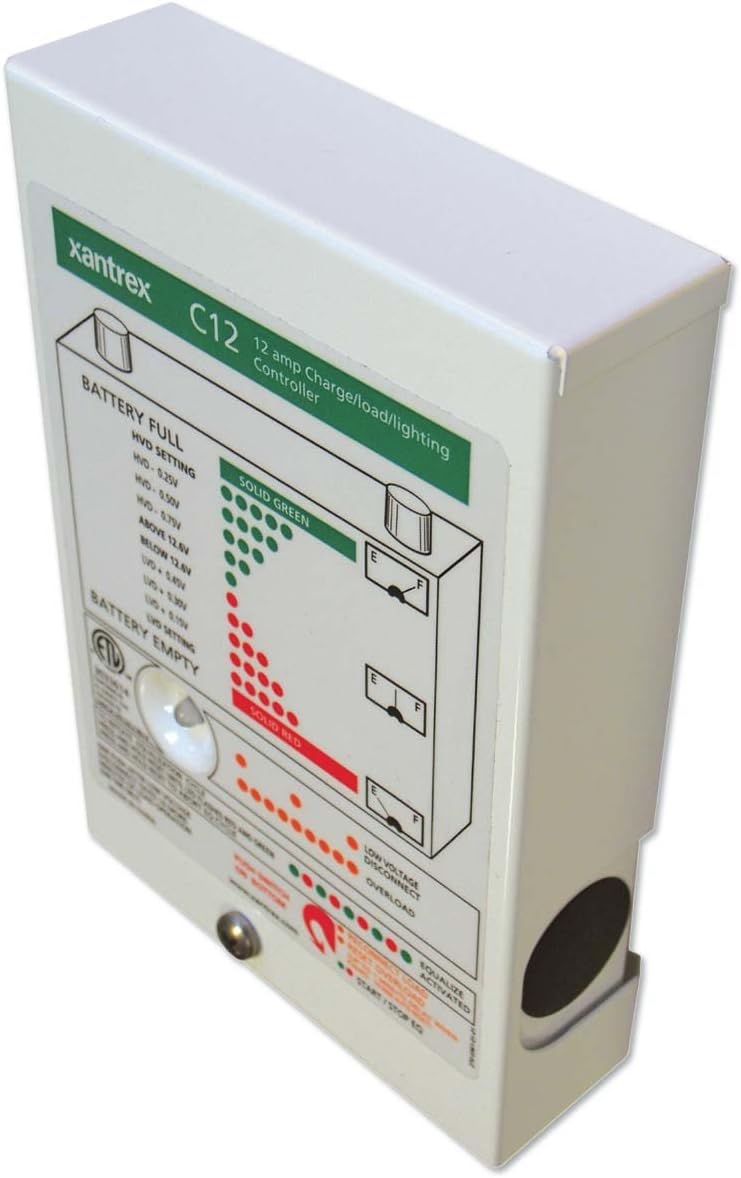
פיגורע 1: פראָנט view of the Xantrex C12 Solar Charge Controller, showing the LED indicator panel.
The LED panel provides visual feedback on the system's status:
- BATTERY FULL (Solid Green LEDs): Indicates the battery is fully charged or near full. The specific voltage thresholds for High Voltage Disconnect (HVD) are displayed on the panel (e.g., HVD - 0.25V, HVD - 0.50V, HVD - 0.75V, ABOVE 12.8V).
- BATTERY EMPTY (Solid Red LEDs): Indicates the battery is discharged or near empty. The specific voltage thresholds for Low Voltage Disconnect (UVD) are displayed (e.g., BELOW 12.8V, UVD - 0.50V, UVD - 0.75V, UVD - 1.0V).
- נידעריק VOLTAGE DISCONNECT (Orange/Red LEDs): ילומאַנייץ ווען די באַטאַרייע וואָלtage drops below a critical level, and the load has been disconnected to protect the battery.
- OVERLOAD (Orange/Red LEDs): Indicates that the connected load is drawing excessive current, potentially causing the controller to shut down the load output.
- EQUALIZE ACTIVATED (Green LED): Lights up when the automatic battery equalization cycle is active.
- START/STOP EQ (Button): A push-button located at the bottom of the panel to manually initiate or stop an equalization cycle.
7. וישאַלט
The Xantrex C12 Solar Charge Controller requires minimal maintenance.
- רעגולער דורכקוק: קאָנטראָלירט פּעריִאָדיש אַלע וויירינג פֿאַרבינדונגען פֿאַר שטרענגקייט און קעראָוזשאַן.
- רייניקונג: Keep the controller's exterior clean and free of dust. Use a dry cloth; do not use liquid cleaners.
- ווענטילאַטיאָן: זיכער מאַכן אַז די ווענטילאַציע עפענונגען זענען נישט פֿאַרשטאָפּט צו פאַרמייַדן איבערהיצונג.
8. טראָובלעשאָאָטינג
If you encounter issues with your Xantrex C12 controller, refer to the following common problems and solutions:
| פּראָבלעם | מעגלעך סיבה | לייזונג |
|---|---|---|
| קיין דיספּלעי/קיין מאַכט | Loose battery connection, reversed polarity, blown fuse (external) | Check battery connections and polarity. Inspect external fuses. |
| די באַטאַרייע איז נישט טשאַרדזשינג | No solar input, reversed solar polarity, faulty solar panel, battery already full | Check solar panel connections and polarity. Verify solar panel output. Monitor battery status. |
| Load disconnected (Low Voltage Disconnect LED on) | באַטערי וואָלtagE צו נידעריק | Allow battery to charge. Reduce load. |
| Overload LED on | Excessive current draw from load | Reduce the connected load. Check for short circuits in the load wiring. |
If the problem persists after attempting these solutions, contact Xantrex customer support.
9. ספּעסאַפאַקיישאַנז
| שטריך | דעטאַל |
|---|---|
| סאָרט | Xantrex |
| מאָדעל | C12 |
| Ampעראַגע | 12 Amps |
| Voltage | 12 וואלטס |
| ווייַז טיפּ | LCD (LED indicators on front panel) |
| פּונקט וואָג | 1.35 פונט (0.61 קג) |
| פּעקל דימענשאַנז | 6.7 X 4.8 X 1.8 אינטשעס (17 X 12.2 X 4.6 סענטימעטער) |
| מאַטעריאַל | מעטאַל, פּלאַסטיק |
| UPC | 687873000520 |
10. וואָראַנטי און שטיצן
For detailed warranty information, please refer to the warranty card included with your product or visit the official Xantrex webפּלאַץ.
If you require technical assistance or have questions not covered in this manual, please contact Xantrex customer support through their official webזייטל אדער באשטימטע שטיצע קאנאלן.
פֿאַרבונדענע דאָקומענטן - C12
 |
C12 Wireless Earbuds User Manual and Specifications Comprehensive guide for C12 wireless earbuds, covering features, operation, specifications, troubleshooting, and FCC compliance. Learn how to pair, control, and maintain your earbuds. |
 |
קסאַנטרעקס מאַכט סאַלושאַנז בראשור: ינווערטערס, טשאַרדזשערז און זונ - אויספאָרשן די ברייטע קייט פון קסאַנטרעקס מאַכט לייזונגען, אַרייַנגערעכנט אמתע סינוס כוואַליע ינווערטערס, ינווערטער/טשאַרדזשערס, און באַטאַרייע טשאַרדזשערס. די בראשור דעטאַלירט פּראָדוקט ספּעסיפיקאַציעס, אַפּלאַקיישאַנז פֿאַר RVs, מאַרינע, טראַקס, און ספּעציעלע וועהיקלעס, און ינסטאַלירונג גיידאַנס. |
 |
Viessmann Vitocrossal 200 C12 Installation and Start-up Guide A comprehensive guide for licensed professional heating contractors on the installation and start-up of the Viessmann Vitocrossal 200 C12 gas condensing boiler. Covers unpacking, positioning, access, connections, electrical wiring, venting, and initial setup procedures. |
 |
זשאַנגזשאָו אַיוועי IoT טעכנאָלאָגיע C12-H סורוועילאַנס קאַמעראַ באַניצער מאַנואַל באַניצער מאַנואַל פֿאַר די זשאַנגזשאָו אַיוועי IoT טעכנאָלאָגיע C12-H סורוועילאַנס קאַמעראַ, וואָס גיט אינסטרוקציעס און ספּעסיפיקאַציעס. |
 |
Canon EOS 400D Digital Service Manual This comprehensive service manual provides detailed technical information, repair procedures, adjustments, parts catalog, and circuit diagrams for Canon EOS Kiss Digital X, EOS Digital Rebel XTi, and EOS 400D Digital cameras. It is intended for service technicians. |
 |
C12 Series Auto Tracking Tripod User Manual User manual for the C12 Series Auto Tracking Tripod by Dongguan Laike Technology Co., Ltd, detailing product introduction, operation instructions, remote control usage, and FCC compliance. |
Ask a question about this manual
Ask about setup, troubleshooting, compatibility, parts, safety, or missing instructions. Manuals+ will review the question and use this page’s manual context to help answer it.