
פּראָדוקט איבערview
The Focusrite ISA Two is a classic dual mono transformer-based microphone preamplifier designed for professional audio recording. It incorporates the renowned Lundahl LL1538 mic input transformer, originally selected by Rupert Neve for the ISA 110, ensuring exceptional audio quality.
שליסל פֿעיִקייטן אַרייַננעמען:
- Lundahl LL1538 Transformer: Utilizes the high-quality Lundahl LL1538 mic input transformer for superior sound.
- High Gain and Low Noise: Offers up to 80 dB of clean gain on the microphone input with minimal noise.
- וואַריאַבלע אַרייַנשרייַב ימפּידאַנס: Four selectable input impedance settings, including the original ISA 110 value, allow for optimal matching with various microphones.
- User-Calibrated Metering: Each channel features an eight-LED array for clear level display, with a rear panel calibration knob to match DAW converters.
- ווערסאַטאַל ינפּוץ: Two 1/4-inch front panel DI inputs for instruments and rear panel TRS line inputs.
- הויך-פּאַס פילטער: An 18dB/octave high-pass filter, based on the ISA 110 module, is built-in for precise low-frequency control.
- Balanced Inserts: Each channel includes balanced insert points (1/4-inch TRS send and receive) for integrating external hardware processors.
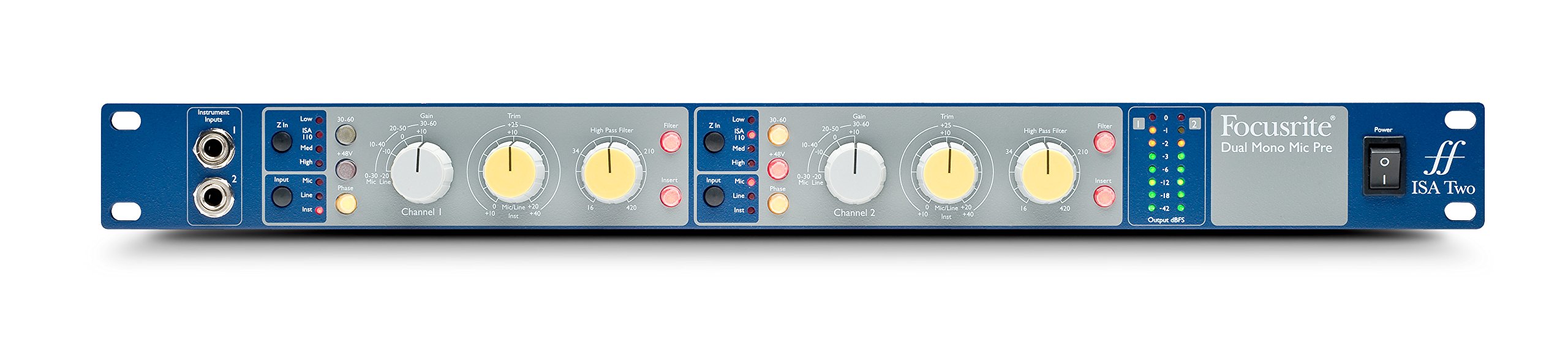
פיגורע 1: פראָנט view of the Focusrite ISA Two preampלײַכטער, ווײַזןasing its controls and metering.
פּעקל אינהאַלט
באַשטעטיקן אַז אַלע זאכן זענען פאַראַן אין פּעקל:
- Focusrite ISA Two Unit
- IEC מאַכט קאַבלע
סעטאַפּ גייד
Follow these steps to set up your ISA Two preampלייבער:
- ראַקמאָונט ינסטאַלירונג: The ISA Two is designed for standard 19-inch rack mounting. Secure the unit using appropriate rack screws.
- מאַכט קשר: Connect the supplied IEC power cable to the rear panel power inlet and then to a suitable AC power source. Ensure the power switch is in the OFF position before connecting.
- קאַנעקטינג מייקראָופאָונז: Use balanced XLR cables to connect your microphones to the 'MIC INPUT' XLR connectors on the rear panel for each channel.
- Connecting Line Sources: For line-level signals, use balanced TRS cables to connect to the 'LINE INPUT' TRS connectors on the rear panel.
- קאַנעקטינג מכשירים: For instruments such as guitars or basses, use 1/4-inch jack cables to connect to the 'Instrument Inputs' on the front panel.
- רעזולטאַט קאַנעקשאַנז: Connect the 'OUTPUT' XLR connectors on the rear panel to your audio interface, mixer, or other recording equipment using balanced XLR cables.
- Insert Connections: If using external hardware processors, connect them to the 'SEND' and 'RETURN' 1/4-inch TRS jacks on the rear panel for each channel.

Figure 2: Rear panel of the Focusrite ISA Two, showing microphone, line, output, and insert connections.
אַפּערייטינג ינסטראַקשאַנז
This section details the operation of the ISA Two preamplifier's controls:
- מאַכט אויף: After all connections are made, switch the power button on the front panel to the ON position.
- אַרייַנשרייַב סעלעקציע: Use the 'Input' buttons (Mic, Line, Inst) to select the appropriate input source for each channel. Ensure only one input type is active per channel.
- געווינען קאָנטראָל: The large 'Gain' knob adjusts the primary gain level (e.g., 0-30 dB, 30-60 dB). The smaller 'Trim' knob provides fine-tuning (+/-10 dB) for precise level setting.
- Variable Input Impedance (Z In): For microphone inputs, select one of the four impedance settings (Low, ISA 110, Med, High) to optimize the interaction with your microphone. Experiment to find the best sonic match.
- פאַנטאָם מאַכט (+48 וו): Activate the +48V button for condenser microphones that require phantom power. Ensure the microphone is connected before engaging phantom power.
- הויך-פּאַס פילטער (HPF): Engage the 'Filter' button and use the 'High Pass Filter' knob to remove unwanted low-frequency rumble or proximity effect. The filter offers an 18dB/octave slope.
- Insert Function: Press the 'Insert' button to engage any external hardware processors connected to the rear panel insert points.
- מעסטן: Monitor your signal levels using the eight-LED array. Adjust gain and trim to achieve optimal levels without clipping (red LEDs). The VU meter provides an average level indication.
For a visual demonstration of the ISA Two in action, watch the official product video:
Video 1: Focusrite ISA Two Classic Dual Mono Transformer-Based Microphone Preamplifier in use during a recording session. This video demonstrates the preamplifier's features and sound quality in a practical studio environment.
וישאַלט
To ensure the longevity and optimal performance of your Focusrite ISA Two, follow these maintenance guidelines:
- רייניקונג: Use a soft, dry cloth to clean the exterior of the unit. Avoid abrasive cleaners, solvents, or waxes.
- ווענטילאַטיאָן: Ensure adequate airflow around the unit, especially if rackmounted, to prevent overheating.
- סטאָרידזש: When not in use for extended periods, store the unit in a cool, dry environment away from direct sunlight and extreme temperatures.
- קאַבלע פאַרוואַלטונג: Keep cables organized and free from kinks or excessive tension to prevent damage to connectors and the unit.
טראָובלעשאָאָטינג
If you encounter issues with your ISA Two, consider the following common troubleshooting steps:
- קיין מאַכט: Check the power cable connection to both the unit and the wall outlet. Ensure the power switch is ON.
- קיין אַודיאָ רעזולטאַט: Verify all input and output cables are securely connected. Check the input selection (Mic, Line, Inst) and ensure phantom power is engaged if using a condenser microphone. Confirm gain levels are appropriately set.
- פאַרקרימט אַודיאָ: Reduce the input gain and trim levels. Check for proper impedance matching with your microphone. Ensure no cables are damaged.
- אינטערמיטענט סיגנאַל: Inspect all cable connections for looseness or damage. Try swapping cables to isolate a faulty one.
- Noise/Hum: Ensure all equipment is properly grounded. Check for nearby sources of electromagnetic interference.
If problems persist after these steps, contact Focusrite support for further assistance.
טעכניש ספּעסאַפאַקיישאַנז
| באַשרייַבונג | ווערט |
|---|---|
| סאָרט | Focusrite |
| מאָדעל נאָמען | ייצע צוויי |
| קאַנעקטיוויטי טעכנאָלאָגיע | אַנאַלאָג |
| קאַנעקטער טיפּ | 2-אין / 2-אויס |
| קאָליר | Blue / Gray |
| פּונקט וואָג | 7 פונט |
| נומער דימענשאַנז (L X W X H) | 5.55 X 15.16 X 26.06 אינטשעס |
| מאַטעריאַל | ומבאַפלעקט שטאָל |
| ייַזנוואַרג פּלאַטפאָרמע | מיק פּרעamp |
| נומער פון טשאַנאַלז | 2 |
| אָפטקייַט ענטפער | 20 KHz |
| אָפּצוימונג מאַטעריאַל | ומבאַפלעקט שטאָל |
| מאָדעל נומער | AMS-ISA-2 |
| גלאבאלע האַנדל לעגיטימאַציע נומער (GTIN) | 815301005148 |
| UPC | 815301005148 |
| מפר טייל נומער | ייצע צוויי |
וואָראַנטי און שטיצן
The Focusrite ISA Two comes with a 2 יאָר וואָראַנטי פֿון דעם קויפֿדאַטום, וואָס דעקט פֿאַבריקאַציע־דעפֿעקטן און מאַלפאַנגקשאַנז אונטער נאָרמאַלן באַנוץ.
For technical support, product registration, or to view the full warranty terms and conditions, please visit the official Focusrite webזייטל. איר קענט אויך געפֿינען דאָרט אָפֿט געשטעלטע פֿראַגעס און נאָך רעסורסן.
אָנליין שטיצן: www.focusrite.com/support