
1. הקדמה
This manual provides essential information for the safe and efficient operation of your Alto Professional TMX160 DFX 16-Channel Powered Mixer. The TMX160 DFX is a versatile audio mixing console featuring 16 input channels, a built-in Alesis digital effects processor, and an integrated power amplifier capable of delivering 750W stereo output at 4Ω or 1500W mono output at 8Ω. It includes 12 XLR microphone inputs with phantom power, 16 line inputs, and stereo RCA inputs, along with a 3-band equalizer on each mono and stereo channel.
Please read this manual thoroughly before using the product to ensure proper setup and operation. Keep this manual for future reference.
2. זיכערקייַט אינפֿאָרמאַציע
שטענדיק פֿאָלגן די גרונטלעכע זיכערהייט מיטלען ווען איר ניצט דעם פּראָדוקט צו רעדוצירן דעם ריזיקאָ פֿון פֿײַער, עלעקטרישן קלאַפּ און שאָדן צו מענטשן.
- מאַכט מקור: פֿאַרבינדט דעם אַפּאַראַט נאָר צו אַן AC מאַכט אַוטלעט פון דער ספּעציפֿישער וואָלומעןtage.
- גראָונדינג: Ensure the unit is properly grounded. Do not defeat the safety purpose of the polarized or grounding-type plug.
- וואַסער און נעץ: Do not expose this equipment to rain or moisture. Do not use near water.
- ווענטילאַטיאָן: זיכער מאַכן אַז עס איז דאָ גענוג ווענטילאַציע. נישט פֿאַרשטאָפּן די ווענטילאַציע עפענונגען.
- היץ: דו זאלסט נישט ינסטאַלירן לעבן קיין היץ קוואלן אַזאַ ווי ראַדיאַטאָרס, היץ רעדזשיסטערז, סטאָוווז אָדער אנדערע אַפּאַראַט (אַרייַנגערעכנט ampליפיערס) וואָס פּראָדוצירן היץ.
- קאַבלעס: באַשיצן מאַכט קאָרדס פון זייַענדיק געגאנגען אויף אָדער פּינטשעד.
- סערוויס: איבערגעבן אלע סערוויסינג צו קוואַליפֿיצירטע סערוויס פּערסאָנעל. פּרוּווט נישט צו סערוויסן דעם פּראָדוקט אַליין.
3. סעטאַפּ
3.1 אַנפּאַקינג און דורכקוק
Carefully unpack the TMX160 DFX mixer and inspect it for any signs of damage that may have occurred during transit. If any damage is found, contact your dealer immediately.
3.2 קאַנעקטינג מאַכט
Connect the supplied AC power cord to the mixer's power input and then to a suitable grounded AC power outlet. Ensure the mixer's power switch is in the OFF position before connecting to power.
3.3 פֿאַרבינדן איינגאַבעס
The TMX160 DFX offers a variety of input options:
- Microphone Inputs (MIC 1-12): Use XLR cables to connect microphones to the 12 XLR inputs. Phantom power (+48V) can be activated for condenser microphones.
- Line Inputs (Channels 1-16): Use 1/4-inch TRS or TS cables for line-level instruments or devices. Channels 13/14 and 15/16 are stereo line inputs, also accepting RCA for 2-Track In.
- 2-Track In: Connect external audio sources like CD players or media players using RCA cables.
3.4 פֿאַרבינדן אַוטפּוטן
Connect your speakers or monitoring system to the appropriate outputs:
- רעדנער אַוטפּוץ: Connect passive speakers to the power amplifier outputs. Ensure the impedance of your speakers matches the mixer's output capabilities (e.g., 4Ω for 750W stereo, 8Ω for 1500W mono).
- Monitor/Aux Outputs: Use these outputs to send signals to stage monitors or external effects processors.
- Stereo Out/Mono Out: These outputs provide the main mix signal for recording or connecting to additional sound systems.
3.5 ערשט מאַכט-אויף
After all connections are made, ensure all channel faders and the main mix fader are at their lowest settings. Turn on any connected devices (e.g., microphones, instruments) first, then power on the TMX160 DFX mixer. Finally, turn on your power ampליפיערס אָדער אַקטיוו ספּיקערז.
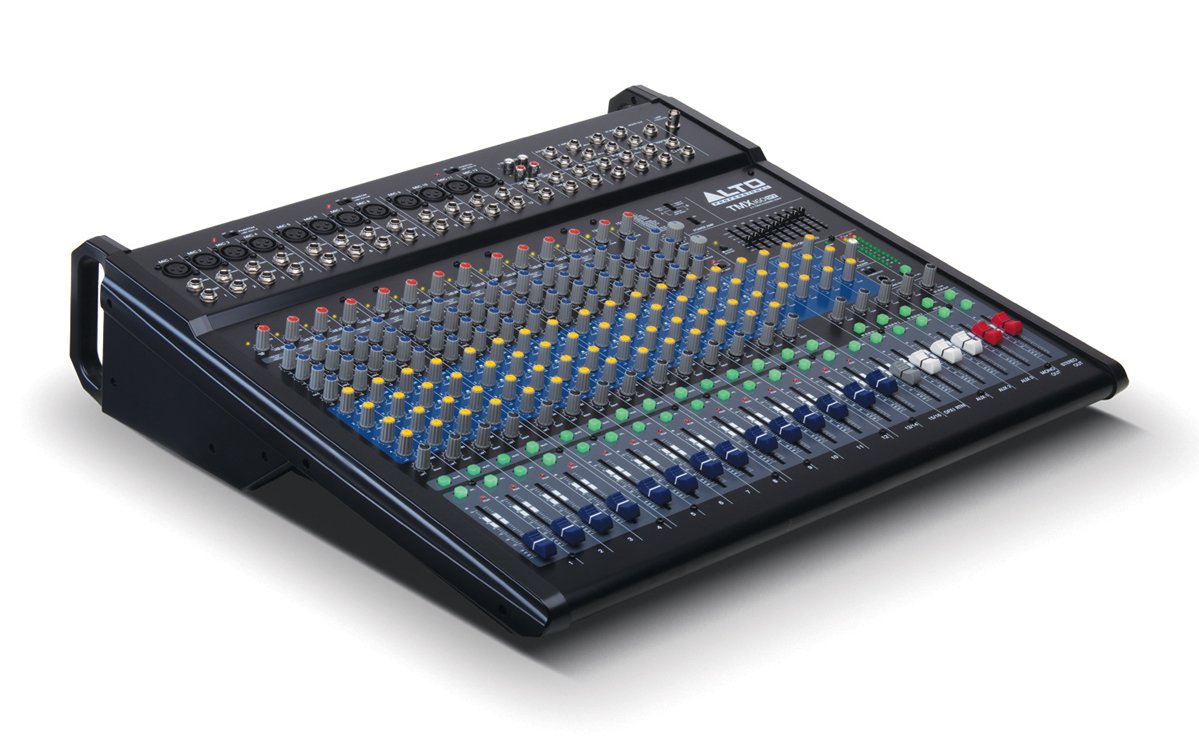
פיגורע 1: פראָנט טאַפליע איבערview of the Alto Professional TMX160 DFX mixer. This image shows the comprehensive layout including microphone and line inputs at the top, channel controls in the middle, and faders at the bottom.
4. אָפּעראַציע
4.1 קאַנאַל קאָנטראָלס
Each input channel (1-16) features a set of controls to shape its sound:
- געווינען: Adjusts the input sensitivity for the connected microphone or line-level device. Set this to achieve a strong signal without clipping (distortion).
- עק (הויך, מיטן, נידעריק): A 3-band equalizer allows you to boost or cut frequencies (treble, midrange, bass) for each channel.
- AUX סענדז: Controls the amount of signal sent from the channel to the auxiliary outputs (e.g., for monitors or external effects).
- פּאַן: פּאַזיציאָנירט דעם קאַנאַל'ס סיגנאַל אין דעם סטערעאָ פעלד (פון לינקס צו רעכטס).
- לעוועל פעדער: Controls the overall volume of the channel in the main mix.
4.2 Master Section
The master section controls the overall output of the mixer:
- הויפּט מיקס פאַדערס: Control the overall volume of the stereo output.
- DFX (Digital Effects) Controls: Select and adjust parameters for the built-in Alesis digital effects.
- Stereo Graphic EQ: A 7-band graphic equalizer allows for fine-tuning the overall frequency response of the main mix.
- מאַכט Amp קאָנטראָלס: Adjust the output level and mode (Stereo/Mono) for the integrated power ampליפער.
4.3 Built-in Alesis Digital Effects
The TMX160 DFX features a high-quality Alesis digital effects processor. Use the DFX controls in the master section to browse and select from various effects such as reverb, delay, chorus, and more. Adjust the effect send levels on individual channels and the overall effect return level in the master section to blend the effects into your mix.
פיגורע 2: דעטאַילעד view of the input channels, showing individual GAIN, EQ, AUX, PAN, and LEVEL controls for precise audio shaping.
5. וישאַלט
Proper maintenance ensures the longevity and optimal performance of your TMX160 DFX mixer.
- רייניקונג: ניצט אַ ווייכע, טרוקענע שטאָף צו רייניקן די אויסערלעכע זייט פון דעם מיקסער. פֿאַרמייַדט ניצן אַברייסיוו רייניגער, סאָלווענטן, אָדער וואַקסן.
- שטויב: Regularly remove dust from the ventilation openings to prevent overheating.
- סטאָרידזש: ווען נישט אין באַנוץ פֿאַר לענגערע פּעריאָדן, האַלט דעם מיקסער אין אַ קיל, טרוקן אָרט, אַוועק פון דירעקט זונשייַן און עקסטרעמע טעמפּעראַטורן.
- פאַדערס און קנעפּלעך: Avoid applying excessive force to faders and knobs. Keep them free from dust and debris.
6. טראָובלעשאָאָטינג
If you encounter issues with your TMX160 DFX, refer to the following common problems and solutions:
- קיין מאַכט:
- Check if the power cord is securely connected to both the mixer and the AC outlet.
- באַשטעטיקן אַז די AC אַוטלעט אַרבעט גוט.
- זיכער מאַכן אַז דער מאַכט קנעפל אויף דעם מיקסער איז אין דער ON פּאָזיציע.
- קיין סאָונד רעזולטאַט:
- קאָנטראָלירט אַלע אינפוט און אַוטפּוט קאַבלע קאַנעקשאַנז.
- Ensure channel GAIN and LEVEL faders are appropriately set.
- Verify the Main Mix faders are raised.
- Check if connected speakers or power amplifiers are turned on and functioning.
- פאַרזיכערן די מאַכט Amp controls are set correctly for your speaker configuration.
- פאַרקרימט סאָונד:
- Reduce the GAIN setting for the input channel.
- Lower the channel LEVEL fader or Main Mix faders.
- קוק נאָך צעבראָכענע קאַבלען.
- Effects Not Heard:
- Ensure the DFX send controls on the channels are turned up.
- Verify the DFX return level in the master section is raised.
- Check the selected effect program.
If the problem persists after trying these steps, contact Alto Professional customer support.
7. ספּעסאַפאַקיישאַנז
| שטריך | באַשרייַבונג |
|---|---|
| סאָרט | אַלטאָ פּראַפעשאַנאַל |
| מאָדעל | TMX160 DFX |
| נומער פון טשאַנאַלז | 16 |
| פּונקט וואָג | 12.5 קילאָגראַמס |
| קאַנעקטיוויטי טעכנאָלאָגיע | אַגזיליערי |
| אַודיאָ אַרייַנשרייַב | XLR, RCA, Line, AUX, 2-Track |
| פאַבריקאַנט | אין מוזיק |
| ASIN | B007T1VZ52 |
| מאַכט אַרויסגאַנג (סטערעאָ) | 750 וו @ 4 Ω |
| Power Output (Mono) | 1500 וו @ 8 Ω |
| עקוואַליזער | 3-band EQ per channel, Stereo Graphic EQ |
| עפפעקץ | Built-in Alesis Digital Effector (24-bit A/D and D/A converters) |
| דימענשאַנז (ב x ד x ה) | בעערעך. 21.9 X 22.2 X 5.7 אינטשעס (555 X 565 X 145 מם) |
8. וואָראַנטי און שטיצן
For warranty information and technical support, please refer to the documentation included with your product or visit the official Alto Professional webזייטל. האַלט אייער קויף קוויטל ווי אַ באַווייַז פון קויפן פֿאַר וואָראַנטי קליימז.
For further assistance, you may contact Alto Professional customer service directly.