
1. הקדמה
א דאנק פארן קויפןasing the Medeli M30 61-Key Professional Keyboard. This instrument is designed to provide a rich musical experience with its touch-sensitive keys, extensive voice library, and versatile accompaniment styles. This manual will guide you through the setup, operation, and maintenance of your new keyboard.
פּעקל אינהאַלט
- Medeli M30 61-Key Professional Keyboard
- מאַכט אַדאַפּטער
- מוזיק רעסט
- באַניצער מאַנואַל (דעם דאָקומענט)
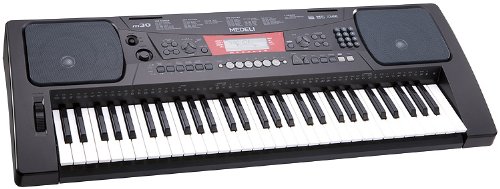
Figure 1: Medeli M30 61-Key Professional Keyboard. This image shows the keyboard from a front-angle view, highlighting its 61 keys, control panel, and display.
2. זיכערקייַט אינסטרוקציעס
- מאַכט צושטעלן: ניצט נאָר דעם ספּעציפֿירטן מאַכט אַדאַפּטער. זיכערט זיך אַז דער וואָלומעןtage שוועבעלעך דיין היגע מאַכט צושטעלן.
- וואַסער און נעץ: Do not expose the keyboard to water or moisture. Avoid placing liquids near the instrument.
- ווענטילאַטיאָן: Do not block ventilation openings. Ensure adequate airflow around the keyboard.
- היץ קוואלן: האַלט די קלאַוויאַטור אַוועק פון היץ קוועלער ווי ראַדיאַטאָרן, היץ רעגיסטערס, אויוון, אָדער אַנדערע אַפּאַראַטן (אַרייַנגערעכנט ampליפיערס) וואָס פּראָדוצירן היץ.
- רייניקונג: רייניקן נאָר מיט אַ טרוקענעם שטאָף. נישט נוצן פליסיקע רייניקונגס־מיטלען אָדער אַעראָזאָלן.
- סערוויס: דו זאלסט נישט פּרווון צו דינען דעם פּראָדוקט זיך. קאָנטאַקט אַלע קוואַלאַפייד סערוויס פּערסאַנעל.
3. סעטאַפּ
3.1 אַנפּאַקינג
נעמט פֿאָרזיכטיק אַרויס אַלע קאָמפּאָנענטן פֿון דער פּאַקאַדזשינג. האַלט די פּאַקאַדזשינג פֿאַר צוקונפֿטיקן טראַנספּאָרט אָדער סטאָרידזש.
3.2 מאַכט קאַנעקשאַן
- Ensure the keyboard's power switch is in the "OFF" position.
- Connect the power adapter to the DC IN jack on the rear panel of the keyboard.
- שטעקט אריין דעם מאַכט אַדאַפּטער אין אַ נאָרמאַלן AC ווענטיל.
- Turn the power switch to the "ON" position to power on the keyboard.
3.3 מוזיק-שטיצע אינסטאַלאַציע
Insert the music rest into the designated slots on the top panel of the keyboard. Ensure it is securely seated.
4. אַפּערייטינג ינסטרוקטיאָנס
4.1 גרונטלעכע ווידערשפּיל
- מאַכט אויף: Press the [POWER] button to turn on the keyboard.
- באַנד אַדזשאַסטמאַנט: Use the [MASTER VOLUME] knob to adjust the overall sound level.
- פּלייַינג די שליסלען: The M30 features 61 touch-sensitive keys. The harder you press, the louder the sound.
4.2 אויסקלייבן שטימען
The M30 offers 359 different voices (instrument sounds).
- דריקן די [VOICE] קנעפּל.
- Use the numeric keypad or the [+] / [-] buttons to select a voice number.
- The selected voice name will appear on the display.
4.3 Selecting Styles
The keyboard includes 150 accompaniment styles.
- דרוק די [STYLE] קנעפּל.
- Use the numeric keypad or the [+] / [-] buttons to select a style number.
- Press [START/STOP] to begin the accompaniment.
- Adjust the style volume using the [ACCOMPANIMENT VOLUME] button (if available, or general volume).
4.4 Playing Songs
The M30 has 100 built-in songs and 2 demo songs.
- דרוק דעם [SONG] קנעפּל.
- Use the numeric keypad or the [+] / [-] buttons to select a song number.
- Press [PLAY/PAUSE] to start or pause the song.
- Press [STOP] to stop the song.
5. קאַנעקטיוויטי
5.1 וסב קאַנעקשאַן
The Medeli M30 features a USB port for connecting to a computer. This allows for MIDI data transfer, enabling the keyboard to be used as a MIDI controller or to connect with music software.
- Connect a standard USB cable (Type B to Type A, not included) from the keyboard's USB port to your computer's USB port.
- Your computer should automatically recognize the keyboard as a MIDI device.
- Refer to your music software's documentation for instructions on setting up MIDI input devices.
6. וישאַלט
6.1 רייניקונג
- ווישט די ייבערפלאַך פון דער קלאַוויאַטור מיט אַ ווייכן, טרוקענעם שטאָף.
- פֿאַר שווערן שמוץ, אַ ביסל דampוואַשט דעם שטאָף מיט וואַסער און אַ מילד וואַשפּולווער, און ווישט טרוקן גלייך.
- ניצט נישט קיין אברייסיוו רייניגער, וואקס, אדער סאָלווענטן.
6.2 סטאָרידזש
- ווען נישט אין באַנוץ פֿאַר לענגערע פּעריאָדן, אָפּשטעקן דעם מאַכט אַדאַפּטער.
- האַלט די קלאַוויאַטור אין אַ קיל, טרוקן אָרט, אַוועק פון דירעקט זונשייַן און עקסטרעמע טעמפּעראַטורן.
- Consider using a dust cover to protect the keys and control panel.
7. טראָובלעשאָאָטינג
| פּראָבלעם | מעגלעך סיבה | לייזונג |
|---|---|---|
| קיין געזונט | די קול איז צו נידעריג אדער שטיל. | Increase the [MASTER VOLUME] knob. |
| קלאַוויאַטור טוט נישט מאַכט אויף | מאַכט אַדאַפּטער נישט פארבונדן אָדער דעפעקטיוו. | Ensure power adapter is securely connected and plugged into a working outlet. Check power switch position. |
| שליסלען ריספּאַנד נישט | Keyboard may be in a specific mode (e.g., demo mode). | Try powering off and on again. Refer to the operating section for specific mode exits. |
8. ספּעסאַפאַקיישאַנז
| שטריך | דעטאַל |
|---|---|
| שליסלען | 61, Touch-Sensitive |
| קולות | 359 |
| סטיילז | 150 |
| לידער | 100 (plus 2 Demo Songs) |
| קאַנעקטיוויטי | וסב (מידי) |
| דימענסיעס (L X W X H) | 93.98 X 35.56 X 15.24 סענטימעטער |
| וואָג | 6.8 קג |
| מאָדעל נומער | M30 |
| UPC/GTIN | 857285003529 |
9. וואָראַנטי און שטיצן
For warranty information and technical support, please refer to the warranty card included with your product or visit the official Medeli webזייטל. האַלט דיין קויפן באַווייַז פֿאַר קיין וואָראַנטי קליימז.
פאַבריקאַנט: מעדעלי
Webפּלאַץ: www.medeli.com (באַמערקונג: דאָס איז אַ פּלאַץ האָלדער URL, please refer to actual product documentation for correct support contact.)