
פּראָדוקט איבערview
The iSound Twist Portable Bluetooth Wireless Speaker offers a unique design combined with superior sound quality. Its compact form factor allows for portability, while its advanced features enable wireless music streaming and hands-free calling. The speaker features full stereo sound with 6 watts total output from two 40mm drivers and a passive radiator for enhanced bass.
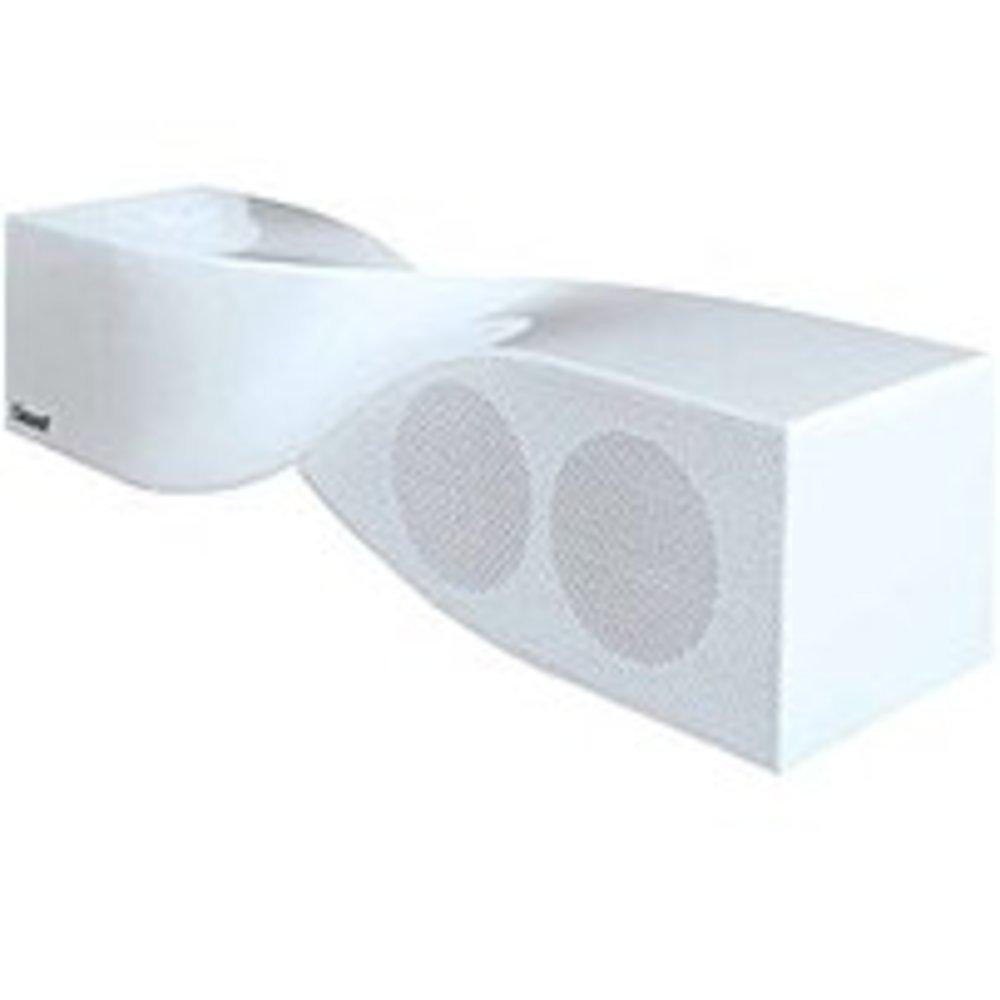
Image: The iSound Twist Portable Bluetooth Wireless Speaker in white, showcasing its unique twisted design.
פּעקל אינהאַלט
- iSound Twist Portable Bluetooth Wireless Speaker
- וסב טשאַרדזשינג קאַבלע
- 3.5mm AUX Input Cable
- באַניצער מאַנואַל (דעם דאָקומענט)
סעטאַפּ
1. טשאַרדזשינג די ספּיקער
Before initial use, fully charge the iSound Twist speaker. Connect the provided USB charging cable to the speaker's USB charging port and the other end to a powered USB source (e.g., computer, USB wall adapter). The charging indicator light will illuminate during charging and turn off when fully charged. A full charge provides up to 5 hours of continuous play.

Image: Rear panel of the speaker, highlighting the USB charging port, ON/OFF switch, and AUX IN port.
2. פּאָווערינג אויף / אויסגעלאשן
Locate the ON/OFF switch on the rear panel of the speaker. Slide the switch to the "ON" position to power on the device. Slide it to the "OFF" position to power off.
3. בלועטאָאָטה פּערינג
- Ensure the speaker is powered on and within close proximity to your Bluetooth-enabled device (e.g., smartphone, tablet, laptop).
- The speaker will automatically enter Bluetooth pairing mode. A blue indicator light will flash, indicating it is discoverable.
- אויף אייער דעווייס, גייט צו די בלועטוט סעטינגס און אקטיוויזירט בלועטוט.
- זוכן פֿאַר available devices. The iSound Twist speaker should appear in the list, typically named "iSound Twist" or similar.
- Select the speaker from the list to initiate pairing. If prompted for a password, enter "0000".
- Once successfully paired, the blue indicator light on the speaker will stop flashing and remain solid. You will hear an audible confirmation.
- Your device is now connected, and you can stream audio wirelessly.
4. AUX Input Connection
For devices without Bluetooth capability, or if you prefer a wired connection, use the provided 3.5mm AUX cable.
- Connect one end of the 3.5mm AUX cable to the AUX IN port on the rear of the speaker.
- Connect the other end of the cable to the headphone jack or audio output port of your audio device.
- The speaker will automatically switch to AUX input mode.
אַפּערייטינג ינסטראַקשאַנז
קאָנטראָל פּאַנעל פאַנגקשאַנז
The speaker features onboard controls located on its top surface for convenient operation.
- מאַכט / מאָדע קנעפּל: Press and hold to power on/off. Short press to switch between Bluetooth and AUX modes.
- שפּיל/פּויזע/רוף קנעפּל: Short press to play or pause music. During an incoming call, short press to answer or end the call. Press and hold to reject an incoming call.
- באַנד אַרויף/נעקסטע ליד קנעפּל: Short press to increase volume. Press and hold to skip to the next track.
- באַנד אַראָפּ/פֿריִערדיקע ליד קנעפּל: Short press to decrease volume. Press and hold to go to the previous track.
הענט-פריי פאַך
When connected via Bluetooth, the iSound Twist speaker's built-in microphone allows for hands-free phone calls.
- ענטפֿערן אַ רוף: When a call comes in, the music will pause. Press the Play/Pause/Call button once to answer.
- ענדיקן אַ רוף: During a call, press the Play/Pause/Call button once to end the call.
- פארווארפן א רוף: Press and hold the Play/Pause/Call button to reject an incoming call.
וישאַלט
- האַלט דעם רעדנער אַוועק פון וואַסער, נעץ און עקסטרעמע טעמפּעראַטורן.
- רייניקט דעם רעדנער מיט אַ ווייכן, טרוקענעם שטאָף. ניצט נישט קיין שרײַבנדיקע רייניגערס אדער סאָלווענטן.
- ויסמיידן דראַפּינג אָדער ונטערטעניק די רעדנער צו שטאַרק ימפּאַקץ.
- ווען נישט אין באַנוץ פֿאַר לענגערע פּעריאָדן, האַלט דעם רעדנער אין אַ קיל, טרוקן אָרט און לאָד עס אויף פּעריאָדיש צו האַלטן די באַטאַריע געזונט.
טראָובלעשאָאָטינג
| פּראָבלעם | לייזונג |
|---|---|
| דער רעדנער גייט נישט אן. | זיכער מאַכן אַז די באַטאַרייע איז אויפגעלאָדן. פֿאַרבינדט דעם רעדנער צו אַ מאַכט מקור מיטן USB קאַבל און פּרוּווט ווידער. |
| קען נישט פארבינדן דורך בלוטוט. |
|
| קיין קלאַנג אָדער נידעריקע וואָלומען. |
|
| די קוואַליטעט פון די רופן איז שלעכט. |
|
ספּעסאַפאַקיישאַנז
| שטריך | דעטאַל |
|---|---|
| מאָדעל נאָמען | ISOUND-1691 |
| סאָרט | iSound |
| רעדנער טיפּ | טורעם |
| ספּעציעלע שטריך | געבויט אין מיקראָפאָן |
| רעקאָממענדעד ניצט | For Smartphones or Tablets, Music Players |
| קאַמפּאַטאַבאַל דעוויסעס | דעסקטאָפּ, לאַפּטאָפּ, MP3 שפּילער, פּראָיעקטאָר, סמאַרטפאָון, טאַבלעט, טעלעוויזיע |
| אַרומרינגלען סאָונד קאַנאַל קאַנפיגיעריישאַן | 2.0 |
| קאָליר | ווייַס |
| פּונקט וואָג | 13.6 אונסעס |
| איז וואָטערפּרוף | פאַלש |
| ווירעלעסס קאָמוניקאַציע טעכנאָלאָגיע | בלועטאָאָטה |
| רעדנער גרייס | 0.75 אינטשעס |
| מאַכט מקור | באַטאַרייע פּאַוערד |
| נומער פון באַטעריז | 1 ליטהיום יאָן באַטעריז פארלאנגט. (אַרייַנגערעכנט) |
| אַודיאָ דרייווער טיפּ | דינאַמיש דרייווער |
| אַודיאָ דרייווער גרייס | 40 מילאַמיטערז |
| פּראָדוקט דימענשאַנז | 5 X 4 X 11.75 אינטשעס |
| רעדנער מאַקסימום רעזולטאַט מאַכט | 6 וואטס |
| קאַנעקטיוויטי טעכנאָלאָגיע | ווירעלעסס |
| אַודיאָ רעזולטאַט מאָדע | סטערעאָ |
| מאַונטינג טיפּ | טאַבלעטאָפּ בארג |
אפיציעלע פּראָדוקט ווידעאָ
Video: Official product video for the iSound Twist Bluetooth Speaker, demonstrating its features and design. This video showcases the speaker's ability to stream audio from various devices and handle calls.
וואָראַנטי און שטיצן
The iSound Twist Portable Bluetooth Wireless Speaker comes with a לימיטעד וואָראַנטי. For specific warranty terms, conditions, and support inquiries, please refer to the warranty card included in your product packaging or visit the official iSound webפּלאַץ.
For further assistance, please contact iSound customer support.