
Selve i-R Receive (29 87 71)
Selve i-R Receive Radio Receiver Instruction Manual
Model: i-R Receive (29 87 71)
1. הקדמה
This manual provides comprehensive instructions for the installation, operation, and maintenance of the Selve i-R Receive radio receiver. Please read this manual carefully before installation and operation to ensure proper function and safety.
The Selve i-R Receive is designed to receive radio signals from Selve radio transmitters operating at 868 MHz, enabling control of connected devices such as roller shutters or awnings.
2. זיכערקייַט אינסטרוקציעס
שטענדיק אָבסערווירן די פאלגענדע זיכערקייַט פּריקאָשאַנז:
- די אינסטאַלאַציע מוז דורכגעפירט ווערן דורך אַ קוואַליפֿיצירטן עלעקטריקער לויט די לאָקאַלע עלעקטרישע קאָודן און רעגולאַציעס.
- אָפּשטעקן די מאַכט איידער איר דורכפירן קיין ינסטאַלירונג, וישאַלט אָדער פּראָבלעם לייזונג.
- דו זאלסט נישט ויסשטעלן די מיטל צו נעץ אָדער עקסטרעם טעמפּעראַטורעס.
- פאַרזיכערן געהעריק גראַונדינג צו פאַרמייַדן עלעקטריקאַל קלאַפּ.
- עפֿנט נישט דעם אַפּאַראַט־געhäuse. עס זענען נישטאָ קיין טיילן אינעווייניק וואָס קענען דורכן באַניצער ווערן גענוצט.
3. פּראָדוקט איבערview
The Selve i-R Receive is a compact radio receiver designed for integration into electrical systems. It features terminals for input and output connections and a programming button.

פיגורע 3.1: פראָנט view of the Selve i-R Receive showing input/output terminals and programming button.

פיגורע 3.2: דערציען view of the Selve i-R Receive indicating the programming button location.

פיגור 3.3: ווינקלדיק view of the Selve i-R Receive, highlighting its compact design.

Figure 3.4: The Selve i-R Receive unit alongside its packaging.

פיגורע 3.5: דנאָ view of the Selve i-R Receive, showing the "PROG" label and button.
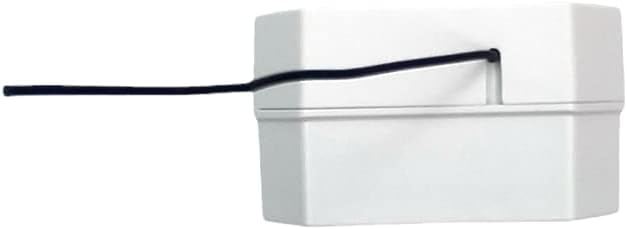
פיגורע 3.6: זייַט view of the Selve i-R Receive, illustrating the antenna cable exit point.

Figure 3.7: Functional example diagram showing the Selve i-R Receive connected to a roller shutter and controlled by an i-R Transmit unit.
4. טעכניש ספּעסאַפאַקיישאַנז
| שטריך | דעטאַל |
|---|---|
| מאָדעל | i-R Receive (Artikel-Nr.: 29 87 71) |
| אַפּערייטינג אָפטקייַט | 868 מהז |
| אַרייַנשרייַב וואָלtage | 230 וו 50 הז |
| Output Current/Voltage | Max. 3 A / 230V |
| שוץ קלאַס | IP 20 |
| ASIN | B007E5L328 |
| Manufacturer Reference | YUNHAI |
5. סעטאַפּ און ייַנמאָנטירונג
וויכטיק: Installation must be carried out by a qualified electrician. Disconnect the main power supply before beginning installation.
5.1 וויירינג קאַנעקשאַנז
Refer to the wiring diagram on the device and in Figure 3.7 for correct connections. The terminals are typically labeled as follows:
- אין: Power input (L - Live, N - Neutral).
- אויס: Output to the motor/device (e.g., for roller shutters: Up, Down, Neutral).
- ענשור אַז אַלע קאַנעקשאַנז זענען זיכער און רעכט ינסאַלייטיד.
5.2 מאַונטינג
The i-R Receive is designed for flush-mounted installation behind a switch or in a junction box. Ensure adequate space for ventilation and wiring.
5.3 אַנטענע פּלאַצירונג
The integrated antenna should be positioned freely and not be coiled or placed near large metal objects, which could interfere with signal reception.
6. אַפּערייטינג ינסטרוקטיאָנס
6.1 Pairing with a Transmitter
To control the i-R Receive, it must first be paired with a compatible Selve radio transmitter (e.g., Selve i-R Transmit). The programming button is located on the back of the unit (see Figure 3.2 and 3.5).
- Ensure the i-R Receive is powered on.
- Press the programming button on the i-R Receive briefly (approx. 1 second). The connected device may briefly react (e.g., a short movement of a roller shutter) to indicate it is in pairing mode.
- Within approximately 10 seconds, press the desired "UP" or "DOWN" button on your Selve radio transmitter.
- The connected device should react again, confirming successful pairing.
- Repeat for additional transmitters if desired.
6.2 יקערדיק אָפּעראַציע
Once paired, the i-R Receive will respond to commands from the linked Selve radio transmitter:
- Pressing the "UP" button on the transmitter will activate the 'Up' output.
- Pressing the "DOWN" button on the transmitter will activate the 'Down' output.
- A "STOP" or middle button (if available on the transmitter) will halt the current movement.
7. וישאַלט
The Selve i-R Receive is designed for maintenance-free operation. No regular maintenance is required.
- רייניקונג: If necessary, gently wipe the exterior with a dry, soft cloth. Do not use liquid cleaners or solvents.
- דורכקוק: Periodically check wiring connections for looseness or damage. Ensure the device is not exposed to excessive heat or moisture.
Do not attempt to open or repair the device. Refer to qualified personnel for any issues beyond basic operation.
8. טראָובלעשאָאָטינג
| פּראָבלעם | מעגלעך סיבה | לייזונג |
|---|---|---|
| Device does not respond to transmitter. | Not paired, transmitter battery low, out of range, power supply issue. |
|
| ינטערמיטאַנט אָפּעראַציע. | Radio interference, antenna obstruction, loose wiring. |
|
| די מיטל טוט נישט מאַכט אויף. | No power supply, incorrect wiring, faulty unit. |
|
9. וואָראַנטי און שטיצן
Selve products are manufactured to high quality standards. For warranty information, please refer to the terms and conditions provided at the point of purchase or visit the official Selve webפּלאַץ.
For technical support or service inquiries, please contact your authorized Selve dealer or the Selve customer service department. When contacting support, please have your product model (i-R Receive, 29 87 71) and ASIN (B007E5L328) ready.
Selve GmbH & Co. KG
Werdohler Landstraße 286
58513 לודענשייד
דייטשלאנד
Note: Contact details are for informational purposes and may vary. Please refer to the official Selve webזייטל פֿאַר די מערסט אַקטועלע קאָנטאַקט אינפֿאָרמאַציע.
10. באַזייַטיקונג
Do not dispose of electrical devices with household waste. In accordance with the European Directive on Waste Electrical and Electronic Equipment (WEEE), electrical and electronic equipment must be collected separately and recycled in an environmentally sound manner. Contact your local authorities for information regarding proper disposal and recycling facilities.
Ask a question about this manual
Ask about setup, troubleshooting, compatibility, parts, safety, or missing instructions. Manuals+ will review the question and use this page’s manual context to help answer it.