
הקדמה
די סעלעסטראָן פּענטאַView LCD Digital Microscope is a versatile biological microscope designed for educational, laboratory, and hobbyist use. It features a 4.3-inch full-color LCD screen, a 5MP digital camera, and offers magnification up to 2400x. This manual provides essential information for setting up, operating, and maintaining your microscope.

Image: The Celestron PentaView LCD Digital Microscope, a comprehensive tool for microscopic observation.
פּעקל אינהאַלט
באַשטעטיקט אַז אַלע זאכן וואָס זענען אויסגערעכנט אונטן זענען פאַראַן אין אייער פּעקל:
- Celestron PentaView לקד דיגיטאַל מיקראָסקאָפּ
- 8 גיגאבייט סד קאָרט
- USB 2.0 Cable (for data transfer)
- 10 צוגעגרייט סליידז
- 4-plug, multi-country AC Adapter
- שטויב קאָווער
- קעריינג קאַסע
- ריר פּען
- AV Cable (for TV output)

Image: All components included with the Celestron PentaView LCD Digital Microscope, neatly arranged.
פּראָדוקט קאַמפּאָונאַנץ
Familiarize yourself with the various parts of your microscope:
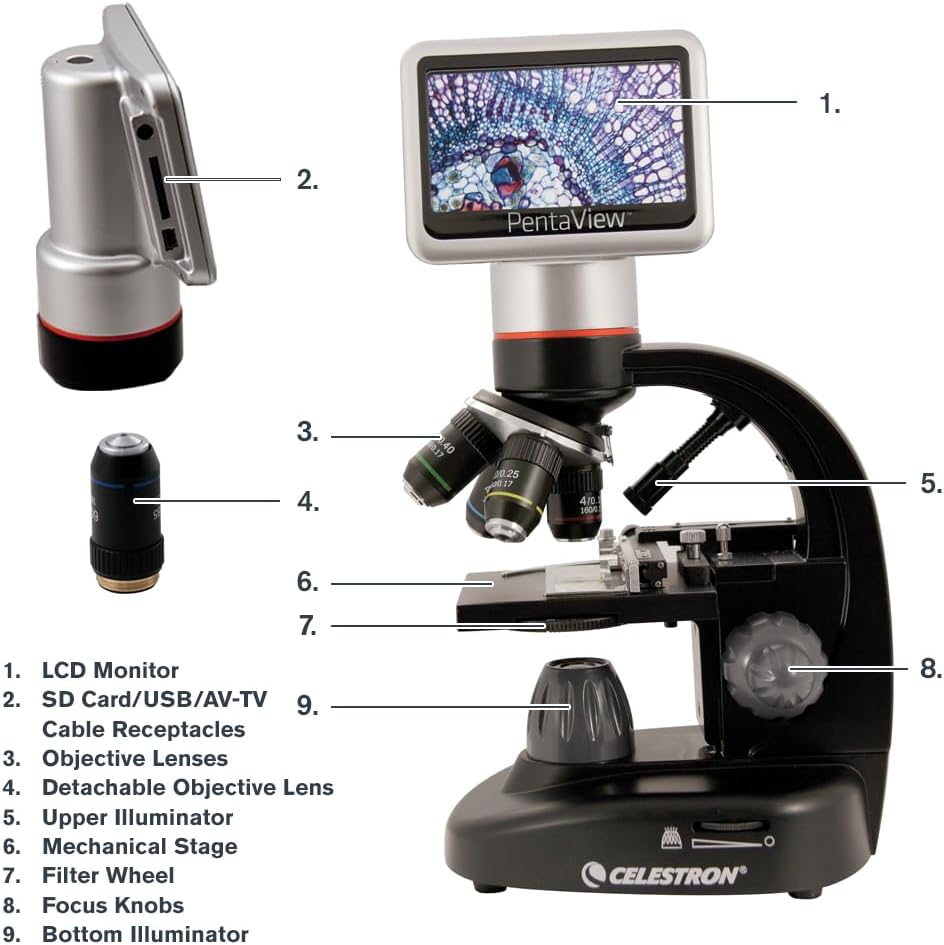
Image: A detailed diagram labeling the key components of the PentaView LCD Digital Microscope for easy identification.
- LCD מאָניטאָר: 4.3-inch full-color screen for viewing specimens.
- SD Card/USB/AV-TV Cable Receptacles: Ports for memory card, USB connection, and AV output.
- אָביעקטיוו לענסעס: Rotating turret with 4x, 10x, 20x, 40x lenses.
- Detachable Objective Lens: A separate 60x objective lens for higher magnification.
- Upper Illuminator: Top LED light source for opaque specimens.
- מעטשאַניקאַל שtage: Adjustable platform for precise slide positioning.
- Filter Wheel: 6-position wheel with color and aperture filters to enhance contrast.
- פאָקוס קנעפּלעך: Coarse and fine adjustment knobs for sharp imaging.
- Bottom Illuminator: Adjustable LED light source beneath the stage for translucent specimens.
שליסל פֿעיִקייטן
- 4.3" LCD Screen with 180° Rotating Head: Allows for comfortable viewארויפלייגן און טיילן פון אבזערוואציעס.
- 5MP Digital Camera with Video Recording: Captures high-resolution still images and 20 fps video directly to an SD card.
- Magnification up to 2400x: Optical magnification up to 600x with 4x digital zoom for a total of 2400x.
- Adjustable Mechanical Stage with Illumination: Provides precise control over slide movement and optimal lighting.
- צווייענדיק מאַכט אָפּציעס: Operates with the included AC adapter or 4 AA batteries (not included) for portability.
- טעלעוויזיע רעזולטאַט: Connects to a TV or monitor via AV output for large-scale viewing.
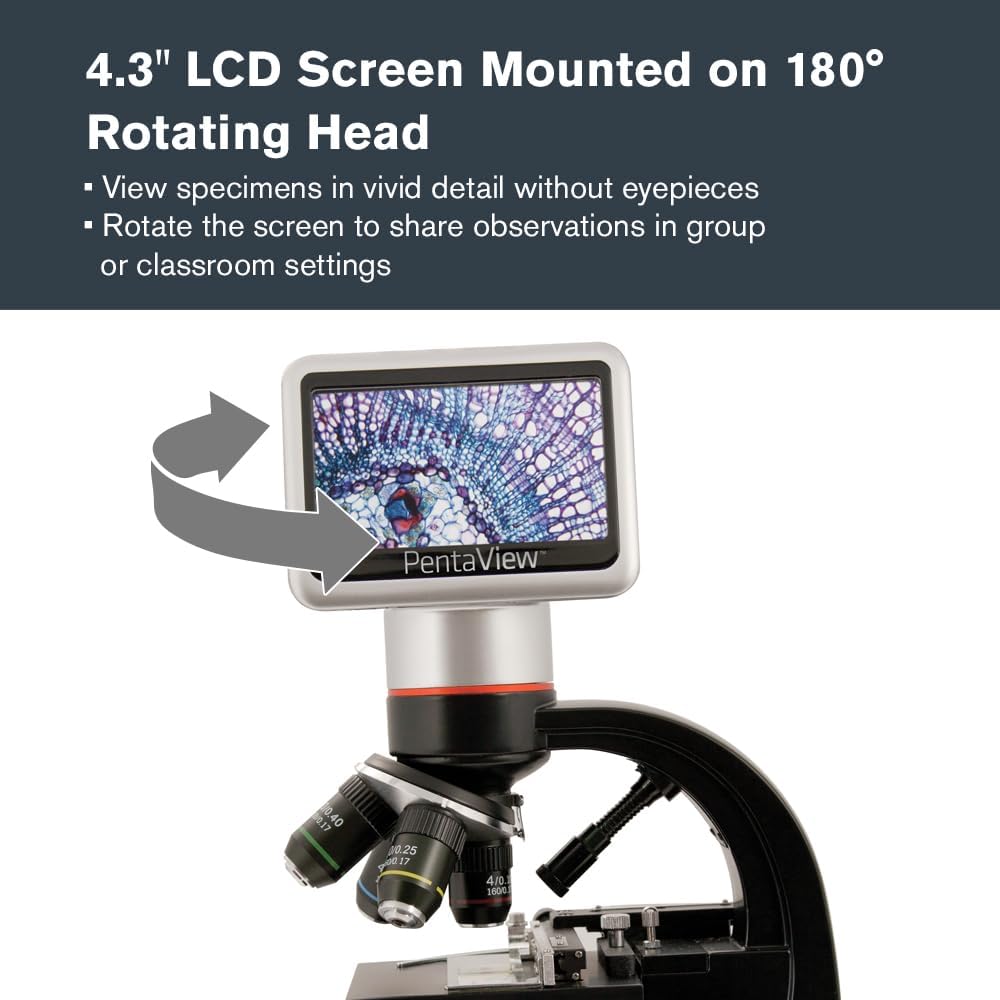
Image: The microscope's LCD screen rotated to demonstrate its flexibility for group viewing.
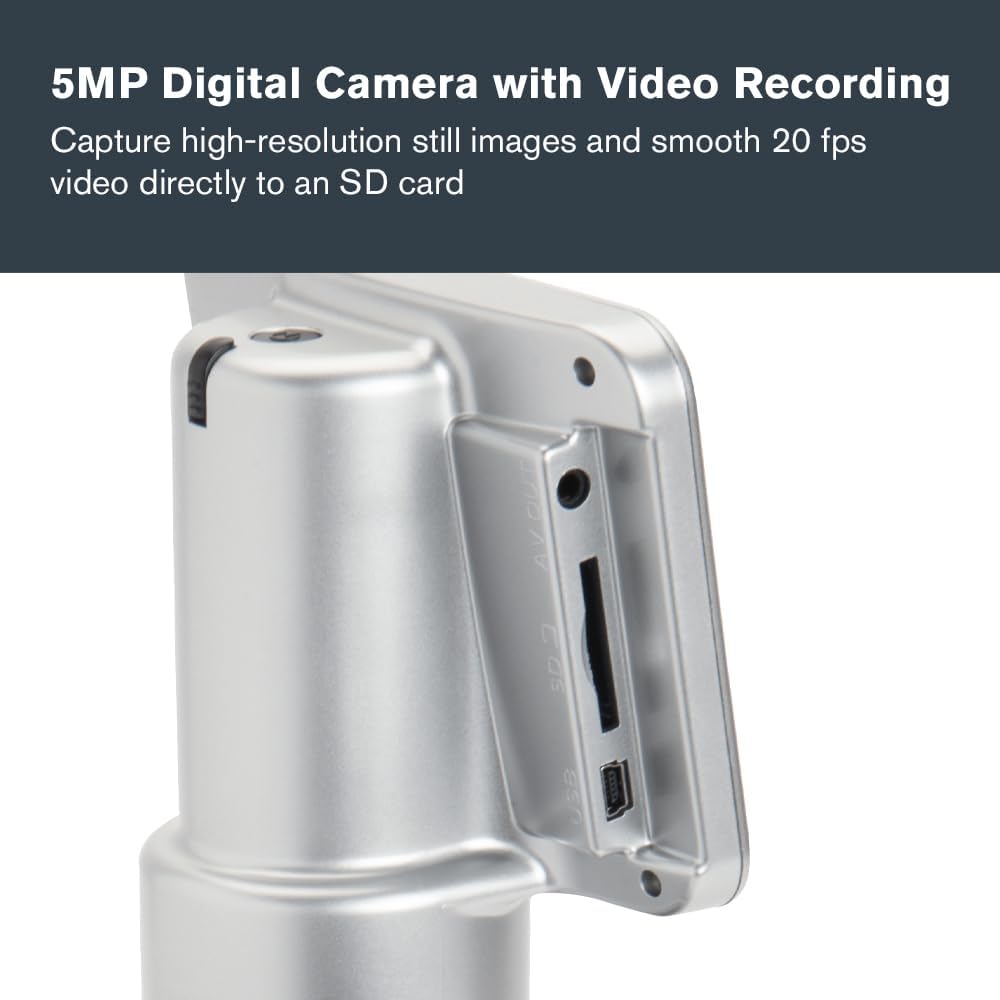
בילד: א נאָענטע בילד view of the microscope's side panel, highlighting the SD card slot and other connectivity ports.

בילד: א דעטאַלירטע view of the microscope's objective lenses, indicating the various magnification options.

Image: The mechanical stage and focus knobs of the microscope, designed for precise specimen manipulation.

Image: The microscope connected to its AC power adapter, demonstrating one of its power options.

Image: The microscope displaying a specimen on an external television screen via its AV output.
סעטאַפּ
Powering the Microscope
- AC מאַכט: Connect the included AC adapter to the microscope's power input and plug it into a wall outlet.
- באַטאַרייע מאַכט: For portable use, insert 4 AA batteries (not included) into the battery compartment located at the base of the microscope.
ינסערטינג די סד קאָרט
Locate the SD card slot on the side of the LCD monitor. Insert the included 8GB SD card until it clicks into place. This card is used for saving images and videos.
Placing a Specimen Slide
- Gently open the stage clips on the mechanical stage.
- Place a prepared slide (or your own specimen slide) under the clips, ensuring the specimen is centered over the aperture.
- מעלדונג די stage clips to secure the slide.
אָפּעראַציע
קערן אויף / אַוועק
Press and hold the power button located on the microscope's base until the LCD screen illuminates (or turns off).
אַדזשאַסטינג מאַגניפיקאַטיאָן
- Rotate the objective lens turret to select the desired magnification (4x, 10x, 20x, or 40x).
- For 60x magnification, attach the detachable 60x objective lens.
- Use the digital zoom function on the LCD screen (up to 4x) to achieve higher magnifications, up to 2400x total.
פאָקוסינג די בילד
- Use the coarse focus knob for initial, large adjustments to bring the specimen into approximate focus.
- Then, use the fine focus knob for precise adjustments to achieve a sharp, clear image.
Adjusting Illumination and Filters
- Bottom LED Illuminator: Adjust the brightness using the control dial for translucent specimens.
- Upper Illuminator: Turn on the top LED for opaque specimens.
- Filter Wheel: Rotate the 6-position filter wheel to select different color or aperture filters to enhance contrast and control light intensity for various specimens.
קאַפּטשערינג בילדער און ווידיאס
Use the controls on the LCD monitor to capture still images or record videos. Saved files are stored directly on the inserted SD card.
קאַנעקטינג צו אַ פונדרויסנדיק ווייַז
Use the included AV cable to connect the microscope to a television or monitor for larger-scale viewing. Ensure the external display is set to the correct input source (e.g., AV, Video 1).
וישאַלט
- רייניקונג לענסעס: ניצט אַ ווייכע, לינט-פֿרייע שטאָף ספּעציעל דיזיינד פֿאַר אָפּטישע סערפאַסיז. פֿאַרמייַדט שטרענגע כעמיקאַלן.
- אַלגעמיינע רייניקונג: ווישט דעם מיקראָסקאָפּ קערפּער מיט אַ ווייכן, טרוקענעם שטאָף.amp שטאָף. דו זאלסט נישט נוצן אַברייסיוו קלינערז.
- סטאָרידזש: When not in use, cover the microscope with the provided dust cover and store it in its carrying case in a dry, clean environment.
- באַטערי פאַרבייַט: Replace AA batteries when the low battery indicator appears on the LCD screen or when performance diminishes.
טראָובלעשאָאָטינג
| פּראָבלעם | מעגלעך סיבה | לייזונג |
|---|---|---|
| No image on LCD screen | Microscope not powered on; insufficient illumination; objective lens not properly aligned. | Ensure power is connected or batteries are installed. Turn on illuminators and adjust brightness. Rotate objective turret until it clicks into place. |
| די בילד איז בלערי | Incorrect focus; objective lens dirty; slide not flat. | Adjust coarse and fine focus knobs. Clean objective lenses. Ensure slide is properly seated on the stage. |
| קען נישט ראַטעווען בילדער/ווידעאָס | SD card full or not inserted correctly; SD card corrupted. | Check SD card insertion. Delete unnecessary files or use a new SD card. Format the SD card if necessary (this will erase all data). |
| No image on external TV | AV cable not connected properly; TV input not selected correctly. | Ensure AV cable is securely connected to both microscope and TV. Select the correct AV input on your television. |
ספּעסאַפאַקיישאַנז
| שטריך | דעטאַל |
|---|---|
| מאָדעל נאָמען | פּענטאַView לקד דיגיטאַל מיקראָסקאָפּ |
| נומער מאָדעל נומער | 44348 |
| מאַגנאַפאַקיישאַן קייט | 40x - 2400x (Optical up to 600x, Digital up to 4x) |
| אַפּאַראַט האַכלאָטע | 5MP (Still Images), 20 fps (Video) |
| לקד סקרין | 4.3 inch, 180 Degrees Rotating |
| אָביעקטיוו לענסעס | 4x, 10x, 20x, 40x, Detachable 60x |
| Illumination | Adjustable Bottom LED, Upper LED |
| פילטער וויל | 6-position (Color and Aperture Filters) |
| סטאָרידזש | SD קאַרטל (8 גיגאבייט אַרייַנגערעכנט) |
| קאַנעקטיוויטי | USB 2.0, AV Output |
| מאַכט מקור | AC Adapter (included), 4 AA Batteries (not included) |
| פּראָדוקט דימענשאַנז | 7 X 5.5 X 13 אינטשעס (17.8 X 14 X 33 סענטימעטער) |
| פּונקט וואָג | 4.18 פונט (1.9 קג) |
| מאַטעריאַל | לקד דעסקטאָפּ |
| קאָליר | שוואַרץ |
וואָראַנטי און שטיצן
Celestron provides a 2-Year US Warranty for this product. For technical assistance or warranty claims, please contact Celestron customer support. Detailed contact information can be found on the official Celestron webזייטל אדער אין דער וואָראַנטי קאַרטל וואָס איז אַרייַנגערעכנט מיט אייער פּראָדוקט.
פֿאַר נאָך רעסורסן און אָפֿט געשטעלטע פֿראַגעס, באַזוכט די סעלעסטראָן webפּלאַץ.