
הקדמה
This manual provides essential information for the proper installation, operation, and maintenance of your Russound DMS-3.1 Network Player Digital Media Streamer. The DMS-3.1 is designed to integrate internet audio into your Russound MCA system, offering enhanced performance and access to various streaming services. Please read this manual thoroughly before using the device to ensure optimal performance and longevity.
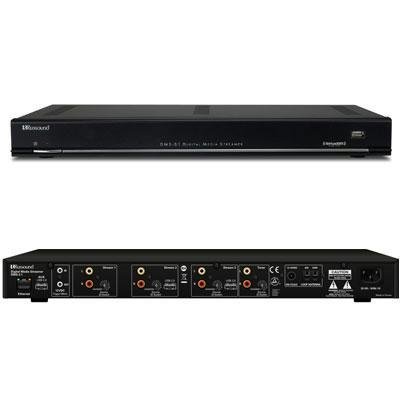
פיגורע 1: פראָנט view of the Russound DMS-3.1 Network Player Digital Media Streamer. This image displays the compact design of the unit, typically featuring indicator lights and possibly a power button on the front panel.
סעטאַפּ
1. ונפּאַקקינג
- Carefully remove the DMS-3.1 unit and all accessories from the packaging.
- Verify that all components are present: DMS-3.1 unit, power adapter, and this instruction manual.
- האַלט די פּאַקאַדזשינג פֿאַר צוקונפֿטיק טראַנספּאָרט אָדער סטאָרידזש.
2. קאַנעקטינג צו מאַכט
- Connect the provided power adapter to the DC input port on the rear of the DMS-3.1.
- צאַפּן די מאַכט אַדאַפּטער אין אַ נאָרמאַל עלעקטריקאַל ווענטיל.
- The unit will power on automatically or may require a press of the power button if present.
3. נעץ קאַנעקשאַן
- For optimal performance, connect the DMS-3.1 to your local network using an Ethernet cable (RJ45) from the unit's LAN port to your router or network switch.
- While some functionality may support Wi-Fi, a wired connection is recommended for stable streaming.
4. Audio/Video Connections
- הדמי: Connect an HDMI cable from the DMS-3.1 HDMI output to an available HDMI input on your television or AV receiver.
- וסב: The USB port can be used for connecting external storage devices for local media playback or for firmware updates.
- אַנאַלאָג אַודיאָ: Connect the analog audio outputs (if available) to your Russound MCA system or other audio amplifier using appropriate RCA cables.
5. Initial Configuration and Firmware Update
- After connecting, power on all connected devices.
- Access the DMS-3.1's web interface or dedicated control app (e.g., Russound App) from a compatible device (laptop, tablet, smartphone) connected to the same network.
- Follow the on-screen instructions for initial network setup and configuration.
- It is highly recommended to check for and install the latest firmware updates to ensure access to all features and performance improvements. Firmware updates can often be initiated through the web interface or app, or by downloading from the Russound support website and installing via USB.
אַפּערייטינג ינסטראַקשאַנז
1. Controlling the DMS-3.1
- The primary method of control is through the dedicated Russound control app, available for compatible tablets and smartphones.
- The unit can also be integrated and controlled via Russound MDK C5 keypads or other compatible Russound control systems.
- Ensure your control device is connected to the same network as the DMS-3.1.
2. Streaming Media
- אינטערנעט ראַדיאָ: Access a wide variety of internet radio stations through the control app.
- מוזיק באַדינונגס: Integrate and stream from popular music services such as Pandora and Sirius XM (subscription may be required).
- AirPlay: Utilize AirPlay functionality to stream audio directly from Apple devices. Note that AirPlay performance can be affected by network conditions.
- לאקאלע מעדיע: שפּיל אַודיאָ files from USB-connected storage devices.
3. Multi-Zone Audio
When integrated with a Russound MCA system, the DMS-3.1 can provide multiple independent audio streams to different zones. Consult your MCA system manual for details on configuring and managing multi-zone audio.
וישאַלט
1. רייניקונג
- זיכער מאַכן אַז די אַפּאַראַט איז אויסגעלאָשן און אַרויסגעטראָגן פֿון דער פּלאַטע איידער איר רייניקט.
- ניצט אַ ווייכן, טרוקענעם שטאָף צו ווישן די אויסערלעכע ייבערפלאַכן.
- ניצט נישט פליסיקע רייניגער, אַעראָסאָלן, אדער אַברייסיוו מאַטעריאַלן, ווײַל די קענען שעדיקן די ענדיקונג אדער אינעווייניקסטע קאָמפּאָנענטן.
2. פירמוואַרע דערהייַנטיקונגען
- Periodically check the Russound support webפּלאַץ פֿאַר נייַע פירמוואַרע ווערסיעס.
- Firmware updates can improve performance, add new features, and resolve known issues.
- Follow the specific instructions provided with each firmware update package.
טראָובלעשאָאָטינג
| פּראָבלעם | מעגלעך סיבה | לייזונג |
|---|---|---|
| קיין מאַכט | Power cable disconnected; outlet not active. | זיכער מאַכן אַז דער עלעקטרישער קאַבל איז זיכער פֿאַרבונדן. פּרוביר די אַוטלעט מיט אַן אַנדער מיטל. |
| קיין אַודיאָ רעזולטאַט | Incorrect audio connections; volume too low; input selection on receiver incorrect. | Verify all audio cables are correctly connected. Increase volume. Select the correct input on your audio system. |
| Streaming interruptions or buffering | Weak network connection; router issues; internet service provider (ISP) problems. |
|
| AirPlay is sporadic or not working | Wi-Fi interference; network congestion; outdated firmware. |
|
| Control app not connecting to DMS-3.1 | Control device not on same network; network issues; DMS-3.1 not powered on. | Ensure both devices are connected to the same local network. Restart the app and the DMS-3.1. Check network cables. |
ספּעסאַפאַקיישאַנז
| סאָרט | רוסאָונד |
| מאָדעל נומער | 2450-533419 |
| פאַבריקאַנט | רוסאָונד |
| קאַמפּאַטאַבאַל דעוויסעס | Television, Laptop, Desktop, Tablet, Smartphone |
| קאַנעקטער טיפּ | HDMI, USB, RJ45 |
| קאָליר | רויט |
| טונער טעכנאָלאָגיע | דיגיטאַל |
| טונער טיפּ | דיגיטאַל |
| Analog Video Format | NTSC |
| כולל רימאָוט | ניין |
| פּונקט וואָג | 9.85 פונט |
| UPC | 013040003092, 612934533419 |
| ASIN | B007BS01ZS |
| GTIN | 013040003092, 612934533419 |
וואָראַנטי און שטיצן
וואָראַנטי אינפֿאָרמאַציע
The Russound DMS-3.1 Network Player Digital Media Streamer comes with a 30-טאָג לימיטעד וואָראַנטי. This warranty covers defects in materials and workmanship under normal use. Please retain your proof of purchase for warranty claims. For specific terms and conditions, refer to the warranty card included with your product or visit the official Russound webפּלאַץ.
קונה שטיצן
For technical assistance, troubleshooting beyond this manual, or warranty service, please contact Russound customer support.
- אָנליין שטיצן: Visit the official Russound webזייטל פֿאַר אָפֿט געשטעלטע פֿראַגעס, שטיצע דאָקומענטן און קאָנטאַקט פֿאָרמען.
- טעלעפאָן שטיצן: Refer to the Russound website for regional contact numbers and operating hours.
- When contacting support, please have your model number (2450-533419) and purchase date available.