
הקדמה
This manual provides essential instructions for the setup, operation, maintenance, and troubleshooting of your Insignia 6.1-Channel 600W Digital Home Theater Receiver, model IS-HC040917. Please read this manual thoroughly before using the receiver to ensure proper and safe operation.
וויכטיק סאַפעטי אינסטרוקציעס
- בלאָקירט נישט קיין ווענטילאַציע עפענונגען. אינסטאַלירט לויט די אינסטרוקציעס פונעם פאַבריקאַנט.
- דו זאלסט נישט ינסטאַלירן לעבן קיין היץ קוואלן אַזאַ ווי ראַדיאַטאָרס, היץ רעדזשיסטערז, סטאָוווז אָדער אנדערע אַפּאַראַט (אַרייַנגערעכנט ampליפיערס) וואָס פּראָדוצירן היץ.
- באַשיצן די מאַכט שנור פון גיין אויף אָדער פּינטשט, ספּעציעל אין די פּלאַגז, קאַנוויניאַנס רעסאַפּיז און די פונט ווו זיי אַרויסגיין פון די אַפּאַראַט.
- נאָר נוצן אַטאַטשמאַנץ / אַקסעסעריז ספּעסיפיעד דורך דער פאַבריקאַנט.
- אָפּשטויסן דעם אַפּאַראַט בעשאַס בליץ סטאָרמז אָדער ווען אַניוזד פֿאַר לאַנג פּיריאַדז.
- קאָנטאַקט אַלע קוואַלאַפייד סערוויס פּערסאַנעל. סערוויסינג איז פארלאנגט אויב די אַפּאַראַט איז דאַמידזשד אין קיין וועג.
סעטאַפּ גייד
1. ונפּאַקקינג
Carefully remove the receiver and all accessories from the packaging. Ensure all components are present:
- Insignia IS-HC040917 Receiver
- ווייַט קאָנטראָל
- AM שלייף אַנטענע
- FM דראָט אַנטענע
- באַניצער מאַנואַל (דעם דאָקומענט)
2. פֿאַרבינדן רעדנערס
The IS-HC040917 receiver supports a 6.1-channel speaker configuration. Connect your speakers to the corresponding terminals on the rear panel. Ensure correct polarity (+ to + and - to -) for each speaker.
- Front Left/Right: פֿאַר הויפּט סטערעאָ געזונט.
- צענטער: For dialogue.
- Surround Left/Right: For ambient sound effects.
- אַרומרינגלען צוריק: For additional rear channel effects in 6.1 setups.
- Subwoofer (Pre-out): Connect to a powered subwoofer's LFE input.
Note: The receiver is designed for speakers with an impedance of 8 ohms.
3. פֿאַרבינדן אַודיאָ/ווידעאָ קוועלער
Connect your external devices (e.g., DVD player, Blu-ray player, game console, cable box) to the appropriate input jacks on the receiver.
- הדמי: Use HDMI cables for high-definition audio and video signals. The receiver has 3 HDMI input ports.
- דיגיטאַל אַודיאָ (אָפּטיש/קאָאַקסיאַל): For digital audio from devices like CD players or set-top boxes.
- אנאַלאָג אַודיאָ (RCA): For standard stereo audio connections from devices like VCRs or older CD players.
- S- ווידעא: For video signals from compatible devices.
4. אַנטענע קאַנעקשאַן
Connect the supplied AM loop antenna and FM wire antenna to their respective terminals on the rear panel for radio reception.
5. מאַכט קאַנעקשאַן
Once all audio/video and speaker connections are made, plug the receiver's power cord into a standard AC wall outlet.
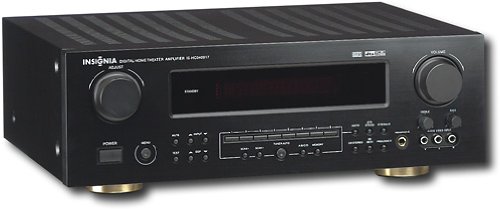
בילד: Rear panel of the Insignia IS-HC040917 receiver, showing various input and output connections for speakers, audio/video sources (HDMI, RCA, S-Video, Digital), and antenna terminals. This diagram is crucial for correctly wiring the home theater system.
אַפּערייטינג ינסטראַקשאַנז
1. מאַכט אויף / אויסגעלאשן
דרוק די מאַכט קנעפּל אויף דער פראָנט פּאַנעל אָדער די ווייַט קאָנטראָל צו דרייען דעם ופנעמער אויף אָדער אויס.
2. ינפּוט סעלעקציע
ניצן די INPUT סעלעקטאָר knob/buttons on the front panel or the remote control to choose the desired audio/video source (e.g., HDMI 1, DVD, CD, Tuner).
3. באַנד קאָנטראָל
אַדזשאַסטירן די הויפּט באַנד מיט די גרויסע קנעפּלעך באַנד קנעפּל אויף דער פראָנט פּאַנעל אָדער די באַנד +/- קנעפּלעך אויף די ווייַט קאָנטראָל.
4. אַודיאָ מאָדעס
The receiver supports various audio modes, including 6.1-channel surround sound. Use the מאָדע or דספּ buttons on the remote to cycle through available sound modes (e.g., Stereo, Dolby Digital, DTS, Pro Logic).
5. Tuner Operation (AM/FM Radio)
Select the "Tuner" input. Use the BAND button to switch between AM and FM. Use the טונע +/- buttons to manually tune to stations or פאָרגעשטעלט +/- to select stored stations. Refer to the remote control for specific tuner functions.
וישאַלט
1. רייניקונג
Wipe the exterior of the receiver with a soft, dry cloth. Do not use liquid cleaners or aerosol sprays, as they may damage the finish or internal components. Ensure the unit is unplugged before cleaning.
2. ווענטילאַטיאָן
Ensure that the ventilation openings on the top and sides of the receiver are not blocked. Proper airflow is essential to prevent overheating and ensure long-term performance.
3. קאַבלע מאַנאַגעמענט
Periodically check all cable connections to ensure they are secure. Loose connections can lead to poor audio or video quality.
טראָובלעשאָאָטינג
| פּראָבלעם | מעגלעך סיבה | לייזונג |
|---|---|---|
| קיין מאַכט | Power cord unplugged; power outlet not active. | קאָנטראָלירט די פֿאַרבינדונג פֿון דער עלעקטרישער שנור; פּרוּווט אַן אַנדער אַוטלעט. |
| קיין געזונט | אומרעכטע אריינגאבע אויסגעקליבן; רעדנער דראטן פריי; קול צו נידעריג; שטום אקטיווירט. | Select correct input; check speaker connections; increase volume; deactivate mute. |
| קיין ווידעא | Incorrect input selected; video cables loose or incorrect. | Select correct input; check video cable connections (HDMI, S-Video, RCA). |
| ווייַט קאָנטראָל נישט ארבעטן | באַטעריעס אויסגעשעפּט; פֿאַרשטאָפּונג צווישן ווײַטקאָנטראָל און ריסיווער; אומרעכט ווײַטקאָנטראָל מאָדע. | Replace batteries; remove obstructions; ensure remote is in the correct operating mode. |
ספּעסאַפאַקיישאַנז
- מאָדעל: IS-HC040917
- סאָרט: ינסיגניאַ
- רעזולטאַט מאַכט: 600 וואטס
- נומער פון טשאַנאַלז: 6.1 קאַנאַל
- אַודיאָ רעזולטאַט מאָדע: אַרומרינגלען
- גאַנץ HDMI פּאָרץ: 3
- טייפּס פון קאַנעקטער: 3.5mm Jack, HDMI, RCA, USB
- קאַמפּאַטאַבאַל דעוויסעס: רעדנער
- קאָנטראָל אופֿן: ווייַט
- קאָליר: שוואַרץ
- UPC: 799530659962
- ASIN: B0075C3DN2
וואָראַנטי און שטיצן
For warranty information and customer support, please refer to the warranty card included with your product or visit the official Insignia webפּלאַץ. האַלטן דיין קויפן קאַבאָלע פֿאַר וואָראַנטי קליימז.
For further assistance, you may contact Insignia customer service. Contact details are typically available on the manufacturer's webפּלאַץ אָדער אין די פּראָדוקט פּאַקקאַגינג.