
1. הקדמה
This manual provides essential information for the safe and efficient installation, operation, and maintenance of your Antec MT-352 Micro ATX Power Supply. Please read this manual thoroughly before installation and retain it for future reference. The Antec MT-352 is a 350W Micro ATX power supply designed for personal computer systems, offering 88% efficiency and compatibility with 110V AC and 220V AC input voltages.
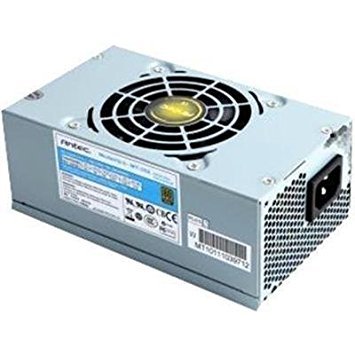
Figure 1: Antec MT-352 Micro ATX Power Supply unit.
2. זיכערקייַט אינפֿאָרמאַציע
שטענדיק אָבסערווירן די פאלגענדע זיכערהייט מיטלען צו פאַרמייַדן שאָדן און שעדיקן צו דיין ויסריכט:
- עלעקטריקאַל סכנה: עפֿנט נישט די מאַכט-צושטעל אַפּאַראַט. הויך וואָלומעןtages are present inside, even when the system is turned off and unplugged. There are no user-serviceable parts inside.
- מאַכט דיסקאַנעקשאַן: Always disconnect the power cord from the wall outlet before installing, removing, or servicing the power supply or any other system components.
- געהעריק גראָונדינג: Ensure your system is properly grounded. Use only the power cord provided with the unit or a suitable replacement that meets local safety standards.
- ווענטילאַטיאָן: זיכערט זיך אז עס איז דא גענוג לופט-פלוס ארום דער מאכט-צושטעל. בלאקירט נישט די ווענטילאציע עפענונגען.
- Moisture and Temperature: Do not operate the power supply in high humidity environments or near water. Avoid extreme temperatures.
- אָווערלאָאַדינג: Do not overload the power supply beyond its specified wattage.
3. פּעקל אינהאַלט
Verify that all items are present in your Antec MT-352 package:
- Antec MT-352 Micro ATX Power Supply Unit
- אַק מאַכט שנור
- מאַונטינג סקרוז
- באַניצער מאַנואַל (דעם דאָקומענט)
4. סעטאַפּ און ייַנמאָנטירונג
Follow these steps carefully to install your Antec MT-352 power supply:
- צוגרייטונג: Turn off your computer and disconnect the power cord from the wall outlet. Open your computer case. If replacing an existing power supply, disconnect all cables from the old PSU and remove it.
- מאָנטירן די פּסו: Carefully slide the Antec MT-352 into the power supply bay of your Micro ATX case. Ensure the fan faces the correct direction for optimal airflow (typically facing downwards or towards the rear vent, depending on case design). Secure the power supply to the case using the provided mounting screws. (An image showing the PSU being mounted into a case would be helpful here.)
- פֿאַרבינדן די מוטערבאָרד:
- 20+4 Pin ATX Connector: Connect the main 20+4 pin ATX power connector to the corresponding socket on your motherboard. Ensure both parts of the connector are securely latched. (An image illustrating the 20+4 pin ATX connector connection would be helpful here.)
- 4-Pin ATX 12V (CPU) Connector: Connect the 4-pin ATX 12V connector to the CPU power socket on your motherboard. This is usually located near the CPU socket. (An image showing the 4-pin ATX 12V connector connection would be helpful here.)
- קאַנעקטינג פּעריפעראַלס: Connect the SATA power connectors to your hard drives, SSDs, and optical drives. Use the 4-pin Molex connectors for older peripherals or case fans if needed. Ensure all connections are firm. (An image demonstrating SATA and Molex connections would be helpful here.)
- קאַבלע פאַרוואַלטונג: Route cables neatly to improve airflow and aesthetics. Use cable ties if necessary.
- לעצט טשעקס: טשעק נאכאמאל אלע פארבינדונגען צו זיכער מאכן אז זיי זענען זיכער. פארמאכט אייער קאמפיוטער קעסטל.
5. אָפּעראַציע
After successful installation, follow these steps to operate your system:
- פאַרבינדן מאַכט: Plug the AC power cord into the power supply's AC inlet and then into a grounded wall outlet.
- מאַכט אויף: Press the power button on your computer case. The system should boot up normally.
- מאַכט אַוועק: To turn off your system, use the operating system's shutdown procedure. For a hard shutdown, press and hold the power button on your case for several seconds. Always ensure the system is fully shut down before disconnecting the power cord.
6. וישאַלט
געהעריגע אויפהאלטונג גאראנטירט די לאנגעוויטי און אפטימאלע פערפארמאנס פון אייער מאכט צושטעל:
- באַזייַטיקונג פון שטויב: Periodically clean the power supply's fan and vents to prevent dust buildup, which can impede airflow and cause overheating. Use compressed air to gently blow dust out of the unit. Ensure the system is powered off and unplugged before cleaning.
- לופט לויפן: Ensure that your computer case has good airflow. Avoid placing the computer in enclosed spaces that restrict ventilation.
- קאַבלע פאַרוואַלטונג: Maintain tidy cable routing to prevent obstruction of airflow within the case.
7. טראָובלעשאָאָטינג
If you encounter issues with your Antec MT-352 power supply, refer to the following common problems and solutions:
| פּראָבלעם | מעגלעך סיבה | לייזונג |
|---|---|---|
| סיסטעם טוט נישט מאַכט אויף. | לויזער מאַכט קאַבל, PSU סוויטש אויסגעלאָשן, דעפעקטיווער קאָמפּאָנענט. | Check AC power cord connection. Ensure PSU switch (if present) is ON. Verify all internal power connectors are secure. Test with a different power outlet. |
| סיסטעם צינדט זיך אן אבער שליסט זיך גלייך אויס. | Overload, short circuit, overheating, faulty component. | Disconnect non-essential peripherals to check for overload. Inspect for any loose screws or components causing a short. Ensure adequate ventilation. |
| Unusual noises from PSU. | Fan obstruction, faulty fan bearing. | Power off and unplug the system. Carefully inspect the fan for obstructions (e.g., loose cables). If noise persists, contact support. |
| System instability or random reboots. | Insufficient power, faulty PSU, other component issues. | Ensure your system's power requirements do not exceed 350W. Check for other faulty components (RAM, GPU). |
If troubleshooting steps do not resolve the issue, contact Antec customer support for further assistance.
8. ספּעסאַפאַקיישאַנז
The following are the technical specifications for the Antec MT-352 Micro ATX Power Supply:
- מאָדעל: מט-352
- פאָרם פאַקטאָר: מיקראָ אַטקס
- רעזולטאַט וואָסtage: 350 וואטס
- עפעקטיווקייַט: 88%
- אַרייַנשרייַב וואָלtage: 110V AC - 220V AC (Minimum Input Voltage: 110 Volts, Maximum Input VoltagE: 220 וואלטס)
- קאָאָלינג אופֿן: לופט
- קאַנעקטער טיפּ: ATX (20+4 Pin, 4-Pin ATX 12V, SATA, Molex)
- קאַמפּאַטאַבאַל דעוויסעס: פערזענלעכע קאָמפּיוטער
- נומער וואָג: 3.1 פונט (אומגעפער 1.4 ק"ג)
- פאַבריקאַנט: Antec
- ASIN: B0065OD10G
- ערשטער דאַטע בנימצא: 10 נאוועמבער 2011
9. וואָראַנטי און שטיצן
Antec products are backed by a manufacturer's warranty. For specific warranty terms and conditions, please refer to the warranty card included with your product or visit the official Antec webזייטל. האַלט דיין קויפן באַווייַז פֿאַר וואָראַנטי קליימז.
For technical support, troubleshooting assistance, or warranty inquiries, please contact Antec customer service through their official webזייטל אדער די קאָנטאַקט אינפֿאָרמאַציע וואָס איז צוגעשטעלט אין אייער פּראָדוקט פּאַקאַדזשינג.
באַמערקונג: קיין אפיציעלע פּראָדוקט ווידעאָס זענען נישט געפֿונען געוואָרן אין די צוגעשטעלטע דאַטן פֿאַר עמבעדדינג.