
1. הקדמה
This manual provides comprehensive instructions for the Fotodiox Pro Lens Cap, specifically designed to protect the delicate lenses of compatible Rollei Twin Lens Reflex (TLR) cameras. Please read this manual carefully to ensure proper use and maintenance of your lens cap.
2. פּראָדוקט איבערview
The Fotodiox Pro Lens Cap is a durable, hinged plastic cap with a matte finish, engineered to provide reliable protection against dust, scratches, and minor impacts for your camera lenses. Its design complements the classic aesthetic of Rollei cameras.
שליסל פֿעיִקייטן אַרייַננעמען:
- Specifically designed for Rolleiflex TLRs with Bay II 75mm 3.5 C & E lenses.
- Premium quality plastic construction for lens protection.
- Hinged design maintains the classic look of Rolleiflex cameras.
- Matte finish for reduced reflections.
- Precision-designed fit for secure attachment.

Image 2.1: The Fotodiox Pro Lens Cap in its closed, protective state.
3. קאַמפּאַטאַבילאַטי
This lens cap is specifically designed for Rolleiflex TLR cameras with Bay II (B2) mount, specifically models with 75mm 3.5 C & E (Planar, Xenotar) lenses. It is crucial to verify your camera's lens type and Bayonet mount size before installation.
וויכטיק באַמערקונג: Not all Rollei Bay II mounts are identical. This cap is tailored for the 3.5E variant. Please ensure your camera's lens configuration matches the specified compatibility to avoid fitment issues.

Image 3.1: The lens cap indicating its 42mm diameter for Bay II 3.5E lenses.
4. ינסטאַלירונג
To install the Fotodiox Pro Lens Cap:
- Ensure both your camera lenses and the lens cap are clean and free of dust or debris.
- Gently align the cap with the Bay II mount of your Rollei TLR camera's viewing and taking lenses.
- Press the cap firmly but carefully onto the lens mount until it sits securely. The hinged design allows it to cover both lenses simultaneously.

Image 4.1: The lens cap in a partially open position, demonstrating its hinged mechanism.
5. אָפּעראַציע
The Fotodiox Pro Lens Cap is designed for straightforward operation:
- צו עפענען the cap, gently lift the top half away from the bottom half. The hinge allows it to fold open, exposing both lenses.
- צו נאָענט the cap, fold the top half back over the lenses until it securely clicks or rests flush with the bottom half, covering both lenses.
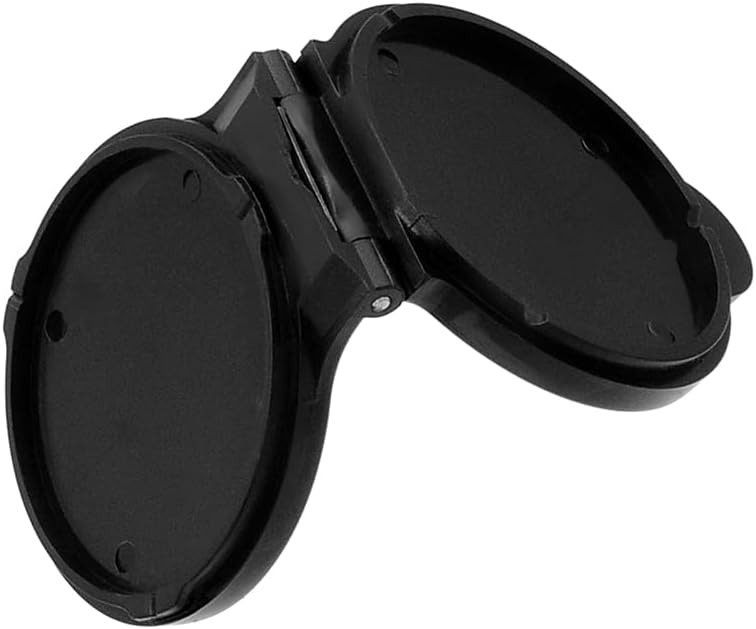
Image 5.1: The lens cap fully open, revealing the hinge mechanism.
6. וישאַלט
To ensure the longevity and effectiveness of your lens cap:
- Clean the cap regularly with a soft, dry cloth to remove dust and fingerprints.
- פֿאַר שווערן שמוץ, אַ ביסל דamp שטאָף קען גענוצט ווערן, און דערנאָך זאָל עס גלייך טרוקנט ווערן.
- Avoid using harsh chemicals or abrasive materials, as these can damage the plastic finish.
- Store the cap in a clean, dry environment when not in use.
7. טראָובלעשאָאָטינג
| אַרויסגעבן | מעגלעך סיבה | לייזונג |
|---|---|---|
| Cap does not fit securely or falls off easily. | Incorrect camera model or lens type. | Verify that your camera is a Rolleiflex TLR with Bay II 75mm 3.5 C & E lenses. This cap is not universally compatible with all Bay II mounts. |
| Cap is difficult to open or close. | Dust or debris in the hinge mechanism. | Clean the hinge area with a soft brush or compressed air. Avoid forcing the cap. |
8. ספּעסאַפאַקיישאַנז
| שטריך | דעטאַל |
|---|---|
| פּראָדוקט דימענשאַנז | 1 X 1 X 1 אינטשעס |
| פּונקט וואָג | 1.6 אונסעס |
| נומער מאָדעל נומער | Cap-Rol-B2f35e-Pls |
| פאַבריקאַנט | Fotodiox Inc. |
| מאַטעריאַל | פּלאַסטיק |
| קאַמפּאַטאַבילאַטי | Rollei TLR with Bay II 75mm 3.5 C & E Lenses |
9. וואָראַנטי און שטיצן
This Fotodiox Pro Lens Cap comes with a לימיטעד 2-יאָר פאַבריקאַנט וואָראַנטי. For warranty claims, technical support, or additional product information, please visit the official Fotodiox store or contact their customer service directly.
פֿאַר ווייטערדיקע הילף, ביטע באַזוכט די Fotodiox Store on Amazon.