
1. הקדמה
This manual provides detailed instructions for the installation, operation, and maintenance of the Supermicro CSE-827HD-R1400B 1400W 2U Rackmount Server Chassis. This high-performance chassis is designed to house server components, offering robust power delivery and efficient cooling for demanding applications. Please read this manual thoroughly before proceeding with installation or operation.
2. זיכערקייַט אינפֿאָרמאַציע
שטענדיק אָבסערווירן די פאלגענדע זיכערהייט מיטלען צו פאַרמייַדן שאָדן און שעדיקן צו די ויסריכט:
- זיכער מאַכן אַז די מאַכט צושטעל איז דיסקאַנעקטיד איידער איר דורכפירן קיין ינסטאַלירונג אָדער וישאַלט.
- Wear anti-static wrist straps when handling internal components to prevent electrostatic discharge (ESD).
- Do not operate the chassis with the cover removed unless specifically instructed for troubleshooting.
- זיכער מאַכן אַז אַלע עלעקטרישע פֿאַרבינדונגען האָבן אַ געהעריקע גראַונדינג.
- This chassis is heavy. Use appropriate lifting techniques or assistance when moving or installing it in a rack.
- Maintain adequate ventilation around the chassis to prevent overheating.
3. פּעקל אינהאַלט
באַשטעטיקן אַז אַלע זאכן זענען פאַראַן אין פּעקל:
- Supermicro CSE-827HD-R1400B 2U Rackmount Server Chassis
- 1400W High-Efficiency (1+1) Redundant Power Supply (pre-installed)
- 4x 80mm PWM Cooling Fans (pre-installed)
- Rack mounting rails (if included with your specific purchase)
- Accessory kit (screws, cables, standoffs)
- שנעלע אינסטאַלאַציע גייד (דאָס דאָקומענט)
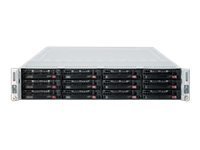
פיגורע 3.1: Supermicro CSE-827HD-R1400B 2U Rackmount Server Chassis. This image shows the front view of the server chassis, highlighting its rackmount design and general appearance.
4. סעטאַפּ און ייַנמאָנטירונג
Follow these steps for proper installation of the server chassis and its components.
4.1. געשטעל מאַונטינג
- Attach the provided rack rails to the server chassis sides using the designated screws.
- Mount the other end of the rack rails to the server rack posts, ensuring they are securely fastened.
- Slide the chassis into the rack until it locks into place.
4.2. מאָטהערבאָאַרד ינסטאַללאַטיאָן
The chassis supports ATX motherboards.
- Remove the chassis top cover by unscrewing the retaining screws.
- Install the I/O shield into the chassis rear panel.
- Align the motherboard with the standoffs inside the chassis.
- באַזײַטיקט דאָס מאַדערבאָרד מיט די פּאַסיקע שרויפֿן.
4.3. האַרד דרייוו ינסטאַלירונג
The chassis supports 3.5-inch hard drives.
- Locate the drive bays.
- Mount each 3.5-inch hard drive into a drive tray.
- Slide the drive tray with the installed hard drive into the designated bay until it clicks into place.
- Connect the SATA/SAS data and power cables to each hard drive.
4.4. מאַכט קאַנעקשאַנז
- Connect the main 24-pin ATX power connector from the power supply to the motherboard.
- Connect the 8-pin (or 4-pin) CPU power connector to the motherboard.
- Ensure all peripheral power connectors (e.g., for GPUs, additional fans) are properly connected.
- Connect the AC power cords from the redundant power supplies to separate, grounded power outlets.
5. אַפּערייטינג ינסטרוקטיאָנס
5.1. פּאָווערינג אויף / אויסגעלאשן
- מאַכט אויף: After all connections are secure, press the power button on the front panel. The power LED should illuminate.
- נאָרמאַל שאַטדאַון: Perform a graceful shutdown through the operating system.
- פאָרס שאַטדאַון: Press and hold the power button for 5-7 seconds. Use only when necessary to prevent data loss.
5.2. געפֿירט ינדיקאַטאָרס
Refer to your motherboard manual for specific LED indicator meanings. Common indicators on the chassis front panel include:
- Power LED: Indicates system power status (On/Off/Standby).
- HDD טעטיקייט LED: Flashes when hard drives are being accessed.
- Network Activity LED: Indicates network traffic (if integrated on the front panel).
6. וישאַלט
Regular maintenance ensures optimal performance and longevity of your server chassis.
- באַזייַטיקונג פון שטויב: Periodically clean dust from the chassis interior, especially fan blades and heatsinks, using compressed air. Ensure the system is powered off and unplugged before cleaning.
- פאָכער דורכקוק: Check cooling fans for proper operation and excessive noise. Replace any failing fans promptly.
- קאַבלע פאַרוואַלטונג: Ensure internal cables are neatly routed to avoid obstructing airflow.
7. טראָובלעשאָאָטינג
די סעקציע באהאנדלט אלגעמיינע פראבלעמען וואס איר קענט באגעגענען.
| פּראָבלעם | מעגלעך סיבה | לייזונג |
|---|---|---|
| סיסטעם טוט נישט מאַכט אויף. | Power cables disconnected, faulty power supply, faulty power button. | Check all power connections. Verify power supply status LEDs. Test power button functionality. |
| איבערגעטריבענער פען גערויש. | Dust accumulation, failing fan bearing. | Clean fans. Replace noisy or failing fans. |
| סיסטעם אָוווערכיטינג. | Poor airflow, fan failure, dust buildup. | Ensure proper ventilation. Check fan operation. Clean dust from components. |
| Hard drives not detected. | Loose data/power cables, incorrect BIOS settings, faulty drive. | Verify all data and power cables are securely connected. Check BIOS/UEFI settings. Test drives in another system if possible. |
8. ספּעסאַפאַקיישאַנז
| שטריך | דעטאַל |
|---|---|
| סאָרט | סופּערמיקראָ |
| מאָדעל נאָמען | CSE-827HD-R1400B |
| פאָרם פאַקטאָר | 2U ראַקמאָונט |
| מאָטהערבאָאַרד קאַמפּאַטאַבילאַטי | אַטקס |
| מאַכט צושטעלן | 1400W High-Efficiency (1+1) Redundant, 80 PLUS Gold Certified |
| קאָאָלינג פאַנס | 4x 80mm PWM |
| שווער דיסק פאָרם פאַקטאָר | 3.5 אינטשעס |
| קאָליר | שוואַרץ |
| פּונקט וואָג | 68 פונט |
| פּראָדוקט דימענשאַנז (ד רענטגענ וו רענטגענ ה) | 28.5"ד רענטגענ 28.5"וו רענטגענ 28.5"ה |
| UPC | 672042062768 |
| ASIN | B005KFBPBS |
9. וואָראַנטי און שטיצן
For warranty information, please refer to the documentation provided with your purchase or visit the official Supermicro website. For technical support, product inquiries, or to report issues, please contact Supermicro customer service through their official channels.
אָנליין שטיצן: www.supermicro.com/support
קאָנטאַקט אינפֿאָרמאַציע: אָפּשיקן צו די סופּערמיקראָ webזייטל פֿאַר רעגיאָנאַלע קאָנטאַקט דעטאַילס.