BlackBerry BB 9900 Bold Touch Smartphone User Manual
Model: BB 9900
1. הקדמה
This manual provides essential instructions for setting up, operating, and maintaining your BlackBerry BB 9900 Bold Touch smartphone. Please read this guide thoroughly to ensure proper use and to maximize the device's capabilities. The BlackBerry BB 9900 Bold Touch combines a capacitive touchscreen with a full QWERTY keyboard, running on BlackBerry OS 7.
2. פּעקל אינהאַלט
באַשטעטיקן אַז דיין פּעקל כּולל די פאלגענדע זאכן:
BlackBerry BB 9900 Bold Touch Smartphone
קריקאָנלאָדלעך באַטערי
וואנט טשאַרדזשער
וסב קאַבלע
באַניצער מאַנואַל (דעם דאָקומענט)
3. דיווייס איבערview
Familiarize yourself with the physical features of your BlackBerry BB 9900 Bold Touch.
3.1 פראָנט View
בילד: פראָנט view of the BlackBerry BB 9900 Bold Touch, highlighting the 2.8-inch touchscreen and the physical QWERTY keyboard below it. The device also features a trackpad and call/end buttons.
טאָוטשסקרעען ווייַז: 2.8-inch capacitive display for interactive navigation.
QWERTY קלאַוויאַטור: Full physical keyboard for efficient typing.
Optical Trackpad: For precise navigation and selection.
רוף/ענדע קנעפּלעך: Standard telephony controls.
3.2 דערציען View
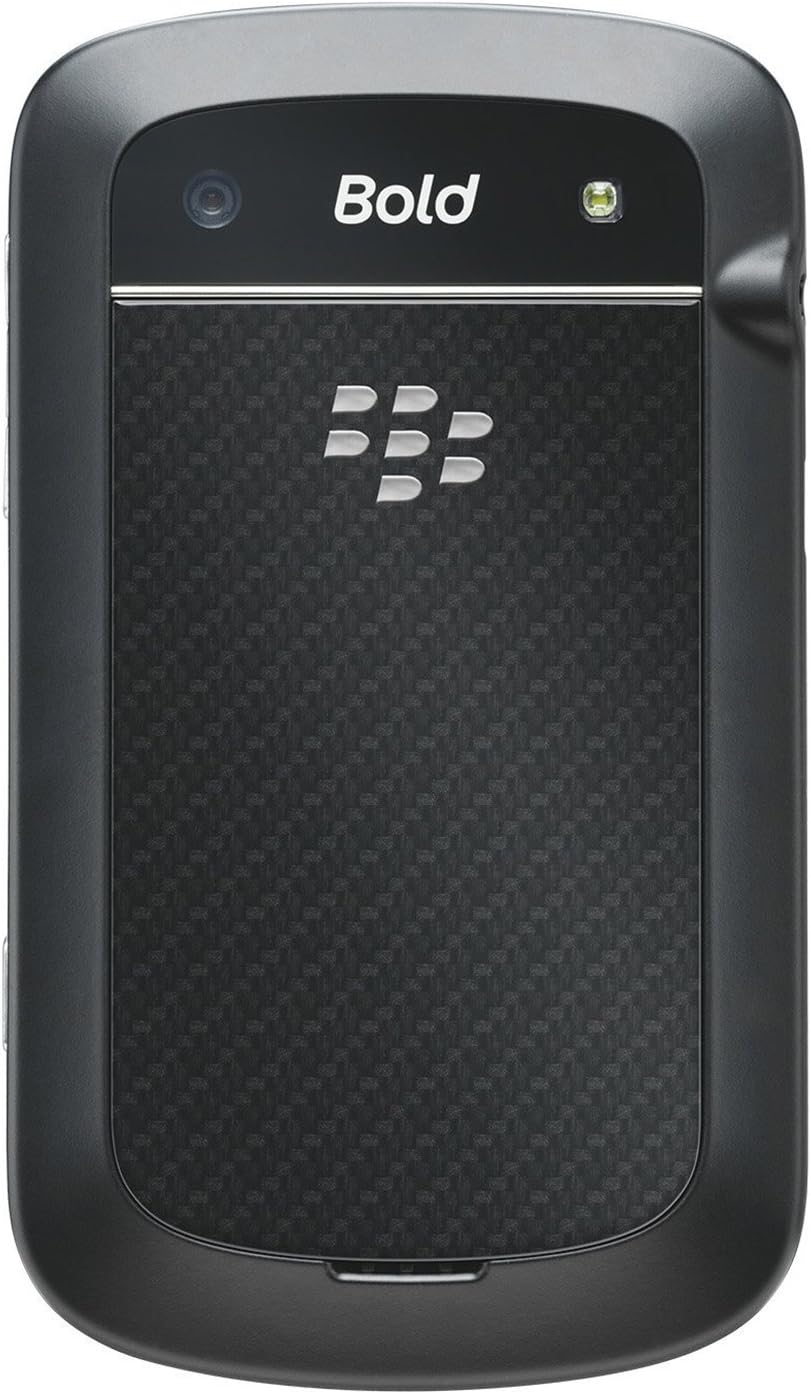
בילד: הינטערשטע view of the BlackBerry BB 9900 Bold Touch, featuring the 5-megapixel camera lens, LED flash, and the BlackBerry logo.
5MP אַפּאַראַט: Primary camera with autofocus and LED flash.
באַטערי דעקל: Removable cover for battery and SIM card access.
3.3 זייַט View
בילד: זייט view of the BlackBerry BB 9900 Bold Touch, illustrating the placement of the volume control buttons and a customizable convenience key.
באַנד קנעפּלעך: אַדזשאַסטירן אַודיאָ לעוועלס.
Convenience Key: Customizable shortcut button.
4. סעטאַפּ
4.1 אריינשטעלן די סים קארטל
Remove the battery cover from the back of the device.
געפֿינען די סים קאָרט שפּעלטל.
אַרײַנשטעלן די סים קאַרטל מיט די גאָלדענע קאָנטאַקטן אַראָפּגעקערט און די אָפּגעשניטענע ווינקל אויסגעשטעלט מיטן שפּאַלט.
זיכער מאַכן אַז די סים קאַרטל איז זיכער אין פּלאַץ.
4.2 ינסערטינג די באַטערי
After inserting the SIM card, align the battery's gold contacts with the contacts in the battery compartment.
דריק די באַטאַרייע לײַכט אין פּלאַץ ביז זי קליקט.
פאַרבייַטן די באַטאַרייע דעקן.
4.3 טשאַרדזשינג די מיטל
Connect the USB cable to the charging port on your device.
Plug the other end of the USB cable into the wall charger, then into a power outlet.
לאַקכענען: Drag your finger across the screen to scroll through lists or switch between home screen panels.
קניפּ-צו-זומען: ניצט צוויי פינגער צו פארגרעסערן אדער פארקלענערן בילדער, web בלעטער, אדער מאַפּעס.
5.2 ניצן די QWERTY קלאַוויאַטור
The physical QWERTY keyboard allows for fast and accurate text entry. Each key corresponds to a letter, number, or symbol. Use the 'Alt' key for alternate characters and the 'Shift' key for capitalization.
5.3 מאַכן רופן
From the home screen, tap the Phone icon or press the green Call button.
Enter the phone number using the keyboard.
Press the green Call button to initiate the call.
To end a call, press the red End Call button.
5.4 שיקט אַרטיקלען
Tap the Messages icon from the home screen.
Select 'Compose New' or similar option.
אַרייַן די נומער פון דעם באַקומער אָדער סעלעקטירן פון קאָנטאַקטן.
Type your message using the QWERTY keyboard.
Tap 'Send'.
5.5 ניצן די קאַמעראַ
Tap the Camera icon to open the camera application.
ראַמען דיין שאָס ניצן דעם עקראַן ווי אַ viewפינדער.
Tap the screen or press the convenience key (if configured) to take a photo.
The 5MP camera features autofocus and an LED flash for improved image quality.
5.6 קאַנעקטינג צו Wi-Fi
Go to 'Options' > 'Networks and Connections' > 'Wi-Fi'.
צינד אן Wi-Fi. די דעווייס וועט סקענען פאר פארהאן נעטוואָרקס.
Once connected, the Wi-Fi indicator will appear in the status bar.
5.7 Using NFC (Near Field Communication)
The BlackBerry BB 9900 Bold Touch supports NFC for short-range wireless communication. This allows for quick pairing with compatible accessories or sharing data with other NFC-enabled devices by tapping them together.
פאַרזיכערן אַז NFC איז ענייבאַלד אין דיין מיטל סעטטינגס.
Hold your device close to another NFC-enabled device or tag.
Follow on-screen prompts to complete the desired action (e.g., pairing, data transfer).
פֿאַרמײַדן עקסטרעמע טעמפּעראַטורן, וואָס קענען פֿאַרערגערן די באַטאַריע־פּערפאָרמאַנס.
Use only the original or approved charger.
נישט דורכשטעכן אדער באשעדיגן די באטעריע.
6.3 ווייכווארג דערהייַנטיקונגען
Periodically check for software updates to ensure your device has the latest features and security enhancements. Updates can typically be found in the device's 'Options' or 'Settings' menu under 'Software Updates'.
7. טראָובלעשאָאָטינג
7.1 דיווייס גייט נישט אן
פאַרזיכערן די באַטאַרייע איז רעכט ינסערטאַד און באפוילן.
Connect the device to the charger and wait a few minutes before attempting to power on again.
If the issue persists, try removing and reinserting the battery.
7.2 נעץ קאָנעקטיוויטי פּראָבלעמען
Check if your SIM card is correctly inserted and activated with your carrier.
Verify that cellular data or Wi-Fi is enabled in your device settings.
ריסטאַרט די מיטל.
If using Wi-Fi, ensure your router is working and you have entered the correct password.
If the issue is intermittent, check for any recent software installations that might be causing conflicts.
8. ספּעסאַפאַקיישאַנז
שטריך
דעטאַל
מאָדעל נאָמען
BB 9900
אָפּערייטינג סיסטעם
בלאַקבערי אָ.עס. 7
ווייַז
2.8-inch Capacitive Touchscreen, 640 x 480 Resolution
פּראַסעסער
Not specified (typically 1.2 GHz for this model)
באַראַן
768 מב
אינערלעכער סטאָרידזש
8 גיגאבייט
דערציען אַפּאַראַט
5 MP, Autofocus, LED Flash
קאַנעקטיוויטי
Wi-Fi 802.11 b/g/n, NFC, Bluetooth, GPS
נעץ שטיצן
Quad-band GSM/GPRS/EDGE, Tri-band HSPA+
דימענשאַנז
4.53 X 2.6 X 0.41 אינטשעס (115 X 66 X 10.5 מם)
וואָג
4.6 אונסעס (130 גראַמז)
אַודיאָ דזשאַק
3.5 מם
9. שטיצן און וואָראַנטי
9.1 קונה שטיצן
For technical assistance, troubleshooting beyond this manual, or service inquiries, please visit the official BlackBerry support website or contact your local service provider. Refer to the packaging or official webוועבזייטל פֿאַר ספּעציפֿישע קאָנטאַקט דעטאַלן.
9.2 וואָראַנטי אינפֿאָרמאַציע
Your BlackBerry BB 9900 Bold Touch is covered by a limited warranty. Please refer to the warranty card included in your product packaging or visit the official BlackBerry webזייטל פֿאַר דעטאַלירטע תּנאים און באַדינגונגען, אַרייַנגערעכנט וואָראַנטי פּעריאָד און קאַווערידזש ספּעציפֿיק. האַלט דיין באַווייַז פון קויפן פֿאַר וואָראַנטי קליימז.
Ask a question about this manual
Ask about setup, troubleshooting, compatibility, parts, safety, or missing instructions. Manuals+ will review the question and use this page’s manual context to help answer it.