
1. הקדמה
Welcome to the user manual for your HP EliteBook 2560p laptop. This document provides essential information for setting up, operating, maintaining, and troubleshooting your device. Please read this manual thoroughly to ensure proper use and to maximize the lifespan of your laptop.
2. זיכערקייַט אינפֿאָרמאַציע
To prevent injury, damage to the product, or loss of data, observe the following safety precautions:
- ניצט נאָר דעם מאַכט אַדאַפּטער וואָס קומט מיט אייער לאַפּטאַפּ.
- שטעלט נישט אויס דעם לאַפּטאָפּ צו עקסטרעמע טעמפּעראַטורן, הומידיטי, אדער דירעקטע זונשייַן.
- פֿאַרמײַדט צו לייגן שווערע זאַכן אויף דעם לאַפּטאָפּ.
- האַלטן ליקווידס אַוועק פון די מיטל.
- פרובירט נישט צו צענעמען אדער פאררעכטן דעם לעפטאפ אליין. ווענדט זיך צו קוואַליפֿיצירטע סערוויס פּערסאָנעל.
- פאַרזיכערן געהעריק ווענאַליישאַן צו פאַרמייַדן אָוווערכיטינג.
3. פּעקל אינהאַלט
באַשטעטיקן אַז אַלע זאכן זענען פאַראַן אין דיין פּעקל:
- HP EliteBook 2560p Laptop
- AC מאַכט אַדאַפּטער און מאַכט שנור
- באַטערי פּאַק
- דאָקומענטאַציע (די מאַנואַל, וואָראַנטי אינפֿאָרמאַציע)
4. פּראָדוקט איבערview
Familiarize yourself with the components of your HP EliteBook 2560p.
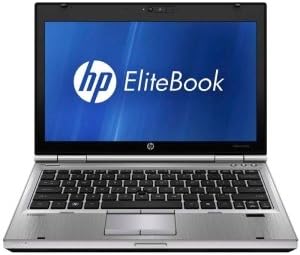
פיגורע 4.1: פראָנט view of the HP EliteBook 2560p laptop. This image shows the laptop open, revealing the 12.5-inch display, keyboard, and touchpad. The screen displays the "HP EliteBook" logo.
4.1. Front and Top Components
- 12.5-inch HD Anti-Glare LED Display: For visual output.
- קלאַוויאַטור: Standard QWERTY layout for text input.
- טאָוטשפּאַד: For cursor control and navigation.
- Webקאַם: Integrated for video conferencing and imaging.
- Fingerprint Reader (FPR): For enhanced security.
4.2. Side and Rear Components
- וסב 2.0 פּאָרץ: For connecting peripheral devices.
- DVD+/-RW Optical Drive: For reading and writing CDs/DVDs.
- מאַכט קאַנעקטער: פֿאַר פֿאַרבינדן דעם AC אַדאַפּטער.
- עטהערנעט פּאָרט: פֿאַר אַ דראָטיקער נעץ פֿאַרבינדונג.
- ווייַז פּאָרץ: פֿאַר פֿאַרבינדן עקסטערנע מאָניטאָרן.
- אַודיאָ דזשעקס: פֿאַר כעדפאָונז און מיקראָפאָן.
5. סעטאַפּ
5.1. פֿאַרבינדן דעם מאַכט אַדאַפּטער
- פאַרבינדן די אַק מאַכט שנור צו די אַק אַדאַפּטער.
- שטעקט אריין דעם AC אַדאַפּטער אין אַ געערדטן עלעקטרישן ווענטיל.
- Connect the DC output plug of the AC adapter to the power connector on your laptop.
- Allow the battery to charge fully before initial use, or use the laptop while connected to power.
5.2. Initial Boot-Up and Operating System Setup
- עפענען די לאַפּטאַפּ דעקל.
- דריק דעם מאַכט קנעפּל, וואָס געווענליך געפינט זיך איבער דער קלאַוויאַטור.
- Follow the on-screen instructions to complete the Windows 7 Professional setup, including language selection, user account creation, and network configuration.
6. אַפּערייטינג ינסטרוקטיאָנס
6.1. פּאַוערינג אויף און אויסגעלאשן
- צו מאַכט אויף: דרוק די מאַכט קנעפּל.
- צו פאַרמאַכן אַראָפּ: Click the Start button, then select "Shut Down."
- צו ריסטאַרט: Click the Start button, then select "Restart."
- צו שלאפן: Close the lid or click the Start button and select "Sleep."
6.2. ניצן דעם טאָוטשפּאַד
The touchpad allows you to control the cursor on the screen.
- צאַפּן: איין צאַפּ צו קליקן, צוויי מאָל צאַפּן צו צוויי מאָל קליקן.
- שלעפּן: Tap and hold, then drag your finger across the touchpad.
- מעגילע: Use two fingers to scroll vertically or horizontally.
6.3. Connecting to a Wireless Network (Wi-Fi)
- Click the network icon in the system tray (bottom-right corner of the screen).
- אויסקלייבן אייער געוואונטשענע Wi-Fi נעץ פון דער ליסטע.
- דריקט "פאַרבינדן" און אַרייַן די נעץ זיכערהייט שליסל (פּאַראָל) אויב געבעטן.
6.4. Using the Optical Drive
The integrated DVD+/-RW drive allows you to read and write CDs and DVDs.
- Press the eject button on the drive to open the tray.
- Place a disc gently onto the tray, label side up.
- Push the tray back into the laptop until it clicks shut.
7. וישאַלט
7.1. רייניקן דיין לאַפּטאָפּ
- שטענדיק אויסלעשן און ארויסציען דעם לעפטאפ פון עלעקטרישן קאנטראל איידער איר רייניגט.
- ניצן אַ ווייך, לינט-פֿרייַ שטאָף אַ ביסל דampאָפּגעוואַשן מיט וואַסער אָדער אַ ספּעציעלן עקראַן רייניגער פֿאַר דעם עקראַן.
- פֿאַר דער קלאַוויאַטור און שאַסי, ניצט אַ ווייכע שטאָף. פֿאַרמייַדט שאַרפע כעמיקאַליעס.
- ניצט קאמפרעסט לופט צו רייניקן שטויב פון ווענטילאציעס און קלאַוויאַטור שפּאַלטן.
7.2. באַטערי קער
- פֿאַרמײַדט אָפֿט פֿולשטענדיק אויסצולאָדן די באַטעריע.
- האַלט דעם לאַפּטאָפּ אין אַ קיל, טרוקן אָרט אויב עס ווערט נישט גענוצט פֿאַר לענגערע צייטן.
- If the battery is removable, ensure it is securely seated.
7.3. ווייכווארג דערהייַנטיקונגען
Regularly check for and install operating system updates (Windows Update) and driver updates from the HP support webפּלאַץ צו ענשור אָפּטימאַל פאָרשטעלונג און זיכערהייט.
8. טראָובלעשאָאָטינג
| פּראָבלעם | מעגלעך לייזונג |
|---|---|
| דער לאַפּטאָפּ גייט נישט אָן. | זיכער מאַכן אַז דער AC אַדאַפּטער איז זיכער פֿאַרבונדן און אַז די עלעקטרישע אַוטלעט אַרבעט. קאָנטראָלירט די לאָדונג פֿון דער באַטעריע. |
| קיין Wi-Fi פֿאַרבינדונג. | Verify Wi-Fi is enabled (check physical switch or function key). Restart router and laptop. Re-enter Wi-Fi password. |
| פאַרשטעלן איז ליידיק. | Connect an external monitor to check if the display is faulty. Adjust brightness settings. Restart the laptop. |
| די סיסטעם איז שטייט אדער רעאגירט נישט. | Close unnecessary applications. Check for malware. Ensure sufficient free disk space. Restart the laptop. |
For more complex issues, refer to the HP support webפּלאַץ אָדער קאָנטאַקט קונה דינסט.
9. ספּעסאַפאַקיישאַנז
| שטריך | דעטאַל |
|---|---|
| מאָדעל | HP EliteBook 2560p (LJ467UT#ABA) |
| פּראַסעסער | Intel Core i5-2520M |
| ווייַז | 12.5-inch HD Anti-Glare LED (1366 x 768 pixels) |
| באַראַן | 4 גיגאבייט DDR3 (1333 מעגהערץ) |
| סטאָרידזש | 320 גיגאבייט הדד |
| אָפּטיש דרייוו | ווי +/-רוו |
| גראַפיקס | ינטעגראַטעד ינטעל גראַפיקס |
| ווירעלעסס | 802.11a/b/g/n, בלועטוט |
| פּאָרץ | USB 2.0 (x1), DisplayPort, VGA, Ethernet, Audio Jacks |
| אָפּערייטינג סיסטעם | Windows 7 פּראַפעשאַנאַל 64-ביסל |
| Webקאַם | ינטעגראַטעד Webקאַם |
| זיכערהייַט | פינגערפּרינט רידער |
| באַטערי לעבן | ביז 8.5 שעה (דורכשניטלעך) |
| דימענשאַנז (LxWxH) | 16.5 X 13.5 X 4.5 אינטשעס |
| וואָג | 6.8 פונט |
10. וואָראַנטי און שטיצן
For information regarding your product's warranty, please refer to the warranty document included with your purchase or visit the official HP support webפּלאַץ.
HP provides various support resources, including online documentation, driver downloads, and customer service contact options.
- HP שטיצן Webפּלאַץ: www.hp.com/support
- קאָנטאַקט שטיצן: אָפּשיקן צו די HP webזייטל פֿאַר רעגיאָנאַלע קאָנטאַקט נומערן און שמועס אָפּציעס.