
1. הקדמה
This manual provides essential instructions for the safe and efficient operation of your Sharp CD-DH950P 240W Mini-Component System. This system features a 5-disc CD changer, a cassette deck, an iPod/iPhone docking station, a USB host for digital audio playback, and an AM/FM tuner. Please read this manual thoroughly before using the system and retain it for future reference.
2. זיכערקייַט אינפֿאָרמאַציע
- מאַכט מקור: פֿאַרבינדט דעם אַפּאַראַט נאָר צו אַן AC אַוטלעט פֿון דער ספּעציפֿישער וואָלומעןtage.
- ווענטילאַטיאָן: זיכער מאַכן אַז עס איז דאָ גענוג ווענטילאַציע. נישט פֿאַרשטאָפּן די ווענטילאַציע עפענונגען.
- וואַסער און נעץ: שטעלט נישט אויס דעם אַפּאַראַט צו רעגן, פייכטקייט, אדער טראָפּנדיקע/שפּריצנדיקע פליסיקייטן.
- היץ: האַלט דעם אַפּאַראַט אַוועק פון היץ קוועלער ווי ראַדיאַטאָרן, היץ רעגיסטערס, אויוון, אָדער אַנדערע אַפּאַראַטן וואָס פּראָדוצירן היץ.
- רייניקונג: Unplug the unit from the wall outlet before cleaning. Use a soft, dry cloth.
- סערוויס: דו זאלסט נישט פּרווון צו דינען דעם פּראָדוקט זיך. קאָנטאַקט אַלע קוואַלאַפייד סערוויס פּערסאַנעל.
3. פּעקל אינהאַלט
באַשטעטיקן אַז דיין פּעקל כּולל די פאלגענדע זאכן:
- Main Unit (CD-DH950P)
- לינקער רעדנער
- רעכט רעדנער
- ווייַט קאָנטראָל מיט באַטעריז
- AM שלייף אַנטענע
- FM דראָט אַנטענע
- מאַכט שנור
4. סעטאַפּ
4.1 פֿאַרבינדן די רעדנערס
Connect the speaker wires from the main unit to the corresponding terminals on the back of each speaker. Ensure correct polarity (red to red, black to black) for optimal sound quality. The left speaker connects to the left speaker output, and the right speaker to the right speaker output.
4.2 Connecting the Antennas
- FM אַנטענע: Connect the supplied FM wire antenna to the FM antenna terminal on the rear of the main unit. Extend the wire for better reception.
- AM אַנטענע: Connect the supplied AM loop antenna to the AM antenna terminals on the rear of the main unit. Position the antenna for best reception.
4.3 מאַכט קאַנעקשאַן
Plug the power cord into the AC IN jack on the rear of the main unit, then plug the other end into a standard AC wall outlet.
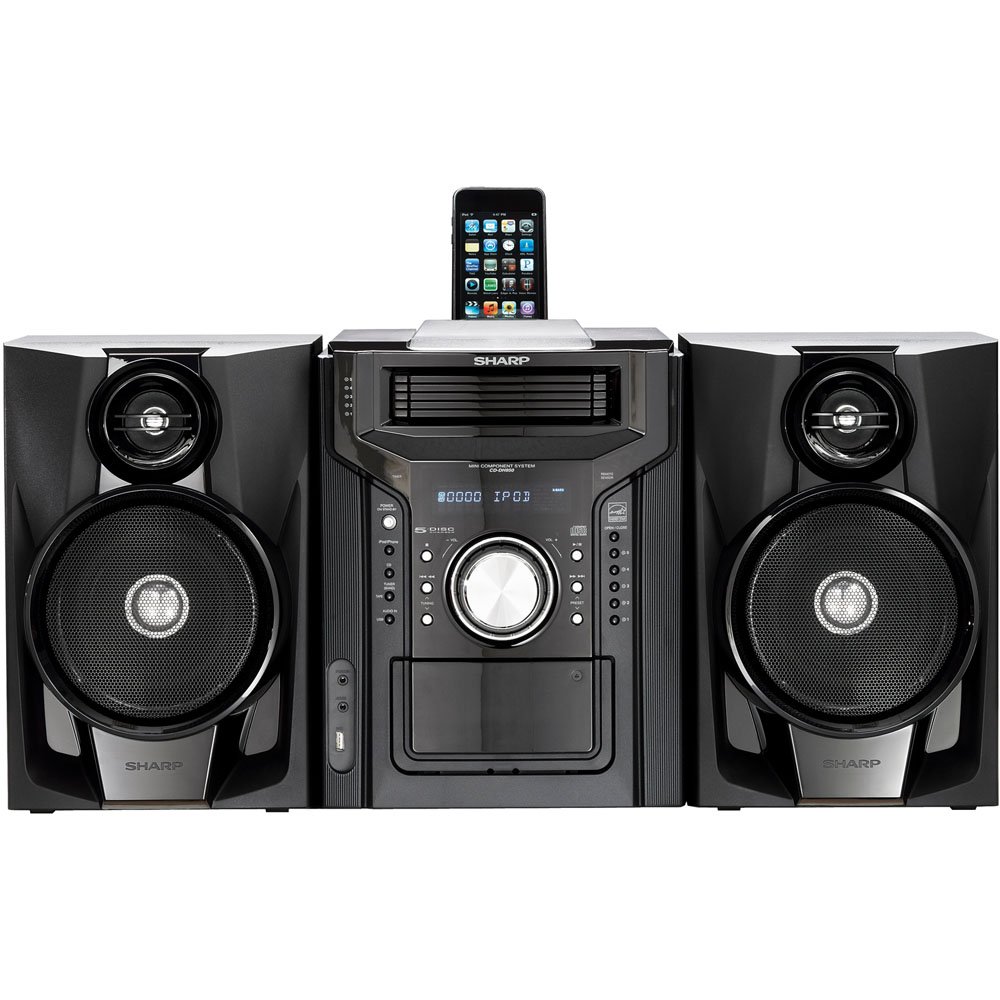
פיגורע 4.3.1: קוילעלדיק view of the Sharp CD-DH950P Mini-Component System, showing the main unit flanked by two speakers, with an iPhone docked on top of the main unit.
5. אַפּערייטינג ינסטרוקטיאָנס
5.1 מאַכט אויף/אויס און באַנד קאָנטראָל
- דרוק די מאַכט קנעפּל אויף דער פראָנט פּאַנעל אָדער ווייַט קאָנטראָל צו דרייען די אַפּאַראַט אויף אָדער אויס.
- דרייען די באַנד קנעפּל אויף דער פראָנט פּאַנעל אָדער נוצן די וואָל +/- קנעפּלעך אויף דער ווײַטקאָנטראָל צו סטרויערן דעם געזונט־ניוואָ.
5.2 סי פּלייבאַק
This system features a 5-disc CD changer.
- דרוק די עפענען / נאָענט קנעפּל צו עפענען די CD טאַץ.
- Place up to five CDs on the disc trays, label side up.
- דרוק עפענען / נאָענט ווידער צו פאַרמאַכן דעם טאַץ.
- דרוק די CD קנעפּל צו אויסקלייבן די CD פונקציע.
- דרוק די שפּיל / פּויזע קנעפּל צו אָנהייבן פּלייבאַק.
- ניצן די SKIP buttons to navigate between tracks or discs.
5.3 קאַסעטע דעק אָפּעראַציע
- דרוק די TAPE OPEN/CLOSE button to open the cassette deck.
- אַרייַנלייגן אַ קאַסעט טייפּ.
- דרוק די טופּען קנעפּל צו אויסקלייבן די קאַסעטע פונקציע.
- דרוק שפּיל צו אָנהייבן פּלייבאַק.
- To record, ensure the source is selected (e.g., CD, Tuner) and press the רעקאָרד button on the cassette deck.
5.4 iPod/iPhone Docking
The system includes a top-mounted docking slot for compatible iPod and iPhone devices (30-pin connector).
- Carefully place your iPod or iPhone into the docking slot.
- The system will automatically switch to iPod/iPhone mode or you may need to press the יפּאָד / יפאָנע קנעפּל.
- Use the system's controls or your device's controls to play music. The device will also charge while docked.
5.5 USB Host Playback
Connect a USB storage device containing MP3 or WMA audio files to the USB port on the front panel.
- אַרייַנלייגן די וסב מיטל אין די וסב פּאָרט.
- דרוק די וסב button to select the USB function.
- Use the playback controls to navigate and play files.
5.6 AM/FM טונער
- דרוק די סטרויער button to select AM or FM radio.
- ניצן די טונינג +/- קנעפּלעך צו מאַנועל צושטעלן צו אַ סטאַנציע.
- To auto-scan, press and hold the טונינג +/- קנעפּלעך.
- To store a preset, tune to the desired station, then press זיקאָרן נאכגעפאלגט דורך א פארגעשטעלטע נומער.
5.7 אַודיאָ ינפּוט
Connect an external audio device (e.g., MP3 player, smartphone) to the AUDIO IN jack on the front panel using a 3.5mm stereo cable.
- Connect your device to the AUDIO IN jack.
- דרוק די אַודיאָ אין button to select this source.
- קאָנטראָליר ווידערשפּיל פֿון דיין פֿאַרבונדענעם מיטל.
6. וישאַלט
6.1 רייניקונג די אַפּאַראַט
Wipe the exterior of the unit with a soft, dry cloth. Do not use abrasive cleaners, waxes, or solvents. Ensure the unit is unplugged before cleaning.
6.2 סי-די און קאַסעטע זאָרג
- Handle CDs by their edges to avoid fingerprints and scratches. Clean discs with a soft, lint-free cloth from the center outwards.
- Store cassette tapes away from strong magnetic fields and direct sunlight.
7. טראָובלעשאָאָטינג
| פּראָבלעם | מעגלעך סיבה | לייזונג |
|---|---|---|
| קיין מאַכט | שטראָם קאַבל נישט פארבונדן; שטראָם אַוטלעט דעפעקט | זיכער מאַכן אַז די עלעקטרישע שנור איז גוט איינגעשטעקט; פּרוּווט אַן אַנדער אַוטלעט |
| קיין געזונט | Volume too low; Speakers not connected; Incorrect source selected | Increase volume; Check speaker connections; Select correct input source |
| סי-די שפּילט נישט | Disc inserted incorrectly; Disc is dirty or scratched | Insert disc correctly (label side up); Clean or replace disc |
| נעבעך ראַדיאָ אָפּטראָג | אַנטענע נישט ריכטיק פּאַזיציאָנירט; שוואַך סיגנאַל | Adjust position of AM/FM antennas; Try auto-tuning or manual fine-tuning |
| iPod/iPhone not charging/playing | Device not properly docked; Device not compatible (e.g., newer connector) | Re-dock the device; Note that this system uses a 30-pin connector, newer devices may require an adapter (not included) |
8. ספּעסאַפאַקיישאַנז
- סאָרט: שאַרף
- מאָדעל: CD-DH950P
- גאַנץ רעזולטאַט מאַכט: 240 Watts RMS (85W/ch FTC)
- רעדנער קאָנפיגוראַטיאָן: 2.1 קאַנאַל
- שטיצט אַודיאָ פֿאָרמאַטירונגען: קאָמפּאַקטדיסק, mp3, וומאַ
- סיגנאַל-צו-ראַש פאַרהעלטעניש: 100 דב
- קאַמפּאַטאַבאַל דעוויסעס: MP3 Player, Smartphone (via 30-pin dock or USB/Audio In)
- דימענשאַנז (L x W x H): 27.6 X 13.6 X 13.5 אינטשעס
- נומער וואָג: 24.4 פונט
- UPC: 074000369863, 074000369290
9. וואָראַנטי אינפֿאָרמאַציע
This product is covered by a 1-year limited warranty from the date of purchase. Please refer to the warranty card included with your product for full terms and conditions, or contact Sharp customer service for details.
10. שטיצן
For further assistance, technical support, or service inquiries, please contact Sharp customer service. Contact information can typically be found on the Sharp official webוועבזייטל אדער אין די דאקומענטאציע וואס איז צוגעשטעלט געווארן מיט אייער פראדוקט.


