
Sanus CAPC01-B1
Sanus CAPC01-B1 Rack Mounted Power Conditioner User Manual
Model: CAPC01-B1
הקדמה
This manual provides essential information for the proper installation, operation, and maintenance of your Sanus CAPC01-B1 Rack Mounted Power Conditioner. Please read these instructions thoroughly before use to ensure optimal performance and safety.
The Sanus CAPC01-B1 is designed to protect your rack equipment and provide clean power. It features adjustable, dual pull-out LED lights for illuminating rack equipment, 11 protected outlets, and EMI/RFI noise filtration.
וויכטיק סאַפעטי אינפֿאָרמאַציע
- לייענען אַלע ינסטראַקשאַנז: Before operating the unit, read and understand all safety and operating instructions.
- האַלטן ינסטראַקשאַנז: האַלטן דעם מאַנואַל פֿאַר צוקונפֿט רעפֿערענץ.
- היט די וואָרנינגז: נאָכגיין אַלע וואָרנינגז אויף דעם פּראָדוקט און אין די אַפּערייטינג ינסטראַקשאַנז.
- Unplug during storms: אָפּשטעקן די אַפּאַראַט בעשאַס בליץ סטאָרמז אָדער ווען אַניוזד פֿאַר לאַנג פּיריאַדז.
- Avoid liquids: Do not expose the unit to dripping or splashing liquids. Do not place objects filled with liquids on the unit.
- געהעריק ווענטאַליישאַן: זיכער מאַכן אַז עס איז דאָ גענוג ווענטילאַציע. נישט פֿאַרשטאָפּן די ווענטילאַציע עפענונגען.
- מאַכט מקור: Connect only to a grounded AC power outlet with the specified voltage.
- סערוויס: דו זאלסט נישט פּרווון צו דינען דעם פּראָדוקט זיך. קאָנטאַקט אַלע קוואַלאַפייד סערוויס פּערסאַנעל.
פּראָדוקט איבערview
The Sanus CAPC01-B1 is a rack-mounted power conditioner designed to provide clean, protected power to your audio/video equipment. Key features include:
- Adjustable, dual pull-out LED lights for illuminating rack equipment.
- 11 fast-acting 2,400-joule protected outlets.
- Multi-Mode LED panel indicating voltage, amperage, and power consumption.
- EMI/RFI noise filtration, reducing noise up to 30 dB for superior signal quality.
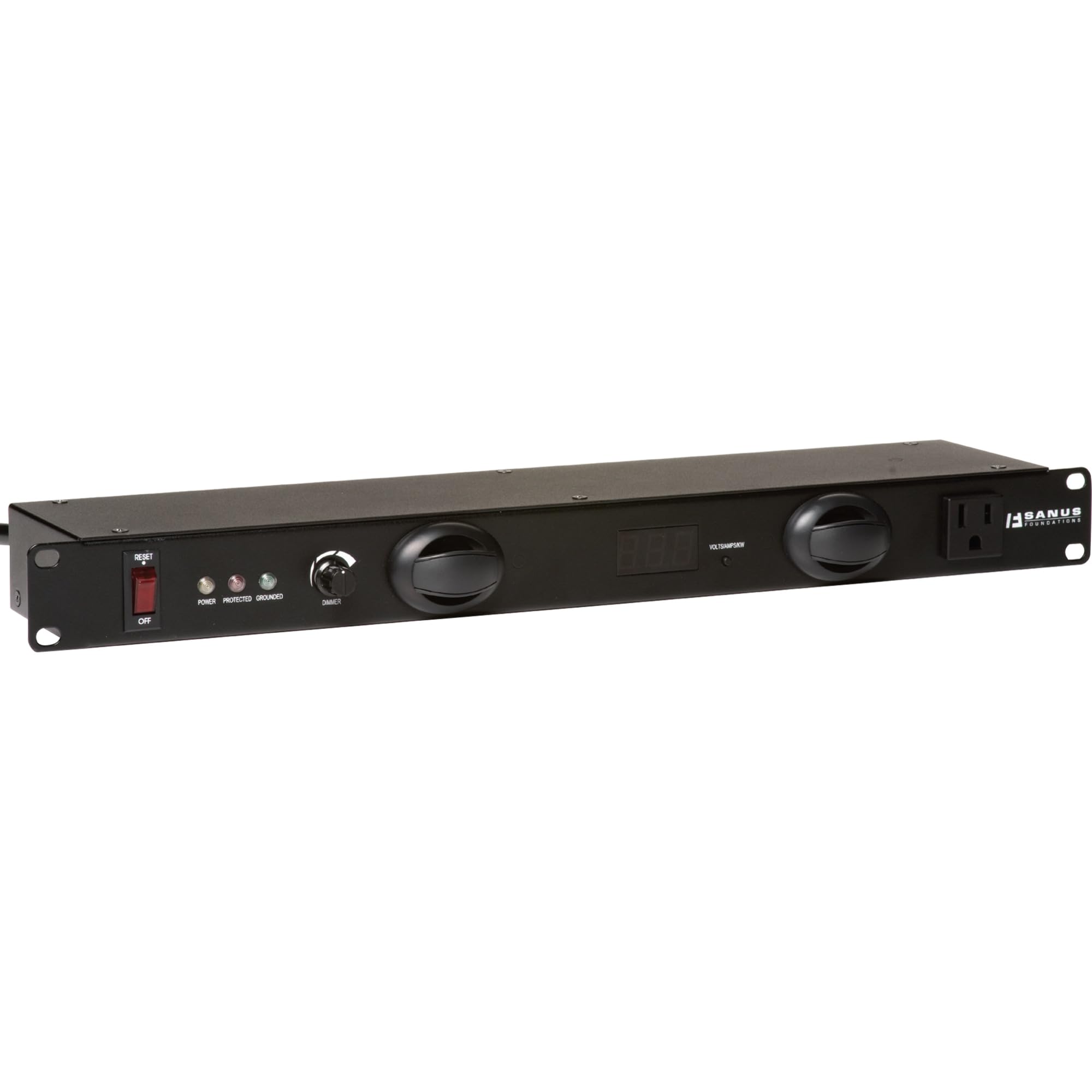
פיגורע 1: פראָנט view of the Sanus CAPC01-B1 Rack Mounted Power Conditioner, showing the LED lights and display.
סעטאַפּ און ינסטאַלירונג
פּעקל אינהאַלט
באַשטעטיקן אַז אַלע קאָמפּאָנענטן זענען פאַראַן:
- Sanus CAPC01-B1 Power Conditioner
- געשטעל מאַונטינג ייַזנוואַרג
- באַניצער מאַנואַל (דעם דאָקומענט)
מאַונטינג ינסטראַקשאַנז
- זיכער מאַכן אַז די געשטעל איז סטאַביל און ריכטיק געערדעט.
- Align the mounting ears of the CAPC01-B1 with the rack rails.
- Secure the unit to the rack using the provided rack mounting hardware. Ensure all screws are tightened securely.
- Allow adequate space for ventilation around the unit.
קאַנעקטינג עקוויפּמענט
- With the power conditioner turned OFF, plug your audio/video equipment into the protected outlets on the rear of the CAPC01-B1.
- Ensure all equipment is properly seated in the outlets.
- Plug the power conditioner's main power cord into a grounded AC wall outlet.
אַפּערייטינג ינסטראַקשאַנז
מאַכט אויף / אַוועק
- To power on the unit, press the main power switch located on the front panel. The LED display will illuminate.
- צו אויסלעשן, דריק נאכאמאל דעם הויפט מאכט קנעפל.
ניצן די געפירט לייץ
- The CAPC01-B1 features dual pull-out LED lights. Gently pull out the lights from the front panel.
- Rotate the lights to adjust their direction.
- Use the dimmer knob on the front panel to adjust the brightness of the LED lights.
- Push the lights back into the unit when not in use.
Monitoring with the Multi-Mode LED Panel
The front panel LED display provides real-time information:
- Voltage: Displays the incoming AC voltage.
- Ampאַרויסרופן: Shows the total current draw of connected equipment.
- מאַכט קאַנסאַמשאַן: Indicates the total power being consumed.
Regularly monitor these readings to ensure your equipment is operating within safe parameters.
וישאַלט
רייניקונג
- שטענדיק אָפּשטעקן די אַפּאַראַט פון די מאַכט ווענטיל איידער רייניקונג.
- ניצט אַ ווייכן, טרוקענעם שטאָף צו ווישן די אויסערלעכע ייבערפלאַכן.
- Do not use liquid cleaners, aerosol cleaners, or strong chemicals, as they may damage the finish or internal components.
ווענטילאַטיאָן
- Ensure that the ventilation openings on the unit are not blocked by dust or other obstructions.
- Periodically check for dust buildup and gently clean if necessary.
טראָובלעשאָאָטינג
| פּראָבלעם | מעגלעך סיבה | לייזונג |
|---|---|---|
| דער אַפּאַראַט טוט נישט מאַכט אויף. | No power from wall outlet; main power switch off; internal fuse tripped. | Check wall outlet with another device. Ensure main power switch is ON. If unit has a resettable breaker, press it. If not, contact support. |
| Connected equipment not receiving power. | Equipment not plugged in correctly; power conditioner not on; surge protection tripped. | Verify equipment is securely plugged into outlets. Ensure power conditioner is ON. Check for a surge protection reset button (if applicable) or power cycle the unit. |
| די על-אי-די לייץ ארבעטן נישט. | Lights not pulled out; dimmer knob set to minimum; internal issue. | Gently pull out the LED lights. Adjust the dimmer knob. If still not working, contact support. |
| Display shows unusual readings. | Overload; faulty sensor. | Reduce the load by unplugging some equipment. If readings persist, contact support. |
ספּעסאַפאַקיישאַנז
- מאָדעל: CAPC01-B1
- אַוטלעץ: 11 protected outlets
- סערדזש שוץ: 2,400 דזשאָולס
- Noise Filtration: EMI/RFI up to 30 dB
- דימענסיעס: 20.5 X 8 X 2.6 אינטשעס (52.07 X 20.32 X 6.6 סענטימעטער)
- וואָג: 6.55 פונט (2.97 קג)
- פאַבריקאַנט: Tjernlund Products – Audio
- ערשטער דאַטע בנימצא: 31 מערץ 2011
וואָראַנטי און שטיצן
For warranty information and technical support, please refer to the documentation provided with your purchase or visit the official Sanus webזייטל. פרובירט נישט צו פאררעכטן דעם איינהייט אליין, ווייל דאס קען בטל מאכן אייער גאראנטיע.
קאָנטאַקט אינפֿאָרמאַציע: Please visit the Sanus official webזייטל פֿאַר די מערסט אַרויף-צו-דאַטע שטיצע קאָנטאַקט דעטאַילס.
Ask a question about this manual
Ask about setup, troubleshooting, compatibility, parts, safety, or missing instructions. Manuals+ will review the question and use this page’s manual context to help answer it.