
1. הקדמה
Thank you for choosing the Rocketfish RF-HDWEB 720p HD USB Webcam. This manual provides essential information for the proper installation, operation, and maintenance of your webcam. Designed for clear video communication and high-resolution photo capture, this webcam features a true 2 MP sensor with a wide-angle glass lens, delivering 720p HD video at up to 30 frames per second. It also supports photo capture up to 8 MP through interpolation. The integrated autofocus technology ensures sharp images, and the built-in microphone with noise cancellation provides clear audio. This device is compatible with both PC (32-bit) and Mac systems.

Figure 1: Rocketfish RF-HDWEB 720p HD USB Webקאַם.
2. וואָס איז אין דער קעסטל
ביטע טשעקט די אינהאַלט פון די פּאַקעט צו זיכער מאַכן אַז אַלע זאכן זענען דאָרט:
- וסב קאַבלע
- Camera Body (Rocketfish RF-HDWEB Webקאַם)
- Installation CD (for optional drivers and software)

Figure 2: Retail packaging of the Rocketfish RF-HDWEB Webcam, showing the product and its features.
3. סעטאַפּ
- פאַרבינדן די Webקאַם: שטעקט אריין דעם USB קאבל פון דעם webקאַם אין אַן בנימצא וסב 2.0 פּאָרט אויף דיין קאָמפּיוטער.
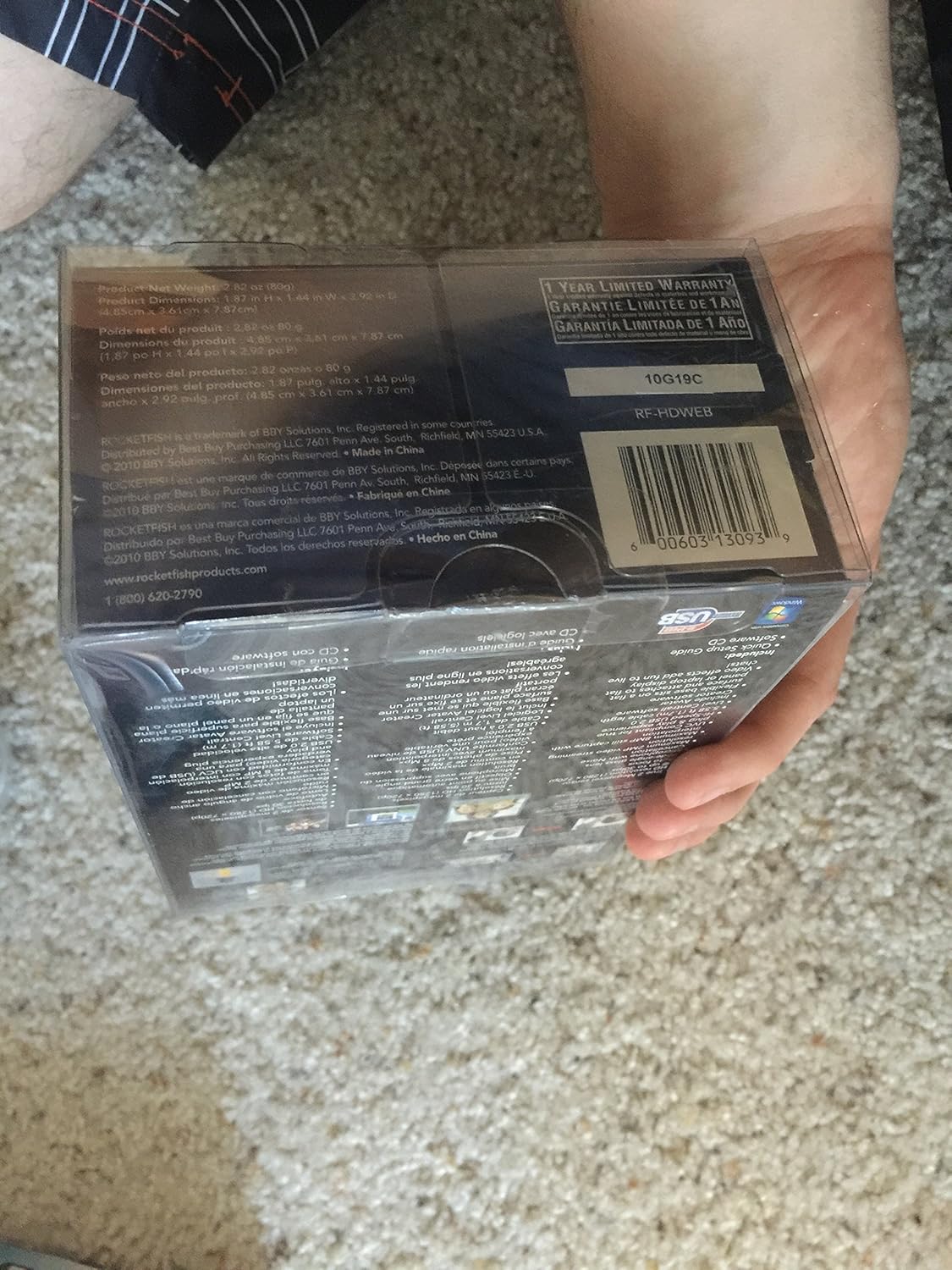
Figure 3: The Rocketfish RF-HDWEB Webcam, ready for connection.
- Driver Installation (Windows): For Windows 7 and newer operating systems, the computer should automatically detect the webcam and install default drivers within a few minutes. This allows basic functionality with most applications.
- Driver Installation (Mac): די webcam is compatible with Mac systems and typically works without additional driver installation for basic functions.
- אפציאנעלע ווייכווארג אינסטאַלאַציע: An installation CD is included with the webcam. This CD contains additional drivers and software (e.g., Live! Central by Creative) that may offer more options, effects, and advanced settings.
- To install the optional software, first ensure any default Windows drivers for the webcam are uninstalled (via Device Manager > Imaging Devices > Rocketfish HD Webקאַם).
- Insert the installation CD and follow the on-screen prompts.
- באַמערקונג: Some users have reported issues with the included software on Windows 7, leading to "error 15". If you encounter this, uninstall the software and rely on the default Windows drivers for basic functionality.
- פּאַזישאַנינג די Webקאַם: די webcam features a sturdy base designed to fit securely on top of most monitor frames or to be placed flat on a desktop. Adjust the angle as needed for optimal viewing.
4. אַפּערייטינג ינסטרוקטיאָנס
אַמאָל די webcam is connected and drivers are installed, you can begin using it with various applications.
- Video Communication: The Rocketfish RF-HDWEB webcam works seamlessly with most instant messenger services, including AIM, Yahoo! Messenger, MSN Messenger, and Skype.
- Open your preferred video communication application.
- Navigate to the video/audio settings and select "Rocketfish HD Webקאַם" ווי אייער ווידעאָ אַרייַנשרייַב מיטל.
- Select the integrated microphone as your audio input device if desired.
- די webcam provides HD resolution 720p (1280x720p) video streaming at up to 30 frames per second.
- פאָטאָ כאַפּן: די webcam can capture still images up to 8 MP through interpolation.
- Use compatible software (e.g., the included Live! Central software, or third-party applications) to access photo capture features.
- אַוטאָ פאָקוס: די webcam features autofocus technology to maintain clear and detailed images.
- In some applications or with the optional software, you may have the ability to disable autofocus and set manual focus if preferred.
- מיקראָפאָן: The built-in microphone includes noise cancellation for clearer audio during calls.
- פאַרזיכערן די webcam's microphone is selected as the input device in your application's audio settings.
5. וישאַלט
To ensure the longevity and optimal performance of your Rocketfish RF-HDWEB webקאַם, פֿאָלגן די אויפֿהאַלטונג גיידליינז:
- רייניקונג: Gently wipe the lens with a soft, lint-free cloth. For the camera body, use a dry or slightly damp שטאָף. פֿאַרמײַדט שאַרפֿע כעמיקאַלן אָדער אַברייסיוו מאַטעריאַלן.
- סטאָרידזש: ווען ניט אין נוצן, קראָם די webקאַם אין אַ ריינעם, טרוקענעם אָרט אַוועק פון עקסטרעמע טעמפּעראַטורן און דירעקטער זון.
- קאַבלע זאָרגן: Avoid bending or kinking the USB cable excessively to prevent internal damage.
6. טראָובלעשאָאָטינג
| פּראָבלעם | מעגלעך סיבה | לייזונג |
|---|---|---|
| Webcam not detected or not working. |
|
|
| דאָס בילד איז פֿאַרשוואָמען אָדער נישט אין פֿאָקוס. |
|
|
| "Error 15" when installing or using included software. |
|
|
| Poor video quality or low frame rate. |
|
|
7. ספּעסאַפאַקיישאַנז
| שטריך | דעטאַל |
|---|---|
| מאָדעל נומער | RF-HDWEB |
| סענסאָר טיפּ | True 2 MP Sensor (MOS Photo Sensor Technology) |
| ווידעא האַכלאָטע | 720p HD (1280x720) up to 30fps (maximum 2MP video streaming resolution) |
| פאָטאָ האַכלאָטע | Up to 8 MP (with interpolation) |
| לענס טיפּ | Wide-angle glass lens |
| פאָקוס | אַוטאָפאָקוס טעכנאָלאָגיע |
| מיקראָפאָן | Built-in with Noise Cancellation |
| קאַנעקטיוויטי | Hi-Speed USB 2.0 |
| קאַמפּאַטאַבילאַטי | PC (32-bit) and Mac compatible |
| פּראָדוקט דימענשאַנז | 7.3 X 5.2 X 3.1 אינטשעס |
| פּונקט וואָג | 8.8 אונסעס |
| ערשטער דאַטע בנימצא | 22טן דעצעמבער 2010 |
| UPC | 0600603130939 |
8. וואָראַנטי און שטיצן
The Rocketfish RF-HDWEB Webקאַמעראַ קומט מיט אַ 1-יאָר לימיטעד וואָראַנטי. For specific terms and conditions, please refer to the warranty information provided with your product packaging or visit the official Rocketfish webפּלאַץ.
For technical support or customer service, you may contact Rocketfish directly:
- טעלעפֿאָן: 1 (800) 620-2790
- Webפּלאַץ: rocketfishproducts.com

Figure 4: Product packaging displaying warranty details and UPC (0600603130939).