
Oster CKSTBR9050
Oster Expressbake Bread Maker Instruction Manual
Model: CKSTBR9050-NP | Brand: Oster
הקדמה
Welcome to the world of homemade bread with your new Oster Expressbake Bread Maker. This appliance is designed to simplify the bread-making process, offering a variety of settings for different bread types, doughs, and even jams. Enjoy fresh, delicious bread with minimal effort.
פּראָדוקט איבערview און שליסל פֿעיִקייטן
The Oster Expressbake Bread Maker (CKSTBR9050-NP) is a versatile kitchen appliance designed for ease of use and consistent results. It features a compact design and intuitive controls.
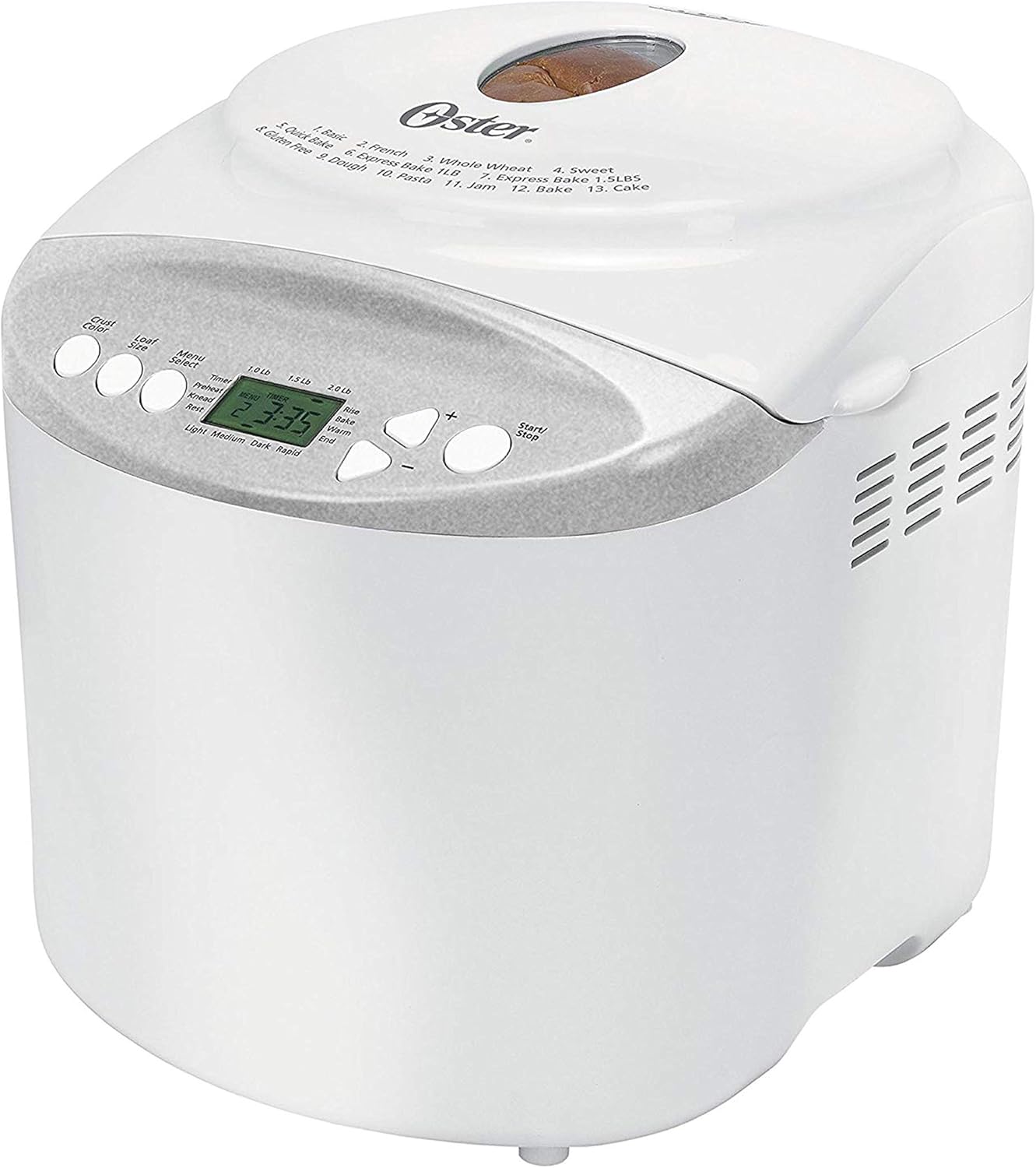
פראָנט view of the Oster Expressbake Bread Maker, showing the control panel and viewאין פֿענצטער.

אינערלעכער view highlighting the removable lid, nonstick aluminum pan, and easy-to-read LCD display.
שליסל פֿעיִקייטן:
- 2-Pound Loaf Capacity: Ideal for families, allowing for larger bread batches.
- 13 סעטטינגס: Offers a wide range of options for various breads, doughs, and jams.
- Gluten-Free Setting: Dedicated program for preparing gluten-free bread.
- Express Bake Setting: Bakes bread in under an hour for quick results.
- Crust Color Selection: Choose from light, medium, or dark crusts.
- 13-שעה פּראָגראַמירבאַר טייַמער: Allows for delayed baking, so you can wake up to fresh bread.
- באַקוועם אַקסעסעריז: Includes a measuring cup and spoon.
Product Features Video: A Closer Look
דאס ווידעא גיט א דעטאלירטע איבערזיכטview of the Oster Expressbake Bread Maker, showcasing its various components and features, including the bread pan, kneading paddle, and control panel. It highlights the ease of use and the different settings available.
סעטאַפּ גייד
- אויספּאַקן: Carefully remove all packaging materials from the bread maker and its accessories.
- רייניקונג: Before first use, wash the bread pan and kneading paddle with warm, soapy water. Wipe the exterior of the unit with a damp שטאָף. זיכער מאַכן אַז אַלע טיילן זענען גאָר טרוקן איידער איר אַסעמבאַלט.
- אָרט: Place the bread maker on a stable, flat, heat-resistant surface, away from direct sunlight and heat sources. Ensure adequate ventilation around the unit.
- Install Bread Pan: Insert the kneading paddle onto the shaft inside the bread pan. Place the bread pan into the bread maker, ensuring it clicks securely into place.
- מאַכט קשר: צאַפּן די מאַכט שנור אין אַ גראָונדעד עלעקטריקאַל ווענטיל.

The included measuring cup and spoon are essential for accurate ingredient measurement.

The control panel displays the 13 available settings for various bread types and functions.
אַפּערייטינג ינסטראַקשאַנז
Follow these steps for successful bread baking:
- לייג ינגרידיאַנץ: Always add liquid ingredients first, followed by dry ingredients. Create a small well in the dry ingredients for the yeast, ensuring it does not come into direct contact with liquids or salt initially.
- אויסקלייַבן פּראָגראַם: Press the "Menu Select" button to choose from the 13 available settings (e.g., Basic, French, Whole Wheat, Sweet, Gluten-Free, Express Bake, Dough, Jam, Cake).
- קלייבט אויס ברויט גרייס: Press the "Loaf Size" button to select your desired loaf size (1.0 lb, 1.5 lb, or 2.0 lb).
- אויסקלייבן קראַסט קאָליר: Press the "Crust Color" button to choose your preferred crust shade (Light, Medium, or Dark).
- אָנהייבן באַקן: Press the "Start/Stop" button to begin the baking cycle. The machine will automatically knead, rise, and bake the bread.
- Delayed Baking (Optional): To use the 13-hour programmable timer, add ingredients, then set the desired delay time before pressing "Start/Stop".
וויכטיק עצות פֿאַר בעסטער רעזולטאַטן:
- Ensure all ingredients are at room temperature unless otherwise specified in the recipe.
- Measure ingredients precisely. Use the provided measuring cup and spoon for accuracy.
- During the kneading cycle, use a rubber spatula to scrape down any flour from the sides of the pan to ensure all ingredients are incorporated.
- Avoid opening the lid during the baking cycle, especially during the rising phase, as this can affect the bread's texture.
וישאַלט און רייניקונג
Proper maintenance ensures the longevity and optimal performance of your bread maker.
- נאָך יעדער נוצן: Unplug the bread maker and allow it to cool completely before cleaning.
- ברויט פאן און קנעטן פאדל: Remove the bread pan and kneading paddle. Wash them with warm, soapy water. Do not use abrasive cleaners or scouring pads, as this can damage the nonstick coating. Rinse thoroughly and dry completely.
- עקסטעריע: ווישט אָפּ די אויסערלעכע זייט פון דער ברויט מאַשין מיט אַ ווייכן, טרוקענעם שטאָף.amp שטאָף. טונקט נישט דעם אַפּאַראַט אין וואַסער אָדער קיין אַנדערע פליסיקייט.
- דעקל: The inner lid is detachable for easy cleaning. Wipe it down with a damp שטאָף.
- סטאָרידזש: Store the bread maker in a dry, cool place when not in use.
טראָובלעשאָאָטינג
If you encounter issues with your bread maker, refer to the common problems and solutions below:
| פּראָבלעם | מעגלעך סיבה | לייזונג |
|---|---|---|
| Bread is too dense or flat | Too much liquid, old yeast, or incorrect ingredient order. | Reduce liquid slightly. Ensure yeast is fresh. Always add liquids first, then dry ingredients, with yeast last in a well. |
| Bread did not rise | Inactive yeast, water too hot/cold, or too much salt/sugar. | Check yeast expiration. Use water between 77°-85°F. Measure salt and sugar accurately. |
| קנעטן פּאַדעל שטעקן אין ברויט | געוויינטלעכע געשעעניש. | Allow bread to cool. Use the provided metal hook to carefully remove the paddle. |
| מאַשין איז נישט סטאַרטינג | Not plugged in, lid not closed, or incorrect program selection. | Ensure power cord is securely plugged in. Close the lid firmly. Verify program settings. |
פּראָדוקט ספּעסאַפאַקיישאַנז
- מאָדעל נומער: CKSTBR9050
- קאָליר: ווייַס
- לאַבן קאַפּאַציטעט: אַרויף צו 2 פונט
- נומער פון מגילה: 13
- פּראָדוקט דימענשאַנז: 12.1"ד רענטגענ 13.5"וו רענטגענ 13.2"ה
- נומער וואָג: 8 פונט
- פאַבריקאַנט: אָסטער
- UPC: 750343688389, 034264440203
- ערשטער פאַראַנען דאַטע: 17 יאנואר 2011

Detailed dimensions of the Oster Expressbake Bread Maker.
וואָראַנטי און שטיצן
For detailed warranty information and customer support, please refer to the official user guide provided with your product or visit the Oster website. A digital version of the user guide is often available for download.
For additional assistance, you may also refer to the באַניצער גייד (PDF).
Ask a question about this manual
Ask about setup, troubleshooting, compatibility, parts, safety, or missing instructions. Manuals+ will review the question and use this page’s manual context to help answer it.