
Quantum J-32U Portable CD/MP3 Player, USB, Radio, and Cassette Recorder User Manual
Model: J-32U
1. הקדמה
א דאנק פארן קויפןasing the Quantum J-32U Portable CD/MP3 Player, USB, Radio, and Cassette Recorder. This device is designed to provide versatile audio playback and recording capabilities in a compact, portable unit. Please read this manual thoroughly before operating the unit to ensure proper use and to maximize its performance.
האַלטן דעם מאַנואַל פֿאַר צוקונפֿט רעפֿערענץ.
2. וויכטיק סאַפעטי אינסטרוקציעס
- מאַכט מקור: אַפּערירט דעם אַפּאַראַט נאָר פֿון דער מאַכט-מקור וואָס איז אָנגעגעבן אויף דער מאַרקירונג-עטיקעט.
- ווענטילאַטיאָן: בלאָקירט נישט קיין ווענטילאַציע עפענונגען. אינסטאַלירט לויט די אינסטרוקציעס פונעם פאַבריקאַנט.
- וואַסער און נעץ: דו זאלסט נישט נוצן דעם אַפּאַראַט לעבן וואַסער אָדער נעץ.
- רייניקונג: ריין בלויז מיט אַ טרוקן שטאָף.
- היץ: דו זאלסט נישט ינסטאַלירן לעבן קיין היץ קוואלן אַזאַ ווי ראַדיאַטאָרס, היץ רעדזשיסטערז, סטאָוווז אָדער אנדערע אַפּאַראַט (אַרייַנגערעכנט ampליפיערס) וואָס פּראָדוצירן היץ.
- סערוויס: קאָנטאַקט אַלע קוואַלאַפייד סערוויס פּערסאַנעל. סערוויסינג איז פארלאנגט אויב די אַפּאַראַט איז דאַמידזשד אין קיין וועג.
- באַטעריז: אַוועקוואַרפן גענוצטע באַטעריעס לויט די לאָקאַלע רעגולאַציעס. שטעלט נישט אויס באַטעריעס צו איבערגעטריבענער היץ.
3. פּעקל אינהאַלט
ביטע קאָנטראָלירט אַז די פאלגענדע זאכן זענען אַרייַנגערעכנט אין דיין פּעקל:
- Quantum J-32U Portable Audio System
- אַק מאַכט שנור
- באַניצער מאַנואַל (דעם דאָקומענט)
4. פּראָדוקט איבערview
4.1 פראָנט פּאַנעל
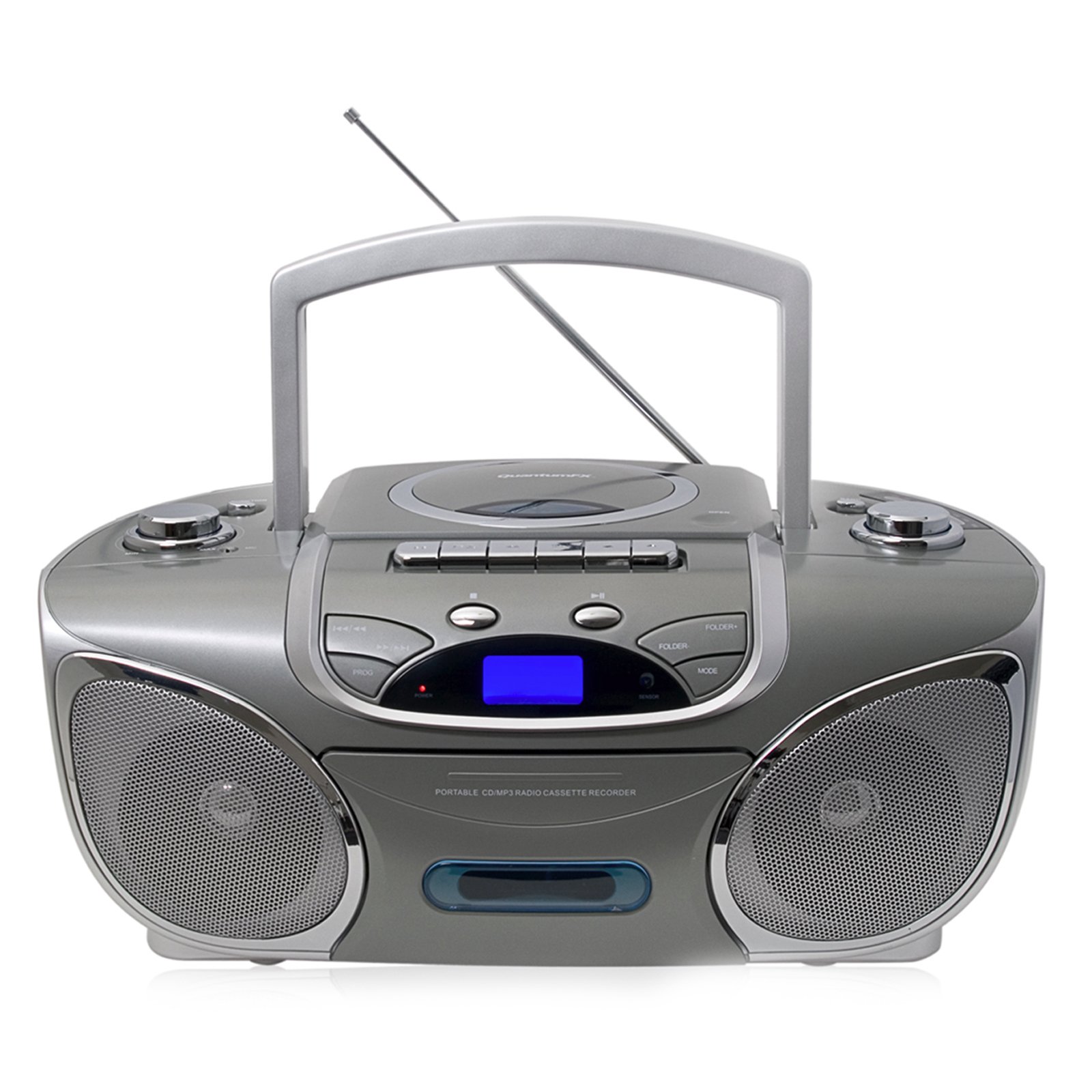
בילד: פראָנט view of the Quantum J-32U, showing the speaker grilles, display, and control buttons.
- רעדנער: סטערעאָ רעדנערס פֿאַר אַודיאָ אַרויסגאַנג.
- LCD ווייַז: Shows current mode, track number, and radio frequency.
- פונקציע קנעפּלעך: Play/Pause, Stop, Skip/Search (Forward/Backward).
- באַנד קאָנטראָל: Rotary knob to adjust audio output level.
- מאָדע קנעפּל: Selects between CD, USB/SD, Radio, and Cassette modes.
4.2 שפּיץ פּאַנעל
בילד: אויבן view of the Quantum J-32U, highlighting the CD compartment, cassette deck, USB port, and SD/MMC slot.
- סי-די קאמפארטמענט: Top-loading CD/MP3 disc tray.
- קאַסעט דעק: פֿאַר שפּילן און רעקאָרדירן קאַסעטע טייפּס.
- וסב פּאָרט: פֿאַר פֿאַרבינדן USB פֿלאַש דרייווז.
- SD/MMC קאַרטל שפּאַלט: פֿאַר אַרײַנשטעלן SD אָדער MMC זכּרון קאַרטלעך.
- טונינג קנעפּל: For manual radio frequency selection.
- קאַסעט קאָנטראָל קנעפּלעך: Play, Record, Fast Forward, Rewind, Stop/Eject.
4.3 דערציען פּאַנעל
בילד: הינטערשטע view of the Quantum J-32U, showing the AC power input and battery compartment.
- אַק מאַכט אַרייַנשרייַב: פֿאַרבינדט דאָ דעם צוגעשטעלטן AC מאַכט שנור.
- באַטערי אָפּטייל: For inserting batteries for portable operation.
- FM אַנטענע: Telescopic antenna for FM radio reception.
5. סעטאַפּ
5.1 אנשטעלן דעם איינהייט
The J-32U can be powered by AC mains or batteries.
אַק מאַכט
- מאַכן זיכער אַז די אַפּאַראַט איז אויסגעדרייט אַוועק.
- Connect the supplied AC power cord to the AC power input on the rear panel of the unit.
- שטעקט אריין דעם אנדערן עק פונעם AC שטראָם שנור אין א געווענליכע וואנט ווענטיל.
באַטאַרייע מאַכט
- עפֿנט דעם דעקל פֿון דער באַטעריע־אָפּטיילונג אויף דער הינטערשטער פּאַנעל.
- Insert the required number of "C" size batteries (not included), ensuring correct polarity (+/-).
- פאַרמאַכן די באַטאַרייע אָפּטייל דעקן סיקיורלי.
- באַמערקונג: Disconnect the AC power cord when operating on batteries.
6. אַפּערייטינג ינסטרוקטיאָנס
6.1 אַלגעמיינע אָפּעראַציע
- מאַכט אויף / אַוועק: דרוק די מאַכט קנעפּל צו קער די אַפּאַראַט אויף אָדער אַוועק.
- מאָדע סעלעקציע: דרוק די מאָדע button repeatedly to cycle through CD, USB/SD, Radio (AM/FM), and Cassette modes.
- באַנד אַדזשאַסטמאַנט: דרייען די באַנד knob to increase or decrease the sound level.
6.2 סי-די/MP3 שפּיל
- דרוק די מאָדע קנעפּל צו אויסקלייַבן קאָמפּאַקטדיסק מאָדע.
- עפֿנט דעם דעקל פֿונעם סי-די אָפּטייל.
- Place a CD or MP3 CD with the label side facing up.
- Close the CD compartment cover. The unit will read the disc.
- דרוק די שפּיל / פּויזע קנעפּל צו אָנהייבן פּלייבאַק.
- דרוק האָפּקען פאָרויס or האָפּקען צוריק to navigate tracks.
- דריקן און האַלטן האָפּקען פאָרויס or האָפּקען צוריק to fast forward or rewind within a track.
- דרוק די האַלטן קנעפּל צו האַלטן פּלייבאַק.
6.3 USB/SD/MMC Playback
- אַרײַנשטעלן אַ USB פלאַש דרייוו אין דעם USB פּאָרט אָדער אַן SD/MMC קאַרטל אין דעם קאַרטל סלאָט.
- דרוק די מאָדע button to select USB/SD mode. The unit will automatically detect and begin playing MP3 files.
- ניצן שפּיל / פּויזע, האַלטן, האָפּקען פאָרויס, און האָפּקען צוריק קנעפּלעך ווי מיט סי-די ווידערשפּיל.
6.4 Radio Operation (AM/FM Stereo)
- דרוק די מאָדע קנעפּל צו אויסקלייבן ראַדיאָ מאָדע.
- Extend the FM telescopic antenna for better FM reception. For AM, rotate the unit for optimal reception.
- דרייען די טונינג קנעפּל צו אויסקלייבן אייער געוואונטשענע ראַדיאָ סטאַנציע.
- The frequency will be displayed on the LCD screen.
6.5 קאַסעטע ווידערשפּיל און רעקאָרדירונג
פּלייַבאַקק
- דרוק די מאָדע קנעפּל צו אויסקלייבן קאַסעטע מאָדע.
- דרוק די האַלטן / אַרויסוואַרפן button to open the cassette deck.
- Insert a cassette tape and close the deck.
- דרוק די שפּיל קנעפּל צו אָנהייבן פּלייבאַק.
- ניצן שנעל פאָרויס or ריוויינד קנעפּלעך צו נאַוויגירן די טייפּ.
- דרוק האַלטן / אַרויסוואַרפן צו האַלטן פּלייבאַק.
Recording (from CD/USB/SD/Radio)
- שטעל אַרײַן אַ ליידיקע קאַסעטע טייפּ אין קאַסעטע דעק.
- Select the desired source (CD, USB/SD, or Radio) using the מאָדע קנעפּל.
- Start playback on the source (e.g., play a CD track, tune to a radio station).
- While the source is playing, press the רעקאָרד קנעפל אויף דער קאסעטע דעק. די שפּיל קנעפּל וועט אויך אַקטיוויזירן.
- צו האַלטן רעקאָרדינג, דריקן די האַלטן / אַרויסוואַרפן קנעפּל.
- באַמערקונג: Ensure the cassette tape has its record protection tabs intact for recording.
7. וישאַלט
- רייניקונג די אַפּאַראַט: ניצט אַ ווייכע, טרוקענע שטאָף צו רייניקן די אויסערלעכע זייט פון דעם אַפּאַראַט. ניצט נישט קיין שרײַבנדיקע רייניגער אָדער סאָלווענטן.
- סי-די לינז רייניקונג: If CD playback becomes erratic, use a commercially available CD lens cleaner disc to clean the laser lens.
- קאַסעטע קאָפּ רייניקונג: Periodically clean the cassette deck's heads, pinch rollers, and capstan with a cotton swab lightly dampמיט יסאָפּראָפּיל אַלקאָהאָל.
- סטאָרידזש: When not in use for extended periods, disconnect the AC power cord and remove batteries. Store the unit in a cool, dry place.
8. טראָובלעשאָאָטינג
| פּראָבלעם | מעגלעך סיבה | לייזונג |
|---|---|---|
| קיין מאַכט | AC שנור נישט פארבונדן; באַטעריעס אויסגעשעפט אדער נישט ריכטיג אריינגעשטעלט. | קאָנטראָלירט די AC שנור פֿאַרבינדונג; פֿאַרבייטן באַטעריעס אָדער זיכער מאַכן אַז די פּאָלאַריטעט איז ריכטיק. |
| קיין געזונט | Volume too low; Incorrect mode selected. | Increase volume; Press מאָדע to select correct source. |
| סי-די שפּרינגט איבער אָדער שפּילט נישט | Disc dirty or scratched; CD compartment not closed; Disc inserted incorrectly. | Clean or replace disc; Close CD compartment firmly; Insert disc label side up. |
| נעבעך ראַדיאָ אָפּטראָג | אַנטענע נישט אויסגעשטרעקט; איינהייט פּאָזיציע. | Extend FM antenna fully; Rotate unit for better AM reception. |
| קאַסעטע טייפּ שפּילט/רעקאָרדירט נישט | Tape incorrectly inserted; Record protection tab removed (for recording). | Ensure tape is correctly inserted; Cover record protection tab with tape for recording. |
9. ספּעסאַפאַקיישאַנז
- מאָדעל: J-32U
- מאַכט מקור: AC 120V ~ 60Hz or DC 9V (6 x "C" size batteries)
- קאָמפּאַקטדיסק שפּילער: Top-loading CD/MP3 compatible
- USB/SD/MMC: Supports MP3 audio playback
- ראַדיאָ פריקוואַנסיז: AM/FM סטערעאָ
- קאַסעט דעק: Playback and Recording function
- רעדנער: סטערעאָ
- קאַמפּאַטאַבאַל דעוויסעס: MP3 Player, Smartphone (via USB/SD for file playback, not direct audio input)
- GTIN: 606540009864
10. וואָראַנטי און שטיצן
Quantum products are designed for reliability and performance. For warranty information, please refer to the warranty card included with your purchase or visit the official Quantum website. For technical support or service inquiries, please contact Quantum customer service.
אָנליין שטיצן: www.quantumfx.com/support (באַמערקונג: דאָס איז אַ פּלאַץ האָלדער URL as no specific support link was provided.)
קונה סערוויס: Refer to your product packaging or warranty card for contact details.