
Lexmark E360H11A
Lexmark E360, E460, E462 Series High Yield Return Program Toner Cartridge User Manual
סאָרט: Lexmark | מאָדעל: E360H11A
הקדמה
This manual provides essential information for the safe and effective use of your Lexmark E360, E460, E462 Series High Yield Return Program Toner Cartridge (Part Number E360H11A). This genuine Lexmark product is designed to deliver consistent, high-quality monochrome laser prints with an estimated yield of 9,000 pages. Please read this manual thoroughly before installation and use.
זיכערקייַט אינפֿאָרמאַציע
- האַלט טאָנער קאַרטרידזשעס אַוועק פון קינדער.
- Do not incinerate toner cartridges. Residual toner dust can ignite.
- Avoid inhaling toner dust. If toner gets on your skin or clothing, wash it off immediately with soap and cold water.
- Do not attempt to disassemble the toner cartridge.
- האַלט די קאַרטרידזשעס אין זייער אָריגינעלער פּאַקאַדזשינג אין אַ קיל, טרוקן אָרט אַוועק פון דירעקט זונשייַן.
וואָס איז אין די קעסטל
אייער פּעקל זאָל אַנטהאַלטן די פאלגענדע זאַך:
- One (1) Lexmark E360, E460, E462 Series High Yield Return Program Toner Cartridge (Part Number E360H11A)
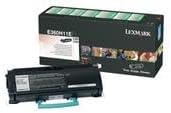
This image displays the Lexmark E360H11A High Yield Return Program Toner Cartridge alongside its retail packaging. The cartridge is black with a light blue handle, and the box features Lexmark branding and product details.
סעטאַפּ און ינסטאַלירונג
Follow these steps to properly install the toner cartridge in your Lexmark E360, E460, or E462 series printer:
- אויסלעשן דרוקער: Ensure your printer is turned off and unplugged from the power outlet before beginning the installation process.
- עפֿענען פֿאָדערשטן דעקל: Open the front cover of your Lexmark printer to access the toner cartridge compartment.
- אַראָפּנעמען אַלטע קאַרטרידזש (אויב אָנווענדלעך): If replacing an old cartridge, carefully pull it straight out of the printer. Place it in a protective bag for recycling.
- אויספּאַקן די נייע קאַרטרידזש: Remove the new Lexmark E360H11A toner cartridge from its packaging. Avoid touching the green drum surface.
- שייק קאַרטראַדזשאַז: Gently shake the new cartridge horizontally 5-6 times to distribute the toner evenly.
- אַראָפּנעמען פּראַטעקטיוו סילינגז: Carefully remove any protective tapes or seals from the cartridge as indicated in your printer's specific manual.
- אַרײַנשטעלן אַ נײַע קאַרטרידזש: גלייכט אויס די נייע קאַרטרידזש מיט די גיידס אינעווייניק אין דרוקער און שטופּ עס פעסט ביז עס קליקט אריין אין פּלאַץ.
- Close Front Cover: נאָענט די פראָנט דעקל פון די דרוקער.
- אײַנשאַלטן דעם דרוקער: Plug in and turn on your printer. The printer will typically perform a self-test and recognize the new cartridge.
Refer to your specific Lexmark printer's user manual for detailed instructions and illustrations.
אַפּערייטינג ינסטראַקשאַנז
Once the Lexmark E360H11A toner cartridge is installed, your printer is ready for operation. The cartridge functions automatically as part of the printing process.
- דרוק: Initiate print jobs from your computer or device as you normally would. The printer will draw toner from the cartridge to create monochrome prints.
- טאָנער לעוועל מאָניטאָרינג: Most Lexmark printers provide a way to monitor toner levels through the printer's control panel or software utility. Monitor these levels to know when a replacement cartridge will be needed.
- דרוק קוואַליטעט: If print quality degrades (e.g., faded prints, streaks), it may indicate a low toner level or an issue with the cartridge. Refer to the Troubleshooting section.
וישאַלט
Proper handling and storage can extend the life and performance of your toner cartridge:
- סטאָרידזש: Store unused cartridges in their original sealed packaging in a cool, dry environment, away from direct sunlight and extreme temperatures.
- האַנדלינג: Always handle the cartridge by its designated handles or edges. Avoid touching the imaging drum.
- באַזייַטיקונג / ריסייקלינג: This is a Lexmark Return Program Toner Cartridge. Please return the empty cartridge to Lexmark for proper recycling. Instructions for return are typically included with the new cartridge or can be found on the official Lexmark website. Do not dispose of cartridges in regular waste.
טראָובלעשאָאָטינג
אויב איר טרעפט פּראָבלעמען מיט אייער טאָנער קאַרטרידזש, באַטראַכט די פאלגענדע געוויינטלעכע לייזונגען:
| פּראָבלעם | מעגלעך סיבה | לייזונג |
|---|---|---|
| פֿאַרבלאַסטע אָדער ליכטיקע דרוקן | נידעריק טאָנער לעוועל; אומגלייכע טאָנער פאַרשפּרייטונג. | שאָקלט די קאַרטרידזש האָריזאָנטאַל. אויב די פּראָבלעם בלייבט, טוישט די קאַרטרידזש. |
| Streaks or Lines on Prints | Dirty imaging drum; damaged cartridge. | Do not touch the drum. If the cartridge is new, ensure all seals are removed. If problem persists, replace the cartridge. |
| "Toner Low" or "Replace Cartridge" Message | טאָנער איז טאַקע נידעריק; קאַרטרידזש נישט ריכטיק אײַנגעזעצט. | Reseat the cartridge firmly. If message persists, replace with a new cartridge. |
| קאַרטרידזש נישט דערקענט | נישט ריכטיקע אינסטאַלאַציע; דעפעקטיווע קאַרטרידזש. | Remove and reinsert the cartridge, ensuring it clicks into place. Restart the printer. If issue continues, contact Lexmark support. |
For more complex issues, consult your printer's specific user manual or the Lexmark support webפּלאַץ.
ספּעסאַפאַקיישאַנז
| שטריך | דעטאַל |
|---|---|
| פּראָדוקט טיפּ | טאָונער קאַרטראַדזשאַז |
| סאָרט | לעקסמאַרק |
| טייל נומער | E360H11A |
| קאַמפּאַטאַבילאַטי | Lexmark E360, E460, E462 Series Monochrome Laser Printers |
| דרוק דעם טעכנאָלאָגיע | מאָנאָטשראָמע לייזער |
| בלאַט ייעלד | ביז 9,000 בלעטער (ISO/IEC 19752) |
| ספּעציעלע שטריך | High Yield, Return Program Cartridge |
| אַרייַנגערעכנט קאַמפּאָונאַנץ | טאָונער קאַרטראַדזשאַז |
| ASIN | B00434R3GI |
| ערשטער דאַטע בנימצא | 15 סעפטעמבער 2010 |
וואָראַנטי אינפֿאָרמאַציע
Lexmark toner cartridges are manufactured to high quality standards. For specific warranty terms and conditions applicable to your Lexmark E360H11A toner cartridge, please refer to the documentation included with your printer or visit the official Lexmark website. Warranty coverage typically addresses defects in materials and workmanship under normal use.
שטיצן
If you require further assistance or have questions regarding your Lexmark E360, E460, E462 Series High Yield Return Program Toner Cartridge, please contact Lexmark Customer Support:
- לעקסמאַרק באַאַמטער Webפּלאַץ: www.lexmark.com/support
- אָנליין רעסורסן: Access FAQs, drivers, and troubleshooting guides.
- קאָנטאַקט אינפֿאָרמאַציע: Find phone numbers or chat options for direct support on the Lexmark support webפּלאַץ.
When contacting support, please have your printer model and toner cartridge part number (E360H11A) ready.
Ask a question about this manual
Ask about setup, troubleshooting, compatibility, parts, safety, or missing instructions. Manuals+ will review the question and use this page’s manual context to help answer it.