
הקדמה
The GIGABYTE GM-M7600 is a wireless precision optical mouse designed for comfortable and reliable use. This manual provides instructions for setting up, operating, maintaining, and troubleshooting your device.
פּעקל אינהאַלט
ביטע טשעקט די אינהאַלט פון די פּאַקעט צו זיכער מאַכן אַז אַלע זאכן זענען דאָרט:
- GIGABYTE GM-M7600 Wireless Optical Mouse
- Portable Nano USB Receiver
- 2 X AAA באַטעריז
סעטאַפּ
1. ינסטאָלינג באַטעריז
The GM-M7600 mouse requires two AAA batteries for operation. The batteries are included in the package.
- געפינט דעם דעקל פונעם באַטעריע־אָפּטייל אויף דער אונטערשטער זייט פון דער מויז.
- לײַכט שלעפּן אָדער הייבן דעם דעקל צו עפֿענען דעם אָפּטייל.
- Insert the two AAA batteries, ensuring the positive (+) and negative (-) terminals align correctly with the markings inside the compartment.
- פאַרמאַכן די באַטאַרייע אָפּטייל דעקן סיקיורלי.
2. פֿאַרבינדן דעם USB ריסיווער
The mouse connects to your computer via a portable Nano USB receiver.
- Locate the Nano USB receiver. It may be stored inside the mouse's battery compartment or packaged separately.
- Plug the Nano USB receiver into an available USB port on your computer (Laptop or Personal Computer).
- Your operating system (e.g., Windows XP, Linux) should automatically detect and install the necessary drivers. This process may take a few moments.
- אַמאָל די דרייווערס זענען אינסטאַלירט, איז די מויז גרייט פֿאַר באַנוץ.
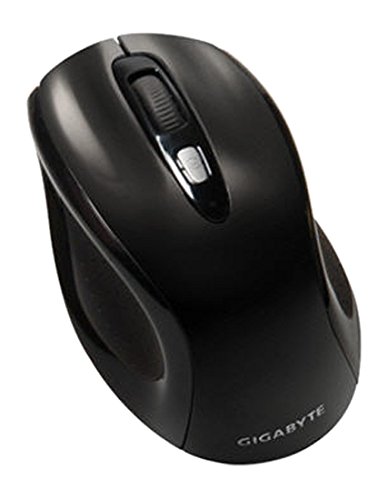
פיגורע 1: GIGABYTE GM-M7600 Wireless Optical Mouse. This image displays the ergonomic design of the mouse, highlighting its form factor and the location of its buttons. The Nano USB receiver is typically stored within the mouse or connected to a computer's USB port.
אַפּערייטינג ינסטראַקשאַנז
1. פּאָווערינג אויף / אויסגעלאשן
The mouse typically has a power switch on its underside. Slide the switch to the 'ON' position to activate the mouse. Slide it to 'OFF' when not in use to conserve battery life.
2. צופּאַסן DPI (סענסיטיוויטי)
The GM-M7600 features an adjustable DPI switch, allowing you to change the mouse sensitivity between 800 DPI and 1600 DPI. This switch is usually located near the scroll wheel. Press the DPI button to toggle between the two sensitivity settings.
3. Basic Mouse Functions
- לינק קליקט: הויפּט קנעפּל פֿאַר אויסקלייבן זאכן, עפֿענען fileס, און אינטעראַקטינג מיט ווייכווארג.
- רעכט גיט: צווייטיקער קנעפּל פֿאַר צוטריט צו קאָנטעקסט מעניוז און נאָך אָפּציעס.
- סקראָל ראָד: געניצט פֿאַר סקראָלן דורך דאָקומענטן און web בלעטער. עס קען אויך פונקציאנירן ווי א מיטל-קליק קנעפל.
וישאַלט
1. רייניקונג
צו האַלטן אָפּטימאַלע פאָרשטעלונג און אויסזען:
- Disconnect the mouse from your computer and turn off the power switch.
- ניצן אַ ווייך, לינט-פֿרייַ שטאָף אַ ביסל דampאָפּגעווישט מיט וואַסער אָדער אַ מילדער רייניקונג לייזונג צו ווישן די ייבערפלאַך פון דער מויז.
- פֿאַרמײַדט די נוצן פֿון שאַרפֿע כעמיקאַלן, אַברייסיוו רייניגער, אָדער שפּריצן פֿליסיקייטן גלייך אויף דער מויז.
- Clean the optical sensor area on the underside of the mouse with a dry cotton swab to remove any dust or debris.
2. באַטערי פאַרבייַט
When the mouse performance degrades or it stops responding, it may be time to replace the batteries.
- Turn off the mouse using the power switch.
- Open the battery compartment as described in the 'Installing Batteries' section.
- אַרויסנעמען די אַלטע AAA באַטעריעס.
- Insert two new AAA batteries, observing the correct polarity (+/-).
- פֿאַרמאַכט דעם באַטעריע־אָפּטייל און צינדט צוריק אָן די מויז.
טראָובלעשאָאָטינג
If you encounter issues with your GIGABYTE GM-M7600 mouse, try the following solutions:
- מויז ענטפערט נישט:
- מאַכן זיכער אַז די מויז איז פּאַוערד אויף.
- קאָנטראָלירט צי די באַטעריעס זענען ריכטיק אינסטאַלירט און האָבן גענוג אָפּצאָל. טוישט זיי אויב נייטיק.
- זיכער מאַכן אַז דער נאַנאָ USB ריסיווער איז זיכער אַרייַנגעשטעקט אין אַ אַרבעטנדיקן USB פּאָרט אויף דיין קאָמפּיוטער. פּרוּווט אַן אַנדער USB פּאָרט.
- ריסטאַרט דיין קאָמפּיוטער.
- אומשטענדלעכע קורסאָר באַוועגונג:
- רייניקט דעם אָפּטישן סענסאָר אויף דער אונטערשטער זײַט פֿון דער מויז.
- זייט זיכער אז איר ניצט די מויז אויף א פאסיגע אויבערפלאך. פארמיידט שטארק רעפלעקטיווע אדער דורכזיכטיקע אויבערפלאכן.
- Check for any wireless interference. Move the mouse closer to the receiver or away from other wireless devices.
- DPI switch not working:
- זייט זיכער אז די מויז איז אנגעצונדן און פארבונדן.
- דריק פעסט דעם DPI קנעפּל.
ספּעסאַפאַקיישאַנז
| מאָדעל נאָמען | GM-M7600 |
| סאָרט | GIGABYTE |
| קאַנעקטיוויטי טעכנאָלאָגיע | 2.4GHz Radio Frequency Wireless |
| באַוועגונג דעטעקטיאָן | אָפּטיש |
| אַדזשאַסטאַבאַל דפּי | 800 / 1600 דפּי |
| נומער פון קנעפּלעך | 3 (Left, Right, Scroll Wheel/Middle Click) |
| מאַכט מקור | 2 X AAA באַטעריז (אַרייַנגערעכנט) |
| ופנעמער טיפּ | Portable Nano USB Receiver |
| קאַמפּאַטאַבאַל דעוויסעס | לאַפּטאַפּ, פערזענלעכע קאָמפּיוטער |
| אַפּערייטינג סיסטעם שטיצן | לינוקס, ווינדאָוס XP |
| אָפּצוימונג מאַטעריאַל | Plastic with Rubberized Finish |
| קאָליר | שוואַרץ |
וואָראַנטי און שטיצן
פֿאַר וואָראַנטי אינפֿאָרמאַציע און טעכנישע שטיצע, ביטע זען די וואָראַנטי קאַרטל וואָס איז אַרייַנגערעכנט מיט דיין פּראָדוקט אָדער באַזוכן די באַאַמטער GIGABYTE. webפּלאַץ. האַלטן דיין קויפן קאַבאָלע פֿאַר וואָראַנטי קליימז.