
1. הקדמה
This manual provides comprehensive instructions for the installation, operation, and maintenance of your Jensen AWM965 AM/FM|CD|DVD|MP3/USB Wallmount Stereo. The AWM965 is a versatile 12-volt unit designed for wall mounting, featuring an AM/FM electronic tuner, CD and DVD player, and a front USB input for MP3, WMA, and JPEG file playback. It also includes three stereo high-level speaker output zones and a remote control for convenient operation.

פיגורע 1.1: פראָנט view of the Jensen AWM965 Wallmount Stereo, showing the display, control knobs, and various buttons.
2. זיכערקייַט אינפֿאָרמאַציע
Please read all safety instructions carefully before operating the unit. Failure to follow these instructions may result in injury or damage to the unit. Keep this manual for future reference.
- מאַכט צושטעלן: This unit operates on a 12V DC negative ground power supply. Ensure correct voltage and polarity during installation.
- ייַנמאָנטירונג: Professional installation is recommended. Ensure all wiring is secure and properly insulated to prevent short circuits.
- נעץ: שטעלט נישט אויס דעם אַפּאַראַט צו רעגן אָדער פייכטקייט כּדי צו פאַרמייַדן פייער אָדער עלעקטרישע קלאַפּן.
- רייניקונג: ניצט אַ ווייכע, טרוקענע שטאָף פֿאַר רייניקונג. פֿאַרמייַדט אַברייסיוו רייניגער אָדער סאָלווענטן.
- סערוויס: פרובירט נישט צו סערוויסן דעם אַפּאַראַט אליין. לאָזט איבער אַלע סערוויסינג צו קוואַליפֿיצירטע פּערסאָנעל.
3. פּאַקינג רשימה
באַשטעטיקן אַז אַלע זאכן זענען פאַראַן אין פּעקל איידער איר גייט ווייטער מיט דער אינסטאַלאַציע.
- Jensen AWM965 Wallmount Stereo Unit
- ווייַט קאָנטראָל מיט באַטערי
- 20-Pin Power/A/B Speaker Mating Pigtail
- Aux Audio/Video Cable
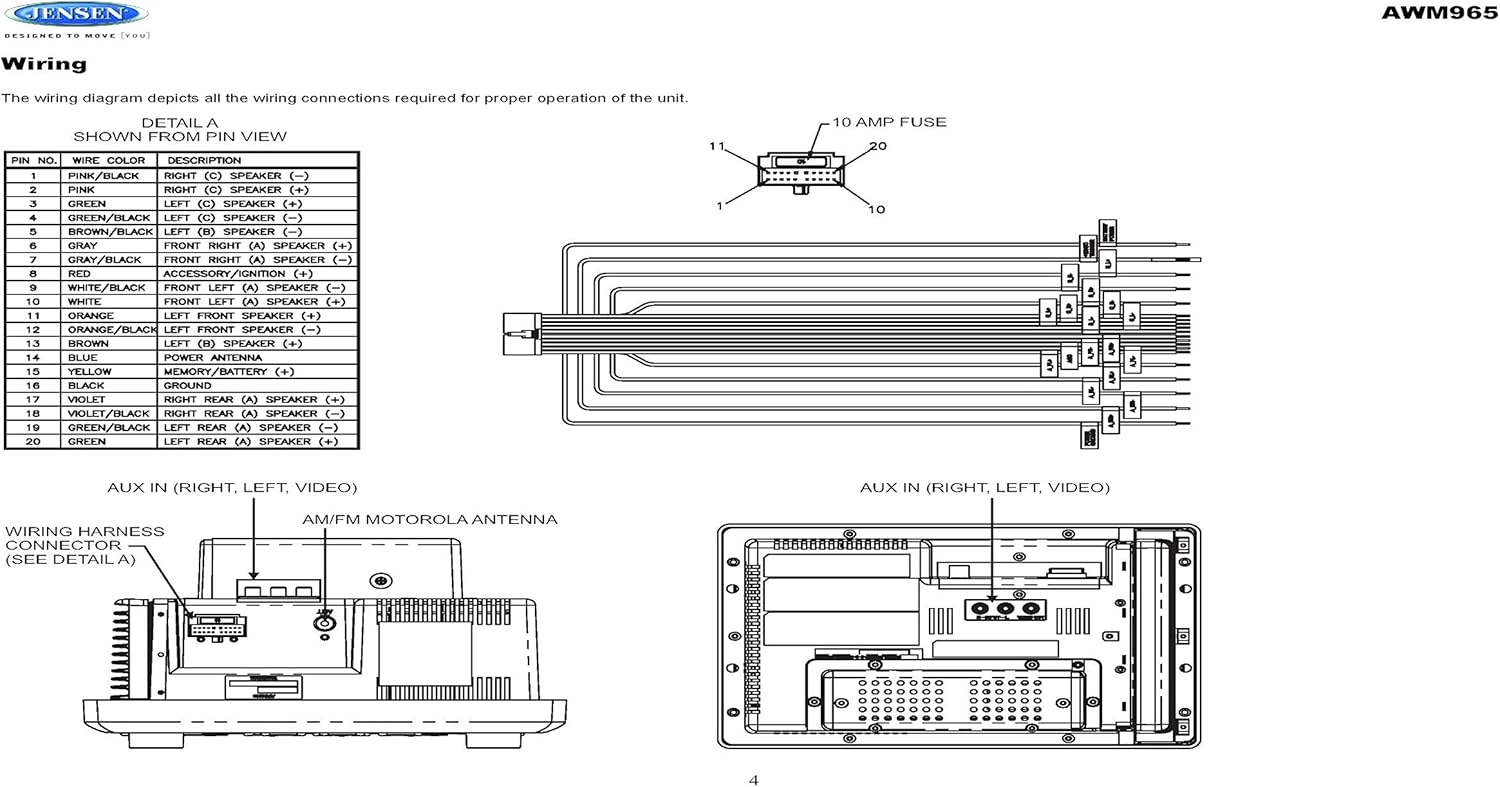
Figure 3.1: Diagram illustrating the components included in the Jensen AWM965 package, including the main unit, remote control, wiring harness, and auxiliary cables.

Figure 3.2: Image showing the included remote control, 20-pin wiring harness, and auxiliary audio/video cable.
4. סעטאַפּ
4.1 סעלעקטינג די מאַונטינג אָרט
It is important to select an appropriate mounting location for the AWM965 to ensure optimal performance and longevity. Consider the following:
- Avoid places exposed to heat-radiating appliances such as electric heaters.
- Do not mount adjacent to other equipment that radiates significant heat.
- Ensure the location is well-ventilated and not dusty.
- ויסמיידן פייַכט אָדער פייַכט לאָוקיישאַנז.
4.2 Preparing the Opening
Use the provided mounting hole diagram to measure and cut an opening in the mounting surface. After cutting, mount the unit using four M3x20mm screws.
4.3 מאָונטינג די ראַדיאָ
Route the power, speaker, and antenna cables through the hole. Connect them to the unit as outlined in the wiring diagram. After ensuring correct connections, perform a test operation.
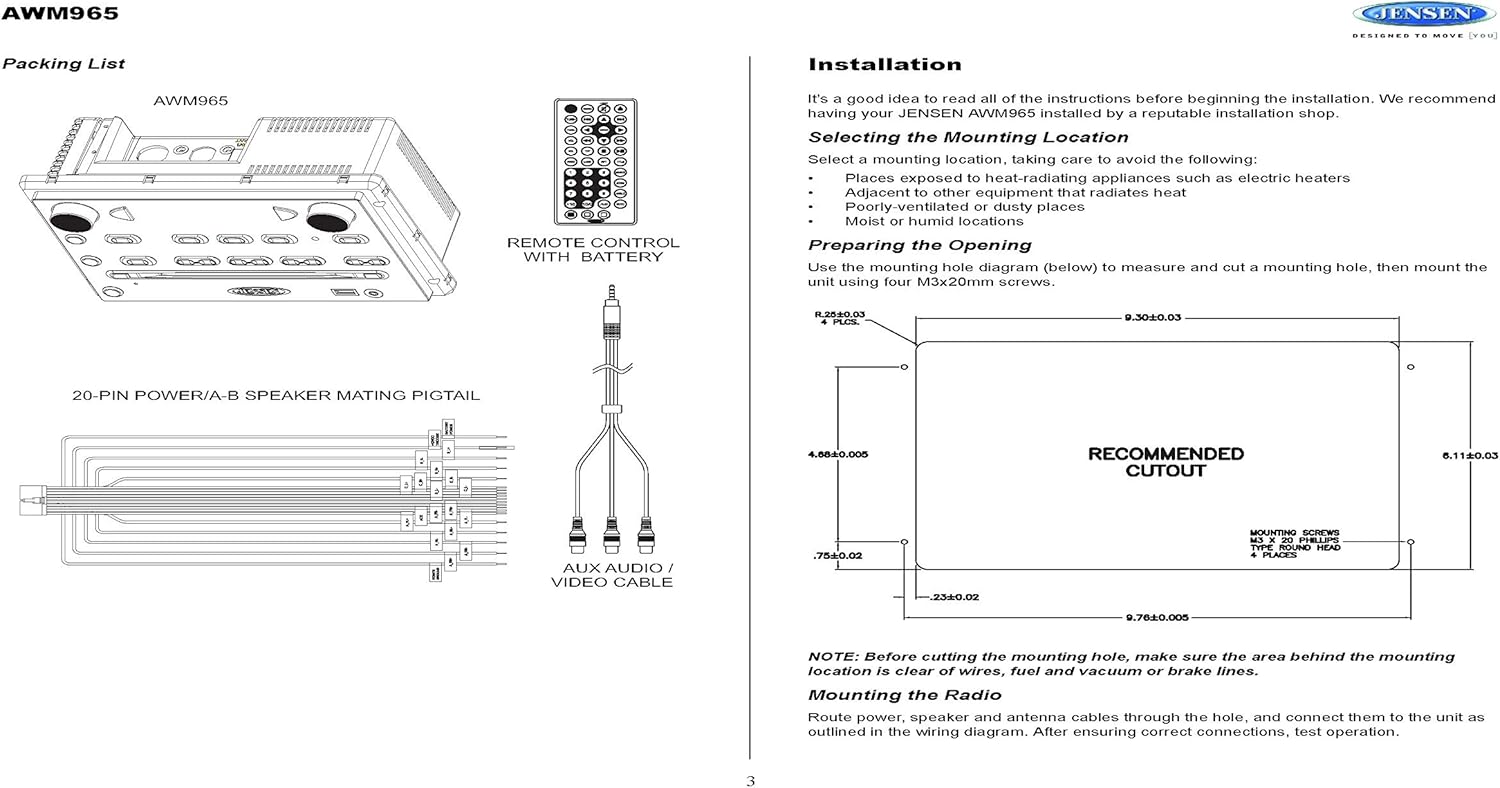
Figure 4.1: Detailed diagram showing the product dimensions (10.43"W x 7.01"H x 5"D) and the recommended cutout dimensions for installation (9.30"W x 6.11"H).
4.4 וויירינג
The wiring diagram below depicts all the connections required for proper operation of the unit. Ensure all connections are secure and correctly matched to prevent damage.
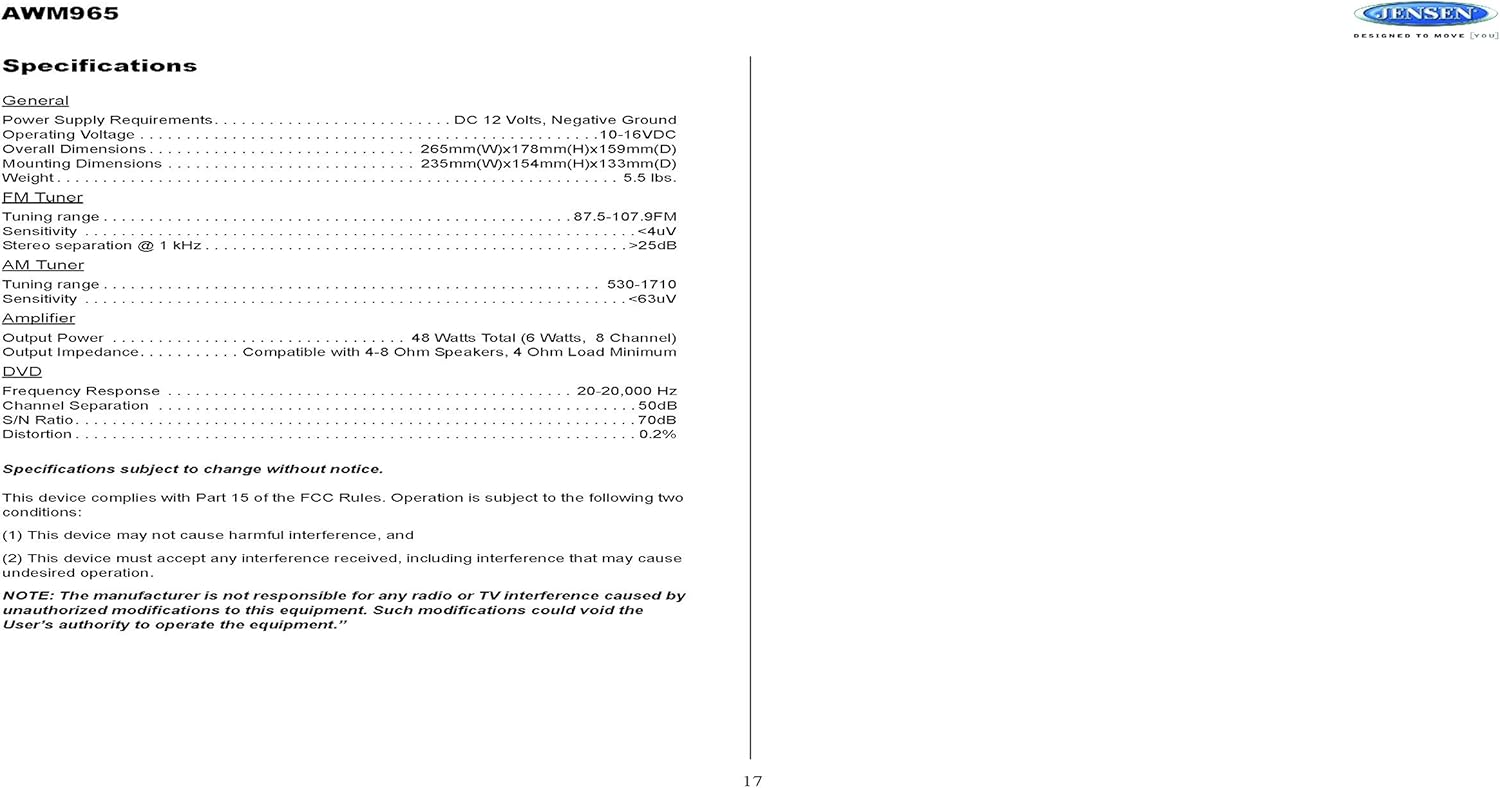
Figure 4.2: Detailed wiring diagram for the Jensen AWM965, showing the 20-pin connector pin assignments for power, ground, accessory, antenna, and speaker outputs (Right/Left, Front/Rear, A/B/C zones).
Wiring Harness Pin Details:
| שפּילקע נומ. | דראָט קאָליר | באַשרייַבונג |
|---|---|---|
| 1 | ראָזעווע / שוואַרץ | רעכט (C) רעדנער (-) |
| 2 | ראָזעווע | רעכט (C) רעדנער (+) |
| 3 | גרין | לינקס (C) רעדנער (+) |
| 4 | גרין / שוואַרץ | לינקס (C) רעדנער (-) |
| 5 | ברוין / שוואַרץ | לינקס (ב) רעדנער (-) |
| 6 | ברוין | לינקס (ב) רעדנער (+) |
| 7 | גרוי / שוואַרץ | פראָנט רעכט (א) רעדנער (-) |
| 8 | רויט | ACCESSORY / IGNITION (+) |
| 9 | ווייַס / שוואַרץ | פראָנט לינקס (א) רעדנער (-) |
| 10 | ווייַס | פראָנט לינקס (א) רעדנער (+) |
| 11 | מאַראַנץ | לינקס פראָנט רעדנער (+) |
| 12 | מאַראַנץ / שוואַרץ | לינקס פראָנט רעדנער (-) |
| 13 | ברוין | רעכט (ב) רעדנער (+) |
| 14 | בלוי | מאַכט אַנטענע |
| 15 | געל | MEMORY / BATTERY (+) |
| 16 | שוואַרץ | ערד |
| 17 | פיאַלקע | רעכט דערציען (א) רעדנער (+) |
| 18 | VIOLET / BLACK | רעכט דערציען (א) רעדנער (-) |
| 19 | גרין / שוואַרץ | לינקס דערציען (א) רעדנער (-) |
| 20 | גרין | לינקס דערציען (א) רעדנער (+) |
5. אַפּערייטינג ינסטרוקטיאָנס
5.1 פראָנט פּאַנעל קאָנטראָלס
Familiarize yourself with the controls on the front panel for easy operation.

פיגורע 5.1: נאָענט-אַרויף view of the Jensen AWM965 front panel, highlighting the display, volume knob, power button, tuning/track buttons, and various function buttons for AUX, AS/PS, speaker zones, and media playback.
- VOL (וואָליום) קנעפּל: Rotate to adjust volume. Push to access audio menu.
- POWER קנעפּל: דרוק צו קער די אַפּאַראַט אויף אָדער אַוועק.
- T/F CLOCK Button: Press to display or set the clock.
- TUN/TRK (Tune/Track) Buttons: Use for tuning radio stations or navigating tracks on media.
- AUX קנעפּל: אויסקלייבט די הילפס-איינגאנג מקור.
- AS/PS (Auto Store/Preset Scan) Button: Automatically stores strong radio stations or scans through presets.
- A, B, C (Speaker Zone) Buttons: Activates or deactivates speaker output zones.
- ENTER קנעפּל: קאַנפערמז סאַלעקשאַנז.
- LOUD Button: Activates/deactivates loudness compensation.
- MUTE קנעפּל: שטומט/אויף-שטומט אודיאָ אַרויסגאַנג.
- 1-6 קנעפּלעך: Radio station presets, track functions (RPT, RDM, G.LANG).
- ALARM SET / ON/OFF Buttons: Sets and activates/deactivates the alarm clock.
- DVD MENU Button: Accesses the DVD menu.
- Disc Eject Button: Ejects a loaded disc.
- וסב פּאָרט: Connect USB devices for media playback and charging.
5.2 יקערדיק אָפּעראַציע
- מאַכט אויף / אַוועק: דרוק די מאַכט קנעפּל.
- באַנד אַדזשאַסטמאַנט: דרייען די VOL קנופּ.
- מקור סעלעקציע: דרוק די מאָדע button (if available, or cycle through sources using a dedicated button or menu).
5.3 ראַדיאָ אָפּעראַציע (AM/FM)
- טונינג: דרוק די TUN/TRK buttons to manually tune or hold to seek.
- פּריסעט סטיישאַנז: Press and hold a numbered button (1-6) to store the current station. Press briefly to recall.
- Auto Store / Preset Scan: ניצן די AS/PS button for automatic station management.
5.4 CD/DVD/MP3/USB Playback
- לאָודינג דיסקס: Insert a disc into the slot with the label side up. The unit will automatically begin playback.
- וסב פּלייַבאַקק: Insert a compatible USB flash drive into the front USB port. The unit supports MP3, WMA, and JPEG formats.
- פּלייבאַק קאָנטראָלס: ניצן די TUN/TRK buttons for track navigation (skip forward/backward). Use numbered buttons for repeat (RPT) or random (RDM) playback.
- DVD מעניו: דרוק די ווי מעניו button to access the disc's menu.
- USB טשאַרדזשינג: The front USB port supports charging of iPod and other USB-based devices.
5.5 Clock and Alarm Features
- באַשטעטיקן די זייגער: דריקן און האַלטן די T/F CLOCK button to enter clock setting mode. Use the TUN/TRK buttons to adjust hours and minutes, and אַרייַן צו באַשטעטיקן.
- וועקער זייגער: ניצן די אַלאַרם שטעלן button to configure the alarm time and the ON/OFF button to activate or deactivate it.
- שלאָפן טימער: Refer to the full manual for detailed instructions on setting the sleep timer.
5.6 אַגזיליערי ינפּוט
Connect external audio/video devices to the front 3.5mm line-level input using the provided Aux Audio/Video Cable. Press the AUX button to select this source.
5.7 רימאָוט קאָנטראָל
The included wireless remote control provides convenient access to most functions. Ensure the battery is correctly installed.
Figure 5.2: Image of the Jensen AWM965 remote control, showing buttons for power, menu, tune, volume, enter, source, program, language, repeat, title, zoom, angle, and numeric keypad.
6. וישאַלט
6.1 רייניקונג די אַפּאַראַט
Wipe the front panel and cabinet with a soft, dry cloth. For stubborn stains, dampen the cloth lightly with water. Never use harsh chemicals, abrasive cleaners, or solvents as they may damage the finish.
6.2 דיסק זאָרג
האַלט די דיסקס ביי די ברעגעס צו ויסמיידן פינגער-אפדרוקן. האַלט די דיסקס ריין און פריי פון קראַצן. לייגט די דיסקס אין זייערע קעסטלעך ווען זיי ווערן נישט גענוצט.
7. טראָובלעשאָאָטינג
If you experience problems with your AWM965, consult the following common issues and solutions before contacting support.
- קיין מאַכט: Check the 12V DC power connection and ensure the unit's fuse (10 AMP) is not blown. Verify proper grounding.
- קיין קול: Check speaker connections and ensure speaker zones (A, B, C) are activated. Verify volume level and mute status.
- Disc Error: Ensure the disc is clean, free of scratches, and inserted correctly. Try a different disc.
- שלעכטע ראַדיאָ אָפּנאַם: Check the antenna connection. Ensure the antenna is fully extended and positioned for best reception.
- יו-עס-בי דעווייס נישט דערקענט: Ensure the USB device is formatted correctly and contains compatible files (MP3, WMA, JPEG). Try a different USB device.
8. ספּעסאַפאַקיישאַנז
Detailed technical specifications for the Jensen AWM965 unit.
| קאַטעגאָריע | באַשרייַבונג |
|---|---|
| מאַכט צושטעלן | 12 וו דק, נעגאַטיוו ערד |
| אַפּערייטינג וואָלtage | 10-16VDC |
| קוילעלדיק דימענשאַנז | 265mm(W) x 178mm(H) x 159mm(D) / 10.4"W x 7"H x 5"D |
| מאַונטינג דימענשאַנז | 235mm(W) x 154mm(H) x 133mm(D) / 9.25"W x 6.06"H x 5.25"D |
| וואָג | 0.9 לבס (בעערעך) |
| עפעם טונינג ראַנגע | 87.5-107.9 מהז |
| עפעם סענסיטיוויטי | <4uV |
| FM Stereo Separation @ 1 kHz | > 25 דב |
| בין טונינג קייט | 530-1710כז |
| בין סענסיטיוויטי | <63uV |
| Ampליפיער רעזולטאַט מאַכט | 48 Watts Total (8 Channel) |
| רעזולטאַט ימפּידאַנס | Compatible with 4-8 Ohm Speakers |
| DVD Frequency Response | 20-20,000 הז |
| DVD Channel Separation | 50dB |
| DVD S/N Ratio | 70dB |
| DVD Distortion | 0.2% |
| קאַמפּאַטאַבאַל דיסק פֿאָרמאַטירונגען | CD, CD-R, CD-RW, MP3, DVD, DVD+/-RW |
| ספּעציעלע פֿעיִקייטן | Adjustable LCD Dimmer, Front USB (MP3/WMA/JPEG, Charging), Front 3.5mm Line-Level Video/Audio Input, 1 Composite Video Out, 1 Stereo Audio Input |
ספּעסאַפאַקיישאַנז זענען אונטערטעניק צו טוישן אָן באַמערקן.
8.1 פקק העסקעם
דער מיטל איז אין לויט מיט טייל 15 פון די FCC כּללים. אָפּעראַציע איז אונטערטעניק צו די פאלגענדע צוויי באדינגונגען:
- דער מיטל קען נישט פאַרשאַפן שעדלעך ינטערפיראַנס.
- דער מיטל מוזן אָננעמען קיין ינטערפיראַנס באקומען, אַרייַנגערעכנט ינטערפיראַנס וואָס קען פאַרשאַפן אַנדיזייראַבאַל אָפּעראַציע.
NOTE: The manufacturer is not responsible for any radio or TV interference caused by unauthorized modifications to this equipment. Such modifications could void the user's authority to operate the equipment.
9. וואָראַנטי אינפֿאָרמאַציע
Jensen products are designed and manufactured to the highest quality standards. This product is covered by a limited warranty against defects in materials and workmanship. The specific terms and duration of the warranty are typically provided with the product packaging or can be found on the manufacturer's official webזייטל. ביטע באַהאַלטן אייער קויפן באַווייַז פֿאַר וואָראַנטי קליימז.
10. שטיצן
If you require further assistance or encounter issues not covered in this manual, please contact Jensen customer support. You can typically find contact information (phone number, email, or support portal) on the official Jensen webפּלאַץ אָדער אין די פּראָדוקט פּאַקקאַגינג.
When contacting support, please have your product model number (AWM965) and a detailed description of the issue ready.