
הקדמה
א דאנק פארן קויפןasing the SENTRY CL933 Big Screen Weather Alarm Clock. This device combines a digital alarm clock with a large LCD display, providing essential information such as time, date, indoor temperature, humidity, and a weather forecast. This manual will guide you through the setup, operation, and maintenance of your new alarm clock.
זיכערקייַט אינפֿאָרמאַציע
- שטעלט נישט אויס דעם אַפּאַראַט צו עקסטרעמע טעמפּעראַטורן, דירעקטע זונשייַן, אדער הויכע הומידיטי.
- פֿאַרמײַדט צו לאָזן פאַלן אָדער אויסשטעלן דאָס אַפּאַראַט צו שטאַרקע קלאַפּן.
- דו זאלסט נישט מישן אַלט און נייַ באַטעריז, אָדער פאַרשידענע טייפּס פון באַטעריז.
- אַראָפּנעמען באַטעריז אויב די אַפּאַראַט וועט נישט זיין געוויינט פֿאַר אַ לאַנג צייַט.
- רייניקט דעם אַפּאַראַט מיט אַ ווייכן, טרוקענעם שטאָף. ניצט נישט קיין שרײַבנדיקע רייניגערס אדער סאָלווענטן.
- דער פּראָדוקט איז בלויז פֿאַר דרינענדיק נוצן.
פּעקל אינהאַלט
ביטע קאָנטראָלירט אַז אַלע זאכן זענען פאַראַן:
- SENTRY CL933 Big Screen Weather Alarm Clock
- באַניצער מאַנואַל (דעם דאָקומענט)
פּראָדוקט איבערview
The SENTRY CL933 features a large, easy-to-read LCD display and intuitive controls. Familiarize yourself with the main components:
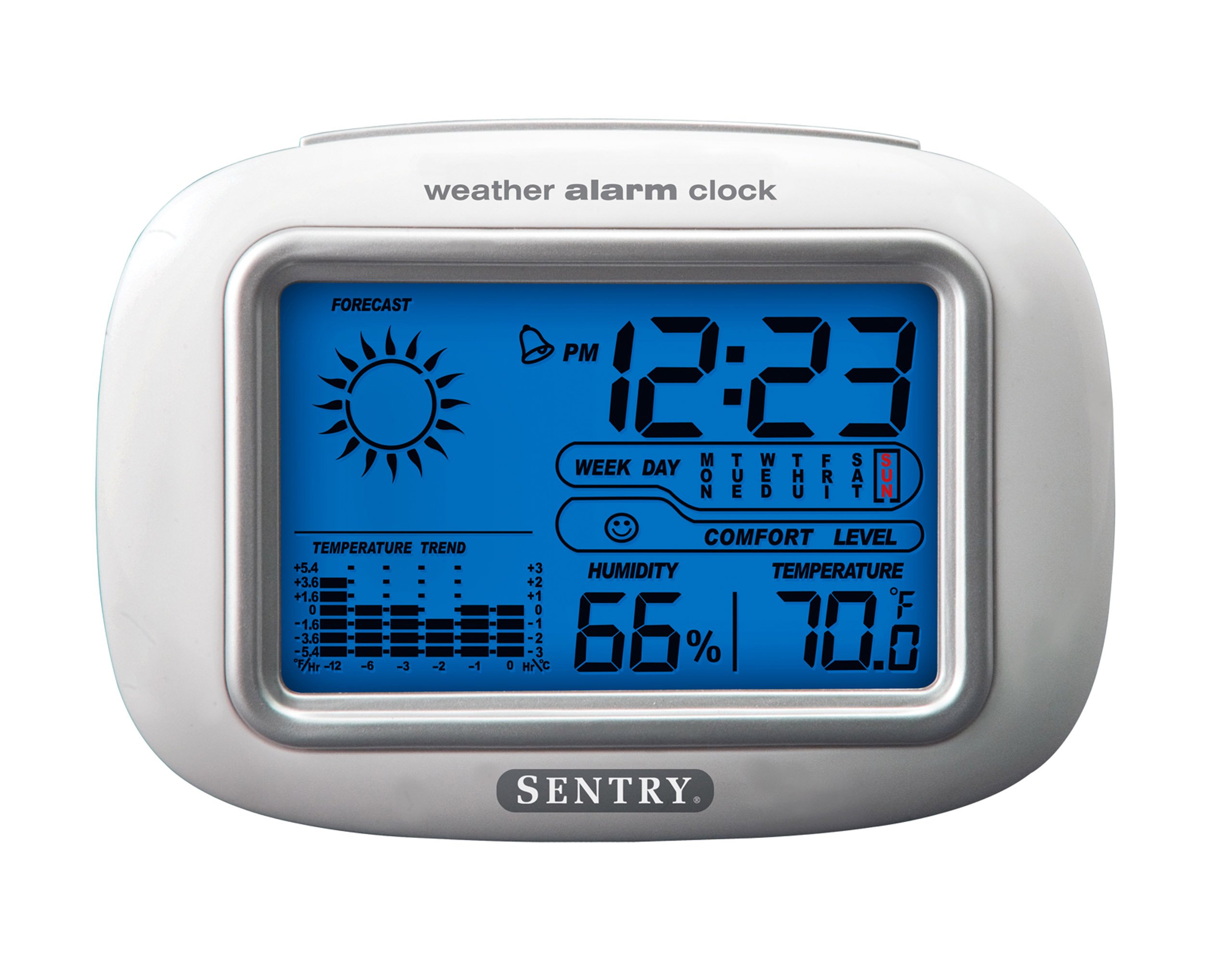
The SENTRY CL933 Big Screen Weather Alarm Clock displayed in its retail packaging, showing the clock face with time, weather forecast, humidity, and temperature readings.
ווייַז עלעמענטן:
- צייט ווייַז: Shows current time (12/24 hour format).
- Date & Day of Week: Displays the current date and day.
- Weather Forecast Icon: Indicates predicted weather conditions (e.g., sunny, cloudy, rainy).
- Moon Phase Icon: ווײַזט די איצטיקע לבנה־פאַזע.
- טעמפּעראַטור ווייַז: ווײַזט די אינעווייניקסטע טעמפּעראַטור אין צעלזיוס אָדער פאַהרענהייט.
- הומידיטי ווייַז: Shows indoor humidity percentage.
- Comfort Level Icon: Indicates the comfort level based on temperature and humidity.
- טעמפּעראַטור גאַנג ינדיקאַטאָר: Shows if the temperature is rising, falling, or stable over the last 12 hours.
- שרעק ייקאַן: Indicates when the alarm is set.
Control Buttons (typically on the back or sides):
- מאָד/שטעלן קנעפּל: Used to switch between display modes and enter setting mode.
- אַרויף / אַראָפּ קנעפּלעך: Used to adjust values during setting and sometimes to toggle display options.
- ALARM קנעפּל: Used to set or activate/deactivate the alarm.
- שלאָף/ליכט קנעפּל: Activates the backlight and functions as the snooze button when the alarm sounds.
- °C/°F קנעפּל: טוישט צווישן צעלזיוס און פאַהרענהייט טעמפּעראַטור אַרויסווייַזונג.
סעטאַפּ
1. באַטאַרייע ייַנמאָנטירונג
- געפינט דעם דעקל פונעם באַטעריע־אָפּטייל אויף דער הינטערשטער זייט פונעם אַפּאַראַט.
- אַראָפּנעמען דעם דעקל דורך אים צו שלעפּן אָדער אויפהייבן.
- Insert two (2) new AAA batteries (not included) according to the polarity indicators (+ and -) inside the compartment.
- פאַרבייַטן די באַטאַרייע אָפּטייל דעקן סיקיורלי.
- The clock will power on and the display will activate.
2. ערשטע פּלאַצירונג
Place the alarm clock on a stable, flat surface away from direct heat sources, strong vibrations, or areas with extreme temperature fluctuations for accurate readings.
אַפּערייטינג ינסטראַקשאַנז
1. באַשטעטיקן צייט און דאַטע
- דריקן און האַלטן די מאָדע / שטעלן button for approximately 3 seconds to enter time setting mode. The hour digit will start flashing.
- ניצן די UP or אַראָפּ קנעפּלעך צו סטרויערן די שעה.
- דרוק מאָדע / שטעלן again to confirm the hour and move to the minute setting.
- Repeat steps 2 and 3 for minutes, year, month, and day.
- נאכדעם וואס איר שטעלט איין דעם טאג, דריקט מאָדע / שטעלן נאך איין לעצט מאל צו פארלאזן דעם סעטטינג מאָדוס.
- To switch between 12-hour and 24-hour time format, press the UP button while the hour is flashing during time setting.
2. באַשטעטיקן די שרעק
- דרוק די שרעק button once to display the current alarm time.
- דריקן און האַלטן די שרעק button for approximately 3 seconds. The alarm hour digit will start flashing.
- ניצן די UP or אַראָפּ קנעפּלעך צו סטרויערן די שרעק שעה.
- דרוק שרעק נאכאמאל צו באשטעטיגן די שעה און אריבערגיין צו די וועקער מינוט איינשטעלונג.
- ניצן די UP or אַראָפּ קנעפּלעך צו סטרויערן די שרעק מינוט.
- דרוק שרעק one last time to confirm and exit alarm setting mode.
- צו אַקטיווירן אָדער דעאַקטיווירן דעם אַלאַרם, דריק די שרעק button briefly when the current time is displayed. An alarm icon will appear on the display when the alarm is active.
3. Snooze Function and Backlight
- ווען דער שרעק סאָונדס, דריקן די SNOOZE / LIGHT button to activate the snooze function. The alarm will temporarily stop and sound again after a few minutes (typically 5-10 minutes).
- To turn off the alarm completely, press any other button (e.g., שרעק, מאָדע / שטעלן) when the alarm is sounding.
- דרוק די SNOOZE / LIGHT button at any time to activate the backlight for a few seconds, illuminating the display for easy viewing in low light conditions. The backlight is not designed to stay on continuously to conserve battery life.
4. טעמפּעראַטור איינהייט אויסוואַל (°C/°F)
דרוק די ° C / ° F button (usually located on the back or side) to toggle the temperature display between Celsius and Fahrenheit.
5. Understanding Weather and Environmental Displays
- וועטער פאָרעקאַסט: The icon (e.g., sun, clouds, rain) represents a prediction of the weather for the next 12-24 hours based on atmospheric pressure changes detected by the internal sensor. This is an estimate and may not always match official weather reports.
- הומידיטי: Displays the current indoor relative humidity percentage.
- Comfort Level: An icon (e.g., smiley face, neutral face, frowny face) indicates the indoor comfort level based on the combination of temperature and humidity.
- Temperature Trend: The arrow indicator shows if the indoor temperature has been rising, falling, or remaining stable over the past 12 hours.
- לבנה פאַסע: The moon icon changes to reflect the current phase of the moon.
וישאַלט
- רייניקונג: ווישן די אַפּאַראַט מיט אַ ווייך, אַ ביסל דamp שטאָף. דו זאלסט נישט נוצן האַרב קעמיקאַלז אָדער אַברייסיוו מאַטעריאַלס.
- באַטערי פאַרבייַט: When the display becomes dim or functions become erratic, replace the two AAA batteries. Ensure correct polarity.
- סטאָרידזש: אויב איר לייגט אַוועק די זייגער פֿאַר אַ לענגערע צייט, נעמט אַרויס די באַטעריעס כּדי צו פֿאַרמייַדן ליקאַדזש.
טראָובלעשאָאָטינג
| פּראָבלעם | מעגלעך סיבה / לייזונג |
|---|---|
| דער עקראַן איז ליידיק אָדער טונקל. | Batteries are low or incorrectly installed. Replace with new AAA batteries, ensuring correct polarity. |
| Time/Date cannot be set. | זייט זיכער אז איר דריקט און האלט די מאָדע / שטעלן קנעפּל פֿאַר 3 סעקונדעס צו אַרייַן באַשטעטיקן מאָדע. |
| דער אַלאַרם קלינגט נישט. | The alarm may not be activated. Press the שרעק button briefly to ensure the alarm icon is displayed. Check alarm time setting. |
| Inaccurate temperature/humidity. | The unit may be placed near a heat source, vent, or in direct sunlight. Move the clock to a more stable environment. Readings are for indoor conditions only. |
| וועטער פאָרויסזאָגן שיינט פאַלש. | The weather forecast is an estimate based on internal barometric pressure changes and may not always align with local weather reports. It is a general trend indicator. |
ספּעסאַפאַקיישאַנז
- מאָדעל: CL933
- סאָרט: SENTRY
- ווייַז טיפּ: דיגיטאַלע LCD מיט באַקלייט
- מאַכט מקור: באַטאַרייע פּאַוערד
- באַטעריז פארלאנגט: 2 X AAA (ניט אַרייַנגערעכנט)
- דימענסיעס: 6.5 X 2.25 X 4.25 אינטשעס (16.5 X 5.7 X 10.8 סענטימעטער)
- וואָג: 6.2 אונסעס (176 גראַמז)
- פֿעיִקייטן: Time, Date, Day of Week, Alarm, Snooze, Indoor Temperature (°C/°F), Indoor Humidity, Weather Forecast Icons, Moon Phase, Comfort Level Indicator, 12-hour Temperature Trend.
- מאַונטינג טיפּ: טאַבלעטאָפּ
וואָראַנטי און שטיצן
SENTRY products are designed for reliability and performance. For any questions, technical support, or warranty inquiries, please refer to the contact information provided with your purchase or visit the official SENTRY webזייטל. ביטע באַהאַלטן אייער קויפן באַווייַז פֿאַר וואָראַנטי קליימז.