
1. הקדמה
The Logisys PSAD24 is a 24-watt AC/DC power adapter designed to convert alternating current (AC) from a wall outlet to direct current (DC) for compatible electronic devices. This adapter features a US connector and provides a stable 12-volt, 2-amp output, suitable for a range of low-power electronics.
פּעקל אינהאַלט:
- 1 x Logisys PSAD24 24-Watt 12V 2A AC Power Adapter
2. זיכערקייַט אינפֿאָרמאַציע
Please read and understand all safety instructions before using this product. Failure to follow these instructions may result in electric shock, fire, or damage to the adapter or connected devices.
- בלויז דרינענדיק נוצן: די אַדאַפּטער איז דיזיינד פֿאַר נוצן אינעווייניק אין טרוקענע ערטער. שטעלט עס נישט אויס צו רעגן, נעץ, אדער עקסטרעמע טעמפּעראַטורן.
- געהעריק ווענטאַליישאַן: Ensure adequate ventilation around the adapter. Do not cover it or place it in an enclosed space that could restrict airflow.
- Voltage און קראַנט קאַמפּאַטאַבילאַטי: Always verify that the voltage (V) and current (A) requirements of your electronic device match the output specifications of this adapter (12V, 2A). Using an adapter with incorrect specifications can damage your device.
- קאַנעקטער קאַמפּאַטאַבילאַטי: Ensure the barrel connector of the adapter fits securely into your device's power input port.
- ויסמיידן אָווערלאָאַדינג: Do not connect devices that require more than 2 amps פון קראַנט.
- שעפּן מיט זאָרג: Do not drop, disassemble, or attempt to repair the adapter. Refer all servicing to qualified personnel.
- אָפּשטעקן ווען ניט אין נוצן: Disconnect the adapter from the wall outlet and your device when not in use for extended periods.
3. סעטאַפּ אינסטרוקציעס
Follow these steps to properly set up your Logisys PSAD24 AC Power Adapter:
- באַשטעטיקן די קאָמפּאַטיביליטי פון די מיטל: Before connecting, confirm that your electronic device requires a 12V DC input and draws no more than 2A of current. Also, ensure the device's power input port is compatible with a standard barrel connector.
- פאַרבינדן צו מיטל: Insert the barrel connector of the PSAD24 adapter firmly into the power input port of your electronic device.
- פאַרבינדן צו מאַכט אָוטלעט: Plug the AC prongs of the adapter into a standard 100-240V AC, 50/60 Hz wall outlet.
- מאַכט אויף דיווייס: Once connected, power on your electronic device. The adapter will automatically begin supplying power.
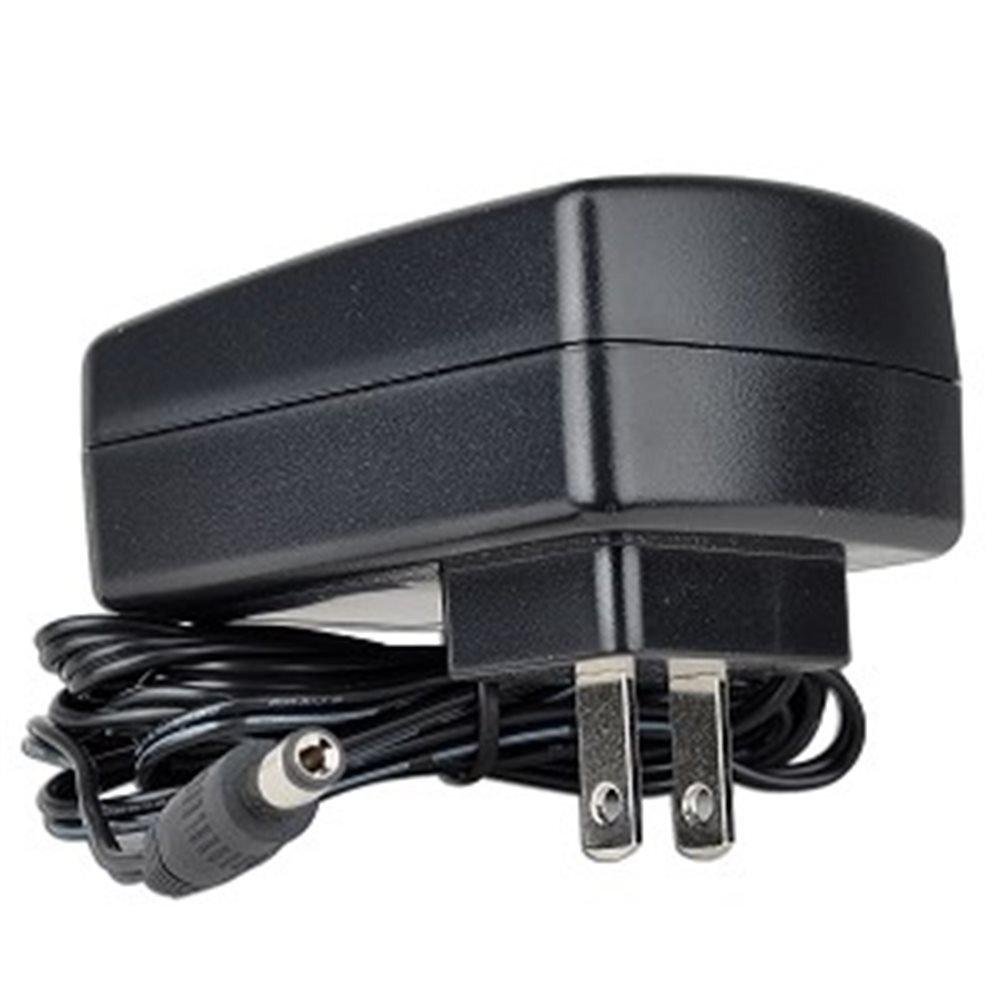
Image of the Logisys PSAD24 AC Power Adapter, showing its compact design and barrel connector.
4. אַפּערייטינג ינסטרוקטיאָנס
The Logisys PSAD24 AC Power Adapter operates automatically once connected to a power source and a compatible device. It provides continuous 12V DC power to your device. There are no user-adjustable settings on the adapter itself.
- Ensure the adapter is always plugged into a functional wall outlet.
- For optimal performance and longevity, avoid disconnecting the adapter by pulling on the cable. Always grasp the plug itself.
5. וישאַלט
Proper care and maintenance will help ensure the longevity and reliable operation of your power adapter.
- רייניקונג: Disconnect the adapter from both the wall outlet and your device before cleaning. Use a soft, dry cloth to wipe the exterior. Do not use liquid cleaners or solvents.
- סטאָרידזש: When not in use, store the adapter in a cool, dry place, away from direct sunlight and excessive heat. Avoid tightly coiling the cable to prevent damage.
- דורכקוק: Periodically inspect the adapter and its cable for any signs of damage, such as frayed wires, cracked casing, or bent prongs. If damage is observed, discontinue use immediately and replace the adapter.
6. טראָובלעשאָאָטינג
If you encounter issues with your Logisys PSAD24 AC Power Adapter, refer to the following common problems and solutions:
- קיין מאַכט צו דיווייס:
- Ensure the adapter is securely plugged into a working wall outlet. Test the outlet with another device.
- Verify that the barrel connector is fully inserted into your device's power port.
- Check your device's power switch or settings.
- Device Not Functioning Correctly or Intermittently:
- Confirm that your device's voltage and current requirements precisely match the adapter's output (12V, 2A).
- Inspect the adapter cable and connectors for any visible damage.
- Ensure the adapter is not overloaded by a device requiring more than 2 amps.
- Adapter Feels Hot:
- It is normal for power adapters to feel warm during operation. However, if it is excessively hot to the touch, disconnect it immediately.
- Ensure the adapter has adequate ventilation and is not covered.
- Verify that the connected device is not drawing more current than the adapter's rated output.
If these steps do not resolve the issue, contact customer support or consult the manual for your specific electronic device.
7. ספּעסאַפאַקיישאַנז
| שטריך | באַשרייַבונג |
|---|---|
| מאָדעל נומער | PSAD24 (FBA_PSAD24) |
| אַרייַנשרייַב וואָלtage | קסנומקס-קסנומקסוו אַק |
| אַרייַנשרייַב אָפטקייַט | 50/60 הז |
| אַרייַנשרייַב קראַנט (מאַקסימום) | 0.8 א |
| רעזולטאַט חלקtage | 12V DC |
| רעזולטאַט קראַנט | 2A |
| וואָסtage | 24 וואטס |
| קאַבלע לענג | 5.5 פֿיס (אומגעפער 1.68 מעטער) |
| קאַנעקטער טיפּ | פאַס קאַנעקטער |
| עפעקטיווקייַט מדרגה | IV |
| רעגולאַטאָרי אַפּרווואַלז | FCC, cULus |
| פּראָדוקט דימענשאַנז | 3.25 x 2.13 x 0.75 אינטשעס (אומגעפער 8.26 x 5.41 x 1.91 ס״מ) |
| פּונקט וואָג | 5.6 אונס (בעערעך 158.76 גראַמז) |
8. וואָראַנטי און שטיצן
For warranty information, please refer to the documentation provided with your purchase or visit the official Logisys webזייטל. ספּעציפֿישע וואָראַנטי טערמינען און באַדינגונגען קענען זיין אַנדערש.
If you require technical assistance or have questions not covered in this manual, please contact Logisys customer support through their official channels.